Managing Microsoft 365 users and licenses
Microsoft 365 user, mailbox, and license management is moving to the Microsoft Admin Portal, which can be used to manage users, mailboxes, and license assignments. Subscription details and the purchase of additional licenses remain available through account manager. During this transition, some customers may encounter an "Action required to keep your Microsoft 365 services active" alert in the account manager, indicating that additional setup or configuration steps must be completed in the Microsoft Admin Portal before certain management capabilities become available. Customers should complete all required actions in the Microsoft Admin Portal to ensure continued access to applicable administrative features, after which Microsoft 365 management tasks can be performed through the appropriate platform based on the activity being completed.
In this article, we will discuss:
What's changing?
When accessing your Microsoft 365 subscription through account manager, you may notice the following changes:
- User and mailbox management: Individual Microsoft 365 users and mailboxes are managed through the Microsoft Admin Portal.
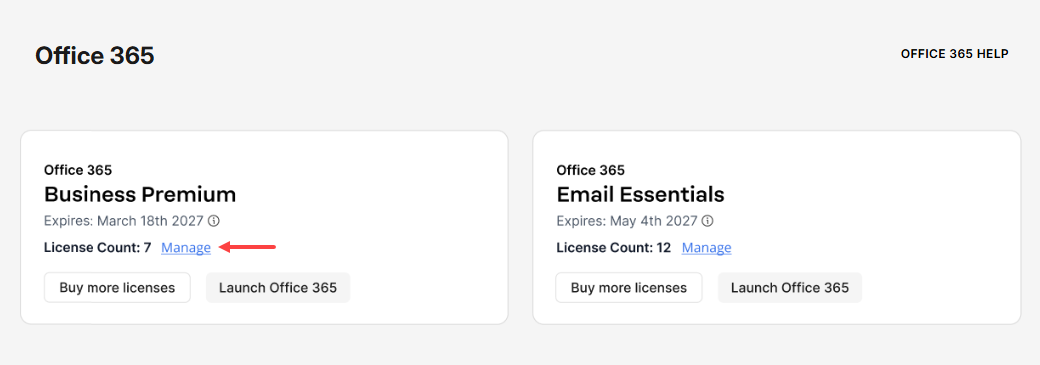
- Manage option: Selecting Manage for your Microsoft 365 subscription opens the Microsoft Admin Portal in a new browser tab.
- License information: Instead of displaying individual users assigned to licenses, account manager displays the number of licenses purchased under License Count.
- Additional licenses: If you need more licenses, you can purchase them through the Buy more licenses option in account manager.
- Previous user management page: The previous user management page and its related menu options are no longer available. If you previously bookmarked that page, use the Microsoft Admin Portal instead.
Manage Microsoft 365 users and mailboxes
To manage individual Microsoft 365 users or mailboxes:
- Log in to your account via https://www.networksolutions.com/my-account/login.
- Click Microsoft Office 365 from the left navigation menu.

Note: Alternatively, click Email & Office and select Microsoft Office 365 from the drop-down menu if you have more than one email service. - Select the Microsoft 365 subscription you want to access, then click Manage or Launch Office 365.
Why am I seeing an action required alert?
If you see the Action is required to keep your Microsoft 365 services active alert, you have not yet completed the required transition steps.
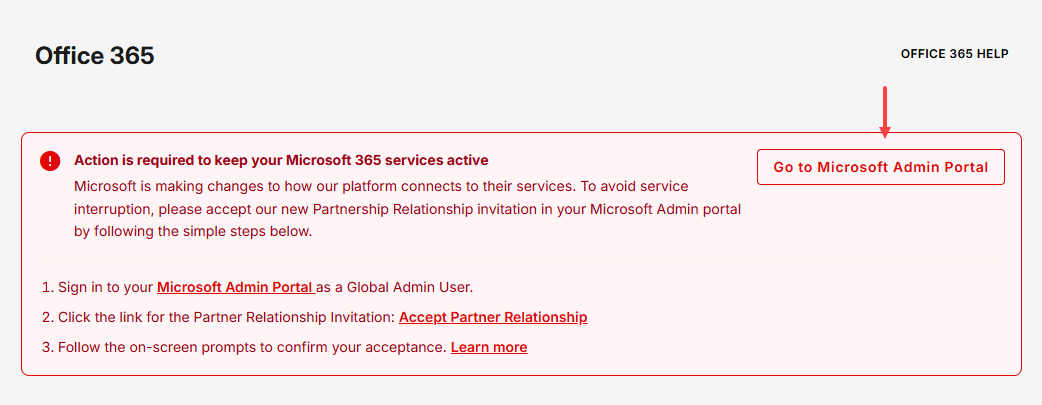
Follow the instructions in the alert to complete the transition. Once the required steps are completed, the alert will no longer appear and your Microsoft 365 plans will be displayed.
Purchase additional licenses
If you need additional Microsoft 365 licenses:
- Select the Microsoft 365 subscription you want to purchase an additional license, then click Buy more licenses.
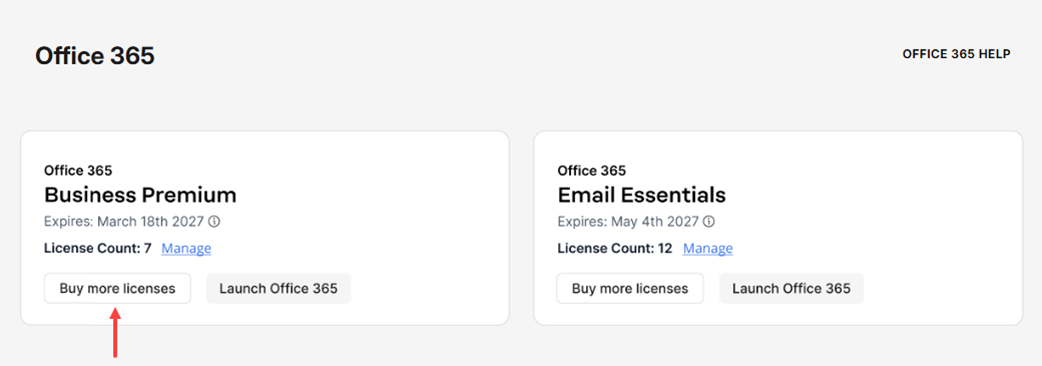
- Follow the prompts to purchase the additional licenses you need.
After purchasing licenses, use the Microsoft Admin Portal to manage individual license assignments.
What can I manage in each location?
| Task | Where to manage it |
|---|---|
| View purchased license count | Account manager |
| Purchase additional licenses | Account manager |
| View individual users | Microsoft Admin Portal |
| Add or remove users | Microsoft Admin Portal |
| Manage individual user settings | Microsoft Admin Portal |
| Assign or change licenses for users | Microsoft Admin Portal |
| Manage mailboxes | Microsoft Admin Portal |
Review
Managing Microsoft 365 users, mailboxes, and license assignments is now completed through the Microsoft Admin Portal, while license purchases and subscription-level management remain available in account manager. During the transition, some customers may see an "Action required to keep your Microsoft 365 services active" alert that requires additional setup in the Microsoft Admin Portal. Once the required actions are completed, customers can manage their Microsoft 365 users, mailboxes, licenses, and subscriptions using the appropriate platform. Using the designated platform for each task helps ensure continued access to Microsoft 365 administrative features and a smooth management experience.
Get practical tips and product updates on LinkedIn.
Follow Network Solutions