How to add dedicated IPs to a self-managed VPS hosting
When you purchase a self-managed VPS hosting package, you configure your server through a multi-step flow during sign-up and checkout. If you want to add a dedicated IP on a self-managed VPS, you can do so during VPS configuration, where you can purchase additional dedicated IPs for your server. A dedicated IP is a unique internet address assigned exclusively to your VPS hosting, allowing direct access to the server and supporting services such as websites, SSL certificates, email, DNS, and remote connections. This guide explains what a dedicated IP is, how much additional IPs cost, how many you can add, and how to add and manage them.
In this article, we will discuss:
What is a dedicated IP?
A dedicated IP is a unique internet address assigned exclusively to your VPS, allowing direct access to the server and supporting services such as websites, SSL certificates, email, DNS, and remote connections.
A dedicated IP is separate from the default server IP, and it uses IPv4 formatting—four numbers separated by periods, for example, 192.168.1.1.
Additional dedicated IPs and the 7-IP limit
Additional dedicated IPs can be added during sign-up based on your needs. You can purchase up to 7 additional dedicated IPs—this does not include the main/default server IP that already comes with your VPS.
How to add dedicated IPs at checkout
If you want to add a dedicated IP on a self-managed VPS, the dedicated IP options are available during VPS sign up:
- Begin the VPS sign-up process.
- Once you reach the configuration page, navigate to Advanced options, then locate the Dedicated IPs section, as shown in the screenshot below.
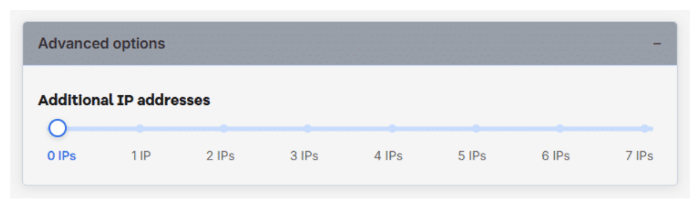
- Decide how many additional dedicated IPs you need—for example, to support additional websites, separate SSL certificates, email, DNS, or remote connections.
- Add the dedicated IPs you want at checkout, at $5/month per additional IP (up to 7 additional, separate from the default server IP).
Managing dedicated IPs after purchase
You are not limited to adding IPs only during sign-up. You can manage your storage, additional IPs, RAM, and CPU within the account manager after purchase.
Glossary
| Term | Definition |
|---|---|
| Dedicated IP address | A unique internet address assigned exclusively to your VPS, allowing direct access to the server and supporting services such as websites, SSL certificates, email, DNS, and remote connections. A dedicated IP is separate from the default server IP and uses IPv4 formatting. |
| IPv4 (Internet Protocol Version 4) | The most commonly used IP address format, consisting of four numbers separated by periods (for example 192.168.1.1) to identify and connect devices on the internet. |
| IPv6 (Internet Protocol Version 6) | A newer IP address format that uses longer alphanumeric addresses (for example 2001:db8::1), providing significantly more unique addresses to support the growing number of internet-connected devices. Dedicated IPs added during VPS sign-up use IPv4, not IPv6. |
Key points to remember
- You can purchase up to 7 additional dedicated IPs—this does not include the main server IP already included with your VPS.
- A dedicated IP is separate from the default server IP and uses IPv4 formatting (for example,
192.168.1.1); it supports websites, SSL certificates, email, DNS, and remote connections. - Every self-managed VPS hosting already includes built-in DDoS protection and a default server IP at no extra cost.
- You can manage your storage, additional IPs, RAM, and CPU within the account manager after purchase.
Related article
Review
Managing dedicated IP addresses is an important part of setting up a VPS for websites, email, SSL certificates, DNS, and remote connections. This guide shows you how to add a dedicated IP on a self-managed VPS, explains what a dedicated IP is, covers the cost of additional IPv4 addresses, outlines the limit of up to seven extra IPs, and walks you through adding and managing them during checkout. It also highlights that every self-managed VPS hosting already includes one default dedicated IP with built-in DDoS protection, helping you make the right choice based on your hosting needs.
Get practical tips and product updates on LinkedIn.
Follow Network Solutions