Knowledge Base
Categories: Builder Legacy
Builder brands: How to use the Business Name Generator
As we fully understand how important the business name is for branding, especially for small business owners, we are introducing the Business Name Generator tool. The Business Name Generator allows you to enter keywords about your business, and we will return ideas for potential business names.
To get started:
- Log in to your account manager via https://www.networksolutions.com/my-account/login.
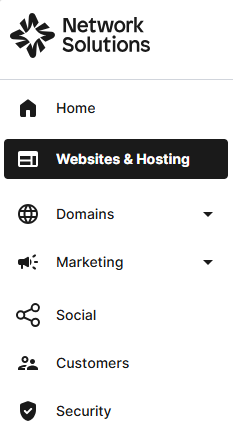
- From the left-hand menu, click the Websites & Hosting tab.
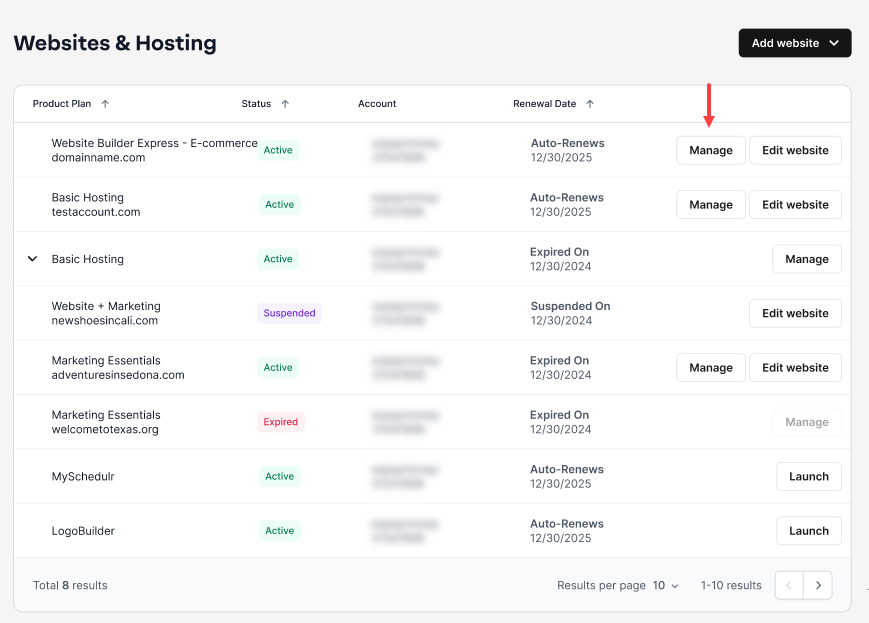
- Navigate to the hosting package that you want to access with Website Builder, then click Manage to continue.
- From the home page, scroll down and click the Try Business Name Generator link.

- Type in your keyword for your business name, then click on Search for your name!

- From here, it will provide different variations for your business name. The star icon can be used to choose favorites; when the star is selected, it will move that name to the top of the list with the rest of your favorites for easy side-by-side comparison.
Note: At this time, we do not store the selected name. We encourage you to copy the name you selected and save it in your notes, just in case you're not going to continue setting up the account during the session.

- Once you click the business name you prefer, click Continue to next steps.

- From here, there's an option for you to add a domain, design a website, create a logo, or add a store.

Get practical tips and product updates on LinkedIn.
Follow Network Solutions
Did you find this article helpful?