Knowledge Base
Categories: Legacy Domain
Powered by Network Solutions: Scripting - How to disable PHP functions
Learn how to turn off PHP functions step-by-step through your Account Manager for improved website security. This guide walks you through accessing your php.ini file, modifying the disable_functions directive, and understanding the impact on WordPress and other PHP-based platforms.
This article will discuss the step-by-step process for turning off PHP functions.
- Log in to your account via https://www.networksolutions.com/my-account/login.
- Click Websites & Hosting from the left navigation menu.

- Navigate to the hosting package that you want to access with Website Builder, then click Manage to continue.
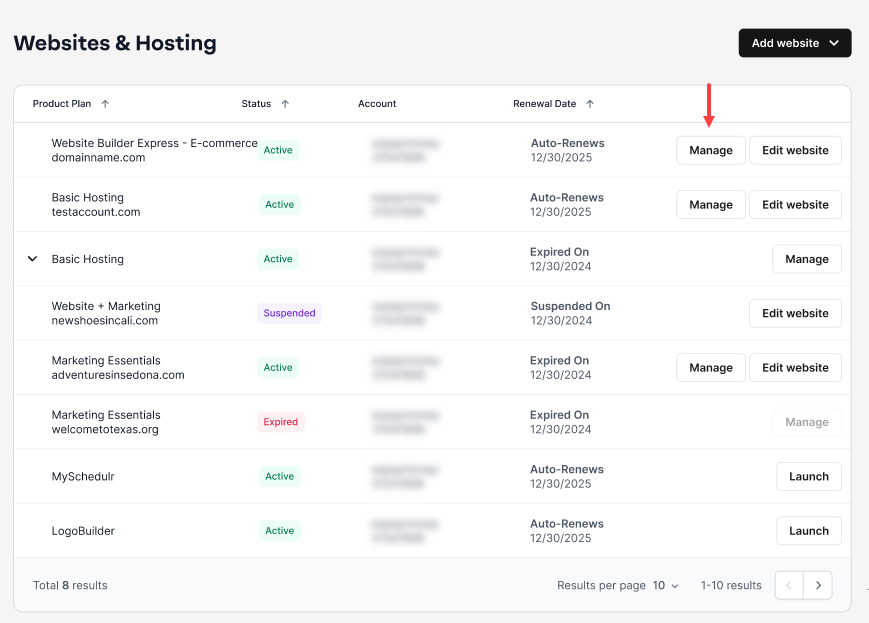
- In the left panel, select Scripting Config and under SCRIPTING CONFIGURATION, click on the Manage PHP Scripting.

- Under PHP SCRIPTING, access the Manage php.ini.

- Locate the following block of code within your php.ini file:

- After 'disable_functions = ', write out the functions you want to disable (exec, passthru, popen). Here is a list of functions that are commonly turned off as a means to improve security:
- exec
- passthru
- shell_exec
- system
- proc_open
- popen
- curl_exec
- curl_multi_exec
- parse_ini_file
- show_source
- Once done, click the Save button.

Important: Some themes, plugins, and features for popular PHP-based website builders (such as WordPress) may rely on one or more functions. Turning off these functions may cause certain features to stop working (notably, some WordPress automatic backup plugins).
Get practical tips and product updates on LinkedIn.
Follow Network Solutions
Did you find this article helpful?