Builder brands: Connecting a website with SocialBooster
SocialBooster is an all-in-one solution for streamlining your social marketing tasks. Create engaging content directly from your dashboard. You can use SocialBooster to:
- Create post-boost ads to reach new audiences
- Manage Facebook and Google Reviews
- Reply to messages on Facebook with our Messenger integration
- Track your growth and performance with accurate analytic reports
In this article, we will discuss:
Accessing SocialBooster
- Log in to your account via https://www.networksolutions.com/my-account/login.
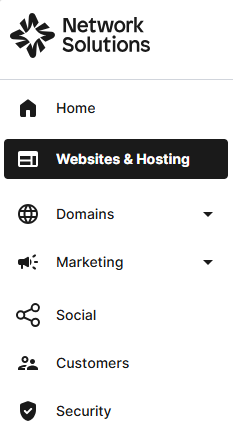
- Click Websites & Hosting from the left navigation menu.
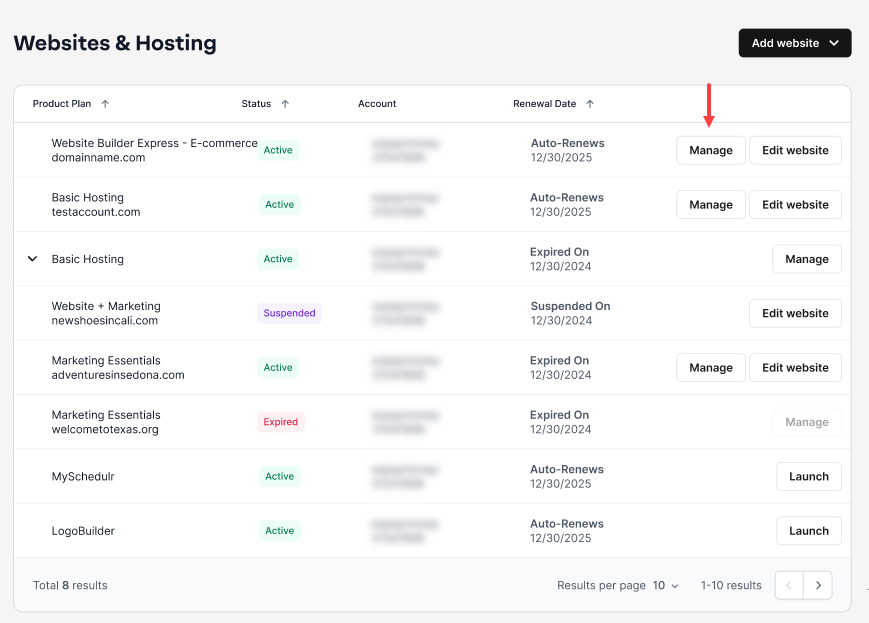
- Navigate to the hosting package that you want to access with Website Builder, then click Manage to continue.
- On your website builder dashboard, tap SocialBooster.

- Tap Let's get started!.

- Choose the platform you'd like to connect to first.

Connecting your social accounts
Google, Facebook, Twitter, Instagram, and LinkedIn are some of the most effective tools for growing and engaging your audience.
Here is a quick walkthrough on how to get started in Google Listing.

Once you have completed connecting your Google Account by entering your Gmail username and password, please proceed to Steps 2-7 by adding your business information, and Steps 8-9 to Verify Listing.
Facebook, Instagram, and Twitter
The steps for connecting Facebook and Instagram are almost the same. For this example, we are going to set up Facebook.
- Click the Connect Facebook.

- Log in using your Facebook credentials.

- Tap Continue as
your nameto proceed.

- Select the Instagram Business Account you want to connect to. Next, choose which information you would like SocialBooster to access.

- Click OK to confirm.

- Click the Connect LinkedIn.

- Log in using your LinkedIn credentials.

- You will be prompted with permissions; Select Allow to move forward.

- Select the LinkedIn Page you would like to connect to.

- Click Continue to save the setup completely.
Get practical tips and product updates on LinkedIn.
Follow Network Solutions