Knowledge Base
Categories: Builder Legacy
Builder brands: Linking a social media account to an email campaign
Consistent branding and visibility across social media is a great way to encourage your subscribers to click through and drive traffic to your site and other platforms. This article will teach you how to link these accounts to your CreativeMail email marketing campaign.
- Log in to your account via https://www.networksolutions.com/my-account/login.
- Click Websites & Hosting from the left navigation menu.
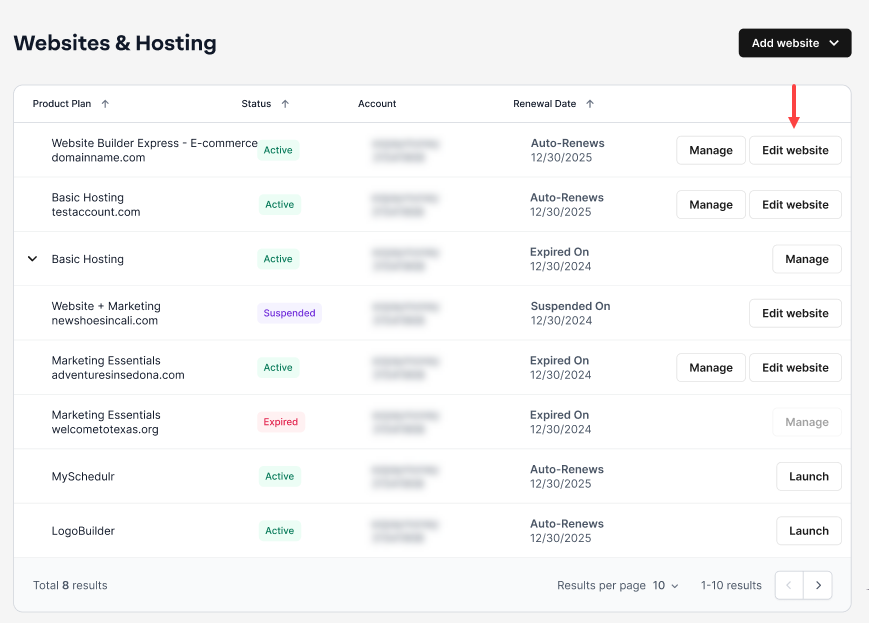
- If you have a single website builder in the account, you will be redirected to the Website Builder dashboard. If you have multiple website builder accounts, click the Edit website button on the respective website package that you need to access.
- Click Marketing Hub from the left-hand menu.

- From within your Marketing Hub page, choose CreativeMail.

- Create or open a campaign to launch into the email editor.

- From the left-hand menu, click Settings to open the settings window.

- On the left side of the Settings window, click the Social accounts tab.

- Enter the full URL of the social media profile page you would like to link.
Note: Make sure this is a full, valid URL; you should be able to paste the URL into a browser window and be directed to the correct page.Valid URL Invalid URL https://www.facebook.com/websitebuilderhelphttps://facebook.com/
- Click Apply in the bottom right to save the links to your campaign.


Note: If you save your social media accounts to the Social accounts section on an Express Editor website, these accounts will be imported each time you create a new email marketing campaign. For more information about adding social media accounts to your website, see Updating social media links in Express editor.
Get practical tips and product updates on LinkedIn.
Follow Network Solutions
Did you find this article helpful?