Get started with website security using cWatch
cWatch is a comprehensive website security solution designed to help protect websites from malware, vulnerabilities, web application attacks, and other online threats. By combining advanced security technologies such as malware scanning, automated cleanup, vulnerability detection, a Web Application Firewall (WAF), real-time threat monitoring, and CDN acceleration, cWatch provides multiple layers of protection to help keep your website secure and performing at its best. This guide will introduce the available cWatch license options, explain the importance of website security, highlight key security benefits, and show you how to access and manage your cWatch dashboard.
In this article, we will discuss:
What types of cWatch product plans are available?
The following cWatch plan types are available:
- cWatch Premium
- cWatch Defend
- cwatch 911
Visit the Network Solutions Website Security page to compare plans and choose the right protection for your website.
Why does your website need cWatch security layers?
Modern websites face a range of security and operational risks, including malware infections, web application attacks, software vulnerabilities, and performance-related issues. cWatch is designed to help mitigate these risks by integrating multiple layers of security and monitoring capabilities into a unified solution.
Malware protection and automated cleanup
cWatch performs scheduled malware scans of website files and, on eligible license tiers, may automatically remove detected malware. The solution uses multiple detection technologies to help identify potential threats, supporting website owners in maintaining a secure and healthy web environment.
Vulnerability scanning
The platform scans websites for potential vulnerabilities, including those associated with the Open Worldwide Application Security Project (OWASP) Top 10 security risks and certain WordPress-related weaknesses. Detected vulnerabilities can be reviewed and remediated to help reduce the risk of exploitation and support an organization's overall security posture.
Web Application Firewall (WAF)
cWatch includes a Web Application Firewall (WAF) designed to help identify and filter potentially malicious traffic, including common web-based attacks such as SQL injection attempts and unwanted bot activity. Firewall rules are regularly updated to help address evolving threats and support ongoing website security.
Cyber Security Operations Center (CSOC)
The Cyber Security Operations Center continuously monitors website event logs and analyzes security-related activity to help identify potential threats. When suspicious activity is detected, cWatch can generate alerts and deploy available protective measures to support risk mitigation efforts.
Content Delivery Network (CDN)
In addition to its security capabilities, cWatch includes a Content Delivery Network (CDN) designed to help improve website performance by delivering content from geographically distributed servers that are closer to website visitors. The CDN also helps support website availability and complements other security features within the platform.
Trust and visitor confidence
cWatch provides website trust seals that indicate applicable security checks have been completed, such as malware scanning and monitoring activities. These seals can help communicate a website's commitment to security and provide visitors with additional confidence in the site's security practices.
Accessing cWatch website security
- Log in to your account via https://www.networksolutions.com/my-account/login.
- Click Security from the left navigation menu.

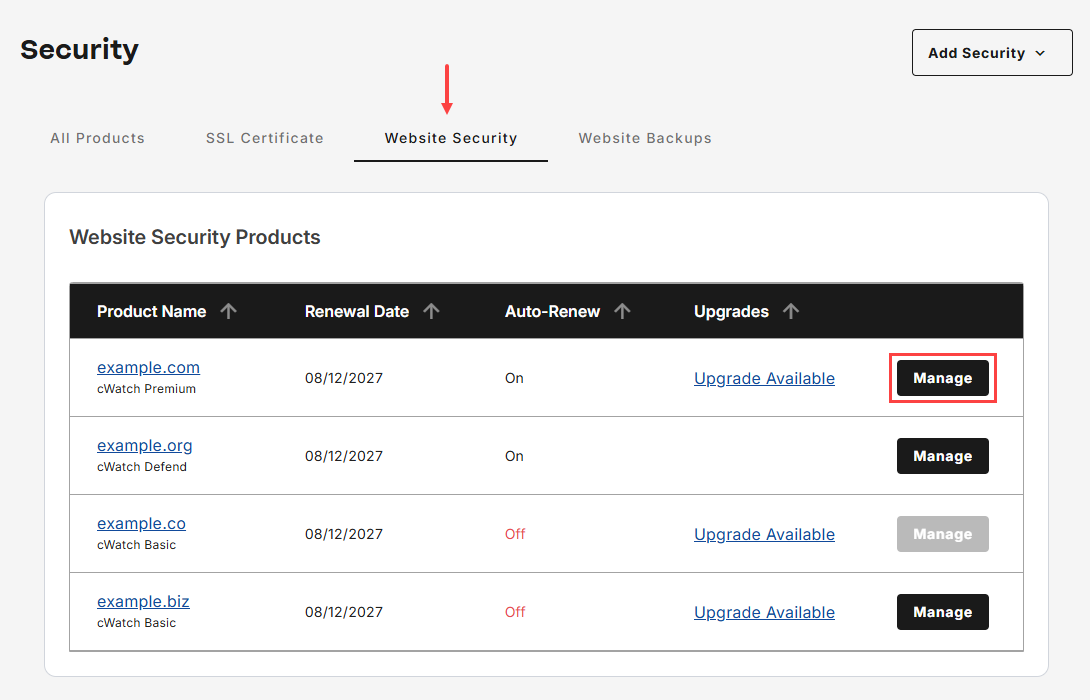
- Go to Website Security, then tap Manage for the domain that you would like to access cWatch.
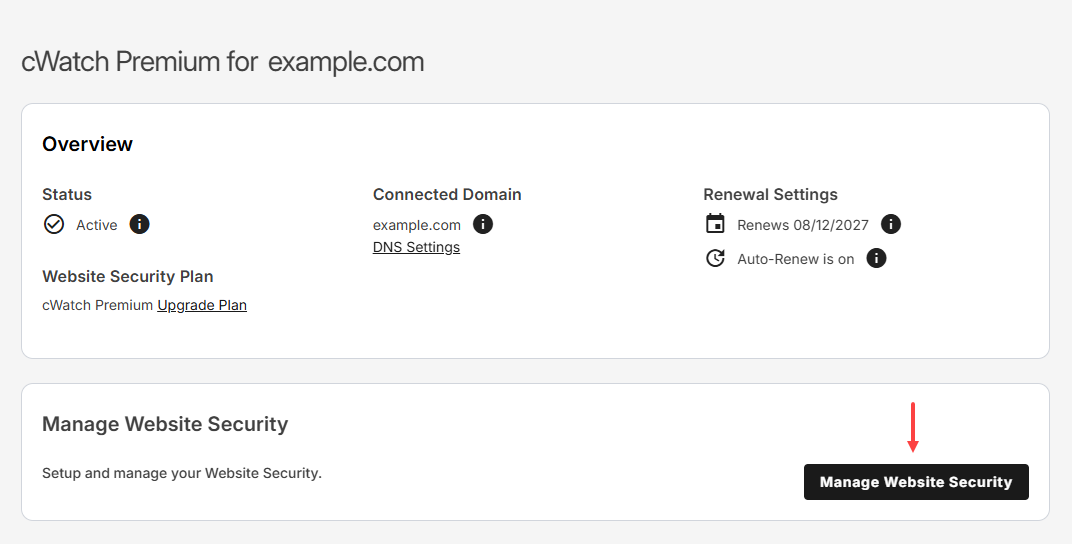
- Tap Manage Website Security to launch cWatch portal.
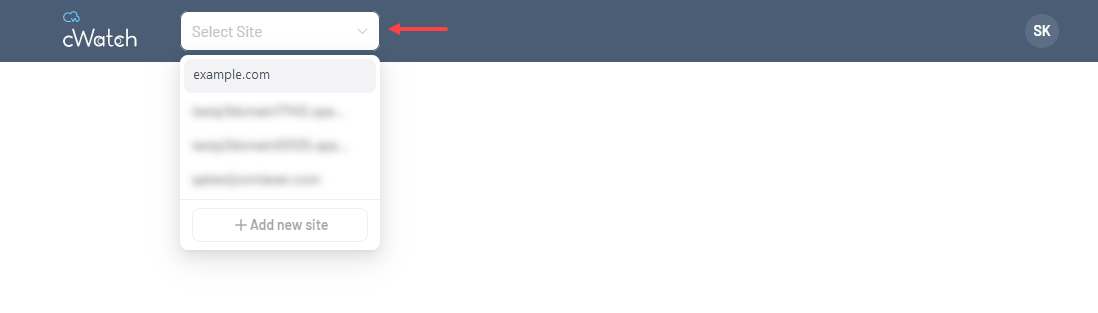
- Ensure that you select the correct domain from the drop-down menu before proceeding with any action in cWatch.
Related articles
- Purchase or upgrade cWatch Website Security plan
- How to add a cWatch trust seal to your website
- How to activate and configure cWatch CDN settings
- Configure cWatch access permissions
- How to monitor firewall activity in cWatch Defense Center
- How to manage traffic from top threat countries in cWatch
- How to submit a Rapid Scan 911 request in cWatch
Review
Protecting a website requires more than a single security measure, and cWatch helps address this need by bringing together multiple tools designed to strengthen website security. From malware detection and cleanup to vulnerability scanning, firewall protection, threat monitoring, performance optimization, and visitor trust features, cWatch offers a layered approach to safeguarding websites. By understanding the available license options and how to access the platform, website owners can better manage risks, improve site reliability, and maintain a secure online experience for their visitors.
Get practical tips and product updates on LinkedIn.
Follow Network Solutions