

Key takeaways:
- An artist website gives your work a clutter-free space that’s fully yours, unlike social media feeds
- This guide explains how to make an artist website that highlights your art, builds your portfolio, and helps you sell online
- With the best website builder tools, you can create your own website fast without any technical skills
Your art deserves a space that feels like home. Many artists dream of a place where their work reflects their artistic vision without the limits of social media. If you’re just starting out, making an artist website can feel like a big step, but it’s easier than it looks with the right tools. It also helps you showcase your art professionally and keep complete control of your artist portfolio.
If you’re new to creating websites, don’t worry. This guide will show you how to make an artist website with the best website builder for your goals and help you design a site that captures your artistic voice.
5 steps to creating your artist portfolio website
Every piece you make has a story, and your website can be the gallery that tells it. With the right tools, you can create an artist website that echoes the creative tone of your studio: organized, personal, and uniquely you.
Here’s a simple breakdown of the steps that can help you plan, design, and grow your creative space:
- Plan your artist website.
- Choose a platform and domain name.
- Build and customize your artist website.
- Optimize, publish, and promote your art website.
- Keep your website fresh and secure.
Step 1: Plan your artist website
Before building your site, take a moment to picture what you want people to see and feel when they visit. That vision will guide your layout, tone, and colors so your website reflects your artistic style from the start.
Next, define your purpose. Will your site serve as an online gallery to showcase your art? A space to connect with collectors or galleries? Or a hub to grow your art portfolio and reputation as a visual artist?
Once you know your purpose, map out what your site needs.
Here are a few things to think about:
- What kind of art will you feature—paintings, photography, digital work, or sculptures?
- How will you organize your portfolio or image galleries for easy browsing?
- Do you plan to include a shop, blog, or behind-the-scenes section?
- What story or emotion do you want visitors to take away from your site?
Every artist’s goal looks different. A photographer might focus on clear image galleries to attract clients. A sculptor could highlight 3D pieces through videos that show texture and form. Painters may use their sites to sell art online, while illustrators often treat theirs as living portfolios that bring in collaborators.
Step 2: Choose a platform and domain name
The first real step to creating an artist website is choosing where to build it. A reliable platform helps you design your space, share your story, and build your artist portfolio over the long term.
Choose a website platform
Here’s how you can make it happen:
- Pick a website builder that fits your goals.
- Try an all-in-one solution.
Pick a website builder that fits your goals
The right website builder for artists frees you from the technical headache. With the right tools, you can set up your site in just a few clicks and spend more time creating. Most site builders today include drag-and-drop editors and ready-made templates to help your site reach more website visitors.
Try an all-in-one solution
Our AI Website Builder bundles hosting, AI copy tools, and basic SEO. Annual plans include a free custom domain and domain privacy for the first year, plus one month of SSL to secure your site. After the intro term, renewal pricing applies.
Choose a domain name that reflects your art
Your domain name is your online address. It’s what people type to reach your portfolio website and what they’ll remember. Keep it short, easy to spell, and close to your name or brand. For example, janedoeart.com or studioclara.com are simple yet professional choices.
When possible, use a custom domain or your own domain name instead of a generic one. It gives your website credibility and helps collectors and galleries see you as a professional. Some site builders even include a free domain for the first year, which makes it easier to get started.
Before you register, check that your chosen name is available across social platforms for consistency. If your name is taken, try small variations or explore creative options using our AI Domain Name Generator.
Secure and protect your domain
Your domain is part of your artistic brand, so protect it just as you would your work. Activate Domain Privacy + Protection to keep your personal details safe from public records, and add an SSL certificate to secure your visitors’ data.
A secure site tells your audience you value professionalism and trust, which are important if you want to turn your passion into a sustainable career.

Step 3: Build and customize your artist website
Once your platform and domain are ready, it’s time to translate your ideas into a visual experience. This is where creativity meets structure as you design a space that reflects your artistic vision and invites people to explore your work.
Now that you’re ready to build, focus on these key parts that will bring your artist website together:
- Choose the right template for your art style.
- Create the pages you need.
- Add an online store (optional).
Choose the right template for your art style
The design of your site should complement your art, not compete with it. Choose from professional templates that match your artistic process and style.
To help you decide, here’s how different layouts work for artists:
- Minimal layouts work best for painters who want their colors to shine.
- Grid-based templates suit photographers who rely on clear image presentation.
- Bold, modern themes fit digital artists who love strong visuals.
When your design is set, it’s time to fill it with content that tells your story.
Create the pages you need
Each page on your site plays a role in showing who you are and what your art stands for. Here are the pages you should include:
- Homepage: The first impression. Use a clear header, short welcome line, and one featured artwork.
- Portfolio: Show your best work in organized collections. Label your pieces and keep navigation simple.
- About page: Share your background, education, or inspiration. Keep it short and write it like a friendly chat.
- Artist statement: Describe what drives your work and what message your art carries.
- Professional bio: Add awards, exhibits, or collaborations with other artists. It helps build credibility.
- Contact page: Make it easy for collectors and new clients to reach you. Include links to your social accounts or an inquiry form.
When you upload photos, use high-quality images that show texture and detail. Clear labels and short captions help website visitors understand what they’re seeing.
Check out our article on What is Website Imagery for an in-depth explanation on which images to use for your website.
Add an online store (optional)
A store gives your audience a simple way to support your art and keeps everything in one professional space. If you plan to sell prints in addition to art, adding a store page can open up new opportunities. This way, you can sell your original work, reproductions, or digital downloads online to those who prefer online purchases.
Consider e-commerce website design services if you want a professional setup that handles layout, payment, and security. You can also explore website builders with built-in e-commerce tools.
Step 4: Optimize, publish, and promote your art website
Your artist webpage deserves visibility so people can easily discover your portfolio and get to know your story. This final step focuses on optimization, mobile-friendliness, and promotion to help your art reach the right audience.
This is how you can approach this:
- Make your site mobile and SEO-friendly.
- Publish and share your artist portfolio website.
Make your site mobile and SEO-friendly
Your site’s layout should adapt easily to desktop and mobile devices without losing its visual impact. Many artists forget to test this, but a smooth mobile experience helps you reach a wider audience. Resize your art pages to fit smaller screens and check that your menu, buttons, and contact details are easy to tap.
Next, focus on SEO to help your site rank on search engines when potential clients search for new artists or art inspiration.
Here are a few simple ways to optimize your site:
- Write clear titles and descriptions using relevant keywords.
- Add alt text for images in your art portfolio so search engines can read what each piece is about.
- Keep file names short and descriptive (for example, abstract-painting-blue-series.jpg).
- Add meta titles and short summaries for your About page and gallery.
- Link related pages inside your site to help people explore your online portfolio easily.
Most website builders already include tools that simplify SEO, even for beginners. If you want deeper insights, premium plans usually come with analytics, keyword tracking, and other optimization features.
But before you publish, use this quick checklist to make sure your art website is optimized and easy to navigate:
- Check your site on mobile devices and tablets
- Use alt text and relevant keywords for images
- Add clear titles and headings for every page
- Test loading speed and fix slow files
- Include contact details on all main pages
You can also connect tools like Google Analytics to track where your visitors come from and which art pages they engage with most.
Need help to understand your website traffic? Learn how to use Google Analytics for small business.
Publish and share your artist portfolio website
Publishing your site is the start of something exciting. It’s a home for your art where people can discover, appreciate, and connect with you.
Once everything looks good, you are ready to publish and share your online portfolio with the world. Many artists promote their sites through social media platforms like Instagram, Pinterest, and Facebook, or join art communities where collectors and galleries connect.
That’s why it helps to share your site link on your social media accounts, digital business cards, or even your email signature. You can also keep new clients and collaborators in the loop by showing your latest work and upcoming events on your homepage.
If you want a more professional touch, you can work with a web designer to refine visuals and structure. But even a basic plan can go far when you keep your website updated with relevant details and genuine storytelling.
Step 5: Keep your website fresh and secure
Your work doesn’t end once your artist website is live. It’s an ongoing project that grows with your work and reputation. Giving it regular care keeps it up-to-date, secure, and inspiring, just like a well-maintained art studio that supports your creativity.
Here’s how to keep things running smoothly:
- Update your content regularly.
- Maintain website security.
- Stay consistent.
Update your content regularly
Adding new posts or artwork keeps your own site active and interesting for website visitors. You can share artwork online, upload behind-the-scenes photos, or post short notes about your creation process.
Fresh content reminds search engines that your portfolio website is active, which helps new people discover your art.
You can keep your site lively with these simple tips:
- Share image galleries of recent projects or exhibitions.
- Post about art fairs, workshops, or community events.
- Add new collections to your art site or online store.
- Include short stories or reflections that show your growth as an artist.
Updating your bio or replacing old images can also keep your site current and engaging. You can use email marketing tools to share updates with subscribers, announce new collections, or invite them to exhibitions.
Maintain website security
A professional website also needs reliable protection. Use SSL certificates to secure customer information, especially if you sell prints or process online payments. You can also consider getting strong protection through SiteLock Security, which scans for malware and blocks suspicious activity before it can harm your site.
Regular maintenance keeps your website files safe and your audience’s trust intact. Here are a few habits worth building:
- Back up your artistic website at least once a month.
- Run security checks and remove inactive plugins or files.
- Renew your SSL certificate before it expires.
- Use strong passwords and update them often.
When you keep your site safe, you protect both your work and your visitors’ experience.
Stay consistent
Successful website owners treat updates as part of their art routine. Schedule a quick monthly review to check for broken links, old pages, or design tweaks you might need. Make sure your first page still reflects who you are today and that your portfolio website feels like a true reflection of your art.
Keeping your site secure and up to date shows professionalism and builds credibility. It also helps your creative brand grow, just like maintaining any new website you’re proud to call your own.
Check out this guide for simple, year-round steps to keep your artist website safe, updated, and ready for visitors.
Real-life examples of artist websites
Need ideas before building your own site? These real-world artist website examples can help spark inspiration. Whether you’re using a free artist website or a premium plan, you’ll see how creators design their portfolio website to showcase their work, tell their story, and sell online.
David Milan

David Milan’s website feels like an extension of his studio. His bold colors and custom graphics make his work easy to recognize. With the right website builder, you can build an art portfolio that does the same—simple, personal, and carries your signature style.
Karen J. Revis
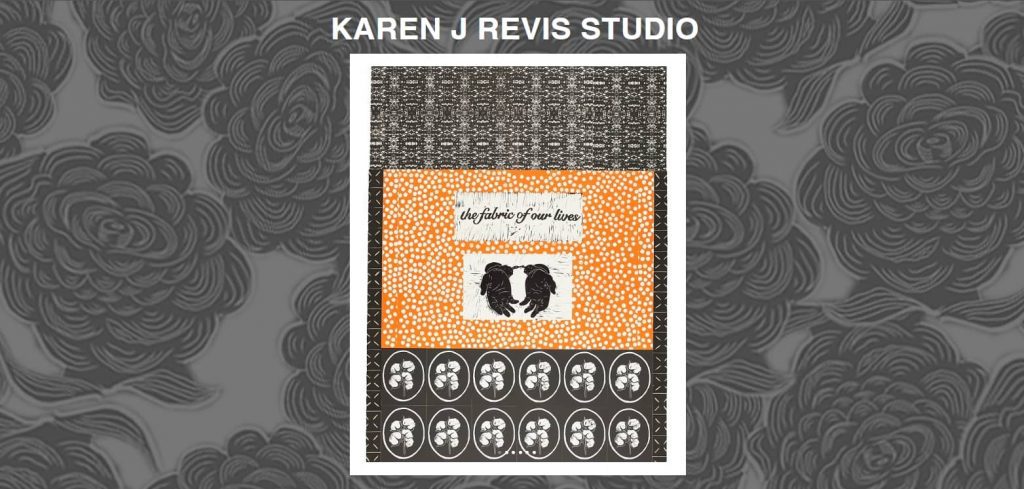
Karen J. Revis’s artist website shows how a simple layout can put the spotlight on your work. This layout allows for both creating art and giving visitors a sense of who you are. So, if you’re ready to make an artist website, you can start with a free plan and build something that lets your work speak for itself.
Zaria Forman

Zaria Forman’s artist website shows how visuals alone can tell a deeper story. Her clean layout and crisp images highlight the details in her pastel work while giving space for her message on climate change. It’s a quiet reminder that a fine art site can inform, move, and connect people beyond the screen.
Alex Garant
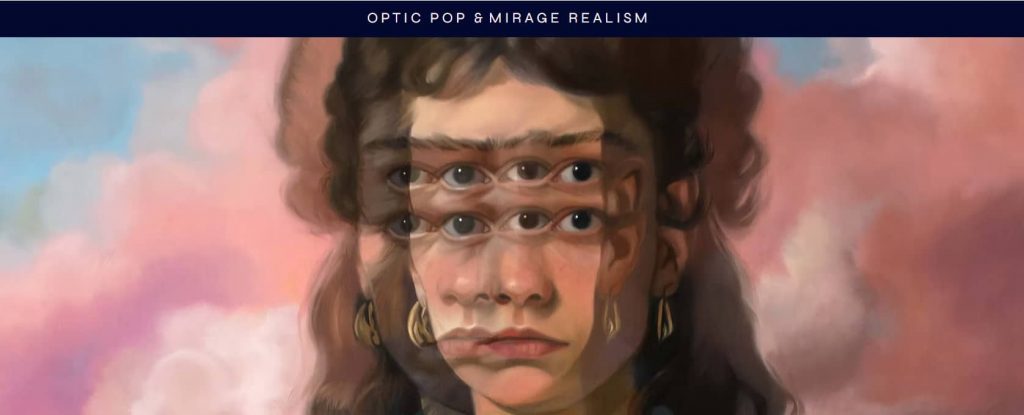
Alex Garant’s artist website shines through bold visuals and a clean layout that highlights her online store. The focus on her artwork and merch draws fans in and motivates them to support her. It’s a solid example of how artists in the visual arts can create a site that blends personality, function, and sales.
Surreal Fashion

Miss Aniela’s Surreal Fashion site mixes high fashion with fantasy using bold visuals and smooth transitions. It’s a good reference for visual artists who want to showcase work in a dramatic but clear way. The site uses marketing tools like slideshows and a clean menu to show off her style in a clear and focused way.
Frequently asked questions
Yes, having a website is worth it for any artist. It gives you a professional space to share your artist portfolio and connect with people who appreciate art online. Unlike social media, you control how your work is displayed, from your homepage to your own portfolio, without worrying about algorithms hiding your posts.
A website also helps you grow your audience. It gives website visitors a clear view of your style, process, and personality, whether you create digital pieces or fine art. It’s a place where collectors, galleries, and potential buyers can explore your work, learn about you, and reach out directly.
The cost of building an artist website depends on your setup. Many website builders offer free websites with basic tools, while paid plans with more features usually start around $10 to $50 per month. You’ll also need a custom domain, which can cost about $15 to $50 per year. Platforms like Wix or Squarespace make it easy to launch a simple portfolio website, while a WordPress site or custom design from a professional can range from a few hundred to several thousand dollars, depending on the design and level of support you need.
An effective artist website should include an artist portfolio that highlights the artist’s best work and shows their artwork online in high quality. It should also feature an ‘About’ page with a bio and artist statement to share your story and creative journey. A ‘Contact’ page helps your visitors, collectors, or galleries easily reach out. Beyond these essentials, adding a blog, testimonials, or an online store enables you to sell your work and connect with a wider audience. Altogether, these pages make your artist website professional, personal, and easy to browse.
Take your fine art online with a stunning artist website
You’ve learned how to plan your site, organize your art, and customize every detail to fit your style. Now it’s your turn to bring it all together. A portfolio website provides your art with a digital home to reach people who truly value your work.
Use Network Solutions AI Website Builder to design your artist website with ease and secure your own domain name to make your art presence truly yours.