
Key takeaways:
- Phishing is a social engineering attack in which criminals impersonate a trusted person or legitimate company to steal sensitive information, money, or access to online accounts.
- Phishing attacks can arrive through emails, text messages, phone calls, QR codes, social media, fake websites, and calendar invitations.
- Businesses can reduce phishing risks through employee awareness training, security software, careful verification, and phishing-resistant multifactor authentication.
Phishing remains one of the most common ways cybercriminals gain access to business systems and sensitive data. Although phishing emails are still widespread, today’s phishing scams also use text messages, phone calls, QR codes, social media platforms, fake web pages, and even meeting invitations.
The business impact can be severe. IBM’s 2025 Cost of a Data Breach Report found that phishing was the most frequent initial attack vector in the breaches it studied, accounting for 16%. Breaches that began with phishing cost organizations an average of USD 4.8 million. Meanwhile, Statista’s data shows 853,244 unique phishing attacks were detected globally on Q4 2025.
Small and medium businesses are not too small to be targeted. Criminals often see businesses with limited security resources as easier entry points. Understanding what phishing is, how phishing works, and what to do after an attack can help you protect your employees, customers, financial information, and reputation.
What is phishing?
Phishing is a type of cyberattack where someone pretends to be a trustworthy person or institution to steal your information. Then, the scammer can steal your personal and financial information or infect your device with malware.
Whether it comes through email, texts, messages on social media, or even phone calls, the goal is the same: to trick you into revealing sensitive information such as login credentials, credit card details, bank account numbers, or personal details.
It’s a form of social engineering. Rather than relying only on technical hacking, attackers exploit trust, fear, curiosity, or a sense of urgency to manipulate victims into taking an unsafe action. This might include clicking links, downloading malware, transferring money, or divulging sensitive information.
How does phishing work?
Phishing works by making fraudulent messages look believable enough that the recipient acts before questioning them. Although individual phishing attempts vary, they generally follow three stages: the bait, the hook, and the catch.
- The bait: An attacker impersonates a trusted person, financial institution, supplier, government agency, coworker, or legitimate company. The attacker sends a message designed to look familiar and convincing, often copying logos, writing styles, email templates, or details found on social media.
- The hook: The message creates pressure or curiosity. It may claim that an account will be suspended, an invoice is overdue, a package cannot be delivered, or an executive needs an urgent payment. The phishing message then asks the recipient to click a malicious link, open an attachment, scan a QR code, make a phone call, or provide confidential information.
- The catch: The victim follows the instructions. A phishing link may lead to a malicious website with fake login pages that capture login credentials. An attachment may install malware, while a fraudulent payment request may persuade an employee to send money directly to the attacker.
A successful phishing attack is often only the entry point to a larger incident. Once attackers gain access to an email account, device, or business network, they may search for additional user accounts, steal sensitive data, impersonate employees, change payment information, or move deeper into connected systems.
This access can eventually lead to email account compromise, financial fraud, ransomware, or data breach. Attackers may also use a compromised account to send more convincing phishing messages to customers, coworkers, or suppliers.
Types of phishing attacks
Phishing comes in many forms, and understanding the differences can help you better spot them.
Here are the most common types of phishing attacks explained in detail:
| Type | How it works | Example |
|---|---|---|
| Email phishing | A fake email asks you to click a link or share information. | A fake Netflix email asks you to update your billing details. |
| Spear phishing | A personalized email targets a specific person. | A fake IT email uses your name and asks you to reset your password. |
| Whaling | A phishing attack targets a business executive. | A fake CEO email asks the CFO to approve a wire transfer. |
| Smishing | A fake text message includes a harmful link or request. | A fake FedEx text asks you to track a package. |
| Vishing | A fraudulent caller asks for money or sensitive information. | A caller claims there is a problem with your account. |
| Quishing | A fake QR code leads to a malicious website. | A QR code on a parking meter opens a fraudulent payment page. |
| Hybrid phishing | A phishing email directs users to call a scammer. | A fake billing email provides a fraudulent support number. |
| Clone phishing | A legitimate email is copied with a harmful link or file. | A fake forwarded email contains malware. |
Email phishing
Email phishing is the most common form of phishing attack. In a bulk email phishing campaign, criminals distribute fraudulent emails to many recipients and hope that some will click a malicious link, download a malicious file, or share sensitive information.
Example: An email from “Netflix” says your payment failed and asks you to log in to update your billing info. But the link leads to a fake login page that will steal your username and password.
Spear phishing
Spear phishing targets a specific individual using personalized messages and personal details. Attackers may research the recipient’s role, coworkers, recent activity, or social media accounts to make the targeted attack more believable.
Example: You get an email that looks like it’s from your company’s IT team, using your name and referencing a recent company meeting. It asks you to reset your password for security purposes.
Whaling
Whaling is a form of spear phishing that targets high-profile individuals, such as CEOs, CFOs, business owners, board members, or other executives. These victims may have access to confidential information, financial systems, or the authority to approve large transactions.
Example: A company’s CFO receives an urgent email that seems to come from the CEO, asking to approve a large wire transfer for a new partner deal.
Smishing (SMS phishing)
Smishing uses fake text messages to trick victims into sharing data, clicking malicious URLs, or downloading malware. These phishing messages may appear to come from a bank, delivery service, government agency, or account provider.
Example: A text that claims to be from FedEx asks you to click a link to track a package—but the link leads to a malicious website.
Vishing (voice phishing)
Vishing, or voice phishing, uses fraudulent phone calls or voice messages to pressure victims into sharing sensitive data, installing remote-access software, or sending money. Attackers may impersonate a bank, technical support agent, supplier, or government official.
Example: Someone calls saying there’s a problem with your computer or tax return and asks you to confirm your identity by providing account numbers or passwords.
Quishing (QR code phishing)
Quishing uses deceptive QR codes to direct victims to a malicious website, fake login pages, or other malicious URLs. Because the destination is hidden inside the QR code, users may not see where it leads before scanning it.
Fraudulent QR codes can appear on posters, flyers, menus, delivery slips, parking meters, or public-transport advertisements. They may also be embedded in phishing emails or messages instead of standard clickable links.
Example: An attacker could place a fake QR code over a parking meter’s legitimate code and direct drivers to a fraudulent payment page.
Hybrid phishing (Email phishing with phone call)
Hybrid vishing combines phishing emails with phone calls. The first message may warn about an invoice, subscription, purchase, or security problem and direct the recipient to call a fraudulent support number. During the call, the attacker may request login credentials, payment details, remote device access, or multifactor authentication codes.
Example: A fake billing email may instruct an employee to call a number to dispute a charge, where a supposed support agent attempts to take control of the employee’s computer.
Clone phishing
Clone phishing copies a legitimate message that the victim has previously received and replaces its original link or attachment with a harmful one. Because the wording, sender name, and layout look familiar, the altered message can be difficult to recognize.
Example: You get what looks like a forwarded email from a coworker with a document attached—but the document is actually malware.
7 common signs of phishing
Knowing what to look for can keep you safe. Here are seven common signs of a phishing attempt:
- Bad spelling and grammar
- Weird email addresses
- Urgent language
- Suspicious links
- Requests for personal info
- Unexpected attachments
- Generic greetings
1. Bad spelling and grammar
Professional companies take time to proofread their messages. If you notice lots of typos, poor grammar, or awkward wording, it could be a sign that the email is fake. Phishing emails often come from non-native speakers or automated scripts, so the language can feel “off.”
2. Weird email addresses
The sender’s email address might look similar to a real one, but with slight changes. For example, instead of [email protected], it might say support@paypall.com. Always double-check the domain name to see if it matches the legitimate source.
3. Urgent language
Messages that scare you into acting quickly—like “Your account will be suspended” or “Payment overdue”—are trying to get you to click without thinking. Phishers use fear to pressure people into making mistakes.
4. Suspicious links
Hover your mouse over any link without clicking it to see where it really goes. If the link address doesn’t match the company’s actual website, it’s probably a scam. Some links may use random strings of numbers or unfamiliar domains to hide their true destination.
5. Requests for personal info
Legitimate companies will never ask for information like your password, Social Security number, or credit card details through email or text. If someone does, that’s a red flag.
6. Unexpected attachments
Don’t open files you weren’t expecting, especially if they come from unknown senders. These could contain viruses or malware that infect your device as soon as you open them.
7. Generic greetings
If a message starts with “Dear Customer” or “Hello User” instead of using your real name, be cautious. Real companies usually personalize their messages. A lack of personalization is a clue that the email may have been sent to thousands of people at once.
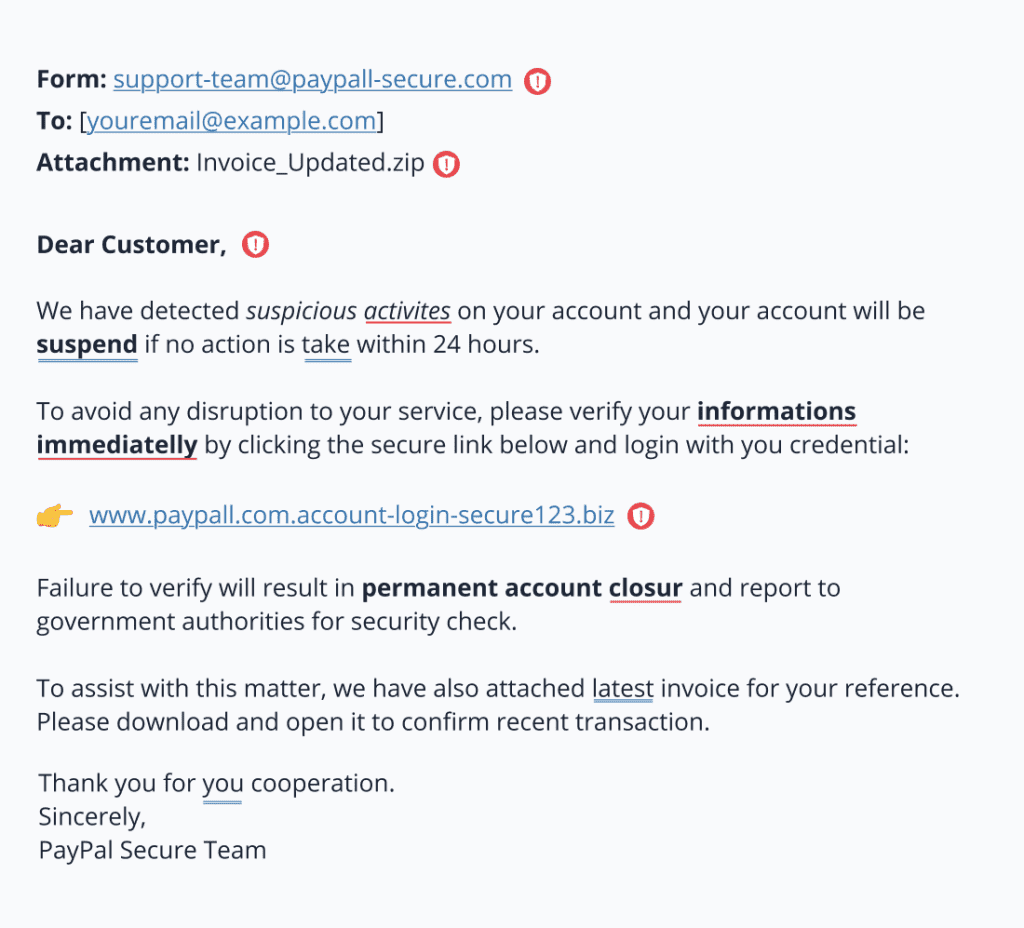
Let’s take a look at this sample email:
**********
**********
This email shows several red flags that point to phishing.
First, the grammar and spelling are noticeably poor, with errors like “suspend,” “immediatelly,” and “closur.” These mistakes are common in scam emails. The sender’s email address looks close to PayPal’s but is slightly off, using a fake domain—“paypall-secure.com”—which is a common trick.
Next, the message uses urgent language, warning that your account will be suspended or permanently closed if you don’t act fast. That pressure is designed to scare you into clicking without thinking.
The link they provide looks official at first glance, but it leads to a suspicious web address that’s nothing like PayPal’s real site. They also ask for your login credentials, which is a clear sign of phishing —real companies won’t request personal information through email.
If you look closer, there’s an unexpected attachment that could contain malware. And finally, the email greets you as “Dear Customer” instead of using your real name, showing it’s not personalized and was likely sent to thousands of people. Together, all of these signs clearly indicate that this is a phishing attempt.
Top risks of getting phished
Falling for a phishing scam can have serious consequences for your wallet, identity, privacy, and even your employer. Let’s take a closer look at the most common risks:
- Identity theft: Phishing attacks often target your personal information. With this data, scammers can pretend to be you and open new bank accounts, apply for loans, or make big purchases. Victims of identity theft often spend months or even years trying to clear their names and recover their credit.
- Money loss: If you hand over your banking or credit card details, scammers can quickly make unauthorized transactions. They might transfer funds out of your account, use your card for online shopping, or even take out loans in your name. Sometimes, people don’t even realize they’ve been scammed until their bank statements show suspicious charges.
- Privacy invasion: Phishing doesn’t always aim for your money—sometimes it’s after your private data. If a scammer gets access to your email, they could read personal conversations, view private photos, or even reset your other online accounts. It’s more than just embarrassing—it can lead to more targeted scams in the future.
- Business damage: For companies, one successful phishing attack can spell disaster. If an employee unknowingly clicks on a malicious link, hackers might gain access to sensitive client data, trade secrets, or internal systems. This can result in lawsuits, regulatory penalties, and massive damage to the company’s reputation. Customers may lose trust, and the financial impact can be devastating.
- Malware infections: Some phishing emails carry malicious attachments or links that install malware on your device. This software can spy on your activity, lock your files, or even use your system as a gateway to attack others. Malware often works quietly in the background, causing damage before you realize something is wrong.
How to protect your business from phishing
Businesses are frequent targets because they store valuable information, handle sensitive transactions, and often have multiple employees—making them an attractive focus for scammers. Anthony Matera, Senior Director, Email Products of Network Solutions, advises, “Use common password best practices, utilize 2FA, ensure your site and language versions are up to date. After initial creation, log into your site periodically to review and make updates.”
Let’s break down those tips with these steps:
- Educate your team
- Use security software
- Enable two-factor authentication
- Keep systems updated
- Back up your data
- Run fake phishing simulations
Educate your team
The first line of defense is your people. Remember, it’s all social engineering and relies on human actions to work. If your personnel know how to spot the threats, that’s one layer of protection from possible scams.
Run regular training sessions that teach employees how to recognize and report phishing attempts. Show them real-world examples of scam emails and simulate fake ones to test their awareness. For instance, you could send out a mock email that looks like a delivery notification—then track who clicked. These training exercises help staff build a habit of thinking before they click.
Use security software
Spam filters and email-security solutions can identify suspicious messages, fraudulent senders, harmful attachments, and known phishing campaigns before they reach employee inboxes.
Antivirus and anti-malware tools can detect or neutralize a malicious file that attempts to install malware. Web filters can block a known malicious website or malicious URLs and alert users when they land on a suspicious page.
Keep these tools active and updated across company devices. Advanced phishing protection that uses machine learning may also identify unusual content, impersonation attempts, and other patterns that traditional filters miss. CISA recommends maintaining antivirus software, firewalls, email filters, and anti-phishing features in email clients and browsers.
Enable two-factor authentication
Two-factor authentication is the minimum level of login protection businesses should use for important online accounts. It adds another verification step, such as an authentication-app code, app approval, security key, passkey, or biometric check.
However, not every form of multifactor authentication offers the same protection. Criminals may trick users into sharing one-time codes or approving fraudulent login prompts. Phishing-resistant MFA, such as FIDO security keys and passkeys, is the safer upgrade because it is designed to prevent users from authenticating on fake login pages.
Prioritize phishing-resistant MFA for email accounts, financial systems, administrator user accounts, website dashboards, and cloud services. CISA recommends that businesses aim to implement phishing-resistant MFA wherever possible.
Keep systems updated
Regularly updating software ensures that any security vulnerabilities are patched quickly. Hackers often exploit known flaws in outdated systems. Make it a policy to update operating systems, antivirus software, and apps across all company devices.
Back up your data
Even with the best protection, things can go wrong. Having secure and regular backups means you can recover important data if your system is compromised. For example, in the event of a ransomware attack delivered through a phishing email, having backups means you can restore your data without paying the ransom.
Run fake phishing simulations
Simulated phishing campaigns help reinforce good habits. These are safe, controlled tests that look like real phishing emails but don’t actually harm anything. If an employee clicks on a link, you can redirect them to a training page that explains what they missed.
Top industry targets of phishing
Some industries are especially attractive to cybercriminals because of the sensitive data they hold and the systems they rely on. Here’s a closer look at why these industries are frequent targets:
- Financial services: Banks, credit unions, and investment firms deal directly with money, making them high-value targets for phishing. These attacks can give hackers access to customer bank accounts, internal financial systems, or employee credentials. Scammers often pose as financial institutions in phishing emails to trick users into giving up login details. One common tactic is sending fake alerts claiming “suspicious activity” on your account.
- Healthcare: Hospitals, clinics, and insurance providers store massive amounts of personal and medical data. This includes Social Security numbers, billing info, and detailed health records. Hackers can sell this data on the black market or use it for identity theft. In some cases, ransomware attacks have shut down entire hospital systems, delaying care and putting patient safety at risk.
- Retail and e-commerce: Online stores collect sensitive customer data, including credit card numbers, shipping addresses, and purchase histories. Phishing attacks may target employees to gain backend access or trick customers into entering their payment details on fake sites. During busy shopping seasons like the holidays, these industries see a spike in phishing attempts.
- Education: Schools and universities manage student records, staff credentials, and research data. With thousands of users and often limited IT resources, educational institutions can be easy targets. Phishing scams may trick students or faculty into revealing passwords or downloading malware that compromises entire campus networks.
- Government agencies: Public sector organizations hold sensitive personal data about citizens and manage critical infrastructure systems. Hackers may use phishing to access classified information or disrupt operations. For example, phishing emails have been used to breach election systems or impersonate law enforcement to obtain unauthorized access.
But the truth is, every industry has something worth stealing. Matera also adds one website security mistake new owners make that’s easy to avoid is “Believing they won’t get targeted/hacked. Using weak, default, or reused passwords for their CMS (like WordPress), hosting accounts, or admin panels, which can be cracked in seconds.” Cybercriminals see opportunities everywhere. That’s why cybersecurity awareness and phishing defenses are vital no matter what industry you’re in.
What to do if you’ve been phished
Being phished can happen to anyone. Phishing scams are designed to look convincing and may use personal details, compromised accounts, or AI-generated content to appear legitimate.
Do not panic or hide the mistake. Acting quickly after a successful phishing attack can limit malware spread, unauthorized access, financial fraud, and damage to the rest of your organization.
Disconnect from the network
Disconnecting the affected device can help stop malware from spreading to other systems or continuing to communicate with the attacker.
- Turn off Wi-Fi or unplug the network cable if you downloaded a malicious file, entered information on a suspicious site, or noticed unusual activity.
- For a work device, notify your IT or security team immediately.
- Do not shut down or reset the device unless your security team tells you to do so, as this may remove information needed for an investigation.
Change passwords immediately
Changing exposed passwords can prevent attackers from accessing your email, financial accounts, and other linked services.
- Use a trusted device to update the login credentials for any accounts entered on the phishing page.
- Start with your email accounts and bank account, then secure shopping, social media, website, cloud storage, and other online accounts.
- Create a strong, unique password for every account instead of reusing passwords.
- Use a password manager to generate and store your credentials securely.
Enable multifactor authentication
Multifactor authentication adds another barrier if an attacker already has your password. It can help prevent unauthorized access to your online accounts after a phishing incident.
- Add a second sign-in step, such as an app approval, authentication code, passkey, or security key.
- Choose phishing-resistant MFA, such as a passkey or security key, where available.
- Review active sessions, trusted devices, account recovery details, and forwarding rules.
- Sign out of any device or location you do not recognize.
Notify IT and your team
Early reporting gives your organization more time to contain the attack and protect other employees, systems, and accounts.
- Tell your IT or security team what you clicked or downloaded, what information you entered, and when the incident occurred.
- Follow their instructions for scans, account resets, or device checks.
- Alert coworkers if the compromised account may have sent them fraudulent messages.
- Report phishing attempts promptly so the security team can block malicious URLs and remove similar emails from other inboxes.
Contact your financial institution
Quick action may help stop or reverse fraudulent payments and prevent further misuse of your financial information.
- Contact your bank, card provider, or payment service if you shared credit card details or bank account information.
- Ask whether a payment can be stopped, reversed, or flagged for investigation.
- Review recent activity and follow the provider’s instructions for replacing cards or securing your bank account.
- Use contact details from an official website, statement, or payment card—not from the phishing message.
Report to relevant authorities
Reporting phishing helps email providers, legitimate companies, and authorities identify active scams and protect other potential victims.
- Use your email provider’s Report phishing feature.
- Notify the legitimate company that was impersonated, such as a bank, delivery service, government agency, or software provider.
- Report fraudulent messages to the appropriate fraud or cybersecurity authority in your region.
- In the United States, phishing scams can be reported to the Federal Trade Commission.
Monitor your accounts and devices
Attackers may not use stolen information immediately, so continued monitoring can help you catch identity theft, account changes, or financial fraud early.
- Check email logins, bank statements, credit reports, social media, and other sensitive accounts for unusual activity.
- Enable alerts for new logins, password changes, account recovery requests, transfers, and large transactions.
- Watch for unfamiliar user accounts, unexpected bills, credit applications, or changes to your contact information.
- Contact your bank or credit provider immediately if you notice signs of identity theft or financial fraud.
AI and phishing
AI is transforming the world of phishing—both for attackers and defenders. It gives cybercriminals new ways to deceive people, but it also equips security teams with smarter tools to stop these threats before they cause harm.
How attackers use AI in phishing
AI lets scammers create phishing messages that sound more convincing than ever. Since they’re using AI language tools to generate messages that mimic real natural tone and grammar, it’s harder for users to tell the difference between a real message and a fake one.
Attackers can also use AI to scan social media profiles and company websites to tailor phishing attempts. This is especially common in spear phishing, where emails are personalized with names, job titles, and recent activity to build trust.
Finally, some even use AI to create fake voices through deepfake technology, calling employees and pretending to be a CEO or IT support staff asking for sensitive credentials.
How AI helps prevent phishing
Fortunately, AI is also a powerful ally in defending against phishing:
- Pattern detection: AI-based security software can analyze thousands of emails in real time, looking for patterns or red flags that humans might miss. For example, it can flag emails that use urgent or manipulative language, or ones that contain hidden malicious links.
- Behavior monitoring: Machine learning models can also track user behavior and detect anomalies. If an employee suddenly starts logging in from unusual locations or accessing sensitive files they don’t normally use, AI systems can flag this as suspicious.
- Email filtering: Email platforms like Gmail and Outlook are already using AI to sort out spam and phishing attempts, reducing the number that reach your inbox in the first place. These tools get smarter over time, learning from new threats and adapting to catch even sophisticated phishing schemes.
It’s an ongoing battle—AI is making phishing attacks more advanced, but it’s also giving us better defenses. The key is to stay informed, use the tools available, and always think twice before clicking.
Frequently asked questions
Phishing is a scam where someone pretends to be a trusted person or company to steal your passwords, money, or personal information.
You may have been phished if you clicked a suspicious link, entered information on a fake website, downloaded an unexpected file, or noticed unusual account activity.
A fake bank email says your account is locked and asks you to sign in through a link. The link opens a fake login page that steals your password.
Four common types are email phishing, spear phishing, smishing through text messages, and vishing through phone calls.
Stay alert and protect your business
Phishing attacks can be convincing, but the right habits and security tools can reduce the risk. Train your team, verify unusual requests, use multifactor authentication, and report phishing attempts quickly.
We can support your website security with SSL certificates and SiteLock protection to help secure data, scan for threats, and strengthen customer trust. Registering and managing your domain in one place can also help protect your brand, maintain control of your official web address, and make it easier for customers to recognize legitimate communications.
Every domain purchase with us includes free marketing tools o help you build a consistent online presence.