Key takeaways:
- A 404 error indicates that your browser cannot retrieve the requested page you typed into the address bar.
- There are several causes for 404 errors, including restricted access pages, bad links, or mistyped URLs.
- Using a custom 404 page can improve the user experience by directing them to a page with relevant information.
404 errors are website diagnosis messages you’ll encounter daily on the world wide web. They can signify issues such as website configuration errors or a dead link.
Ignoring these errors can lead to a slew of problems for your brand. For instance, having too many 404s on your site can indirectly lead to negative consequences to its SEO health. Furthermore, visitors will start mistrusting your brand, which can lead to losses in conversions and revenue.
In short, a 404 error is not a problem that you can set aside.
In this article, we’ll examine a 404 error, learn how to fix it, and discuss the importance and benefits of custom 404 pages.
What is 404 error?
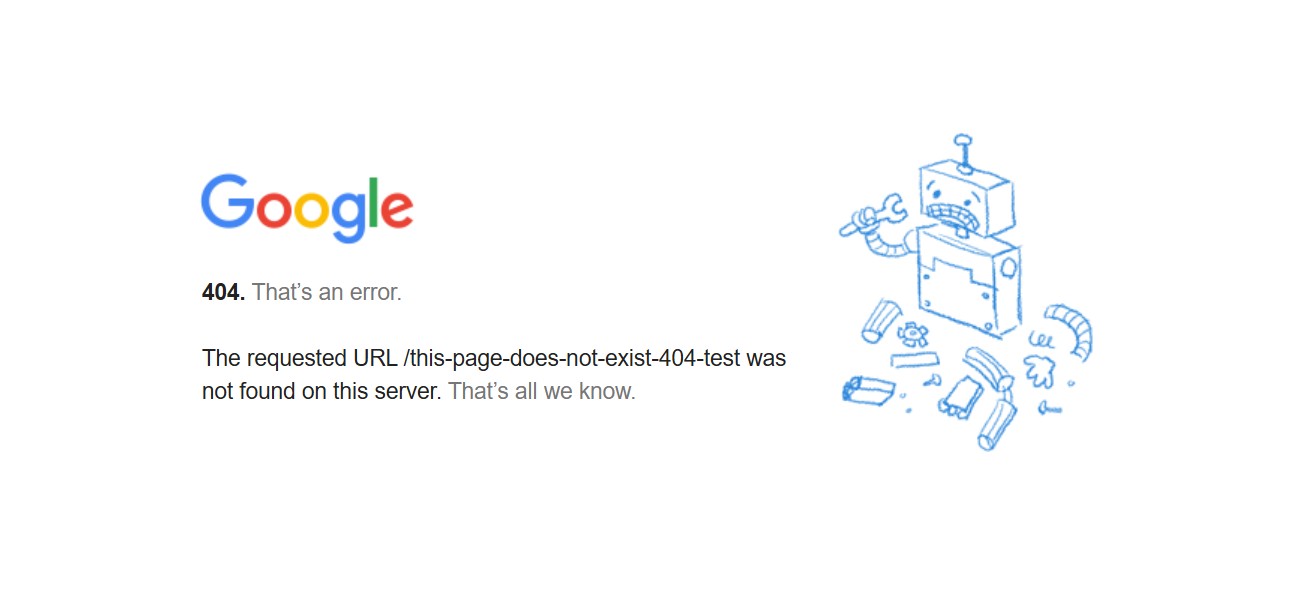
A ‘404 error not found’ is a standard HTTP status code that means the webpage you’re looking for doesn’t exist on the server.
Think of it like using a search engine: if the search engine can’t find what you’re looking for, it shows no results. Similarly, when you type a web address into your browser, it looks for that specific page. If the page isn’t there, you get a 404 error.
When your browser tries to load a web page, it’s actually sending a request to a server, which is where files for a resource live. The server responds with a three-digit HTTP status code that tells your browser what happened with that request.
These status codes fall into five broad families: informational (100s), success (200s), redirection (300s), client errors (400s), and server errors (500s). A 404 error falls into the client error group, meaning the server understood the request but couldn’t find the specific requested resource.
How do 404 errors work?
When you type a web address (URL) or click a link, your web browser immediately asks the server (the computer storing the website) for the files needed to show you that page.
Think of the URL as a precise address. It tells the server exactly where to find the website’s files. If the server finds them, it sends them back to your browser, and the page appears.
But what if the server can’t find the page? Maybe you typed the address wrong, or the page was deleted or moved. In that case, the server can’t fulfill your request. Instead, it sends back a “404 status code.”
This 404 code tells your browser that the page you’re looking for isn’t there. Your browser then shows you a “404 error” message, usually saying something like “Page Not Found.”
What are the common causes of 404 errors?
Pay attention to these common reasons that lead to a 404 error:
- Non-existent URL: A 404 error appears whenever you incorrectly type a website or domain name. The website isn’t accessible on the internet, which results in your browser displaying the error.
- Moved or deleted resource: Web browsers look up a page based on the URL structure. So, whenever you move files to another folder or remove them from a webpage, the server returns a 404 error.
- Misconfigured server: If you incorrectly set up your server settings, your website will display a 404 error. The 404 error page appears when the server is unable to handle or load the requested page.
- Broken links: Visitors clicking site links get a “page does not exist” error when you have mistyped, incorrect, or outdated links.
- Access restrictions: These can occur when a user attempts to access a secure resource. In this case, the server returns the error to prevent unauthorized resource access.
- Outdated content management system (CMS): An outdated content management system (CMS) can cause problems like broken links, leading to those “404 page not found” errors.
- Website migration: When you redesign or move your website, old page addresses (URLs) often change. If you don’t redirect them, links to those old URLs will lead to 404 errors.
- External links: If another website links to your page and you delete or move that page, visitors clicking that link will see a 404 error. That’s why it’s important to monitor external links and set up redirects when needed.
Impact of 404 errors: Why should you fix them?
Not every 404 error represents a problem you can—or should—fix. Sometimes 404s occur because someone simply typed the address incorrectly or followed a broken link from outside your site.
Those random, one-off 404s caused by user typos or bot traffic aren’t harmful and typically fade from search reports over time. Only 404s pointing to legitimate pages that once existed (or should exist) need to be resolved. This distinction helps you prioritize actions that actually benefit your site’s user experience and SEO.
That doesn’t mean you should underestimate 404 errors on your website. Even a few, valid errors can harm your site’s performance and reputation. Here’s how 404 errors can affect your site:
- Poor user experience
- Damaged credibility
- Lower search engine rankings
- Lost link equity
Poor user experience
When visitors hit a 404 error, their browser stops cold. They see a “page not found” message, which is frustrating, especially if they’re looking for something specific. This often makes them leave your site, which, in turn, increases your bounce rate and cuts down on the time they spend there.
Damaged credibility
A website riddled with 404 errors looks neglected and unprofessional. Visitors might see your site as unreliable, outdated, or even suspicious. This can seriously damage your brand’s reputation and reduce how much people engage with your content.
Lower search engine rankings
Search engines like Google want to show users the best, most relevant results. Websites with lots of 404 errors signal that the site isn’t well-maintained or doesn’t offer a good experience. This can negatively impact your search engine rankings, making it much harder for people to find you.
Lost link equity
Links are vital for SEO. When other websites link to yours, it tells search engines that your content is valuable and authoritative. This “link equity” helps boost your search rankings. But when those links point to 404 pages, that link equity is wasted. Search engines can’t follow broken links, which hurts your site’s visibility in search results.
What tools can help address 404 errors?
When fixing 404 errors, there are tools that lighten up the workload for efficiency in identifying these errors. Here are the common tools people use to identify 404 errors on their site:
- Google Search Console
- Screaming Frog
- SEMrush
- Ahrefs, Moz, and Broken Link Checker
- Chrome extensions
- Log file analysis
- Website crawlers
Here’s a closer look at each tool and how it can help you find and fix 404 errors:
- Google Search Console: This free Google tool helps you find 404s through:
- Coverage Report: Shows 404 errors Google found while crawling your site.
- Sitemaps: Submitting a sitemap helps Google (and you) identify 404s more efficiently.
- Screaming Frog: This software scans your website and finds pages with 404 errors and helpful information like page titles and HTTP status codes.
- SEMrush: It crawls your website, detects any errors, and provides a list of URLs that need your attention.
- Other tools: Ahrefs, Moz, and Broken Link Checker to identify and resolve dead links.
- Chrome extensions: Chrome extensions like Check My Links and LinkMiner provide a quick and easy way to test links.
- Manual checking: Click every link yourself. This works for small sites but is too time-consuming for larger ones.
- Log file analysis: For busy websites, examine your server’s log files, which record all requests, including 404s.
- Website crawler tools: Automated tools that scan your site for broken links:
- Dead link checker: Specifically finds broken internal and external links.
- ATOMSEO: Identifies 404 errors and other technical SEO problems.
How to fix a 404 error
As you implement these fixes, focus first on URLs that matter, such as pages that once existed and were linked externally or internally, or ones generating consistent traffic. Random 404s caused by mistyped URLs generally don’t require action.
Here are five ways to handle 404 errors as a site owner:
- Create custom error pages
- Redirect broken URLs and manage links
- Fix file permissions
- Temporarily disable the .htaccess file
- Restore website backup
Create custom error pages
A custom error page is a good solution for a “404 not found” error. It should tell the user that the page they’re looking for doesn’t exist and give them helpful options for where they can go next on the website.
For example, a search bar or a navigation menu can help users find what they need and keep browsing without feeling annoyed.
Redirect broken URLs and manage links
If a page has moved or been deleted, redirect its old address (URL) to a new, relevant page. This also applies to common misspellings or incorrect domain endings. When you discover a 404, you have a few options for the broken link itself:
- Restoring the page: If the page was accidentally deleted, bring it back.
- Redirecting the URL: Point the old, broken link to a new, relevant page.
- Correcting the link: If the broken link is on your own site, edit it to point to the correct page.
- Removing the link: If the linked content no longer exists and there’s no suitable alternative, remove the broken link entirely. Regularly checking for and fixing bad links (both internal and external) prevents these errors and improves user experience and SEO.
Google recommends using redirects thoughtfully and choosing a target page that makes sense for the user and search engines.
Fix file permissions
Sometimes, a 404 error happens because the server can’t access a file due to incorrect permissions. Make sure your server has the right access to display the content. This is often done via your hosting control panel or FTP.
Temporarily disable the .htaccess file
Your .htaccess file can sometimes contain instructions that conflict with the web server, causing 404 errors. Temporarily disabling it can help you pinpoint if it’s the source of the problem. If it is, you’ll need to review and fix problematic directives within the file.
Restore website backup
If 404 errors suddenly appear across your site, restoring a recent backup (from before the errors started) can quickly fix the issue. Use your web hosting control panel or an FTP client to restore the backup, then verify that the errors are gone.
Once you restore the backup, check your website carefully to ensure no 404 errors exist.
How to prevent a 404 error
Preventing a 404 error is different from fixing one after it happens. Prevention is about maintaining your website so visitors and search engines are more likely to reach the right page the first time.
Here are some practical ways to reduce the chances of a 404 error on your website:
- Review your links regularly: Check menus, buttons, internal links, and footer links to make sure they still point to working pages.
- Update links after page changes: If you rename, move, or delete a page, update any links pointing to it.
- Redirect changed URLs: When a page moves, create a redirect so visitors reach the correct destination.
- Watch for outdated content: Older blog posts, product pages, and service pages may still point to pages that no longer exist. Replace broken links with relevant information.
- Keep your sitemap updated: A sitemap helps Google understand which URLs exist on your site and can be especially helpful after a launch or site move.
- Monitor external links when possible: If another website links to an old page on your site, a redirect can help preserve that traffic.
- Check your site after redesigns or migrations: These are common moments when URLs change and broken links slip through.
A few simple checks each month can help keep outdated content, broken links, and missed redirects from turning into a bigger website problem.
Why does a custom 404 error page enhance the user experience?
Finding a 404 error while browsing the web is outright frustrating. As a visitor, it wastes your time and probably affects your opinion of the website that returned the error. That’s where a custom 404 error page can resolve these issues.
Beyond just displaying an error, they can suggest alternative content, offer navigation options, or provide a search tool to help users find what they’re looking for — all of which keep visitors engaged and reduce frustration.
Here’s what you get from a personalized 404 webpage:
- Reduces frustration: A customized page helps users understand they’ve hit a dead end, reducing confusion.
- You can add contact info, links to popular pages, or a search bar to guide them.
- For e-commerce sites, consider adding a product search to keep shoppers engaged.
- If you’re a service provider, include suggestions or links to your support resources.
- Keeps users engaged: Custom 404 pages can guide users back to functional parts of the site.
- Strengthens brand identity: A well-designed page aligns with your website’s style and tone and reinforces brand consistency.
- Improves SEO: A custom page can include links to popular content, which helps users discover more and signals to search engines that you’re aware of the issue and are actively addressing it.
- Adds a touch of humor or creativity: A playful or creative 404 page can turn a negative experience into a memorable and positive one.
Tips for creating an effective 404 page
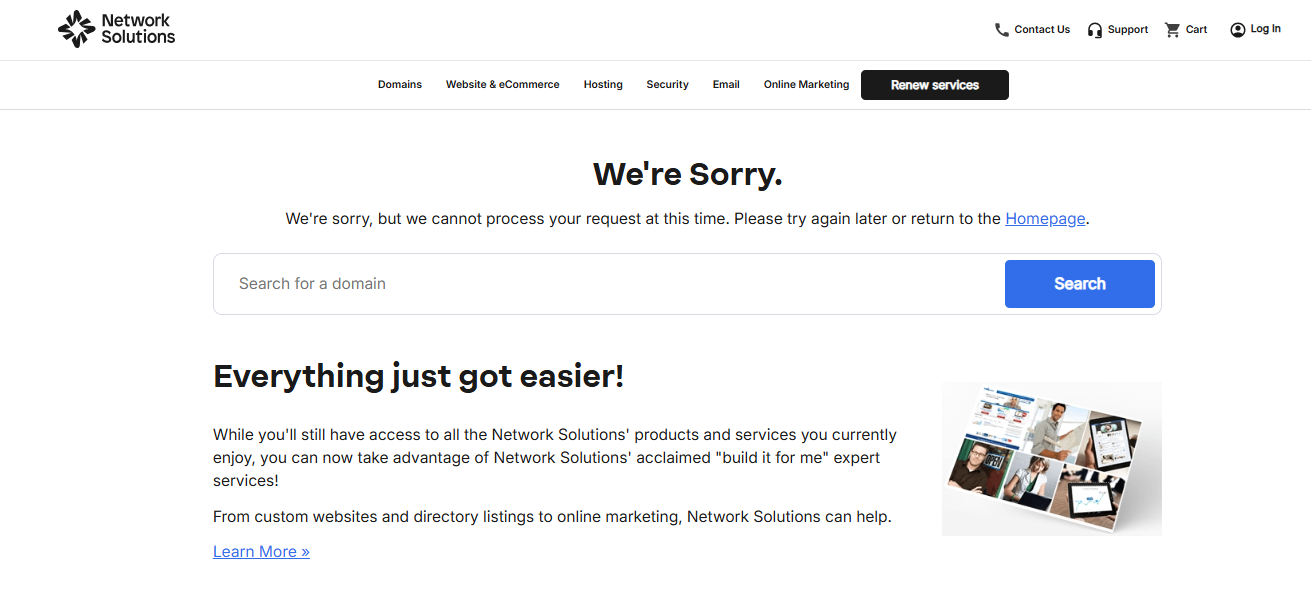
Custom error pages are great for addressing a poor user experience caused by missing pages. Here are some quick tips for creating a good 404 page:
- Explain what happened and why the page is not available to website visitors.
- Apologize for the inconvenience and show empathy for the user.
- Provide a search function or a list of links to help users find what they want.
- Use humor or creativity to make web pages like these more engaging and less boring.
- Keep the design consistent with your website branding and style.
- Track and analyze 404 errors to identify and fix a broken link or missing page.
Example:
For a deeper look at layout, messaging, and design ideas, see our guide to 404 page design.
How does a 404 error affect your ranking and reputation?
404 errors can damage a website’s SEO ranking and brand reputation in several ways:
- They can reduce user experience and satisfaction, which leads to higher bounce rates and lower conversions.
- They can affect the website’s crawl budget and indexation, making it harder for search engines to discover and rank the relevant pages.
- They can harm a website’s authority and trustworthiness, especially if caused by dead or broken links or outdated content.
Frequently asked questions
A 404 error means the page or file you requested could not be found on the server. It usually happens when a URL is wrong, the page was deleted, or the content was moved without a redirect.
404 is famous because it is one of the most common website errors people see online. It became widely recognized as the standard “page not found” message.
Usually, no. A 404 error usually means the page does not exist or cannot be found. If you were blocked, the site is more likely to return a different error, such as 403 Forbidden.
Yes, sometimes. If you’re a visitor, check the URL for mistakes or go back to the homepage. If you own the site, you can fix a 404 by restoring the page, correcting the link, or redirecting the old URL to a relevant new page.
Yes. A custom 404 page can improve user experience by explaining what happened and guiding visitors to helpful next steps, like a search bar, homepage link, or popular pages.
Yes. Adding useful links can help visitors stay on your site and find relevant content faster. Good options include your homepage, key service pages, recent articles, or a search feature.
No. A 403 error means the server understands the request but refuses access. A 404 error means the requested page or file could not be found.
Keep your website 404 error-free
404 errors usually happen when the main domain works, but the specific page URL is wrong, outdated, or no longer exists. Fixing broken links, adding redirects where needed, and using a helpful custom 404 page can make your website easier to navigate and keep visitors from hitting dead ends.
That’s also why a strong domain matters. While a wrong page path can lead to a 404, a clear and memorable domain helps people reach the right website to begin with. You can support both parts of your online presence—from a domain that helps customers find you to a website experience that helps them keep going.
Find the perfect domain
Ready to register a domain name? Check domain availability and get started with Network Solutions today.