
Key takeaways:
- Cybersquatting is when someone registers domain names that are similar to a brand or trademark in order to make money from them.
- To protect your brand, register different versions of your domain, secure several domain extensions, and keep an eye on your online presence.
- If you’re a victim of cybersquatting, you can try to resolve it by negotiating, using UDRP arbitration, or taking legal action under the ACPA to get your domain back.
Cybersquatting can happen to any business. Someone sees your brand name online, notices you don’t own the domain yet, and registers it first. Others grab something confusingly similar, so people think it’s connected to you. The goal is almost always the same: profit from your name through bad-faith intent, like selling the domain back at a high price or using your reputation to pull in visitors.
The problem keeps growing. In 2024 alone, WIPO handled more than 6,100 domain name dispute filings, one of the highest on record. Sadly, many business owners only discover cybersquatting cases when they start building a site and realize the domain they wanted is no longer avaiable.
This guide walks you through the basics, so you know what to do if this happens to your business.
Here’s a quick look at what’s inside:
- What cybersquatting means
- Why it’s illegal
- How to spot a domain squatter
- How the dispute resolution process works
- How tools like domain monitoring help protect your name

Now that you know what this guide covers, let’s begin with a clear look at what cybersquatting really is and how it works.
What is cybersquatting and how does it work?
Cybersquatting exploits the rapidity with which names are claimed online. Instead of using a brand, company name, or personal name legitimately, a squatter registers it first and controls its use. That control is often leveraged for profit, pressure, or to block the real owner from building their online presence.
This is common in the digital world, where people register look-alike domains with a different domain extension or a small spelling change. These setups can mislead consumers, cause financial losses, or even lead to identity theft cybersquatting if the fake site collects information.
Some cases also involve abusive domain name registrations, where individuals target trademark owners and use the domain for malicious purposes, such as redirect scams or pages that attempt to steal business from the genuine brand.
In short, it’s when someone takes a domain that should belong to you and uses it to make money or harm your reputation.

A simple way to prevent cybersquatting is to register your domain as early as possible. Network Solutions can help you do that through our domain registration service.
What are the types of cybersquatting?
Cybersquatting takes many different forms, and each one can affect a business, a brand, or even someone’s personal identity. Here’s a quick look at how domain squatters usually operate:
- Typosquatting
- Identity theft
- Name jacking
- Reverse cybersquatting
- Homograph squatting
- Homophone squatting
- TLD squatting
Now, let’s break each one down so you can understand how they work and what risks they pose.
Typosquatting
Typosquatting happens when someone registers a domain name that looks almost the same name as a real site or a legitimate company, often with a small spelling mistake. These look-alike domains can affect business names, personal names, and even a company’s reputation.
Common signs of typosquatting include:
- A misspelled version of a known brand
- Pages that copy a real site’s brand image
- Redirects that support scams or illegal activity
- Domains used to trick visitors into thinking they are on the right site
It only takes a tiny typo to land someone on the wrong site. A name like “Fxnews.com” instead of Fox News, or even “Gooogle.com,” shows how easy it is to confuse people online. This is why it helps to take a proactive measure and secure the right domain before anyone else grabs it.
Identity theft
Identity theft focuses on impersonation. A squatter registers an infringing domain to pose as a public figure, executive, or brand. The goal is often to mislead users, collect personal information, or damage the reputation of the real person. These domains mimic someone’s identity so closely that visitors believe they’re on an official site. Because this involves deception and misuse of personal likeness, it often overlaps with online defamation and can be challenged under the Uniform Domain-Name Dispute-Resolution Policy (UDRP) or the Anticybersquatting Consumer Protection Act (ACPA).
Name jacking
Name jacking works through opportunism. Instead of impersonating someone, a squatter registers a domain tied to a rising figure, influencer, or trending personality before they can claim it. The squatter benefits from the person’s growing visibility and later profits from traffic or a resale. This tactic exploits name momentum rather than pretending to be the individual.
Reverse cybersquatting
Reverse cybersquatting involves a trademark owner or business accusing someone of cybersquatting, even when the person bought the domain name lawfully and without bad intent. The accuser argues the domain is confusingly similar to their business name or trademark registration, despite the absence of trademark infringement. These disputes can get messy, so it’s important to look at the full context before assuming who’s at fault.
Homograph squatting
Homograph squatting uses look-alike characters to fool users. A squatter registers a domain name with letters that appear identical but come from another language, so the fake site looks the same as the main domain. For example, they can create “аpple.com” using a Cyrillic “а” instead of the Latin “a.” Most people will not spot the difference, which puts a company at risk through data theft or misuse of their intellectual property.
Homophone squatting
Homophone squatting uses sound-alike names to mislead users. It happens when a cybercriminal registers domain names that sound like a real brand or business but use different spelling to trick visitors. A common example is someone grabbing “bycar.com” instead of “buycar.com.” As more people rely on voice search and AI assistants, this cybersquatting issue becomes easier for bad actors to exploit because users may not notice the subtle spelling change.
That small mix-up can still put users and brands at risk. It is one more reason businesses need to stay alert and protect their domains early.
TLD squatting
Top-level domain (TLD) squatting occurs when someone registers your business or brand name under a different domain extension, such as grabbing yourbrand.net when yourbrand.com is already yours. It looks harmless at first, but that tiny change can mislead customers who don’t notice the different ending.
This is where things get messy. Cybercriminals can use the fake domain to send spoofed emails, confuse customers, or pull traffic away from your real website. That minor change can cause real trouble if it goes unnoticed early on.
Famous real-world cybersquatting cases
Below are cybersquatting examples that made headlines over the years. They provide a clear picture of the problems that can arise when another party obtains the domain first.
| Case | Year | What happened | Outcome/takeaway |
|---|---|---|---|
| Nissan vs. Nissan Computer | 1999 | Nissan Motors wanted nissan.com, but it was already owned by Uzi Nissan, who ran a small computer business. | The federal court sided with Nissan Computer. The ruling proves that conflicts don’t always involve malicious actors; sometimes it’s just a shared last name. |
| Madonna (madonna.com) | 2000 | A cybersquatter registered madonna.com and used it for adult content. | WIPO ruled in Madonna’s favor and transferred the domain. The outcome makes clear that celebrity names are safeguarded from malicious actors under trademark rules. |
| tesla.com | 2016 | Tesla Motors wanted tesla.com, but someone else already owned it. | Tesla purchased the domain for $ 11 million. The sale demonstrates the significant losses a company can incur by waiting too long to secure its domain. |
| Panavision vs. Toeppen | 1998 | Toeppen registered panavision.com and attempted to sell it for profit. | The court ruled in favor of Panavision and labeled it cybersquatting. The ruling demonstrates the law’s strong response to bad-faith intent. |
| mikerowesoft.com | 2003 | Teen Mike Rowe registered mikerowesoft.com for his web-design hobby. Microsoft claimed it was too similar. | The case settled after public backlash, which shows that these disputes aren’t always malicious. |
| walmart44.com | 2000s | Fake site used Walmart’s name to spread spyware and trick users. | Walmart took legal action, and the site was shut down—a strong reminder that cybersquatting can create real danger when left unchecked. |
| tiktoks.com | 2017 | Squatters registered tiktoks.com to profit from TikTok’s rising popularity. | TikTok filed a case to reclaim the domain and won. It highlights how quickly opportunists move when a brand begins to gain attention. |
Is cybersquatting illegal?
Yes, cybersquatting is illegal in the U.S. under the ACPA. The law protects trademark owners from people who register a domain name in bad faith, especially when the goal is to take advantage of a brand’s reputation for personal gain.
The ACPA applies when someone registers a domain that closely mimics a protected name and creates confusion. It provides businesses with a means to reclaim the domain through a court order and request damages if necessary.
The 3 ACPA elements
A cybersquatting case often depends on three things:
- The domain is identical or confusingly similar to a trademark.
- It was registered in bad faith.
- It was intended for profit or to harm the real brand.
Global context: How the UDRP fits in
Outside the U.S., domain disputes follow the UDRP, which is managed by the Internet Corporation for Assigned Names and Numbers (ICANN) and reviewed through organizations like the World Intellectual Property Organization (WIPO). The process helps brands recover domains associated with common misspellings, impersonation attempts, or other forms of cybersquatting without the need for court action.
Why cybersquatting is illegal
Cybersquatting crosses the line for several reasons:
- It violates trademark rights.
- It creates confusion for users who expect to land on the real site.
- It harms businesses through lost traffic, brand damage, or phishing risks.
- It shows clear bad-faith intent, especially when the squatter tries to profit from the legitimate business.
A quick note on the Lanham Act
The Lanham Act supports the ACPA by covering broader trademark protection and unfair competition issues. Together, these laws help businesses combat cybersquatting and safeguard their online identity.
Your brand deserves real protection. Network Solutions’ Trademark Protection tools help you guard your name, block confusing domains, and stay one step ahead of copycats.
How do I report domain squatting?
If you suspect misuse of your domain name, the next step is to learn how to report it correctly. Here’s the path you’ll take before getting into the specifics:
- Gather evidence
- Search WHOIS and registrar info
- Contact the registrar or domain owner
- File a UDRP complaint
- Escalate to legal action (ACPA)
Gather evidence
Look for signs that the fake domain name is pretending to be your website or business. Capture the URL, pages that look like yours, and any branding that matches your trademark. Keep records of emails, messages, or any suspicious activity. These details help demonstrate bad-faith behavior and lend more weight to your report.
Search WHOIS and registrar info
Next, use a WHOIS lookup tool to verify the domain name’s registrar and registration details. ICANN’s database shows which registrar the site belongs to and helps you find contact info. This gives a clearer path to identify which business or company may be involved in the misuse. If the WHOIS record looks hidden or questionable, that can be a sign of possible cybersquatting.
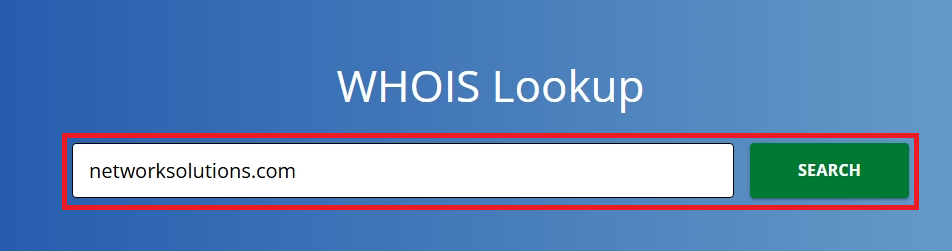
Quick steps you can follow:
- Look up the domain on ICANN’s WHOIS Lookup tool or any trusted WHOIS search tool.
- Check the registrar, creation date, and listed contacts.
Contact the registrar or domain owner
Sometimes, the person behind the domain didn’t mean any harm, so it’s helpful to reach out and ask about the issue. They may be open to removing the content or giving up the domain if you explain the situation clearly.
There is also a chance they want to sell the domain. It’s not ideal, but settling the matter this way can be faster than going through long legal steps. Be cautious when communicating with suspicious emails or links.
File a UDRP complaint
If the domain is clearly infringing on your trademark, you can file a UDRP complaint through organizations like WIPO or NAF. This is a formal process used worldwide to challenge bad faith domain registrations. You’ll need to submit proof that the domain is confusingly similar to your own and that the registrant is using it in bad faith. Once approved, the disputed domain can be transferred or canceled without the need for court proceedings.
Escalate to legal action (ACPA)
If reporting tools and negotiations don’t solve the issue, you can take the case further under the ACPA. This step lets you bring the matter to federal court and request a court order to reclaim the domain. It’s a stronger option when you need legal authority behind your claim.
What to do if you’re a victim of cybersquatting
If someone else registered a domain name tied to your brand, act quickly. A few clear steps can help you gather proof, reach out to the right people, and explore your options. Here’s the game plan ahead:
- Back up your claim
- Attempt negotiation
- Consider UDRP arbitration
- Pursue legal action (ACPA)
- Take preventive measures
Step 1: Back up your claim
Pull together concrete proof that shows the domain is misused. Screenshot the site, save communication attempts, and record URLs that resemble your pages. Include timestamps and any attempt from the squatter to sell the domain. WHOIS records can confirm ownership.
Step 2: Attempt negotiation
Reach out to the domain owner or registrar with a short, polite message explaining the issue. Sometimes, misunderstandings happen, and the owner may agree to transfer the domain. Keep communication factual and avoid sharing sensitive information in case the contact is suspicious.
Step 3: Consider UDRP arbitration
If talking doesn’t work, you can file a complaint through ICANN’s UDRP process. This option is often faster and less expensive than going to court. If the panel agrees that the domain is identical or confusingly similar to your brand and was registered in bad faith, it can be transferred to you.
Step 4: Pursue legal action (ACPA)
When the squatter refuses to cooperate, and other steps lead nowhere, you can file an ACPA lawsuit to fully resolve the dispute. This process focuses on proving that the domain harms your trademark and asking the court to transfer it to you. It takes time, but it gives you a final, enforceable outcome.
Step 5: Take preventive measures
To avoid repeat incidents, secure the domains you need early, including common misspellings and other extensions. If the situation becomes complicated, it is helpful to consult a lawyer who specializes in internet domain name disputes, so you know the best next step for your business.
Negotiating with a domain squatter
Sometimes, a simple conversation can solve the problem more quickly than getting into a legal dispute. If the domain isn’t tied to fraud or malicious activity, reaching out politely can facilitate a quick transfer.
Here’s a safe starting point you can use:
Sample message:
Hi, I noticed that this domain is currently registered under your name. It appears to be connected to my business, so I’d like to ask if you’re open to transferring it. Please let me know the best way to proceed with this discussion. Thank you.
Watch out for red flags, though, especially if:
- The person asks for an unreasonable price
- They refuse to confirm basic details
- Replies come from suspicious or spam-like emails
If the discussion hits a dead end or feels unsafe, stop engaging. At that point, consider using a domain broker or proceeding with a UDRP complaint instead.
Understanding UDRP timelines, costs, and process
If you decide to file a UDRP case, it is helpful to understand the process and the typical timeframe. Here’s a quick breakdown of each step:
- File your UDRP complaint with the right provider
- Respond to the domain owner’s reply or inaction
- Strengthen your case with an optional rebuttal
- Understand how the panel reaches its decision
Step 1: File your UDRP complaint with the right provider
You can initiate a UDRP case by filing your complaint with an accredited provider, such as WIPO or NAF. The filing process is simple: submit your trademark documents, proof of bad-faith use, and the domain names involved. Once received, the provider reviews your complaint and begins the formal dispute process.
Step 2: Respond to the domain owner’s reply or inaction
Once your complaint is filed, the domain owner gets 20 days to respond. They can either fight the claim or remain silent, and a lack of response typically results in a default decision. All you need to do here is wait for the provider to update you on the next step.
Step 3: Strengthen your case with an optional rebuttal
Some UDRP providers allow you to submit an additional statement after reviewing the domain owner’s response, but this typically depends on the panel’s approval and case-specific rules. In a rebuttal, you focus on new points only, such as correcting facts, answering a bad-faith denial, or adding proof that the domain targets your trademark. Keeping this brief, factual, and supported by evidence makes it more likely the panel will accept and consider it.
Step 4: Understand how the panel reaches its decision
When your complaint moves forward, an independent panel of one or three experts is appointed to review the case, and choosing three panelists usually costs more because you help cover the extra fees. After the panel is in place, it normally issues a written decision within about 14 days, and in practice, most UDRP disputes are finished in roughly 60–90 days from the time you file.
Know what to expect when paying UDRP costs
UDRP fees typically range from $1,500 to $5,000, depending on the provider and the number of domains involved in the case. A three-member panel costs more than a single-panel option, but it offers a broader review if you want more eyes on the dispute.
If you want extra protection moving forward, you can also explore Network Solutions’ Trademark Protection tools.
Frequently asked questions
Domain squatting, also known as cybersquatting, is when someone registers a domain name that’s identical or very similar to a trademark or well-known brand. The main purpose is usually to profit by selling the domain to the rightful owner or to benefit from the brand’s reputation. This practice is considered bad faith and can lead to legal challenges.
Not necessarily. Cybersquatting, in most cases, involves bad faith; however, there are situations where someone might register a domain name similar to a brand without realizing it is a trademark. It only becomes unlawful if the intent is to profit from the trademark or confuse users.
Cybersquatting is a civil issue rather than a criminal one. However, if the cybersquatter engages in fraudulent activities or causes harm, they could face legal consequences. While being arrested is rare, legal action can compel the squatter to relinquish the domain and potentially incur damages.
Buying domains to resell isn’t considered cybersquatting unless the domain is closely tied to a trademark, and the goal is to profit from the brand’s identity. If the domain is unrelated to a trademark, it’s a legitimate investment.
However, if the domain exploits a trademark or creates confusion, it enters the territory of domain squatting and becomes a cybersquatting issue.
A well-known example of cybersquatting is whitehouse.com, a domain registered to capitalize on the popularity of thewhitehouse.gov website. The domain is similar to the official site that users might mistakenly visit, especially if they type .com instead of .gov.
This is domain squatting because the intent is to profit from brand recognition and confuse users.
No. If someone registers a domain name that targets your brand on purpose, that’s cybersquatting, and it’s illegal when done in bad faith. This includes buying a domain to confuse customers, profit from your trademark, or sell it back to you at an unfair price. You can challenge this through UDRP or legal action, so acting quickly helps protect your domain name.
Typosquatting is when someone registers a misspelled version of a domain name to trick users who make typing mistakes, like “goggle.com” instead of “google.com.” Cybersquatting is a broader term that involves registering a domain name that is confusingly similar to a brand’s name or reputation, with the intention of profiting from it. Both are bad-faith practices that can mislead users and harm legitimate businesses.
Protect your brand before a squatter gets to it first
Your business depends on trust, and that starts with owning the right domain name. Cybersquatting, impersonation, and look-alike domains can put your reputation at risk. But remember, you are not powerless. Taking action early keeps your online identity safe and prevents bigger problems later.
We give you the tools to monitor your domains, block confusing variations, and secure trademarked names across multiple extensions. With Trademark Protection and GlobalBlock, you can stop copycats, prevent domain squatting, and keep customers on the real website that represents your brand.
Stay in control of your brand. Our brand protection specialists are here to help if you need assistance.