

Key takeaways:
- Google Sites works for basic pages, but it isn’t built to support long-term business growth.
- Choosing a platform built for professional use early can prevent costly rebuilds later.
- The best Google Sites alternative depends on what you’re building.
Google Sites is a free website builder designed for simplicity and quick setup. It works well for basic web pages, but it isn’t built for someone with complex website needs. You’ll eventually reach a point where this free website builder can no longer support the scale of your growing business.
That’s why it’s a good idea to look for a Google Sites alternative even if you still don’t see the need to expand. You want a platform that gives you more control over design, has better SEO and content tools, and provides you with vital e-commerce features.
This article looks into the best Google Sites alternatives that give you the tools your business needs. If you’re a small business, solopreneur, or an organization that started on Google Sites, this guide will help you explore other website builders. It also explains how they differ and how each can help your business succeed.
We’ll cover both free alternatives and more advanced options, with a focus on helping you choose the right platform based on what you’re building.
How we developed this comparison
To identify the best Google Sites alternatives, we evaluated popular website builder platforms based on real-world usage, feature depth, and suitability for users moving beyond Google Sites. Our goal was to compare each Google Sites alternative using consistent criteria that reflect how small businesses and organizations actually build and manage websites.
Our evaluation process prioritized:
- User feedback analysis: We reviewed customer experiences across third-party platforms such as G2, Capterra, Reddit, Quora, and Trustpilot to understand satisfaction levels, recurring issues, and long-term usability.
- Cross-platform consolidation: We compared patterns across multiple review sources to separate isolated complaints from consistent strengths or limitations.
- User-reported feature assessment: We evaluated key features, SEO tools, ease of use, pricing structure, and flexibility based on how users describe their real-world experience.
- Limited hands-on testing: Where possible, we reviewed free plans or trials to verify basic functionality, though our recommendations rely primarily on aggregated customer feedback rather than extensive product testing.
Platforms were assessed using criteria such as price-to-feature ratio, ease of use, billing transparency, quality of customer support, performance and speed, and ease of canceling or switching providers. This approach helps ensure the recommendations reflect practical considerations rather than marketing claims.
Disclaimer: This article is for informational purposes only. Pricing, features, and availability may change over time. Always review the provider’s current terms and documentation before making a decision.
Comparison of the best Google Sites alternatives
The best Google Sites alternatives give you more room to grow than the Google Sites website builder, especially if you want stronger customization, better SEO tools, or business-ready features. Here’s a side-by-side view of each Google Sites alternative in this guide.
Platform | Pricing (starts at) | Key features | Best for |
|---|---|---|---|
Network Solutions | $4.99 / month (website) | Website builder + custom domain and hosting options, SSL/security add-ons, business-focused setup | Small businesses that want a straightforward path to a professional website |
WordPress.org | Free software (hosting costs extra) | Full control, plugins/themes, strong SEO options, vast ecosystem | Users who want maximum flexibility and scalability (and don’t mind hands-on setup) |
Wix | $17 / month | Drag-and-drop editor, large template library, app marketplace, SEO tools | Beginners who want flexibility without coding |
GoDaddy Website Builder | $9.99 / month | Fast setup, built-in marketing tools, business site essentials | Local businesses that want to publish quickly with minimal setup |
Squarespace | $16 / month | Design-first templates, built-in blogging tools, and e-commerce options | Service businesses and creatives that want a polished-looking website |
Elementor (with WordPress) | $5 / month (WordPress plugin) | Visual editor, advanced design control, works with WordPress | WordPress users who want a powerful visual builder for more custom layouts |
Webflow | $14 / month | Advanced design control, CMS, and responsive design tools | Designers/teams building more complex, content-driven sites |
Weebly | $10 / month | Simple editor, basic e-commerce, easy setup | Simple business websites and basic online selling |
Shopify | $29 / month | Dedicated e-commerce, payments, inventory, and app ecosystem | Businesses building more complex online stores |
Canva Websites | $120 / year | Design-first templates, quick publishing, brand asset creation | Lightweight sites like portfolios and landing pages |
This comparison highlights how each website builder differs in pricing, features, and intended use. In the sections that follow, we break down each Google Sites alternative in more detail, including what it does well, who it’s best for, and how users rate their experience.
Note: Pricing reflects annual billing where available. Some platforms apply introductory discounts in the first year, with higher renewal rates afterward. Visit each platform’s official website for the most up-to-date pricing details.
Network Solutions
Network Solutions is a long-standing web hosting provider with a business-focused website builder designed for people who want to move beyond basic site creation.
As an alternative to Google Sites, it offers a more complete website setup by bringing website building, web hosting, domains, and security services together in one place. This removes common friction points that slow businesses down as they grow.
Among the best Google Sites alternatives for small businesses, Network Solutions prioritizes stability, support, and long-term usability over short-term convenience. That focus matters when your website shifts from a simple presence to an asset that supports credibility, customer trust, and growth.
Choosing a platform built for professional websites early on can reduce the need to redesign or migrate your site later, helping you move forward with fewer roadblocks.
Key unique features
- All-in-one web platform: Brings website building, web hosting, domain registration, business email, and related tools into a single dashboard, reducing the need to manage multiple providers.
- AI-powered website builder: Uses business inputs to generate a starting site structure, combined with a drag-and-drop editor and mobile-responsive templates to help launch a site quickly.
- Integrated business and growth tools: Include appointment scheduling, a logo maker, a business name generator, a marketing calendar, and link-in-bio features to help businesses launch, promote, and manage their online presence in one place.
- Built-in e-commerce capabilities: Available on higher-tier plans, offering storefront creation, product and inventory management, order tracking, and marketplace integrations.
- Security and hosting reliability: Supported through SSL certificates, website security packages, and hosting infrastructure backed by Network Solutions’ long-standing role as a domain and hosting provider.
Who it’s best for
- Small businesses and local service providers moving on from Google Sites
- Users who want a professional website with hosting included and a free domain to start with
- Businesses that prefer a single web hosting provider for domains, hosting, and website building
- Site owners who value stability and support over heavy design customization
What users are saying
Business owners often highlight Network Solutions for its reliability and access to customer support, especially when managing a professional website. Reviews across G2, Trustpilot, and Sitejabber frequently mention great support, stable performance, dependable hosting, and the convenience of managing domains, hosting, and website tools in one place.
One customer said, “One of the features I appreciate most is having everything centralized—domain, hosting, email, and the builder itself—so I don’t have to keep track of multiple accounts.” A user from Trustpilot praised our dedicated customer service, saying, “When I had an issue or needed help with an issue, it was dealt with and fixed . . . I recommend it to anyone needing a website.”
At the same time, some users note that the website builder feels more “antiquated” compared to design-first platforms. In addition, some users point out that prices often increase at renewal, with rates higher after the first year.
Pricing and plans
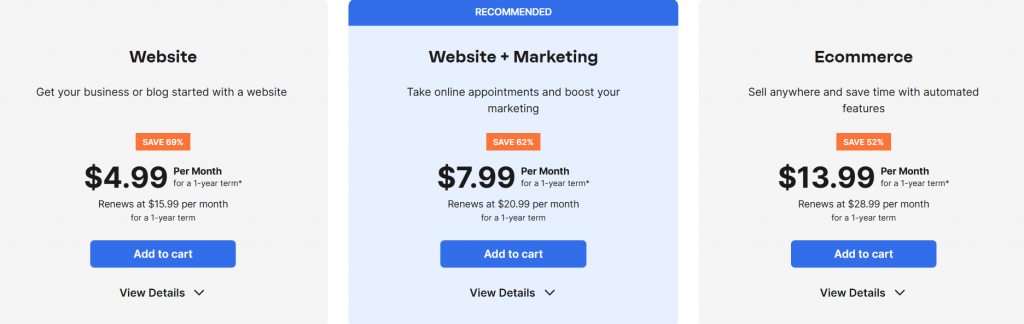
Network Solutions offers tiered website plans with introductory pricing in the first year, including a website builder, hosting, and a free domain on select plans.
Plan | Cost / Term | Plan inclusions |
|---|---|---|
Website Builder | $4.99 / month (first year) | AI website builder, drag-and-drop editor, mobile-responsive templates, free domain (first year), basic hosting, SSL (first term), professional email (3 months) |
Website + Marketing | $7.99 / month (first year) | All Website Builder features plus appointment scheduling, marketing tools (email/social scheduling), advanced promotional tools, calendar/branding tools |
E-commerce | $13.99 / month (first year) | All Marketing features plus online store support, product listings, payment processing, inventory, and order management |
Disclaimer: Pricing is accurate at the time of publication but may change without prior notice. Refer to Network Solutions’ official website for the latest pricing details.
WordPress.org
WordPress.org is a self-hosted website platform that gives users full ownership and control over their site. Being self-hosted means you install your website on a hosting environment you choose and manage it yourself, rather than using a platform that hosts and controls it for you.
Unlike Google Sites and most platforms in this review, WordPress lets you use your own domain name, choose a web hosting provider, and customize nearly every aspect of your website.
As one of the most widely used website platforms in the world, WordPress.org is built to scale. It supports everything from simple business sites to large, content-heavy websites. However, such flexibility comes with a steeper learning curve and more hands-on management than all-in-one builders.
It’s important not to confuse WordPress.org with WordPress.com, which is a hosted platform with a different setup, features, and level of control. This comparison of WordPress.org vs. WordPress.com breaks down the differences in more detail.
Key unique features
- Full ownership and control: Allows you to host your site with any web hosting provider, use your own domain name, and manage files, databases, and configurations directly
- An extensive plugin and theme ecosystem: Gives access to thousands of third-party tools for SEO, performance, security, e-commerce, and content management
- Advanced SEO capabilities: Support custom metadata, structured content, and integration with leading SEO tools, making it well-suited for search-driven websites
- Support for custom code and complex projects: Enable developers and advanced users to build highly customized sites using themes, plugins, and custom code
- Huge global community: Provides ongoing development, documentation, forums, and third-party support resources
Who it’s best for
- Users who want maximum control over their website and hosting setup
- Businesses planning complex or content-heavy projects
- Site owners who rely heavily on SEO tools and custom functionality
- Teams or individuals with technical expertise or access to developer support
- Projects that may need to scale significantly over time
What users are saying
Users consistently describe WordPress.org as a powerful and flexible platform, especially for websites that require advanced customization, robust SEO tools, or the ability to scale.
Reviews across G2, Sitejabber, Trustpilot, and Capterra frequently highlight the ability to use third-party plugins, customize themes, and control nearly every aspect of the site as major advantages, particularly for more complex projects.
One user expressed that he “likes WordPress.org for its unmatched ecosystem. The plugin repository is a standout, offering access to thousands of free plugins.” Another user said, “The SEO plugins are really helpful for getting my work ranked better.”
At the same time, many users note that self-hosted WordPress has a steeper learning curve than managed website builders. “I don’t find it as straightforward to set up templates and systems as I used to . . . I’d love to find a way to be able to work with my WordPress sites with the same kind of ease,” noted one user who compared it with other platforms.
Because WordPress.org is an open-source software, it can be prone to bugs, hacks, and plugin incompatibility if not properly managed. These vulnerabilities are reflected across review platforms, where one user shared that their site was “hacked more than four times,” while another noted that plugin conflicts caused them to lose access to their website altogether.
Pricing and plans
WordPress.org itself is free to use, but total costs depend on your choice of web hosting, domain registration, and any premium themes or plugins you add.
Plan | Cost / Term | Plan inclusions |
|---|---|---|
WordPress.org software | Free | Open-source content management system, full customization, plugin, and theme support |
Web hosting | $3–$30 / month | Hosting services, server resources, backups, security (varies by provider) |
Domain | $10–$40 / year (varies by provider and TLD) | Right to use the domain name for a set period |
Premium themes & plugins | Varies | Advanced web design, SEO tools, security, performance, and e-commerce features |
Disclaimer: Pricing is an estimate and may vary by domain and hosting provider. Refer to the official website of your platform of choice for the most accurate pricing details.
Find the perfect domain
Ready to register a domain name? Check domain availability and get started with Network Solutions today.
Wix
Wix is a user-friendly Google Sites alternative that gives you plenty of control over design and site functionality without any technical intervention. It’s often a better fit than Google Sites and other website builders in this article when you want a modern-looking site you can actively grow, thanks to its drag and drop editor, large library of diverse templates, built-in SEO tools, and a market for useful business applications.
Key unique features
- Drag-and-drop editor with strong design flexibility: Makes it easy to customize layouts, pages, sections, and content without code
- Large template library: Gives you professionally designed starting points you can adapt to different business types and website goals
- App market and integrations: Let you add features like forms, bookings, review widgets, and business tools without custom development
- SEO and marketing tools: Support on-page SEO and built-in marketing features that go beyond what Google Sites offers
- E-commerce features: Available on business plans for running an online store from the same platform.
Who it’s best for
- Small business owners who want a professional website with more branding control than Google Sites
- Service businesses that need high-quality business tools without a complex setup
- Creatives and freelancers who want visually appealing, yet flexible website templates
- Businesses that want to start with a simple website but plan to add e-commerce features later without switching platforms
What users are saying
Users consistently describe Wix as an easy-to-use website builder that lets them create professional-looking websites without technical expertise. Reviews across G2 and Capterra frequently praise the drag-and-drop editor, the wide selection of professionally designed templates, and the ability to extend site functionality through Wix’s app market.
“This tool has different types of designing options available. From drag and drop options to template customisation, everything is almost available on this software to design new and creative websites,” said one G2 reviewer.
On the other hand, reviews on Trustpilot and Sitejabber often raise concerns about pricing and customer support. Common complaints include higher costs as sites grow, additional fees for apps or advanced features, and frustration with renewal pricing.
Some users also mention limitations around site portability, noting that migrating away from Wix can be difficult, if not impossible, once a site is built.
Pricing and plans
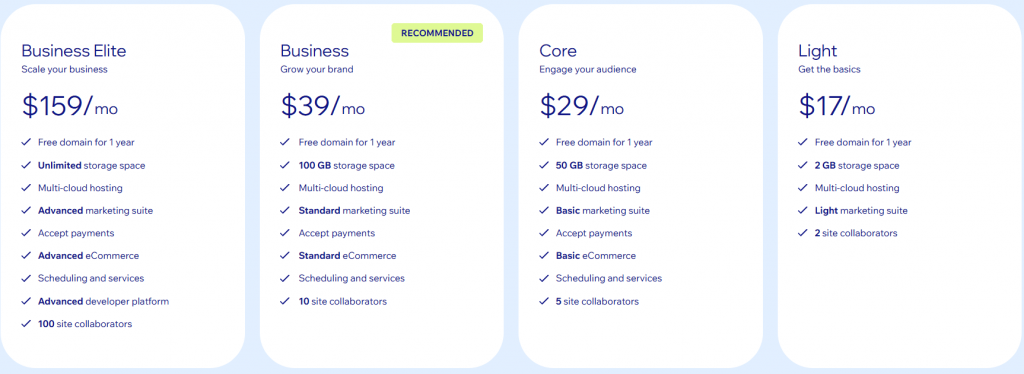
Wix provides a free plan for testing the platform, along with multiple paid tiers that unlock custom domains, additional storage, marketing tools, and e-commerce features.
Plan | Cost / Term | Plan inclusions |
|---|---|---|
Free | $0 | Wix subdomain, Wix branding, basic website builder |
Light | $17 / month (billed annually) | Custom domain for 1 year, light marketing suite, 2 GB storage |
Core | $29 / month (billed annually) | 50 GB storage, basic marketing suite, accept payments, basic e-commerce |
Business | $39 / month (billed annually) | 100 GB storage, standard marketing suite, standard e-commerce features |
Business Elite | $159 / month (billed annually) | Unlimited storage, advanced marketing suite, advanced e-commerce, priority support |
Disclaimer: Pricing is accurate at the time of publication but may change without prior notice. Refer to Wix’s official website for the latest pricing details.
GoDaddy Website Builder
GoDaddy Website Builder is an all-in-one platform designed to help small businesses get online quickly with minimal setup. It focuses on speed, simplicity, and utility rather than deep customization. This makes it a practical option for businesses that want to establish an online presence quickly without managing multiple services.
Compared to more design-flexible website builders, GoDaddy emphasizes ease of use and automation. Its guided setup and integrated business tools appeal to users who want to get their business online right away.
Key unique features
- All-in-one platform: Combines website building, hosting, domain management, and basic marketing tools in a single dashboard
- User-friendly interface: Uses guided setup and prebuilt sections to help users publish a site quickly without technical expertise
- Built-in marketing tools: Includes email marketing, social media posting, and basic SEO guidance to support businesses online
- Business-focused features: Such as appointment booking and contact forms help service-based businesses manage customer engagements
Who it’s best for
- Small businesses and local service providers that want to get online quickly
- Users who prefer a guided, beginner-friendly website builder
- Businesses that value built-in marketing tools over design flexibility
- Owners who want an all-in-one solution with minimal setup and maintenance
What users are saying
Many users describe GoDaddy Website Builder as an easy and accessible way to get a business online quickly. Reviews on Capterra highlighted this sentiment, with one user saying, “This Website Builder allows a novice to create a website. It’s simple to create a world-class site and update it on the fly.”
First-time site owners and small business users also mention that they were able to launch a functional site with little technical effort.
Reviews on Trustpilot and Sitejabber frequently raise concerns about their customer support and pricing. Users often describe difficulty getting timely or effective help when technical issues affect their websites.
“21 weeks and still no functioning website. I had to hire a different company to do what they promised would be done in 4 weeks,” noted one Trustpilot user.
Pricing is another recurring point of criticism, with users noting that costs can increase at renewal or when additional features are needed.
Pricing and plans
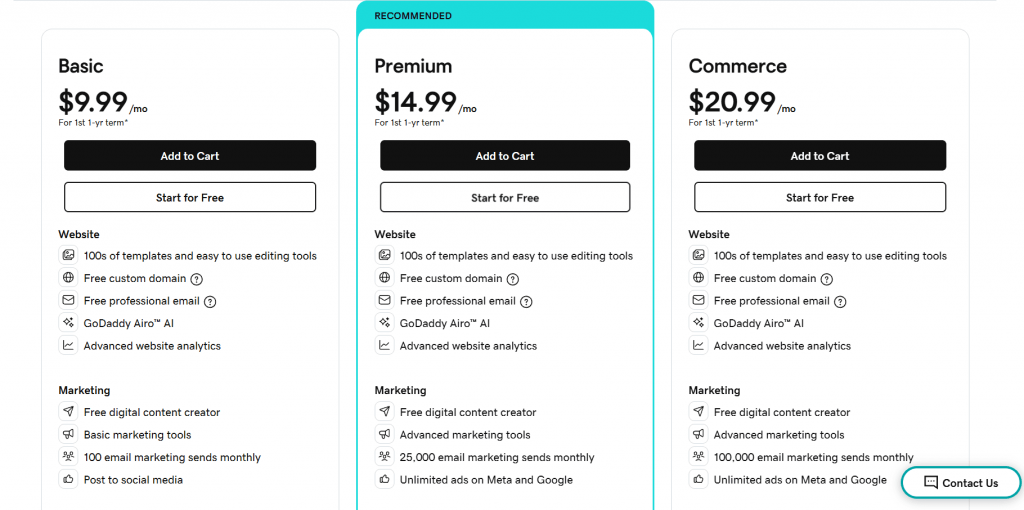
GoDaddy Website Builder includes a free plan and several paid tiers, with discounted pricing in the first year and higher renewal rates afterward.
Plan | Cost / Term | Plan inclusions |
|---|---|---|
Free | $0 | Build a website with GoDaddy branding, mobile-friendly templates, and basic website builder tools |
Basic | $9.99 / mo (first year) | Website builder, hundreds of templates, free domain name (1 year), basic marketing tools, free professional email trial |
Premium | $14.99 / mo (first year) | All Basic features plus advanced marketing tools, higher email send limits, appointment booking, and payment links |
Commerce | $20.99 / mo (first year) | All Premium features plus online store tools, product listings, payment processing, and advanced sales features |
Disclaimer: Pricing is accurate at the time of publication but may change without prior notice. Refer to GoDaddy’s official website for the latest pricing details.
Squarespace
Squarespace is a design-focused website builder known for its visually polished layouts and professionally designed templates. Users who want a stunning website that looks cohesive and modern out of the box choose it over its competitors.
Compared to more flexible or utility-driven website builders, Squarespace prioritizes presentation and visual consistency. This makes it a strong choice for businesses in niche industries such as health, photography, and sports. However, it’s less ideal for users who want deep customization, flexibility, and complex functionality.
Key unique features
- Professionally designed templates offer clean, modern layouts built to look polished across devices, with a strong emphasis on typography and spacing
- Design consistency and visual control help maintain a cohesive look across pages, making it easier to create websites that are visually unified
- Image galleries and media presentations are well-suited for photography work, professional portfolios, and visual brand storytelling, with built-in layouts for showcasing work
- Built-in SEO features support basic on-page optimization, including metadata editing, clean URLs, and mobile-responsive design
- All-in-one hosting and management bundles website building, hosting, and site maintenance into a single platform
Who it’s best for
- Visual artists, designers, photographers, and creatives
- Businesses that want a polished, design-forward website with minimal setup
- Users who value aesthetics and layout consistency over advanced customization
- Small business sites that don’t require complex integrations or custom code
What users are saying
Users frequently praise Squarespace for its clean design, professional templates, and ease of creating visually appealing websites. Reviews on G2 and Capterra often highlight how quickly users can launch a polished site and how well-made and varied their templates are.
On the downside, reviews commonly mention limitations in flexibility and customization.
“For more complex websites, Squarespace can feel limited,” noted one reviewer. It’s echoed by another user on a different review platform, saying, “Squarespace allows for limited customisation of templates, so if you want your site to look different to the template, you are out of luck.”
Pricing and plans
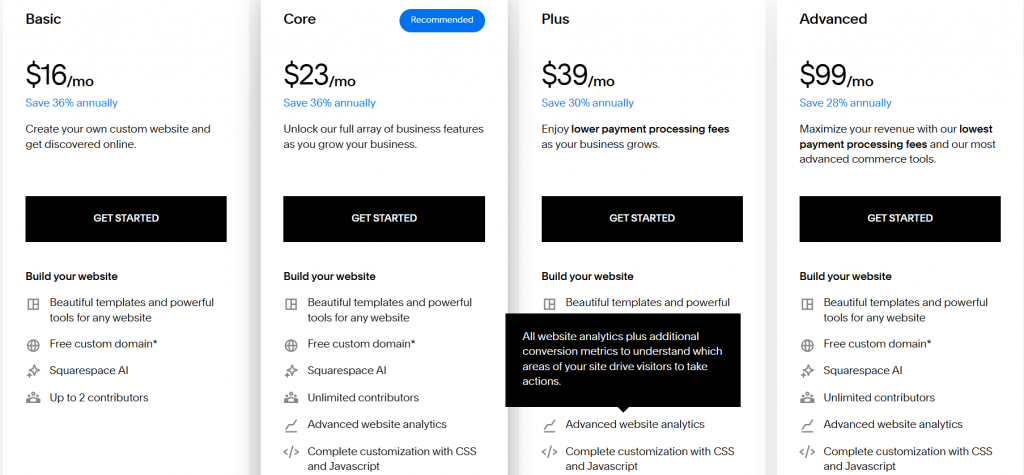
Squarespace does not offer a free plan, but it does offer a free trial and several paid tiers that range from basic websites to full e-commerce functionality.
Plan | Cost / Term | Plan inclusions |
|---|---|---|
Basic | $16 / month (billed annually) | Website builder and hosting, professionally designed templates, mobile-responsive design, basic SEO features, SSL security |
Core | $23 / month (billed annually) | Everything in Basic, plus additional site customization options, advanced blocks and design controls, and enhanced site features for business use |
Plus | $39 / month (billed annually) | Everything in Core, plus e-commerce functionality, product listings, checkout, basic inventory and order management |
Advanced | $99 / month (billed annually) | Everything in Plus, plus advanced e-commerce features such as subscriptions, advanced shipping options, discounts, and lower transaction fees |
You can also check out our article on Squarespace alternatives for e-commerce sites.
Disclaimer: Pricing is accurate at the time of publication but may change without prior notice. Refer to Squarespace’s official website for the latest pricing details.
Elementor
Elementor is a WordPress plugin that turns self-hosted WordPress into a visual, drag-and-drop website builder. It’s a strong option for people who want more design control than most basic website builders offer.
Because it runs on WordPress, Elementor can scale to more complex projects. And because it’s on WordPress, it comes with the responsibilities of managing hosting, security, software patches, and themes/plugin updates.
Key unique features
- Visual editor for building websites: Lets you design pages with drag-and-drop sections, real-time previews, and layout controls that go beyond most basic builders
- Advanced design tools: Include responsive editing, motion effects, global styling, and reusable components to maintain design consistency across a site
- Customizable forms and marketing features: Support lead generation with form builders, integrations, and automation options
- Support for custom code: Allows advanced users to extend layouts and functionality when needed, without rebuilding the site from scratch
- Works with WordPress tools and plugins: So you can layer Elementor on top of WordPress SEO tools, e-commerce plugins, and other compatible third-party tools within the WordPress ecosystem
Who it’s best for
- Users who want more design flexibility than Google Sites or basic website builders
- Small businesses building marketing and e-commerce sites that need deep customization
- Teams that want a visual editor but still want WordPress scalability
- Users who are comfortable managing a WordPress site (or working with a developer)
What users are saying
Users often praise Elementor for its visual editor and the control it gives over designing a website. They highlight the flexibility of templates, widgets, and advanced design tools, especially for creating custom landing pages and business websites.
“Elementor allows me to design fully customized WordPress websites without writing a single line of code, while still giving me the flexibility to add custom CSS or scripts when needed,” commented one reviewer on G2.
On the downside, some users mention compatibility issues, particularly when using tools not native to Elementor.
“Exporting themes and templates from elsewhere sometimes clash, which forces me to use the ones built-in,” noted one reviewer as one of Elementor’s disadvantages.
Others point out that while Elementor makes design easier, “It has a bit of a learning curve. Some elements take a bit longer to ‘get’ than others.”
Pricing and plans
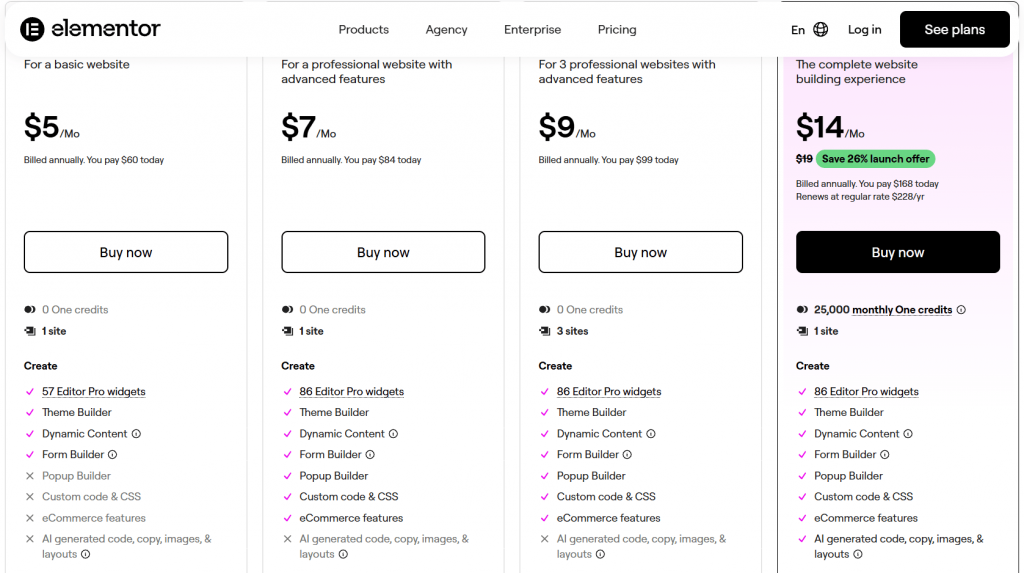
Elementor offers a free version of its WordPress plugin, with paid plans that unlock advanced design tools, e-commerce features, and support for multiple sites.
Plan | Cost / Term | Plan inclusions |
|---|---|---|
Essential | $5 / month (billed annually) | One [1] site; Editor Pro widgets (57); Theme Builder; Dynamic content (limited); Form Builder (limited); No popups; No custom code/CSS; No e-commerce features |
Advanced Solo | $7 / month (billed annually) | One [1] site; Editor Pro widgets (86); Theme Builder; Dynamic content (includes custom fields/post types); Form Builder (with submissions dashboard); Popup Builder; Custom code & CSS; e-commerce features |
Advanced | $9 / month (billed annually) | Three [3] sites; Same “advanced” feature set as Advanced Solo (widgets, theme builder, dynamic content, forms, popups, custom code/CSS, e-commerce features) |
One | $14 / month (billed annually) | One [1] site; One credit for AI + optimization tools; Includes advanced set: Theme Builder, Popup Builder, Custom code and CSS, e-commerce features; Adds AI generation, image optimization, accessibility fixes, email deliverability, and priority support |
Expert | $17 / month (billed annually) | Up to 25 sites; “Advanced” feature set included (widgets, theme builder, dynamic content, forms, popups, custom code/CSS, e-commerce features) |
Agency | $37 / month (billed annually) | Unlimited sites; Generative AI tools; Includes advanced set: Theme Builder, Popup Builder, Custom code & CSS; e-commerce features; Adds AI generation, image optimization, accessibility fixes, email deliverability, and priority support |
Disclaimer: Pricing is accurate at the time of publication but may change without prior notice. Refer to Elementor’s official website for the latest pricing details.
Webflow
Webflow is a powerful website builder that offers advanced design control and built-in CMS capabilities without requiring users to hand-code everything. As an alternative to Google Sites, it stands out for users who want far more control over layout and content structure, while still working in a visual editor rather than a code environment.
Compared to other drag-and-drop website builders, Webflow is built to handle more complex projects. It gives teams the flexibility to create more customized layouts and dynamic content, albeit with a steeper learning curve.
Key unique features
- Advanced design tools and layout control: Allows users to build highly customized layouts with precise control over spacing, typography, and responsive behavior
- Visual editor with code-level output: Lets users design visually while Webflow generates clean HTML, CSS, and JavaScript in the background
- Built-in CMS: Supports dynamic content such as blogs, portfolios, and structured pages without relying on third-party plugins
- Custom code support: Allows developers to add custom CSS and JavaScript or embed third-party tools for advanced functionality
- Hosting optimized for performance: Includes fast page loads, a global content delivery network, and automatic scaling for traffic spikes
Who it’s best for
- Designers and teams who need full design control without building everything from scratch
- Businesses working on more complex projects or content-heavy sites
- Users who want CMS functionality without managing plugins or updates
- Projects where layout precision and performance matter more than simplicity
What users are saying
Users frequently praise Webflow for its design flexibility and the level of control it offers compared to traditional website builders. “Full flexibility, insanely simple,” highlights a Trustpilot reviewer. Another user thought that “The customization is unmatched.”
Other praises for Webflow range from being an intuitive and powerful platform to having a responsive support team and community.
On the downside, many users note that Webflow has a steeper learning curve than tools like Google Sites or Wix. “There’s also a bit of a learning curve at the start, especially when trying to make pages responsive or adding animations,” expressed one user. Others also think that it’s “fast but pricey.”
Pricing and plans
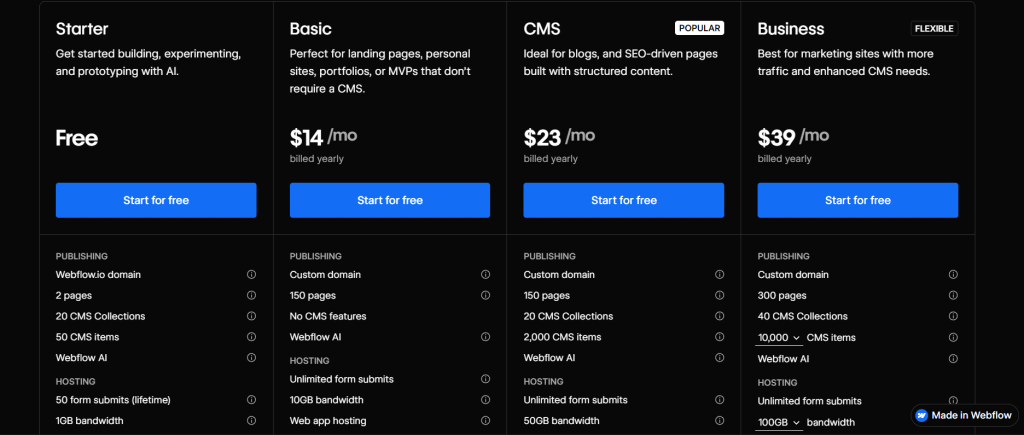
Webflow includes a free starter plan for testing and learning, alongside paid site plans that add custom domains, CMS features, and higher traffic limits.
Plan | Cost / Term | Plan inclusions |
|---|---|---|
Starter | Free plan | Webflow subdomain, visual design tools, limited CMS items, basic hosting for testing or simple sites |
Basic | $14 / month (billed annually) | Custom domain, static pages only, fast hosting, SSL, no CMS |
CMS | $23 / month (billed annually) | CMS collections for dynamic content, blog, and content management, higher page limits |
Business | $39 / month (billed annually) | Higher traffic capacity, advanced site features, priority support for growing sites |
Enterprise | Custom pricing | Advanced security, scalability, compliance features, and enterprise-level support |
Disclaimer: Pricing is accurate at the time of publication but may change without prior notice. Refer to Webflow’s official website for the latest pricing details.
Weebly
Weebly is a drag-and-drop website builder known for its simplicity and accessibility. It appeals to users who want to build simple or small-scale websites. As a drag-and-drop builder, it doesn’t require you to have a deep technical understanding of how websites work. It offers a free plan with a straightforward editor, so you can build something without any costs before moving beyond Google Sites.
Compared to more design-heavy or developer-focused platforms, Weebly prioritizes ease of use over flexibility. It’s not built for complex projects, but it remains a practical option for users who want a functional site with a minimal learning curve.
Key unique features
- Drag-and-drop website builder: Makes it easy to create pages, add content, and adjust layouts without coding
- Free plan available: Allows users to launch a basic website with Weebly branding before committing to a paid plan
- Business-ready website features: Include contact forms, image galleries, and basic SEO tools for simple business websites
- Built-in e-commerce features: Support product listings, inventory management, and checkout on higher-tier plans
- Square integration: Connects Weebly websites with Square’s payment and point-of-sale ecosystem
Who it’s best for
- Users building simple websites or personal projects
- Small businesses that want a quick, no-frills online presence
- Beginners who prefer a drag-and-drop editor with minimal setup
- Sellers who already use Square and want basic e-commerce features
What users are saying
Users often describe Weebly as easy to use and approachable, especially for beginners. One user said it is “incredibly easy to use with an intuitive drag-and-drop interface that makes implementation quick and simple,” and that it is cheap and delivers on its promises.
On the other hand, reviews point out limitations commonly around design flexibility and advanced features.
“Limited customization, weaker SEO tools, and fewer advanced features restrict flexibility for users wanting more control or scaling,” a reviewer on Capterra mentioned.
Some users further note that customization options feel more limited than those of newer website builders, and that the platform has not evolved as quickly as competitors.
Pricing and plans
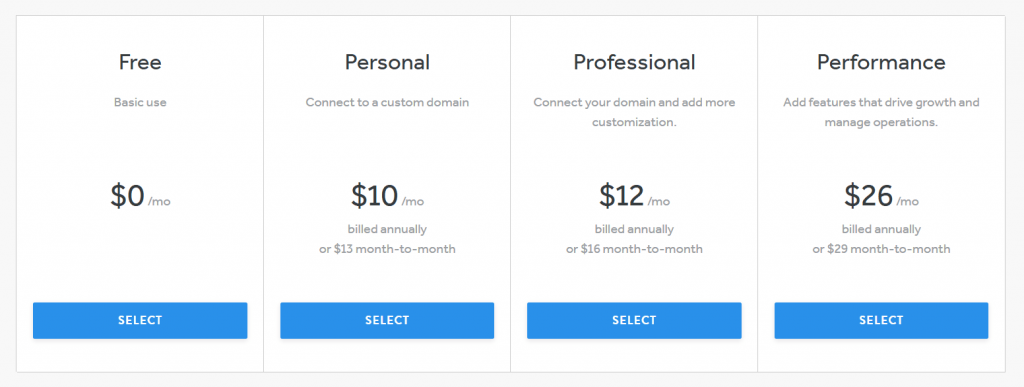
Weebly offers a free plan for basic websites, with paid tiers that remove ads, allow custom domains, and add business and e-commerce features.
Plan | Cost / Term | Plan inclusions |
|---|---|---|
Free | $0 | Weebly subdomain, drag-and-drop website builder, SSL security, Weebly branding |
Personal | $10 / month (billed annually) | Custom domain connection, no Weebly ads, basic site features |
Professional | $12 / month (billed annually) | Advanced site customization, video backgrounds, password protection, site search |
Performance | $26 / month (billed annually) | Full e-commerce features, product listings, inventory management, shipping and tax tools, payment processing |
Disclaimer: Pricing is accurate at the time of publication but may change without prior notice. Refer to Weebly’s official website for the latest pricing details.
Shopify
Shopify is a dedicated e-commerce platform built for online stores that need reliable selling tools and customer management systems. As you move beyond Google Sites, Shopify is a perfect fit if your goal is to sell online, accept payments, track orders, and manage customer data, having all the tools designed for e-commerce from day one.
Key unique features
- Tools for online stores: Include product management, inventory, discounts, and order processing, are built into the core platform
- Payments and checkout support: With built-in payment options (plus the option to use third-party payment providers, which may incur additional fees depending on the plan)
- Scales as you grow: With plan tiers that increase reporting, staff features, and lower third-party transaction fees as your store expands
- A large app ecosystem: Lets you add features like subscriptions, loyalty, shipping tools, and automation without custom development
Who it’s best for
- Businesses building e-commerce sites or full online stores (not just a brochure site)
- Sellers who want to manage products, payments, and customer data in one platform
- Stores that plan to grow into more complex workflows (shipping, reporting, multichannel selling)
- Teams that need a robust e-commerce backend more than maximum design freedom
What users are saying
Users consistently highlight Shopify’s strong e-commerce foundation and the ease of launching a working store without prior technical knowledge.
“I like Shopify because it’s a user-friendly platform and I can use it without any technical knowledge. Setting up products, managing inventory, processing orders, and handling payments is straightforward,” noted a G2 reviewer.
Reviews frequently mention the breadth of built-in selling features and the range of apps that help merchants extend functionality as they scale.
On the downside, users often point to cost creep as stores grow. Common complaints include paying extra for apps to unlock specific features, higher-than-expected overall running costs, and transaction fees or additional costs depending on the payment setup.
Pricing and plans
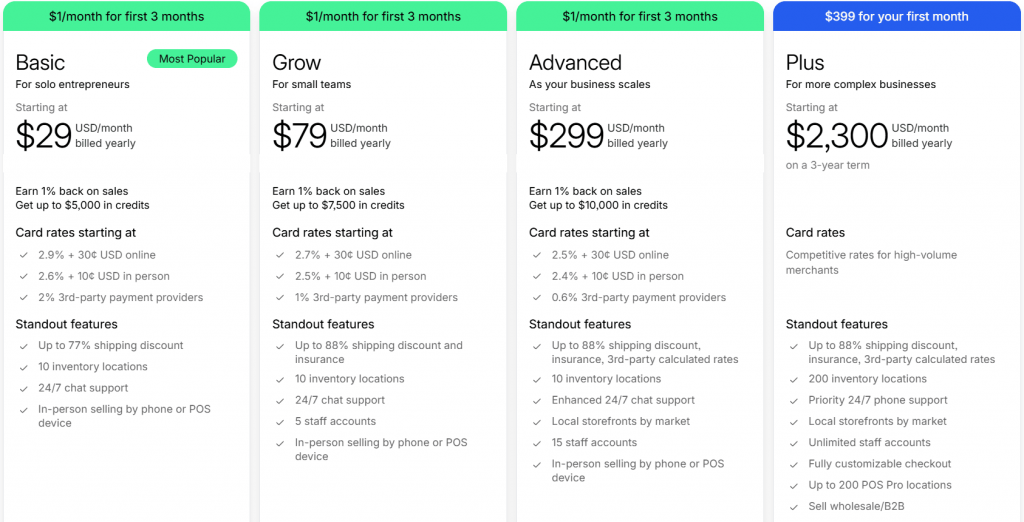
Shopify provides a low-cost starter option and paid plans for full online stores, with pricing that increases as you unlock advanced selling and reporting tools.
Plan | Cost / Term | Plan inclusions |
|---|---|---|
Starter | $5 / month | Sell via social links and messaging with Shopify Checkout; buy buttons; limited storefront (no full site); uses Shopify Payments (simplified e-commerce) |
Basic | $29 / month (billed annually) | Full online store with customizable themes, unlimited products, blogging, basic discount codes, abandoned cart recovery, shipping discounts, SSL/security |
Grow | $79 / month (billed annually) | Everything in Basic plus up to five [5] staff accounts, professional reports, better shipping discounts, lower transaction fees, more operational tools |
Advanced | $299 / month (billed annually) | Everything in Grow plus up to 15 staff accounts, advanced reports, third-party calculated shipping, international pricing tools |
Shopify Plus | $2,300 / month (billed annually) | Enterprise e-commerce: unlimited staff accounts, fully customizable checkout, advanced APIs, multi-store management, dedicated support |
Disclaimer: Pricing is accurate at the time of publication but may change without prior notice. Refer to Shopify’s official website for the latest pricing details.
Canva Websites
Canva Websites extends Canva’s design tools into a simple website builder focused on visual presentation rather than advanced functionality. It works best for users who want to publish simple websites quickly using ready-made templates, especially when content creation and visual appeal are the top priorities.
Compared to full website builders, Canva Websites feels intentionally limited. It’s rather designed for speed, ease of use, and design consistency than complex site structures or advanced e-commerce workflows.
Key unique features
- Ready-made templates: Let users publish a website quickly using professionally designed layouts without manual setup
- Design-first content creation tools: Integrate Canva’s graphics, text, and media editing features directly into the website builder
- Visual editor with minimal setup: Let pages be created and edited without technical knowledge or configuration
- Hosting included by default: Removes the need to manage domains or servers for basic website use
- Mobile-friendly layouts: Make sure sites adapt automatically to different screen sizes
Who it’s best for
- Visual artists, creators, and freelancers showcasing work
- Users building simple websites, portfolios, or personal pages
- Small projects where speed and design matter more than functionality
- Canva users who want a lightweight way to publish content online
What users are saying
Users often praise Canva Websites for its ease of use, especially for creating visually appealing pages.
“Canva makes me look like one. What used to take me hours in complex software now takes 15 minutes. The template library is massive, and the drag-and-drop interface is actually intuitive,” commented a user about how Canva makes him feel like a designer.
Other reviews also praised the platform for how easy it is to build a professional-looking website.
On the other hand, one user complained, which is a sentiment shared in other reviews, that “Canva has some limitations when it comes to advanced design customization, especially compared to more professional tools.”
Pricing and plans
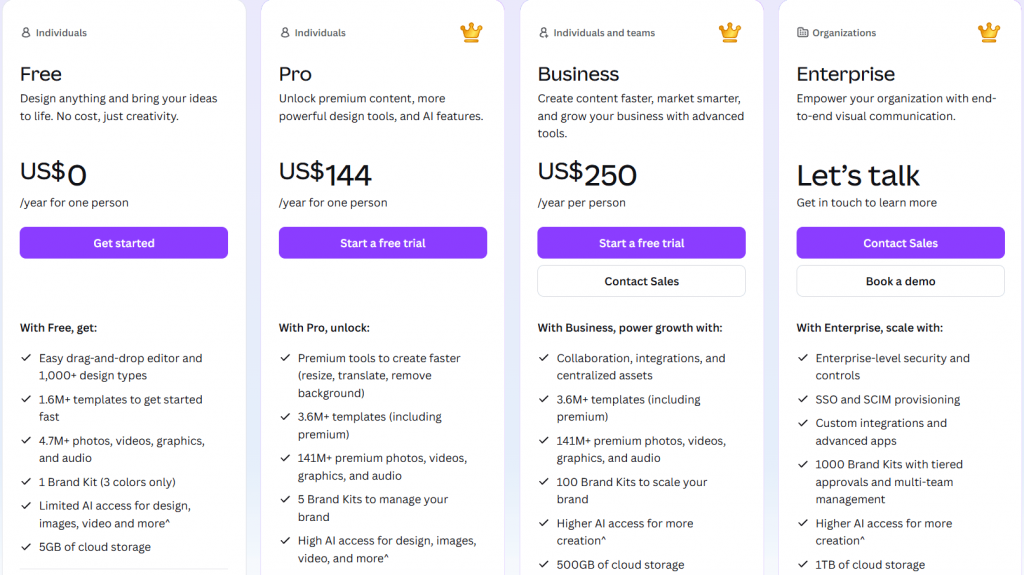
Canva Websites are included with Canva’s free and paid plans, with custom domains and advanced publishing features available on Pro and higher tiers.
Plan | Cost / Term | Plan inclusions |
|---|---|---|
Free | $0 | Website creation with a Canva subdomain, access to free templates, basic design and publishing tools |
Pro | $144 / year | Premium templates and design assets, brand kits, advanced content creation tools, ability to publish websites with a custom domain |
Business | $250 / year | All Pro features plus team collaboration tools, shared brand assets, and content approval workflows |
Enterprise | Custom pricing | Advanced security, centralized admin controls, enterprise-level collaboration and support |
Disclaimer: Pricing is accurate at the time of publication but may change without prior notice. Refer to Canva’s official website for the latest pricing details.
Frequently asked questions
What’s “better” than Google Sites depends on what you need. Website builders like Network Solutions, Wix, Squarespace, and WordPress offer more control over design, SEO tools, and scalability, making them better options for business or professional websites.
No, Google has not announced plans to shut down Google Sites. However, the platform has remained largely unchanged for years, which is why many users look for alternatives as their website needs grow.
Yes. Several website builders offer a similar level of ease of use to Google Sites while providing more features. Tools like Weebly and Canva offer simple, beginner-friendly editors, while platforms like Network Solutions and GoDaddy add marketing and business tools.
Google Sites has limited customization options and no native e-commerce features. It also lacks integrations and scalability, which can make it difficult to grow or scale a website.
For small businesses, the best Google Sites alternative depends on goals. Wix and Network Solutions work well for getting online quickly, Squarespace is ideal for design-focused sites, and WordPress or Shopify fits best for growing online businesses.
Yes. Platforms like Weebly, Wix, and Canva offer free versions, though these typically include platform branding and limited features. Free plans are best for testing ideas rather than running a long-term business site.
Google Sites does not support direct site exports. In most cases, you’ll need to rebuild your site on a new platform and manually transfer your content, images, and domain, if you’re using one.
Choose a platform that grows with you
Businesses with bigger plans for the future will eventually outgrow Google Sites. If you’re one of these businesses, it’s wise to begin looking for alternatives that can handle real business demands.
The right alternative depends on what you’re building. Platforms like Weebly and Canva work well for simple sites, Squarespace and Webflow suit design-focused projects, while WordPress or Elementor offer flexibility for more complex needs. Shopify stands apart in e-commerce, where selling online and managing customer data are core requirements.
For businesses that want a professional website without juggling multiple tools, Network Solutions offers a clear next step. Bringing custom domains, reliable website hosting, built-in security, and centralized site management together removes common friction points that slow growth.
If you’re ready to move beyond Google Sites, choosing a platform built for long-term use can shape how far your website takes you. Network Solutions gives you the infrastructure to build with confidence today.
Find the perfect domain
Ready to register a domain name? Check domain availability and get started with Network Solutions today.