

- A CDN speeds up your site by serving content from edge servers closest to each visitor, reducing delays and improving load times.
- It helps websites remain stable during traffic spikes while adding another layer of protection against common security threats.
- Better website performance creates a smoother visitor experience, lowers bandwidth and hosting costs, and supports stronger SEO visibility.
We’ve all experienced the frustration of clicking on a website and waiting while pages stall, images load, or videos buffer. For visitors, it’s inconvenient. For businesses, it can mean losing potential customers before they even see what you offer.
People expect quick access to online content, and even a short delay can make them leave. That’s where a content delivery network comes in.
So, what is a CDN? It stands for content delivery network, a system designed to improve website performance by delivering content from servers closer to each visitor.
In this guide, we’ll explain what a CDN is, how it works, the role it plays in speeding up websites, and the benefits it offers. We’ll also cover the different types of CDNs, compare major providers, and share practical examples of why they matter.
What is a CDN?
A content delivery network (CDN) is a network of servers distributed across the globe that store and deliver copies of your website’s content.
These servers, called edge servers, serve users from the location closest to them instead of forcing every request back to your single origin server.
When you use a CDN service, it determines which server is nearest to the visitor and delivers content from there. That means users get a cached copy nearby, rather than everyone competing for access from one distant server.
For your visitors, that means pages load quickly and consistently. For you as a website owner, it means better performance, more satisfied users, and fewer lost opportunities.
Here’s how the process works.
How a CDN works
- A visitor requests a page, image, or video from your site.
- The CDN identifies their location.
- The request is sent to the nearest edge server.
- If the content is cached there, it’s delivered immediately.
- If not, the edge server fetches it from your origin, saves a copy, and delivers it.
- The next request in that region is served from the cache.
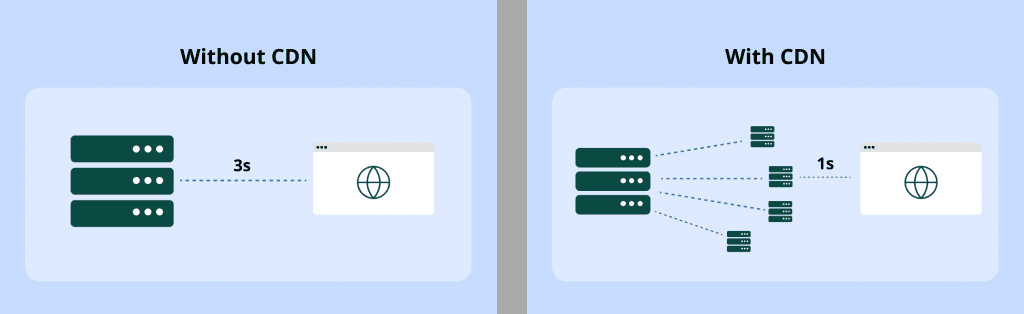
Let’s explain how each scenario works:
Without a CDN
Without a CDN, every visitor connects directly to your origin server. If that server is in New York, someone in London or Sydney has to wait for data to cross oceans. Pages load slowly, and under heavy traffic, the server risks crashing.
For example, a bakery website hosted in New York could take several seconds to load in Europe, which can negatively affect user experience and sales.
With a CDN
With a CDN, the bakery’s images and files are cached on servers near London. Local visitors get near-instant access, the origin server is under less pressure, and the site stays online even during spikes in traffic. The same principle applies to eCommerce stores, SaaS apps, and streaming services.
Benefits of using a CDN
If you run a website, a CDN can solve more than one problem. Here are some of the key benefits of using a CDN:
- Deliver faster load times and a smoother user experience
- Handle traffic spikes without downtime
- Protect your site with built-in security
- Cut bandwidth use and hosting costs
- Boost SEO visibility and conversions
Deliver faster load times and a smoother user experience
Speed is the first thing people notice when they land on a website. A few seconds of delay is often enough to make visitors leave, which is why so many businesses struggle with bounce rates.
A CDN helps reduce latency by delivering content from servers located closer to each user instead of making requests travel halfway around the world.
An online store that loads in two seconds performs better than one that takes six. The faster site keeps people browsing longer and increases the chances of them making a purchase.
This speed advantage can also improve streaming quality, SaaS application responsiveness, and basic browsing on informational sites.
Handle traffic spikes without downtime
A viral social post, holiday shopping rush, or unexpected media coverage can overwhelm a single origin server and bring a site down. A CDN spreads the load across a distributed network of servers.
Instead of everyone trying to reach the same server at once, a CDN distributes traffic across servers in different locations. This load balancing helps reduce network congestion and maintain uninterrupted service, even when thousands of people visit at the same time.
Protect your site with built-in security
Modern CDNs serve as a protective layer between your website and the internet. They can absorb distributed denial-of-service (DDoS) attacks, encrypt traffic with Secure Sockets Layer (SSL) /Transport Layer Security (TLS), and include web application firewalls (WAFs) that block malicious traffic before it reaches your server.
CDNs also hide the IP address of your origin server, making it harder for attackers to target it directly. However, they do not offer complete, foolproof website security.
While the CDN handles incoming traffic, some requests are still forwarded to the origin server for database access, which can expose its IP address.
Effective CDN configurations, such as allowing only the CDN’s IP addresses to access the origin server, can significantly reduce this risk and enhance security.
Build a stronger foundation for your website
A CDN can add speed and protection, but it works best with reliable hosting and secure connections behind it.

Cut bandwidth use and hosting costs
Every time someone visits your site, data has to travel from your server. That uses bandwidth, which can get expensive.
A CDN helps reduce bandwidth costs by storing copies of your files on edge servers. Once a file is cached, it can be delivered to thousands of visitors without adding the same load to your main server.
If you run a photography business with high-resolution images, you might send gigabytes of data every day from your origin server. With a CDN, those same images are served from edge servers closer to your visitors, while your origin handles only occasional updates.
If you stream videos, deliver software updates, or sell digital products, the savings can add up even more. This can reduce bandwidth consumption from your host and lower your monthly bills.
Boost SEO visibility and conversions
Search engines and users both favor websites that load quickly. A slow site can be harder to find, and even when users visit, many may not stay or buy if pages lag or videos buffer.
A CDN can support both visibility and conversions by improving content delivery. Faster load times can help bring in more user visits, while a smoother experience makes it easier for visitors to browse, sign up, or complete a purchase.
For example, if an online store improves its load time from four seconds to under two, customers may find it easier to move through the site and finish checkout, supporting stronger customer satisfaction.
Different types of CDNs
CDNs can be grouped by how they deliver content, how they’re set up, and the type of content they’re meant to serve. Most CDN providers use a geographically distributed network across multiple locations to support different content delivery needs.
Here are the main types you’ll come across:
- Push CDNs
- Pull CDNs
- Cloud-based CDNs
- Private CDNs
- Hybrid CDNs
- Peer-to-peer (P2P) CDNs
- General-purpose CDNs
- On-demand video CDNs
- Live video CDNs
Let’s break down each type by category.
By content handling method
Push CDNs
With a push CDN, you’re the one uploading content to the CDN servers ahead of time. Once it’s there, the CDN serves it to users. This works well for large files or static content that doesn’t change often, such as software downloads, media files, or product images.
The downside is that it takes more effort to keep the CDN updated, since you’re pushing the files yourself.
Pull CDNs
A pull CDN is easier to manage than a push CDN. Instead of uploading files to the CDN yourself, the caching servers automatically pull web content from your origin when a user requests it. Once the file is pulled, it’s cached at the edge, so the next visitor gets it instantly.
The first person to load the file may experience a slight delay, but after that, delivery is fast. This model works well for sites that update frequently because you don’t need to manually push new files every time.
By deployment model
Cloud-based CDNs
Cloud-based CDNs are built on the servers of large cloud providers like Amazon, Google, or Microsoft. Instead of running on a company’s own hardware, they use the provider’s global network and multiple servers.
This makes them easy to set up, quick to scale when traffic grows, and reliable because the infrastructure is already spread around the world.
If you’re a business owner, this means you don’t have to build or manage anything complicated. You simply connect to a system that is ready to deliver your content wherever your audience is.
Private CDNs
A private CDN is built and run by a single company for its own use. It costs more to set up and maintain because the organization manages its data centers and operational servers itself, but it gives the company complete control over performance and security.
Netflix is a good example. Instead of relying on outside providers, it created its own system called Open Connect, a network of servers placed in internet hubs and even inside internet service providers.
This setup helps movies and shows stream smoothly to viewers around the world without overloading its other operational servers.
Hybrid CDNs
A hybrid CDN combines different approaches instead of relying on only one model. For example, a content provider might use a public CDN to deliver general website resources like images, scripts, and style sheets, while keeping sensitive data on private content servers for tighter security and compliance.
This setup gives businesses both global reach and cost savings from the public network, along with greater control and customization. It’s a flexible choice for organizations that handle both everyday content and specialized workloads.
Peer-to-peer (P2P) CDNs
Peer-to-peer CDNs work by letting users share content with each other rather than downloading it from a central server. If you’re watching a video, part of the data might come from nearby users who already have that same file cached.
This model reduces the load on central servers and can make distribution faster for large groups of users. The downside is that it’s harder to guarantee performance and security because it depends on each end user’s device.
That’s why peer-to-peer CDNs are more common in file-sharing networks than on mainstream business websites.
By content type
General-purpose CDNs
General-purpose CDNs are the most common type. They handle a wide range of content, including HTML pages, images, scripts, web applications, and file downloads.
If you’re running a typical business website, blog, online store, or other web page, this is usually the CDN model you’ll use.
On-demand video CDNs
On-demand video CDNs are designed for streaming media libraries that users can access at any time. Think of platforms like Netflix or Hulu, where you choose a movie and it starts right away on different devices.
These CDNs are optimized to store large video files and deliver them smoothly, so viewers don’t have to deal with buffering or slow playback.
Live video CDNs
Live video CDNs are specialized for real-time broadcasting. Sports events, webinars, and live concerts rely on them because the audience is tuning in at the same moment, and any delay can affect the experience.
These CDNs are optimized to manage heavy network traffic and reduce pressure on the core network while handling millions of viewers at the same time. This helps reduce lag and keeps the stream stable.
CDN vs DNS vs hosting
It’s easy to mix up these three because they all work together when a user loads a website. This table shows how they differ:
| Component | What it is | How it works |
|---|---|---|
| Hosting | The web server that stores your website data, including pages, images, videos, databases, and log data. | When someone visits your site, their browser requests these files directly from the host. Without a CDN, that content may come from a single server. |
| Domain Name System | The internet’s addressing system that maps domain names to IP addresses. | When a user types your domain, DNS servers look up its IP address and point the browser to the correct server. |
| CDN | A network of servers placed worldwide that stores cached copies of your content. | When a user visits, the CDN delivers files from the server closest to them, reducing distance and load times. |
Here’s how these three work together when someone enters your web address into a browser:
- DNS translates the domain name into an IP address.
- The request is sent to your hosting server, also called the origin server.
- If a CDN is in place, it intercepts the request and delivers cached files from the nearest server.
- If the file isn’t cached or it’s dynamic content, the CDN retrieves it from the hosting server and then caches it for the next user.
Together, these three systems make websites accessible, fast, and reliable.
Who are the top CDN service providers?
The CDN market is led by a handful of major providers with global reach and reliable infrastructure. Each CDN provider has its own strengths, from security features to integrations with cloud platforms.
Here are some of the most notable CDN providers:
- Akamai
- Cloudflare
- Amazon CloudFront
- Google Cloud CDN
Akamai
Akamai operates a large global network that helps businesses deliver internet content to users in different locations. Its extensive infrastructure makes it a strong choice for enterprises with global audiences that need consistent performance.
It also offers security services such as DDoS protection and bot management. Akamai is best suited for organizations that need both scale and advanced protection.
Cloudflare
Cloudflare is known for its user-friendly setup and free CDN services. Its network spans hundreds of cities worldwide, giving small businesses access to broad global coverage.
While Cloudflare’s free plan makes it appealing to beginners, businesses may need to move to a paid plan to access more advanced features.
Amazon CloudFront
Amazon CloudFront integrates with other AWS services, making it a practical option for businesses already using the Amazon ecosystem. Its pay-as-you-go pricing allows costs to scale with traffic.
CloudFront is also known for its flexibility and global reach. It helps deliver static and dynamic content through a worldwide network of edge locations, reducing the physical distance between users and a nearby CDN server.
Google Cloud CDN
Google Cloud CDN is built into Google Cloud, making it a convenient choice for businesses already hosting websites or applications on the platform.
It uses Google’s global edge network to deliver content closer to users, which helps reduce latency. This can include website assets such as images, CSS files, and JavaScript files.
Ready to improve your website performance?
Pair faster content delivery with reliable hosting, website security, and a trusted domain.

Frequently asked questions
Akamai, Cloudflare, Amazon CloudFront, and Google Cloud CDN are well-known examples. Each CDN provider operates a global network of servers that helps websites deliver content from locations closer to their users.
A CDN is used to deliver website content faster and more reliably. CDN services can cache images, videos, scripts, and web pages closer to users, reduce bandwidth use, handle traffic spikes, and add another layer of security.
There is no single answer because “largest” depends on the metric. Cloudflare leads many website-usage measurements, while Akamai operates an extensive global infrastructure with server points of presence across numerous countries.
Not every small business needs one immediately. However, a CDN can be useful if your site serves visitors across different regions, experiences traffic spikes, or contains many images, videos, downloads, or other large files.
Web hosting stores your website’s main files on an origin server. A CDN does not replace hosting. Instead, it stores cached copies of selected content across a distributed network and delivers them from servers closer to users.
A CDN can support SEO by improving page load times and website reliability. However, it is only one part of website performance and should work alongside mobile optimization, useful content, secure hosting, and a clear site structure. It does not directly affect SEO and web traffic.
Yes. Because content is distributed across multiple servers, requests can be redirected when one server is overloaded or unavailable. This helps maintain content availability during traffic spikes, hardware problems, or certain attacks
Accelerate website performance with a CDN
A CDN helps your website meet people where they are. By delivering content from nearby servers, it can reduce load times, ease pressure on your origin server, and keep your site available when traffic grows.
But speed works best as part of a stronger foundation. Reliable hosting, secure website, and a trusted domain all work together to give visitors a smoother experience and your business more room to grow.
Network Solutions brings those essentials together in one place, with hosting, SSL certificates, domain services, website protection, and free apps included with every domain purchase. Explore your options today and turn better website performance into your next business breakthrough.