Key takeaways:
- The best accountant website builders prioritize professionalism, security, and ease of use, enabling firms to establish trust effectively with their target audience.
- Accountants benefit most from platforms that include Secure Socket Layer (SSL) encryption, professional email services, and service-focused templates with clear and concise copy to enhance professionalism and security.
- Website builders’ monthly costs typically range from $10 to $30, with options to add client booking, secure forms, and online payment tools as needed.
An Allied Market Research report estimates that the global accounting services market will reach $1.5 trillion by 2032. Given the amount of competition, accountants who establish a digital presence now are more likely to secure long-term relationships and improve their search rankings.
Today, prospective clients often check an accountant’s website before making contact, meaning your site serves as the first impression of your firm’s unique approach and professionalism. To meet that expectation, your accounting website should have:
- SSL protection
- Secure forms for client data
- Clean, professional design
- Mobile responsiveness
- Simple tools for booking or document sharing
- Ease of use for ongoing updates
This guide highlights the best website builders for accountants, particularly those serving medium-sized businesses and small firms. Each option is reviewed for security, credibility, and overall value. By the end, you’ll know which builder is the right fit for your firm.
How we developed this list
We created this list with a focus on what matters to accountants, such as:
- Professionalism
- Security
- Ease of building a client-ready website
Instead of relying on marketing claims, we analyzed reviews, pricing, and features through the lens of accounting professionals and small firms. Our evaluation process included:
- User feedback analysis: We reviewed more than 110 customer comments on Capterra, G2, Trustpilot summaries, Reddit, and Quora. We sought consistent praise and identified pain points related to small business owners and accountants.
- Compliance and security considerations: Since accountants handle sensitive financial data, we prioritized platforms offering SSL certificates, secure forms, and reliable uptime.
- Pricing and value: We compared monthly plans to find affordable options for solo accountants and small practices.
- Ease of use: We highlighted platforms with drag-and-drop editors, guided setup, and minimal learning curves, so accountants can focus on client engagement rather than the technology.
Note: This article is for informational purposes only. Pricing and features are accurate as of the time of writing, but are subject to change. Please confirm details with each provider before making a decision.
Comparison of the best website builders for accountants
These website builders provide accountants with the tools to create secure, professional websites without hiring developers or running complex paid ads initially. Here are your options:
Platform | Pricing (starts at) | Key features | Best for |
|---|---|---|---|
Network Solutions | $4.99/mo, renews at $15.99/month | All-in-one solution: Website Builder, web hosting, domain search, Professional Email, SSL certificate options | Small firms and CPAs that need a complete, reliable business website package |
Wix | $0/mo (billed monthly) | Drag-and-drop, 800+ templates, AI builder, app marketplace | Versatile all-around use |
Squarespace | $10/mo (billed monthly) | Award-winning designs, blogging tools | Creatives and design-focused SMBs |
GoDaddy | $11.19/month | Fast setup, SSL included, domain + email bundles | Budget-minded accountants needing a simple, quick launch |
Weebly (Square) | $0/month | Easy builder, integrated online payments, responsive templates | Accountants who want free plans to get started creating a website |
1. Network Solutions

Network Solutions has been in business since 1979, starting as the original .com domain registrar and evolving into a complete website-building platform. For accountants, it stands out as a reliable all-in-one solution that combines domain, hosting, security, and marketing under one roof.
This simplicity makes it an ideal choice for small firms and CPAs who need a professional online presence without juggling multiple providers.
Additionally, Network Solutions can serve as a strategic partner to an accounting company, help firms attract potential clients, and build visibility by targeting relevant keywords.
Key unique features
- All-in-one solution: Website Builder, domain, web hosting, and Professional Email in a single place, making it easier to launch and manage a new website efficiently. Accountants don’t need to look for another platform to buy separate services, saving time and reducing complexity.
- Security features: SSL certificate options, daily backups, and enterprise-grade uptime to ensure client data and communications are safe. Ideal for accountants, particularly when dealing with sensitive financial information.
- Professional email hosting: Custom email addresses (e.g., [email protected]) reinforce trust and credibility with clients.
- Industry-focused templates: Templates for professional services, advisory services, and CPA websites can be quickly adapted for accounting practices.
Who it’s best for
- Accountants and small firms who want everything in one provider
- Professionals who prioritize reliability and credibility over flashy design
- Firms that value uptime, security, and professionalism more than design experimentation
What users are saying
Reviews of Network Solutions show that its biggest strength is customer support. Many users report that agents are patient, knowledgeable, and quick to resolve technical or billing issues. This matters when your website or email access affects client communication; it reduces downtime and troubleshooting.
One user said: ”The young lady who helped out was totally awesome, very professional, knowledgeable and kind and was able to take care of all of our needs with no problem. It was a pleasure speaking with her great job Network Solutions been with you for years. Continue to stay. God bless.”
Accountants can also benefit from the reliability noted in reviews. Customers mention consistent service, quick answers, and clear guidance, even after hours. That means you can get help during busy tax seasons or when working late.
Another customer said, “It appears that everything went well. One of the best customer service calls that I have had in a long time.”
While a few users raised concerns about the new platform design and email access, the support team was able to guide them or offer workarounds. These qualities help accountants focus on client work rather than on technical issues.
Pricing and plans
For accountants, these pricing plans show that you can launch a site with low startup costs depending on your needs. For example, the Website + Marketing plan fits those who need booking/scheduling and client communication, while the E-commerce plan suits those selling courses or digital tools.
Plan | Cost/Term | Plan inclusions |
|---|---|---|
Website | $4.99/month (renews at $15.99) |
|
Website + Marketing | $7.99/month (renews at $20.99) | Everything in [Website] +
|
E-commerce | $13.99/month (renews at $28.99) | Everything in [Website +Marketing] +
|
Here are the pricing details as published on Network Solutions:

2. Wix

Wix is recognized for its intuitive drag-and-drop editor that doesn’t require coding know-how and for its extensive selection of templates.
They also offer dedicated templates for financial services and easy integrations for client booking, contact forms, online payments, and pay-per-click advertising tracking tools. It’s a strong choice for solo CPAs and small firms that want flexibility and modern design options.
Key unique features
- Drag-and-drop editor: Accountants can customize website layouts, colors, and sections to fit their firm’s branding.
- Accounting and finance templates: Professionally designed templates for financial services make it easy to create a polished site quickly.
- Mobile-first website designs: Wix supports mobile-first design, ensuring your site is optimized for both performance and user experience on mobile devices, such as phones and tablets.
- Client booking integration: Clients can book appointments online using built-in scheduling features.
- SEO tools: Built-in guidance to optimize site pages for search engines, helping accounting firms appear in local searches.
Who it’s best for
- Firms that want modern, design-focused websites to appeal to younger, tech-savvy clients
- Solo accountants and freelancers who need an affordable, flexible builder
What users are saying
Wix gets frequent praise for being easy to learn and quick to set up. Users often highlight the platform’s reliability and the range of designs available.
One customer said, “With Wix, I am able to seamlessly create and design highly responsive websites without coding via drag and drop functionality.”
Some reviewers point out serious billing and renewal issues, but most agree it’s a straightforward way to build a professional site.
For accountants, this means Wix may help you set up a professional site quickly and run basic online operations. But you need to watch out for hidden costs, strict renewal policies, and limited refund flexibility.
Pricing and plans
Wix has four business plans, all with a free domain for one year, secure hosting, and no Wix ads. For accountants, the key difference for these plans is access to business tools, which are shown in the table below:
Plan | Cost/Term | Plan inclusions |
|---|---|---|
Free | $0 | • Access to 800+ templates |
Light | $17/month | • 2 collaborators |
Core | $29/month | • Basic e-commerce features (invoicing and order management) |
Business | $39/month | • 100 GB storage |
Business Elite | $159/month | • Unlimited storage/storage not capped in practice |
Enterprise | Custom pricing | • Tailored features |
Here are the pricing details as published on Wix:

Note: Pricing is current at the time of writing but may change. Please confirm with Wix directly.
3. Squarespace

Squarespace is known for its sleek, modern templates and built-in scheduling features. For accountants, it provides a professional look that fosters client trust while offering tools such as appointment booking and mobile-optimized designs. It’s especially appealing to CPAs and small firms that want a polished brand presence with minimal setup effort.
Key unique features
- Professional templates: You get clean and modern designs you can customize for accounting firms, providing a professional touch to your website.
- Built-in scheduling: Clients can book consultations directly on the website without any additional plugins.
- Mobile optimization: All templates are mobile-responsive, ensuring a smooth experience on any device.
- Blog and content tools: Built-in blog functionality enables accountants to publish tax planning insights, tax tips, and firm updates that support growth and long-term lead generation.
Who it’s best for
- CPAs and firms who want a modern, visually polished website
- Professionals looking to combine credibility with easy scheduling tools
- Firms that want to use blogging as a way to share expertise and attract clients
What users are saying
Squarespace earns praise for its polished templates, ease of use, and professional look. Users also highlight the mobile responsiveness and smooth integration with tools like email campaigns.
One reviewer said, “The variety of templates and how easy it is to customize and add your own touch to make the website your own. Great for beginner web-designers or someone looking to set up their own webpage but has no web design experience.”
On the downside, some reviewers mention limited customization options, higher add-on costs, and occasional challenges with the learning curve. Still, most agree that the design quality outweighs these issues.
Pricing and plans
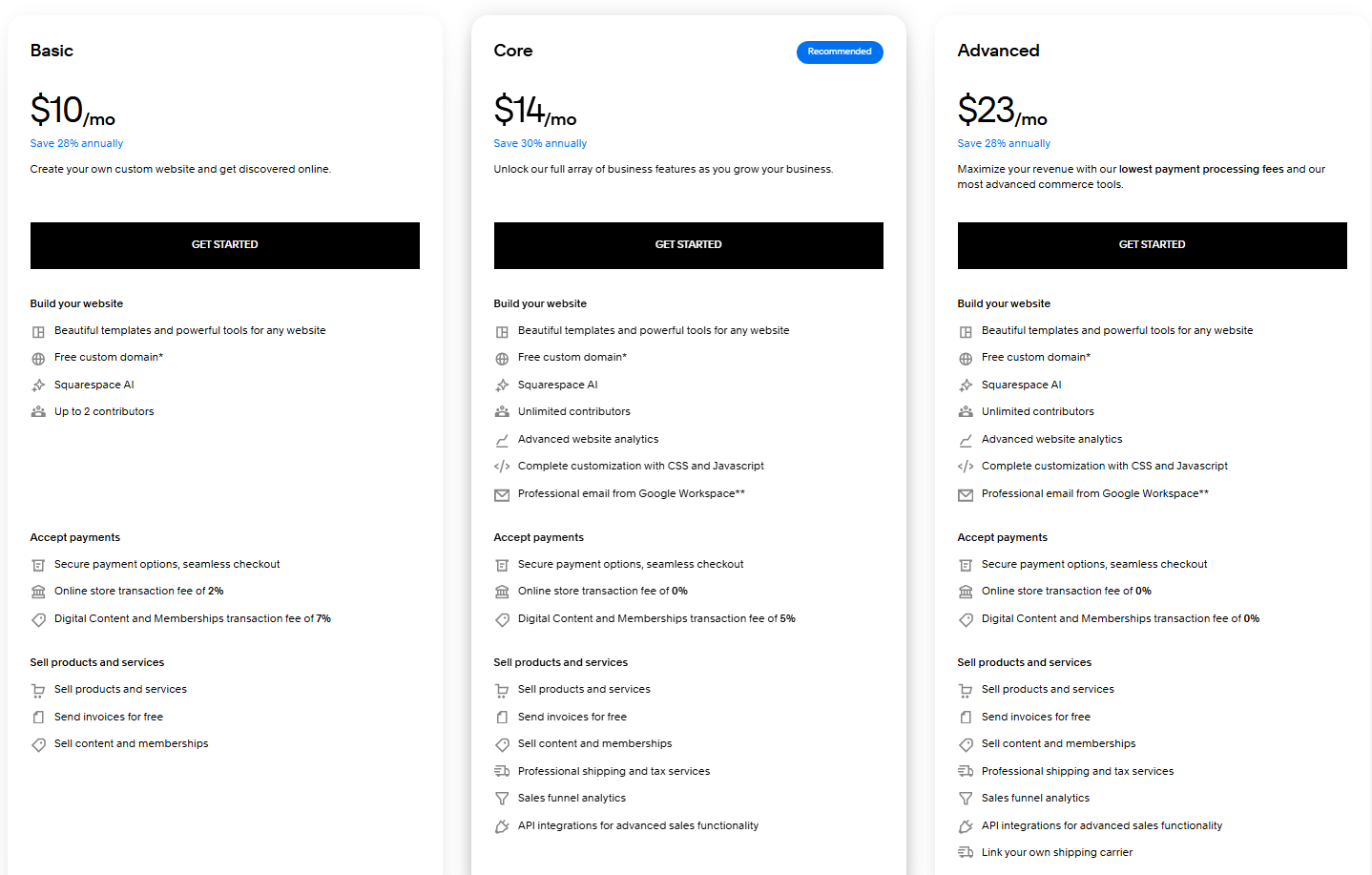
Squarespace offers three paid plans starting at $10 per month. Each plan includes hosting, templates, and a custom domain.
The entry-level plan works for a simple online presence, while the higher tiers add tools for payments, analytics, and advanced commerce features.
Plan | Cost/Term | Features |
|---|---|---|
Basic | $14/month |
|
Core | $20/month |
|
Advanced | $32/month |
|
Here are the pricing details as published on Squarespace:
Note: Pricing is current at the time of writing but may change. Always confirm directly with Squarespace.
4. GoDaddy

GoDaddy is best known as a domain registrar, but its website builder has become a popular choice for small businesses seeking a quick and simple online presence. For accountants, it offers bundled domains, hosting, SSL certificates, and email services to make website launch easier with minimal setup and configuration.
It’s a practical choice for budget-conscious accountants or firms with a small team that want speed, simplicity, and tools that help clients find their services online.
Key unique features
- Fast setup: Pre-made templates and guided setup tools let you launch a website in minutes.
- Bundled services: Domain, SSL, and email are often included, reducing the hassle of managing multiple vendors.
- Mobile-friendly templates: Designs automatically adjust for smartphones and tablets, ensuring accessibility for clients.
- 24/7 support: Round-the-clock customer service is useful for accountants managing websites outside business hours.
Who it’s best for
- Solo accountants or small firms who need a quick, professional-looking website
- Firms that don’t need advanced design flexibility and want a simple solution
What users are saying
GoDaddy Website Builder is often praised for its straightforward and user-friendly design, making it an ideal choice for beginners. One reviewer said, “I love that it was easy to use. The fonts are pretty. I love the SEO integration within website builder. I really appreciate the self-scheduling tool for my clients to easily book appointments with me!”
On the downside, some mention limited customization, upselling during setup, and price hikes after the first year.
Pricing and plans
GoDaddy offers two paid plans. The Basic plan gives you tools like hosting, design features, and professional email to get started.
The Commerce plan adds advanced e-commerce features, making it easier to sell services or digital products as your practice grows.
Plan | Cost/Term | Key features |
|---|---|---|
Basic | $11.19/month |
|
Commerce | $23.51/month | Everything in Basic +
|
Here are the pricing details as published on GoDaddy:

Note: Pricing is current at the time of writing but may change. Always confirm directly with GoDaddy.
5. Weebly (Square)

Weebly, now owned by Square, is a straightforward website builder with built-in e-commerce tools. While it’s often associated with online stores, its simplicity and affordability make it a good option for accountants who want a no-frills website that accepts online payments.
Key unique features
- Simple drag-and-drop builder: Beginners can design a polished website with minimal technical knowledge.
- Responsive templates: Automatically optimized for desktop and mobile, so clients have a consistent browsing experience.
- Built-in blogging: It lets accountants publish tax tips or firm updates to establish expertise and improve SEO.
- Free plan included: Plans have zero upfront costs, making it easier for small firms to test before upgrading.
Who it’s best for
- Accountants who want a very simple, low-cost website
- Firms that want to start creating a website with a free plan
What users are saying
For accountants, reviews of Square Online (formerly Weebly) point to a platform that is easy to use and affordable but limited in flexibility. Most users praise its drag-and-drop editor, simple setup, and professional templates. It works well for small firms that need a quick, functional site without coding.
Because it integrates with Square, you can also accept online payments, which is useful for invoicing clients or offering paid consultations. Many reviews also highlight its low pricing, including a free option, making it budget-friendly for small practices.
However, on the downside, reviewers point to limited design flexibility, slower customer support, and basic templates compared to competitors. One G2 reviewer said, “Weebly provides a drag and drop option that makes website building simpler and easier. It allows you to get your website live for free in weebly subdomain. It offers third party integrations and marketing solutions.
Also, the reviewer added, “Weebly does not have artificial intelligence. It provides limited offers in the basic plans, and you’re forced to move towards other paid plans. It also offers limited customization options.”
Pricing and plans
Weebly has four plans, starting with a free option. The free plan helps you launch quickly, while paid tiers add custom domains, advanced features, and e-commerce tools. You can start for free and upgrade as you need more functionality.
Plan | Cost/Term | Plan inclusions |
|---|---|---|
Free | $0/month |
|
Personal | $10/month (annual) or $13/month (monthly) | Everything in Free +
|
Professional | $12/month (annual) or $16/month (monthly) | Everything in Personal +
|
Performance | $26/month (annual) or $29/month (monthly) | Everything in Professional +
|
Here are the pricing details as published on Weebly:

Note: Pricing is current at the time of writing but may change. Please confirm details with Weebly/Square.
Frequently asked questions
No-code website builders let you build a site with drag-and-drop tools, templates, and images without any coding. Traditional development requires programming or hiring a developer. For the accounting industry, no-code builders save time and costs while still providing essential security features, such as SSL. They enable accountants to create a professional website that supports their practice with minimal investment.
Most website builders for accountants cost between $10 and $ 30 per month. Plans usually include hosting, templates, and SSL security. Additional costs may apply for a custom domain, online payment tools, or a branded email address. For an accounting firm, this is a cost-effective opportunity to establish an online reputation and promote services. If you want to learn more, our guide on the costs of building a website explains the nitty-gritty details about website building expenses.
Switching platforms is possible but not seamless. Most builders don’t allow direct exports, so you’ll need to recreate your accounting website on the new platform. You can still keep your domain and manually transfer content. This makes it important to choose the right builder early for long-term business goals.
No. No-code builders are designed for beginners. Accountants can choose templates tailored to financial services, customize layouts with their firm’s brand, and publish a site within hours. This helps your accounting practice appear professional without requiring outside assistance.
Yes. All modern builders provide mobile-responsive templates. Your accounting website will automatically adjust for phones and tablets, providing clients and customers with a seamless experience on any device. A mobile-first approach is now standard in the accounting industry.
Yes. Most paid plans include a free domain for the first year or let you connect your existing one. Using a custom domain (like yourfirm.com) builds credibility, strengthens your brand, and makes it easier for clients to find your accounting skills online.
Yes. Platforms like Network Solutions offer SSL certificates that encrypt client data. Some also integrate with secure form tools to share sensitive information, in line with best financial practices. Accountants should always choose a plan that includes SSL by default.
A professional website helps your accounting firm appear in search, improves your online reputation, and builds trust. During tax season, clients can access documents and updates at any time. It also streamlines communication and promotes your services, making it easier to attract new clients and grow your practice.
Strong accounting website designs are clean, modern, mobile-first, and SEO-friendly. They include SSL and secure forms to protect client data. A good design looks professional and supports your brand, drives traffic, and helps your firm serve clients effectively.
Good website content explains services in plain language and clearly shows the benefits to clients. Adding testimonials, case studies, and tax updates builds authority. Sharing blogs or firm news improves SEO and attracts new business. For a more detailed approach, here’s a video on how to create a website with zero coding skills.
Why accountant websites need SSL and secure forms
Accountants handle some of the most sensitive information their clients share. That’s why a professional website must prioritize data security from the start.
- SSL certificates are important: An SSL (Secure Sockets Layer) encrypts data exchanged between your website and clients. Without SSL, client details entered on contact forms can be intercepted.
- Secure forms build trust: Clients often need to upload tax documents or share personal financial data. Using secure, encrypted forms ensures confidentiality and demonstrates professionalism.
- Compliance requirements: While most small accounting firms don’t need HIPAA-level compliance, regulators and industry standards still expect accountants to protect client data. A website with SSL and secure hosting helps satisfy these requirements.
- Client confidence: Something as simple as seeing a padlock symbol in the browser bar reassures clients that their data is safe, increasing the likelihood they’ll contact your firm.
When selecting a website builder, accountants should always confirm that SSL is included at no extra cost and that the platform supports secure form integrations.
Build your accounting website and let clients find you today
The right website builder for accountants depends on your priorities.
- Network Solutions is an all-in-one platform for firms that want everything: domain, hosting, email, and SSL, in one place.
- Wix is ideal for accountants who want design flexibility and built-in booking tools.
- Squarespace is suited for CPAs who prioritize sleek, modern designs.
- GoDaddy is a strong option for budget-conscious firms that value speed and bundled services.
- Weebly (Square) is a good choice for accountants who want to get started with a free plan.
Your website is key to growing your accounting business and connecting with clients. Network Solutions provides everything you need for a professional, optimized online presence. Depending on whether you use our easy website builder or opt for custom web design services, we’ll help you create a site that meets your business goals.
You’re ready for what’s next. Build your accounting website with Network Solutions for an online presence that helps you stand out and grow with confidence.