
Key takeaways:
- An SSL certificate creates a secure connection between your web server and visitors, encrypting sensitive data such as login credentials and payment details.
- SSL certificates verify your website’s identity through a trusted certificate authority, helping build customer confidence and support secure online transactions.
- Without a valid SSL certificate, browsers may show security warnings that discourage visitors, disrupt secure transactions, and affect your visibility in search results.
Managing a website comes with real responsibility, especially when customers share personal or payment information with you. An SSL certificate is one part of protecting that data. But what is an SSL certificate and how does it work? Without one, your website may trigger browser warnings that make visitors hesitate or leave altogether.
An SSL certificate creates an encrypted connection between your website and its visitors. It also verifies your website’s identity, helping people confirm that they’re sharing information with the right business instead of a malicious copy.
This guide explains what an SSL certificate is, how SSL certificates work, and why they matter for small business websites. You’ll also learn how SSL helps protect information in transit, establish trust with visitors, and support a safer browsing experience.
Give visitors a safer connection
Protect information shared between your website and visitors with an SSL certificate built for secure online interactions.

What is an SSL certificate?
An SSL certificate performs two key functions. First, it verifies your site’s identity, like an online business ID. This tells visitors that your website is legitimate and can be trusted.
Second, it secures the connection between your website and visitors by creating an encrypted connection. This protects sensitive data by making it unreadable to anyone trying to intercept it.
Behind the scenes, SSL certificates are issued and validated through a public key infrastructure (PKI). This system relies on a trusted certificate authority to confirm your website’s identity and manage the encryption keys that keep data secure.
An SSL certificate acts as a digital certificate that links your website’s digital identity to its web address, with the certificate authority serving as a trusted third party. However, SSL only encrypts data moving between a visitor’s browser and your server. It does not protect your website from malware, weak passwords, or an existing website compromise.
What is SSL?
Secure Sockets Layer (SSL) is a security protocol that creates an encrypted connection between a web server and a browser. Today, SSL has been replaced by the newer Transport Layer Security (TLS) protocol, which supports the secure version of a website shown as HTTPS.
Even though TLS is now the standard, the term “SSL” is still widely used. References to SSL/TLS, SSL certificates, or TLS certificates generally describe the technology that protects data in transit.
How does an SSL certificate work?
An SSL certificate works through an automated SSL/TLS handshake between a visitor’s web browser and your website’s server. This process verifies the server’s identity and establishes encryption keys for a secure session. When you install an SSL certificate for your website, this happens automatically whenever a browser connects.
Here’s how SSL certificates work:
- Request: When a visitor types your website’s address, the browser initiates a connection and requests a certificate from your server.
- Handshake: Your server provides its SSL/digital certificate. During the SSL/TLS handshake, the browser checks that the certificate is valid and issued by a trusted Certificate Authority.
- Creating the key: Once verified, the browser and server use a key pair and asymmetric encryption to establish a shared session key. The server uses its private key as part of this secure exchange.
- Secure session proceeds: The session key encrypts the data exchanged between the browser and server, keeping the communication unreadable to unauthorized parties.
Troubleshooting tip: Even properly installed SSL certificates can cause errors such as ERR_SSL_PROTOCOL_ERROR, which are often due to misconfigurations. If you encounter it, you can clear your browser cache, then run Qualys’ free SSL Server Test to determine what’s causing the error.
What is a self-signed SSL certificate?
A self-signed SSL certificate is issued by the website owner rather than a trusted certificate authority (CA). Unlike a CA-issued certificate, it does not go through an independent vetting process to verify the website’s identity or connect the certificate to a trusted root.
Because of this, browsers cannot automatically trust self-signed certificates. A browser lets visitors know there may be a risk by displaying a security warning because the certificate was not issued by a trusted CA.
Self-signed certificates are commonly created directly on a server for testing or internal systems. They can still encrypt data, but they are generally not suitable for public business websites where visitors need to verify who operates the site.
How can you tell if a website has SSL?
You can usually tell if a website has an SSL certificate by checking a few details in your browser’s address bar or URL bar:
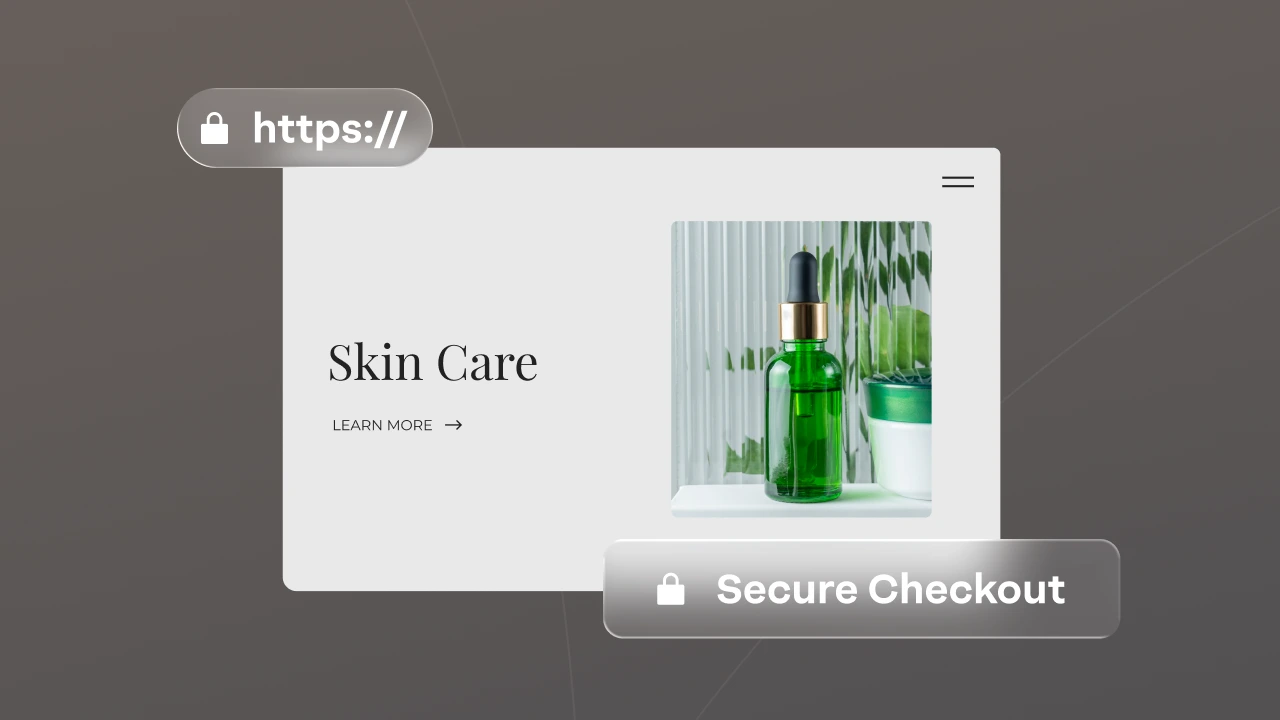
- HTTPS in the URL: A secure website address begins with https:// rather than http://. HTTPS indicates that the connection between your browser and the website is encrypted.
- The padlock icon: Some browsers display a padlock icon or similar site information control next to the URL to indicate connection security.
- Certificate details: Open the site information or certificate details to view the domain name, issuing Certificate Authority (CA), and validity dates.
The certificate authority’s digital signature helps the browser verify that the certificate is authentic. The certificate also contains a public key used during the secure connection, while the corresponding private key remains protected on the website’s server.
What are the different types of SSL certificates?
SSL certificates differ in two main ways: the level of identity validation they provide and the number of domains or subdomains they cover. Validation level refers to how thoroughly the certificate authority verifies the website owner, while coverage determines whether a certificate protects a specific domain, a main domain and its subdomains, or multiple domains.
Here’s a quick comparison of the most common SSL certificate types:
| SSL type | Validation level | Best for |
|---|---|---|
| Domain validated certificates (DV) | Basic | Blogs, personal sites, and informational websites |
| Organization validated certificates (OV) | Moderate | Small to mid-sized businesses that want verified identity |
| Extended validation certificates (EV) | Highest | E-commerce sites, financial services, and businesses handling sensitive data |
| Wildcard SSL certificates | Varies (DV or OV) | Websites with multiple subdomains (e.g., blog, shop, support) |
| Multi-domain certificate (MDC) | Varies (DV or OV) | Businesses managing multiple domain names under one certificate |
| Unified communications certificates (UCC) | Varies (DV or OV) | Organizations running services like email or apps across multiple domains |
A DV certificate verifies control of a domain, while an extended validation certificate requires more extensive identity checks. For a closer look at how these certificates differ, see our guide on which SSL certificate you need.
Find the perfect domain
Ready to register a domain name? Check domain availability and get started with Network Solutions today.
Why do small businesses need an SSL certificate?
Small businesses need an SSL certificate to protect customer data, build trust, and meet basic expectations for online security. Without one, your website can appear unsafe, which can drive visitors away before they take action.
According to recent data, around 90% of websites are now encrypted via HTTPS, making a secure connection the standard for modern websites.
Key reasons an SSL certificate matters include:
- It protects customer data: SSL encrypts sensitive information, such as login credentials and payment details, so unauthorized third parties cannot easily read data exchanged between visitors and your website.
- It builds trust: HTTPS and browser security indicators show visitors that their connection is encrypted, supporting greater confidence in your site.
- It supports SEO: HTTPS is a Google ranking signal, so SSL forms part of a sound search engine optimization and internet security strategy. Learn more in our SSL and HTTPS guide.
- It supports industry requirements: SSL/TLS supports encryption requirements under PCI DSS, HIPAA for businesses handling health information such as medical records, and GDPR for businesses serving customers in the European Union.
For added protection, some businesses also use domain privacy protection to limit the amount of personal information publicly visible, though it serves a different purpose than SSL.
How do you get an SSL certificate for your website?
Getting an SSL certificate is a key step in securing your website. Depending on your business needs, you have a few options. Pricing varies by certificate type and validity period, so check our SSL certificate plans for current rates.
Whether you buy through a web host or configure one on your server, setup may include creating a certificate signing request (CSR) and installing the certificate on your origin server.
Steps in getting an SSL certificate
No matter which type of certificate you choose, the process is straightforward. Many web hosting companies, including Network Solutions, offer SSL certificates.
Step 1: Choose a provider: Select a trusted provider that offers the type of SSL certificate you need. We have various SSL options to fit every business, regardless of size or budget.
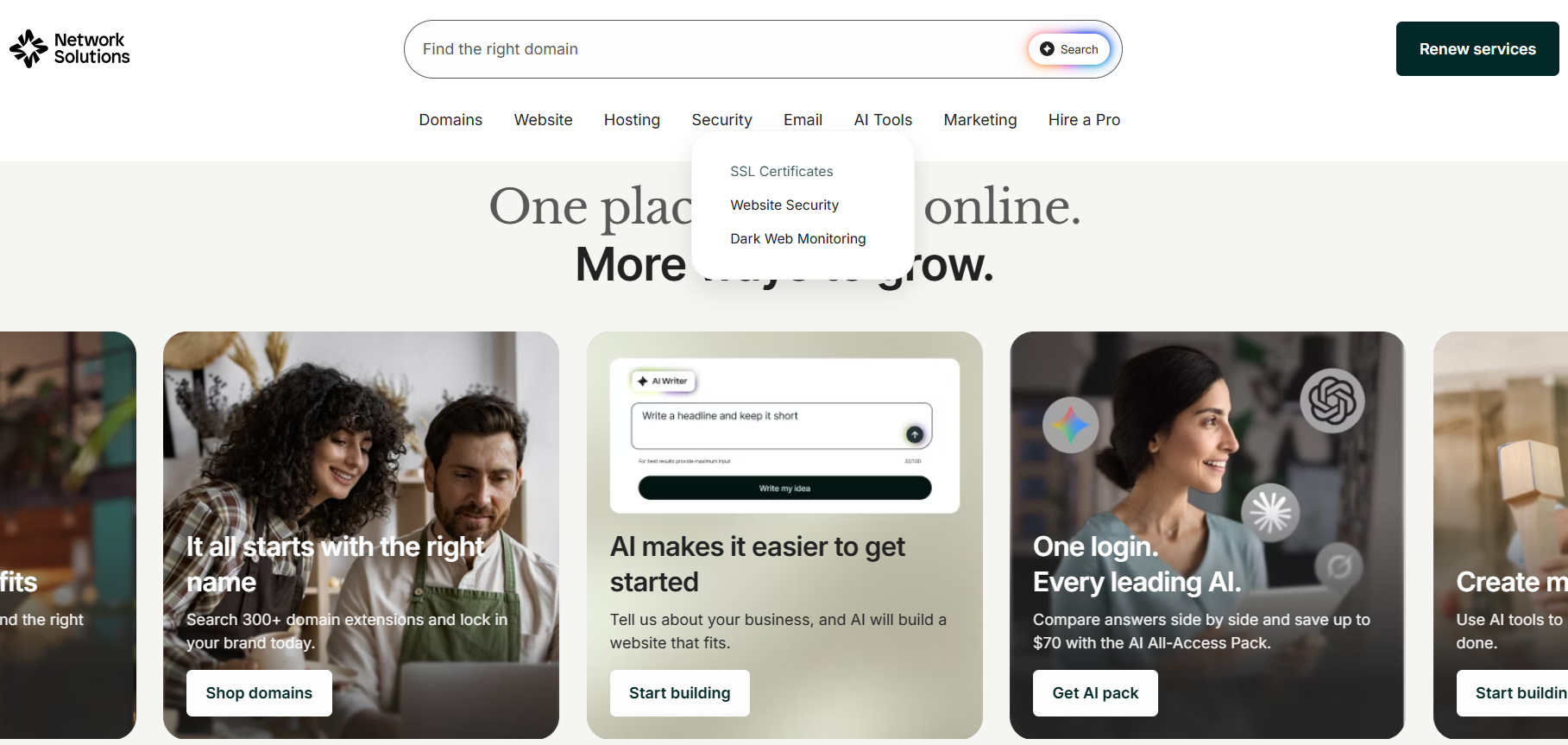
Step 2: Go to ‘SSL Certificates’: You can find it among the products listed near our homepage, under ‘Security’.
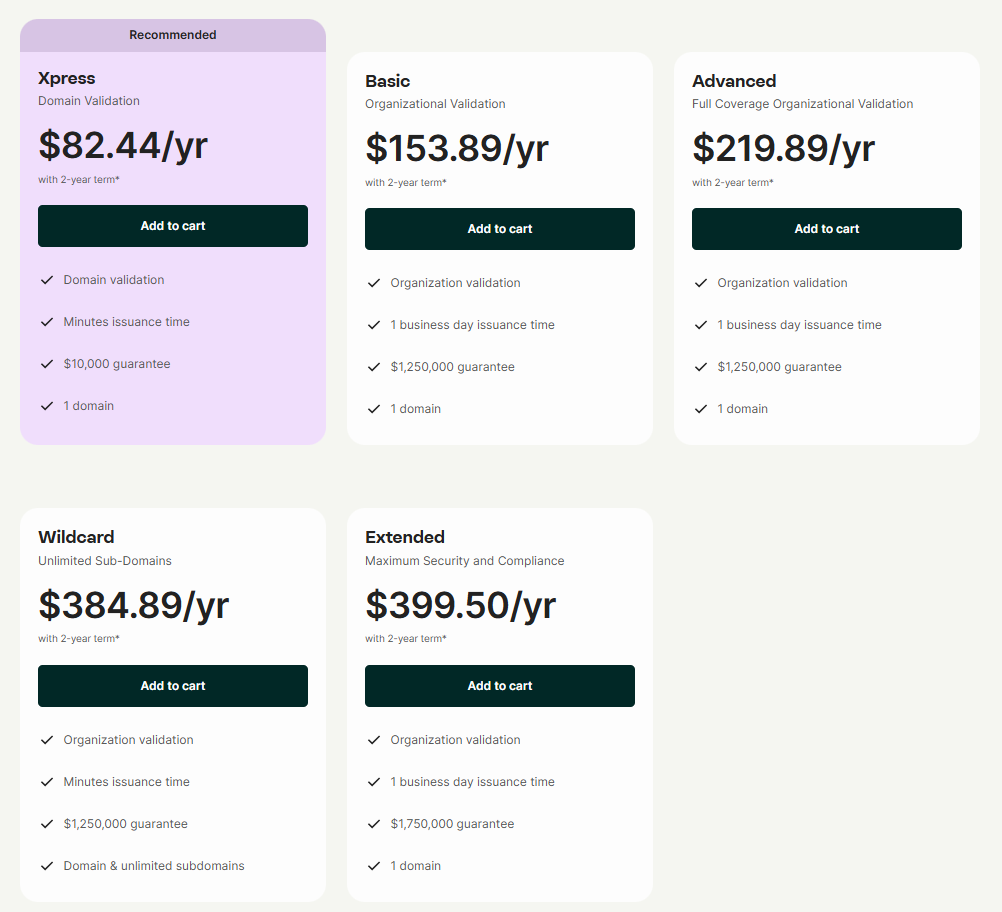
Step 3: Choose from our SSL options. Click ‘Add to cart’ when you’ve picked one.
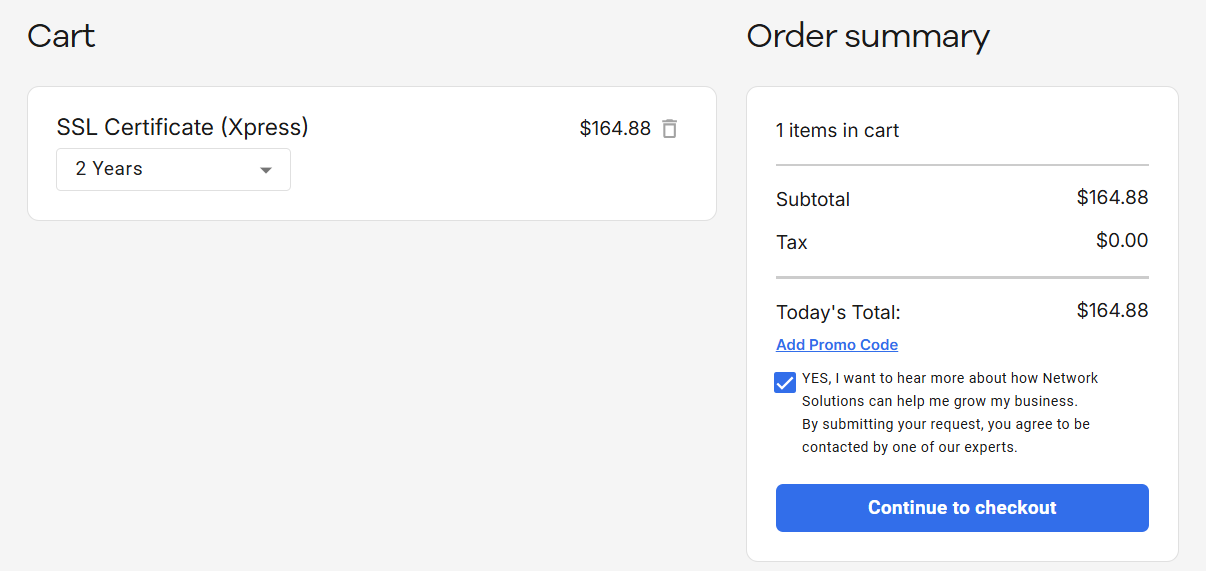
Step 4: Choose the validity period for your SSL certificate: You can pick from one to five years. Click ‘Continue to checkout’ to proceed.
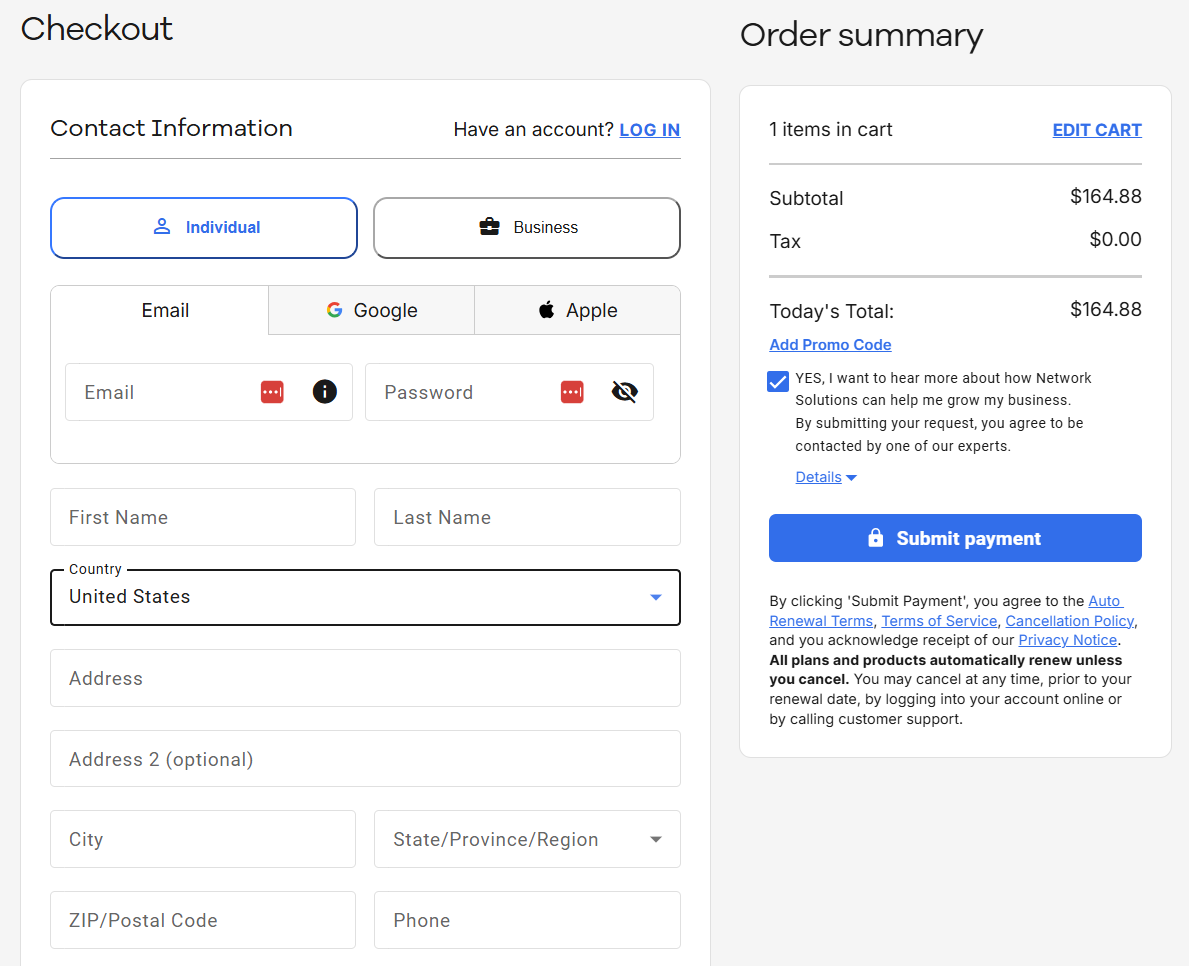
Step 5: Input your contact and billing information. Once done, click ‘Submit payment’ to receive your SSL certificate.
Free vs. paid SSL certificates
Free SSL certificates typically provide Domain Validation (DV) and keep data encrypted between your website and visitors. Some hosting providers and domain providers include free SSL certificates with their hosting plans or domains.
Paid certificates may add Organization Validation (OV) or Extended Validation (EV) to provide stronger identity verification and support digital trust. They may also include warranty coverage and dedicated support for installation, renewal, and troubleshooting.
What happens if an SSL certificate expires?
If your SSL certificate expires, browsers will display a security warning that can prevent visitors from accessing your site, and most users will leave rather than continue.
SSL/TLS certificates are capped at 200 days by industry rules as of March 2026, with further reductions to fewer days by 2029. Some free certificates expire sooner, such as after 90 days.
When a browser checks an expired certificate, the SSL handshake fails because the certificate is no longer valid. This triggers an SSL certificate error and prevents the browser and server from establishing encrypted communication.
An expired certificate can increase your bounce rate and reduce customer trust. It can also interrupt secure transactions, including payments and logins, because sensitive data can no longer be exchanged through a trusted encrypted connection.
Because SSL certificates work across individual domains and subdomains, businesses managing several certificates may have multiple renewal dates to track. Site Health Advisor can help you monitor certificate status and identify expiration issues before they disrupt your website.
Frequently asked questions
An SSL certificate secures a website’s connection with visitors by encrypting data and verifying the site’s identity.
No. An SSL certificate creates an encrypted connection that protects data moving between a visitor’s browser and your server, preventing it from being exposed as plain text in transit. It does not protect your website from malware, weak passwords, software vulnerabilities, or an existing website compromise.
An SSL certificate includes key details that verify your website’s identity and enable a secure connection.
Domain name – The website for which the certificate is issued
Name of the organization/individual to whom it is issued – The verified owner
Issuing authority name – The certificate authority that issued it
The certificate authority’s digital signature – Confirms the certificate is valid
Associated subdomains – Additional subdomains covered, if any
Date of issue – When the certificate becomes active
Expiration date – When it needs renewal
Public key – Used to encrypt data
An SSL certificate is essential for protecting customer data, especially payment information. It helps build customer trust, boost your SEO, and meet compliance requirements.
Publicly trusted SSL/TLS certificates are currently capped at 200 days, though some certificates expire sooner. When a browser attempts to connect, it checks whether the certificate is still valid. To avoid lapses and downtime, enable auto-renewal or set reminders well before your certificate expires.
You can get one from a trusted provider or your web hosting company. The process usually involves choosing the type of certificate you need, generating a certificate signing request (CSR), verifying your domain or business, and installing the certificate on your web server. Many providers also offer guided setup or handle installation for you.
Your website won’t have a secure connection, so data isn’t encrypted. Browsers will label it “Not secure,” which can drive visitors away, reduce customer confidence, and prevent you from handling secure transactions, such as payments or logins.
To fix an SSL certificate error, first identify the cause (e.g., expired certificate, incorrect installation, or mismatched domain name). Then renew or reinstall the certificate as needed. If the issue persists, check your server settings or contact your SSL provider for support to resolve the error and restore a secure connection.
Take the next step to secure your website
Securing your site doesn’t have to be complicated. With the right tools in place, you can strengthen website security, build customer confidence, and keep your business breaking through.
An SSL certificate helps you create a safer, more trustworthy experience for your customers. From protecting sensitive data to supporting secure transactions, it’s a key part of running a reliable website. Our SSL certificates, Site Health Advisor, and cWatch services can help you monitor your website’s health, protect it from online threats, and support a safer experience for your customers.