
Key takeaways:
- Effective e-commerce SEO starts with strong keyword research.
- On-page optimization is most effective when it aligns with user intent.
- Long-term e-commerce growth relies on consistency.
For small e-commerce businesses, taking on established corporations can feel like David vs. Goliath.
But by mastering e-commerce SEO, small businesses like yours can level the playing field and help your site rank better on search engines without paid ads.
It offers a cost-efficient way to reach customers who are already searching for products. Leads generated through SEO have a 14.6% close rate, significantly higher than the 1.7% close rate from outbound marketing efforts. This highlights how investing in SEO can turn visibility into real sales opportunities.
In this guide, we’ll break down what e-commerce SEO is, why it’s essential for small businesses, and how you can build a strategy that helps your products rank higher and sell better.
What is e-commerce SEO?
E-commerce SEO is the process of optimizing an online store’s pages, content, and structure to increase its visibility in search engine results pages (SERPs). It helps your website reach customers without relying on expensive traditional marketing methods.
It also focuses on optimizing product and category pages, including using keywords tailored for e-commerce, improving page speed, writing compelling product descriptions, and ensuring your website is easy to navigate.
By applying e-commerce SEO best practices, your store becomes visible to people searching for products and services. When done right, it will help drive consistent traffic, attract qualified leads, and increase sales without depending heavily on paid ads.
Why e-commerce SEO matters for small businesses
If you’re not ranking in search engines, your business is as good as nonexistent. Backlinko’s data found that only 0.63% of users click on sites found on the second page of SERPs.
Applying SEO best practices for e-commerce websites gives you the visibility, credibility, and reach you need to stand out in competitive markets.
Here’s why it matters for businesses:
- Get your products on the first page of Google
- Reach customers without paying for ads
- Increase your brand’s visibility
- Boost your conversion rates
- Build credibility and trust
- Gain a competitive edge
Get your products on the first page of Google
Most shoppers never go past the first page of Google. That means if your store doesn’t rank at the top, you’re potentially missing out on traffic and sales. Optimizing your e-commerce website for search engines helps bring your products directly to customers.
Reach customers without paying for ads
SEO empowers you to compete with larger companies without paid advertising. A ranking website can enjoy steady, organic traffic without paying per click or impression. It’s an investment that continues to pay off.
Increase your brand’s visibility
When your products appear frequently in search results, customers begin to recognize your brand name even before they click. Consistent visibility builds awareness, which can influence their future purchasing decisions. Over time, this recognition develops into trust, which in turn leads to sales.
Boost your conversion rates
SEO draws customers actively searching for your products. This means that prospects that get funneled from your SEO efforts are more likely to take action. Optimize your product descriptions, images, and metadata with relevant keywords to make it easier for these shoppers to find exactly what they need.
Build credibility and trust
Users often trust organic search results more than paid ads because they view them as more authentic and relevant. Appearing naturally in search builds confidence in your brand’s legitimacy. It signals to customers that your business is established, reliable, and worth their attention.
Gain a competitive edge
Competing with big brands can be tough, but SEO helps level the playing field. With the right strategy, even smaller stores can outrank larger competitors for niche or long-tail keywords. Focus on high-quality content, well-structured product pages, and consistent optimization, and position your business as a trusted alternative to larger competitors.
Organic vs paid traffic: Why SEO drives higher ROI
Organic search remains one of the most trusted and effective sources of website traffic. Consumers tend to view organic results as more credible because they’re earned through genuine relevance.
Yes, in the short term, paid search gives your brand exposure. However, most of the time, consumers tend to ignore paid ads and click only on organic results, leading to a low ROI.
In fact, more than half of all website traffic comes from organic search. That means more than half of your potential customers are finding businesses through unpaid, organic results rather than ads. Plus, e-commerce sites achieve a conversion rate of around 3% to 5% from organic search.
How e-commerce SEO differs from traditional SEO
While both aim to improve visibility and traffic, e-commerce SEO focuses on driving sales, while traditional SEO is often about sharing information and building awareness.
Here are the main differences:
- Focus of optimization: Traditional SEO focuses more on blog posts, guides, and educational content, while e-commerce SEO optimizes product and category pages to attract ready-to-buy customers.
- Keyword intent: Traditional SEO focuses on informational keywords like “how to choose running shoes”, whereas e-commerce SEO targets commercial terms such as “buy running shoes online”.
- Performance metrics: Traditional SEO measures success through traffic and engagement, while e-commerce SEO tracks conversions, product clicks, and revenue derived from this strategy.
- Technical priorities: E-commerce SEO places greater importance on site structure, page speed, mobile usability, and schema markup to improve visibility and user experience.
Product pages vs informational content
A strong e-commerce SEO strategy uses both product-focused and informational content to attract and convert customers. Here’s how they differ and work together:
- Purpose: Product pages aim to convert visitors into customers by showcasing key features, providing pricing information, and featuring customer reviews. Informational content, including blogs, guides, and knowledge bases, aims to educate users, spread brand awareness, and guide them into your marketing funnel.
- Search intent: Product pages target transactional keywords that indicate strong buying intent, while informational content targets research-based keywords that help users learn more before making a purchase.
- Content style: Product pages focus on clear descriptions, visuals, and calls to action. Informational content delves into a specific topic in-depth and is designed to answer questions or solve problems.
- SEO value: Informational pages help attract new visitors and add to your site’s authority, while optimized product pages aim to convert that traffic into sales.
Organic traffic may take longer to build, but its impact lasts far beyond any short-term campaign. Ultimately, SEO for e-commerce offers lasting value that paid advertisements can’t match, helping your business stay visible and competitive over time.
E-commerce funnel: Matching content to buyer intent
An e-commerce funnel represents the stages a customer goes through before making a purchase. For e-commerce businesses, understanding this journey is important when planning your SEO strategies.
Your SEO strategy should align with each stage of this funnel. When you address what customers need at every point, you improve your chances of turning traffic into sales.
An e-commerce funnel typically has four stages:
- Awareness
- Consideration
- Conversion
- Retention
Awareness
At this stage, potential customers are just starting to recognize a need for a product or service. Some may not be familiar with your brand yet, while others are but are only looking for information, exploring options.
Some SEO strategies you can use in this stage include:
- Targeting informational keywords that answer early-stage questions. Example topics are “How to choose running shoes” or “Best skincare routine for oily skin”
- Creating educational content such as blog posts, short-form videos, or downloadable guides while introducing your brand.
- Using internal linking to guide readers from the content to relevant product or category pages
- Optimizing on-page elements such as titles, headers, and meta descriptions to enhance visibility
Consideration
Here, shoppers are already familiar with your brand and are thinking about making a purchase. Your goal in this stage is to demonstrate to people why they need the product and the value of your brand.
The SEO strategies you can use in this stage are as follows:
- Targeting commercial-intent keywords that show buying interest, such as “best,” “top,” “vs,” or “reviews of”
- Creating comparison and buying guides that highlight the advantages of your products
- Optimizing product and category pages with detailed descriptions, specifications, and unique selling points that address customer pain points
- Adding structured data markup (for reviews, ratings, and pricing) to make your listings more appealing in search results
- Showing social proof through testimonials, ratings, or customer stories to build trust and credibility
Conversion
At this stage, the customer is ready to make a purchase. They’ve narrowed their choices and are seeking assurance before pushing through. Your goal in this stage is to make customers seamlessly transition from a decision to a purchase.
At the conversion stage, you can consider:
- Targeting transactional keywords that indicate purchase intent, such as “buy,” “order,” “shop,” or “price of”
- Optimizing product pages with clear calls to action, complete pricing details, and shipping or return information
- Implementing product schema markup to display key details like ratings, price, and availability in search results
- Ensuring your website loads quickly and is optimized for mobile devices
- Maintaining a secure shopping experience with an active SSL certificate and visible trust badges
Retention
This stage is also known as the loyalty stage, as it follows a purchase and aims to convert customers into repeat buyers and brand advocates.
The strategies here are no longer just specific to SEO but shift towards broader marketing efforts:
- Create post-purchase content such as care guides, tutorials, or tips that help customers get the most out of their purchase.
- Encourage customer reviews and testimonials to build trust and strengthen your brand’s online reputation.
- Use email marketing to share product updates, exclusive offers, or related product recommendations.
- Leverage loyalty programs or referral incentives to motivate repeat purchases and customer advocacy.
- Create content for existing customers that covers topics like “how to style,” “how to maintain,” or “what to try next” using your products.
How to build an effective e-commerce SEO strategy
A strong e-commerce SEO strategy takes more than inserting keywords or tweaking product copy. It’s built on three core pillars that work together to improve your site’s visibility, performance, and authority.
- Technical SEO: Ensures your website is crawlable, fast, and secure. It is the foundation of every successful SEO strategy
- On-page SEO: Focuses on optimizing your content, keywords, and product pages to attract and convert visitors
- Off-page SEO: Strengthens your site’s credibility through backlinks, local SEO, and other external efforts that signal trust to search engines
Let’s explore each of these pillars and outline the strategies that will help your store perform better in search results.
Technical SEO for e-commerce
Technical SEO is the foundation of every e-commerce SEO strategy. A well-optimized site helps search engines understand your content and creates a better user experience. Without it, even the best content may never reach potential customers because search engines can’t properly rank your pages.
Here’s how to strengthen your e-commerce store’s technical SEO:
Check crawlability and indexing
Start by ensuring that search engines can access and index your pages. Submit and regularly update your XML sitemap in Google Search Console. Use the robots.txt file to guide crawlers and ensure important pages, such as product and category pages, are not accidentally blocked.
Improve site performance and speed
A slow-loading website can negatively impact your SERP rank by increasing bounce rates. To create a faster and more user-friendly site, you need to understand the Core Web Vitals.
Core Web Vitals are a set of metrics that assess how users experience your website, focusing on loading speed, responsiveness, and visual stability. These metrics include:
- Largest Contentful Paint (LCP): Measures how quickly your main content loads. Aim for your LCP to occur within the first 2.5 seconds of when the page starts loading
- Interaction to Next Paint (INP): Measures how responsive your site feels when users interact with it. Try to keep your INP below 200 milliseconds for a smooth browsing experience
- Cumulative Layout Shift (CLS): Measures how stable your page layout is while loading. Strive for a CLS score lower than 0.1 to prevent unexpected visual shifts
You can also use these tools to help boost site performance:
- PageSpeed Insights: Google’s PageSpeed Insights analyzes your website’s loading speed on both mobile and desktop. It highlights issues affecting your site’s performance and provides specific recommendations to help you improve your Core Web Vitals.
- YSlow: YSlow evaluates your website based on Yahoo’s performance rules and identifies elements that slow down page loading. It provides suggestions to optimize your site’s speed, such as reducing HTTP requests or enabling compression.
- WebPageTest: WebPageTest allows you to test how your site loads from different locations and devices. It provides detailed reports on load times, bottlenecks, and opportunities for improvement.
- Google Search Console: Google Search Console helps you monitor how Google crawls and indexes your website. It alerts you to issues like indexing errors, mobile usability problems, and slow Core Web Vitals.
Optimize site structure and architecture
Organize your website with a clear navigation hierarchy for better UX and search engine indexing.
Your main categories should sit at the top level, followed by subcategories, and then individual product pages. This structure helps shoppers find what they need quickly and ensures crawlers can follow a logical path through your site.
Your URL structure should reflect this hierarchy. Keep your URLs simple, descriptive, and consistent across your entire store. To help search engines understand the page’s context and improve your chances of ranking for relevant keywords, keep a clean format like:
yourstore.com/category/subcategory/product-nameAlso, avoid long, complex URLs with random characters as they make pages harder to crawl and can confuse users.
Ensure mobile-friendliness
Google now uses mobile-first indexing, which means it primarily uses the mobile version of your website to determine how your pages rank. If your site doesn’t perform well on mobile, your visibility can suffer even if the desktop version looks perfect.
To optimize for mobile, make sure your website:
- Loads quickly
- Displays text clearly
- Keeps an intuitive navigation
Also check if:
- Product images scale properly
- Buttons are easy to tap
- Menus are intuitive to use
Responsive design is important for your site as it automatically adjusts your layout across various devices and screen sizes.
Secure your website
Security is a crucial aspect of technical SEO as it directly affects customer trust. Websites that don’t use HTTPS (a secure browsing protocol) may trigger warnings, such as Chrome’s ‘Not Secure’ label, which discourages visitors from entering the website.
To use HTTPS, install and maintain an active SSL certificate. You can get an SSL certificate from your website provider.
Apart from that, if you’re using a content management system like WordPress, you can keep your site more secure by updating your platform version, themes, and plugins regularly.
Handle duplicate content properly
Duplicate content is a common issue in e-commerce sites, especially when you have similar products, multiple variations, or shared descriptions. When search engines encounter identical or nearly identical pages, they struggle to determine which version should rank.
To prevent this, use canonical tags to tell search engines which page is the main version you want indexed. A canonical tag is a small piece of HTML placed in the <head> section of the duplicate page. It looks like this:
<link rel="canonical" href="https://yourstore.com/preferred-page-url" />The link inside the “href” attribute should be the URL you want Google to consider as the canonical or main version of the page.
Also, avoid copying the manufacturer’s descriptions directly. Many stores use the same default text, which makes it harder for your pages to stand out. Writing unique, valuable product descriptions is beneficial for SEO and your shoppers’ experience.
On-page SEO for e-commerce
On-page SEO focuses on the elements you can directly control on your website. This part of your strategy helps search engines understand what each page is about while guiding visitors through a smooth buying experience.
These steps will help you apply effective on-page SEO:
- Conduct e-commerce keyword research
- Create pillar pages and topic clusters
- Optimize metadata
- Optimize product images
- Implement breadcrumb schema
- Optimize category pages
- Optimize product pages
1. Conduct e-commerce keyword research
Keyword research leads to strong on-page SEO. It helps you understand what your customers are searching for and ensures each page on your site targets the right intent. A well-planned keyword strategy prevents pages from competing with one another and increases your chances of showing up in relevant searches.
Here’s how to build an effective keyword strategy for your e-commerce store:
Evaluate keyword relevance and intent
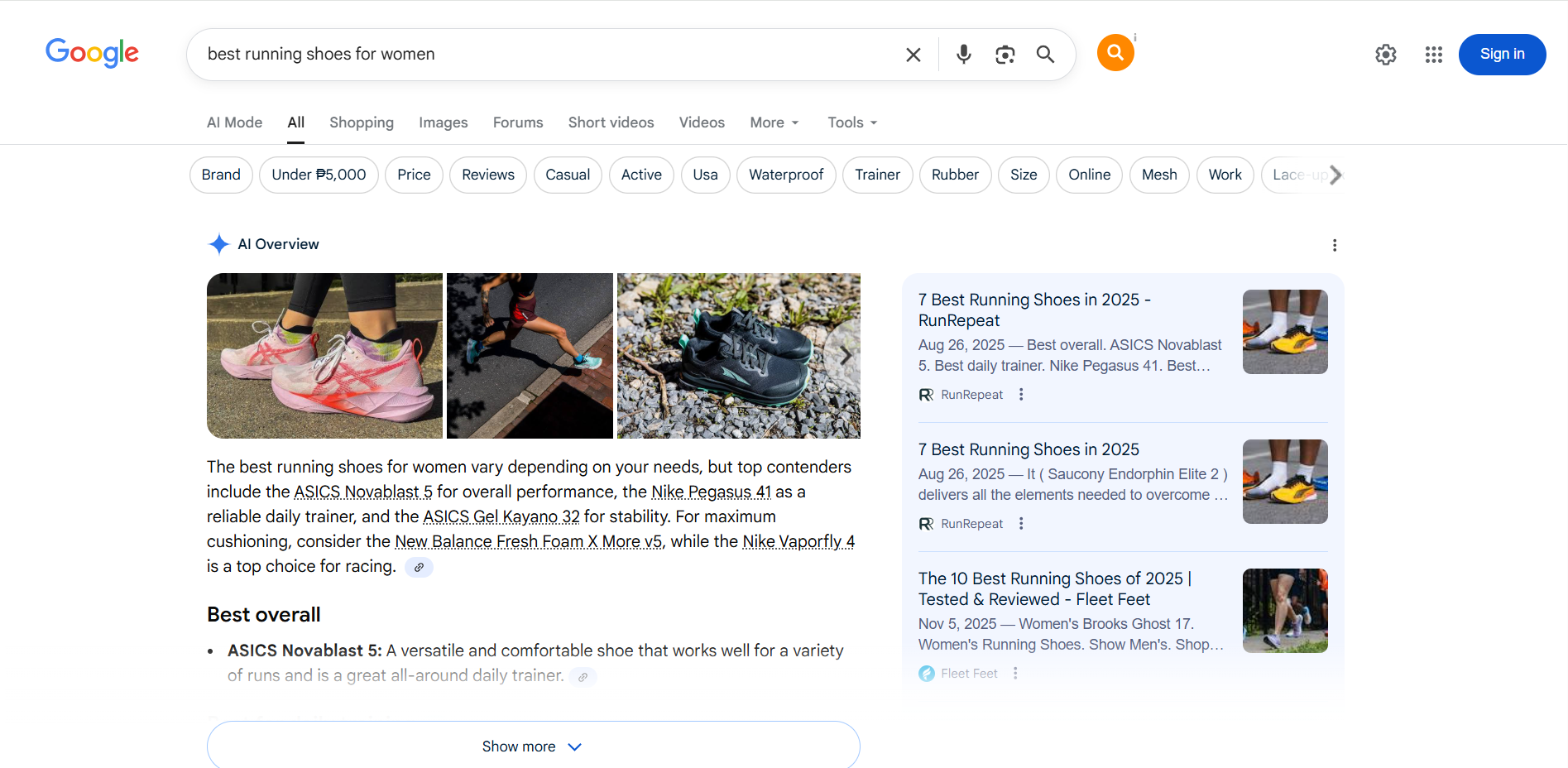
Start by identifying keywords that match what your potential customers are looking for. Every keyword carries a specific type of intent:
- Informational: early-stage searches (e.g., “how to choose skincare products”)
- Commercial: research-based queries (e.g., “best running shoes for women”)
- Transactional: ready-to-buy searches (e.g., “buy women’s running shoes online”)
- Local: location-specific searches (e.g., “shoe store near me”)
- Question-based: how/what/why queries
Understanding intent helps you assign keywords to the right pages, so your store appears when customers need your products most.
Map keywords to the right pages
Assign each keyword to a single page on your website. This prevents keyword cannibalization and helps search engines determine which page should rank for which particular keyword.
As a general guide:
- Category pages: Use short-tail and commercial keywords, such as “running shoes,” on category pages. These broad terms help these pages rank for high-level searches where shoppers are exploring options and comparing product types.
- Product pages: Target transactional keywords on product pages. Examples of great keywords for these pages are “buy women’s running shoes” and “order wireless earbuds online.” These keywords signal strong purchase intent and help capture shoppers who are ready to purchase.
- Blog posts and guides: Focus on informational and question-based keywords like “how to choose running shoes” for these pages. These keywords attract early-stage shoppers who are researching or seeking guidance before making a purchase.
Identify long-tail and transactional keywords
Long-tail keywords are more specific and less competitive. While they may have lower search volume, they target customers who know exactly what they want. These keywords have higher conversion potential.
Examples of long-tail keywords are:
- “best running shoes for flat feet”
- “vegan leather wallet with card holder”
- “wide toe box running shoes for women”
- “lightweight running shoes for beginners”
Also, always include transactional keywords for product-focused pages (e.g., “buy,” “shop,” “order,” or “book”).
Use low-volume keywords for AI Overview (AIO) visibility
Low-volume keywords are search terms that attract minimal search traffic, yet they still hold value. These keywords are worth targeting when they match a specific need your audience has, when they’re part of a niche topic, or when there’s potential for growth in that area.
Here’s why they matter:
- Lower competition: Fewer websites chase these terms, making it easier for your content to rank.
- Highly relevant traffic: Even with a smaller volume, visitors are more likely closer to conversion because the search query matches a well-defined need.
- Ideal niche topics: If you’re working in a specialized product area or a trend-spotting niche, low-volume keywords give you a chance to establish authority early.
- Better fit for smaller or newer stores: Rather than competing for broad, high-volume keywords, smaller e-commerce sites can benefit from ranking for many low-volume, highly targeted keywords.
Organize your keyword types
Now that you’ve identified your keywords, organizing them by type will help you map each one to the right page and search intent. Here’s an example keyword table you can use as a reference:
Keyword type | Example | Search volume | Competition | Best for |
|---|---|---|---|---|
Short tail | running shoe | High | High | Category page |
Long tail | best running shoes for beginners | Medium | Medium | Blog post / Guide |
Transactional | buy women’s running shoes | Medium | Medium–High | Product / Category page |
Local | running shoes store near me | Medium | Medium | Local SEO |
Question-based | how to choose running shoes | Medium | Low | Blog content |
2. Create pillar pages and topic clusters
Pillar pages work like a table of contents for your webpage. They act as the center point of your content strategy, with smaller related articles, called topic clusters, linking back to them. This structure helps search engines understand your expertise. It also makes it easier for your pages to rank for competitive keywords.
How pillar pages support e-commerce SEO:
- They build authority around important topics.
- They help you rank for broad, high-intent commercial keywords.
- They improve internal linking across your site.
- They guide users from informational content to product/category pages.
How to build a pillar page:
- Start with a broad keyword category (e.g., “running shoes”).
- Create a long, helpful guide covering all major subtopics your customers search for.
- Link out to supporting blog posts, guides, and product/category pages.
- Add internal links back to the pillar page from all related content.
3. Optimize metadata
Metadata helps search engines understand your pages and influences whether users click through from search results. Well-written titles, descriptions, and headers make your pages more visible and more compelling to shoppers.
Since this is one of the areas you have full control over, optimizing metadata is an important part of your on-page e-commerce SEO strategy.
Here’s how to optimize your metadata effectively:
Craft clear, descriptive title tags
Your title tag is one of the strongest on-page ranking signals. For e-commerce pages, include your primary keyword and a clear description of the product or category.
How to optimize title tags:
- Include your main keyword naturally.
- Keep titles under 60 characters.
- Add unique attributes like size, color, or material when relevant.
- Avoid stuffing multiple product variants into one title.
Write compelling meta descriptions
While meta descriptions don’t directly affect rankings, they influence click-through rates. Treat them as short ad copy that gives users a reason to visit your page.
How to write effective meta descriptions:
- Aim for 150–160 characters.
- Use an action-oriented tone (shop, discover, explore).
- Highlight benefits, unique features, or value.
- Include a secondary keyword when it fits naturally.
Structure content with proper header tags
Headers help both users and search engines scan your content. They break up large blocks of text and reinforce the primary topic of each page.
Best practices for header tags:
- Use one H1 per page. It’s usually the product or category name.
- Use H2s and H3s to organize supporting details.
- Include keywords where they naturally fit.
- Make headers descriptive, not vague.
Align metadata with search intent
Google rewards pages that match what users expect to see when they click. Ensure that your titles, descriptions, and headers reflect the intent of the keyword you are targeting.
For example:
- Informational intent: “How to choose the right running shoes” → blog post
- Commercial intent: “Best women’s running shoes 2025” → buying guide
- Transactional intent: “Buy women’s running shoes online” → product/category page
Matching intent enhances relevance, which improves both rankings and conversions.
4. Optimize product images
Images play a major role in e-commerce SEO. They influence page speed, user experience, and accessibility, all of which affect store ranking and conversion. Optimizing images helps search engines understand your visuals while also providing an improved browsing experience.
Here’s how to optimize your product images effectively:
Use descriptive, keyword-rich alt text
Alt text helps search engines interpret your images. They also improve accessibility for visually impaired users. For e-commerce, your alt text should describe the product clearly and include a relevant keyword when appropriate.
How to write effective alt text:
- Describe what’s in the image
- Include key attributes (color, style, material)
- Use a natural phrase; avoid keyword stuffing
Compress images to improve page performance
Large images slow down your website. Compress images before uploading them to ensure your pages load quickly.
How to do it:
- Use tools like TinyPNG, Squoosh, or the built-in image optimizer in some e-commerce platforms.
- Aim for a balance between quality and file size (typically under 200 KB).
- Use modern formats like WebP when supported.
Use clear, descriptive file names
Search engines read your image file names, so it’s best practice to avoid generic names like IMG_1234.jpg.
Instead, use descriptive ones like:
- womens-black-running-shoes.jpg
- vegan-leather-wallet-brown.jpg
Add multiple image angles and variations
While this helps conversions more than rankings, it still supports SEO by increasing engagement.
Best practices for adding multiple image variations:
- Add front, back, and side views
- Include lifestyle or in-use photos
- Add images for each color or product variation
5. Implement breadcrumb schema
Breadcrumbs are navigational links that show users where they are within your website’s hierarchy. They usually appear at the top of a page and outline a simple path: Home > Shoes > Women’s Shoes > Running Shoes
For e-commerce sites, which naturally have more complex structures, breadcrumb navigation makes browsing smoother and more intuitive.
Breadcrumbs also support SEO. When paired with breadcrumb schema (a type of structured data), search engines can display these navigation paths directly in search results.
Best practices for implementing breadcrumb schema:
- Apply breadcrumb navigation to complex hierarchies: category → subcategory → product pages. This is where breadcrumbs offer the most value for users and search engines.
- Use the breadcrumb schema only if you already have breadcrumb navigation on your site. Schema supports existing breadcrumbs; it doesn’t create them.
- Keep each breadcrumb label short and descriptive, matching your category and product naming conventions.
- Follow a consistent structure throughout your store, so users and crawlers can easily predict how your site is organized.
- Use JSON-LD format when adding breadcrumb schema, as recommended by Google.
For detailed implementation steps, you can refer to Google’s official guide.
6. Optimize category pages
Category pages are much more than navigational waypoints on an e-commerce site. They act as high-value hubs that can rank for broad, commercial keywords. They also direct traffic to dozens or hundreds of individual product listings.
Here’s how to optimize your category pages effectively:
- Use categories that make sense: Organize your products into logical, intuitive groups. Start broad (“Clothing”), then narrow down (“Men’s Clothing”) → (“Men’s Running Shoes”). Clean categories help visitors and search engines understand your store’s structure.
- Build a clear hierarchy and URL structure: Your category URLs should reflect the structure of your store. For example: store.com/mens/running-shoes. Avoid deep nesting (burying pages in subfolders), long URLs, or random numbers and symbols that confuse users.
- Optimize metadata: Each category page should target a primary keyword and have a unique title and meta description. Titles should stay under 60 characters and clearly describe the page content.
- Create concise and helpful copy: Use a short intro at the top of your category page. Explain what the collection includes, why it’s useful, and help users decide.
- Add user-focused elements: Include elements like product reviews or an FAQ section to help users compare options. These additions also provide fresh content and help your pages rank.
7. Optimize product pages
Product pages are the final destination in the buying journey. These pages should answer customer questions, address concerns, and provide everything a shopper needs to make a confident purchase.
Here’s how to optimize them:
Use unique product descriptions
Avoid copying manufacturer descriptions. Create original, useful content that highlights the benefits, features, and use cases of your products.
Add optimized high-quality images and videos
Offer multiple angles, zoom-ins, and variations of each product. Rich visuals improve engagement and contribute to conversions.
Highlight key details clearly
Make sure to include:
- Pricing
- Specifications
- Size guides
- Shipping and return info
- Warranty details
- Available colors or models
Use product schema markup
Add structured data for price, reviews, availability, and ratings. This can help your listings appear with rich snippets in Google search results.
Include reviews and social proof
Ratings and testimonials build trust and can influence conversion rates. They also add fresh, user-generated content to your page.
Link to related products
Suggest similar items or complementary products to enhance internal linking and increase average order value.
Use AI tools to enhance product pages
AI can help strengthen your product pages by analyzing customer behavior, identifying patterns, and recommending improvements that increase conversions. It can give relevant search results within your store, and make the shopping experience more personalized and efficient.
You can also use AI to refine product descriptions, improve keyword usage, and optimize page layout based on what real shoppers interact with most. These insights can help you create pages that feel more helpful and intuitive, which supports both SEO and user experience.
If you want to explore how AI can improve your online store’s performance, check out our guide on optimizing your e-commerce store with AI.
Off-page SEO for e-commerce
Off-page SEO strengthens your store’s credibility and authority beyond your website. While on-page optimization helps search engines understand your content, off-page signals to them that your store is trustworthy, reputable, and worth ranking.
Here are the key steps to strengthen your off-page SEO:
Analyze your backlink profile
Before building new links, evaluate the quality of links your website already has.
What to look for:
- Are your backlinks coming from relevant and reputable websites?
- Do you see harmful or spammy domains pointing to your site?
- Are there opportunities to get more links from strong, niche-relevant sources?
What to do:
- Use tools like Google Search Console, Ahrefs, or Semrush to audit your backlink profile.
- Identify toxic or low-quality links and disavow them if needed.
- Review which pages attract the most links and build more content around those strengths.
A clean and healthy backlink profile indicates to search engines that your store can be trusted.
Build high-quality backlinks
Backlinks remain one of the strongest ranking signals. For e-commerce stores, focus on relevance and value, not just volume.
Here are a few pointers on how to earn valuable links:
- Create helpful blog posts or guides that other websites naturally want to reference.
- Reach out to niche bloggers or publications that review products similar to yours.
- Offer expert quotes or product samples to reputable reviewers.
- Partner with complementary brands for co-created content.
- Create linkable assets such as buying guides, trend lists, or comparison resources.
High-quality backlinks help your store compete with larger brands by boosting your domain authority.
Use guest posting and digital PR
Guest posting is a strategic way to tap into other people’s audiences, while digital PR helps you earn press mentions that increase brand visibility.
Here are a few ways to apply this:
- Pitch helpful content to blogs in your niche.
- Share your expertise in relevant online communities or publications.
- Reach out to journalists or editors writing about your industry.
- Submit your story to platforms that feature small businesses.
The goal is to appear where your customers already spend time and earn authoritative backlinks in the process.
Leverage local SEO (if applicable)
If you operate a physical store or serve a local area, optimizing your presence in local search can drive both online and in-store traffic.
Here are a few pointers on what to do:
- Create and optimize your Google Business Profile.
- Ensure your business name, address, and phone number are consistent across directories.
- Add high-quality photos, product specifications, and updated hours to your Business Profile.
- Encourage customers to leave reviews.
- Respond to reviews to show engagement and trustworthiness.
Local SEO enables small businesses to stand out in their local community while supporting online rankings.
Strengthen brand mentions and social signals
Although social media signals aren’t direct ranking factors, consistent brand mentions across platforms help improve visibility and brand recognition.
Smart use of social signals:
- Share your best products, blog posts, and guides on social media.
- Collaborate with micro-influencers who genuinely like your products.
- Encourage customers to tag you in their photos.
- Create helpful or entertaining content that gets shared.
When more people talk about your brand online, search engines take note, and your store gains more authority as a result.
Practice e-commerce SEO tips
For small e-commerce businesses, SEO becomes powerful when it’s part of your regular workflow. These SEO e-commerce tips show you how to apply SEO in a manageable way, helping you stay competitive.
Set aside time to boost SEO
SEO is an ongoing process that improves the more consistently you work on it. Search trends shift, new products are added, new competitors emerge, and Google changes its algorithm.
By setting aside dedicated time each month, you can identify these shifts early and ensure your store continues to perform well.
Here’s what a simple, effective SEO routine can look like:
- Refresh outdated content: Update outdated product descriptions, adjust pricing details, or rewrite sections that no longer match customer intent. Even minor updates can signal to search engines that your content is up to date.
- Add new internal links: Look for opportunities to link related products, new arrivals, or seasonal items. This helps search engines crawl your pages more efficiently and strengthens your overall site structure.
- Review and refine metadata: Products evolve. Your metadata should, too. Rewrite meta descriptions to be clearer, more accurate, or more compelling.
- Check indexing and performance in Google Search Console: Use this tool to catch issues early. In Google Search Console, you can spot pages not being indexed, slow URLs, or mobile usability problems.
- Monitor your best-performing pages: Note which pages are gaining traction and which are slipping. This helps you prioritize your next optimization efforts.
Regular updates help your store stay aligned with search behavior and customer needs. Even minor improvements can prevent ranking drops, strengthen your top pages, and maintain visibility for your product catalog in search.
Choose the right SEO tools
SEO tools help you understand what’s working and what needs improvement. Start with free ones, then add paid tools as your store grows.
Highly recommended tools for small e-commerce websites:
Google Analytics 4 (GA4)
GA4 helps you track how customers behave on your website. It helps you uncover what pages they visit, how long they stay, which products get attention, and which pages lead to sales. These functionalities give you a clearer picture of what content or products should be improved or expanded.
What GA4 helps you understand:
- Your top-performing pages
- Where users drop off in the buying journey
- Which traffic sources bring the most valuable customers
- How your store performs across devices
Google Search Console
Search Console shows how Google views your site. It alerts you to indexing issues, helps you track keyword performance, and tells you which queries drive traffic to your store.
Use GSC to:
- Find pages that aren’t being indexed
- Identify declining keywords
- Submit new or updated URLs for faster indexing
- Spot mobile usability or performance issues
Semrush or Ahrefs
These tools offer powerful insights for stores that are ready to scale. They help you discover new keyword opportunities, monitor competitors, and analyze your backlink profile.
They matter for e-commerce because they:
- Find long-tail keywords and product-focused search terms
- Analyze competitors’ top pages and traffic sources
- Track backlinks and find opportunities for link building
- Monitor keyword movements and content health
SERanking
A more budget-friendly alternative to Semrush or Ahrefs, SERanking provides reliable rank tracking, website audits, and competitor insights without the steep price tag.
When it’s useful:
- You want to track daily keyword rankings
- You need simple, visual SEO reports
- You want an affordable way to check technical and on-page issues
Check your top pages monthly and identify which keywords are slipping in search results. Sometimes, a small update to your copy, metadata, or internal links is often enough to regain your rankings.
Avoid duplicate content
Duplicate content is common in e-commerce, especially when products share similar descriptions. If not fixed, search engines may struggle to decide which page to rank.
While this topic was covered more thoroughly in the Technical SEO for e-commerce section, here are the key actions you can take to address it:
- Use canonical tags on similar pages or product variations
- Create unique product descriptions instead of using the one provided by the manufacturer
- Avoid duplicate titles or meta descriptions
- Consolidate thin product pages (pages with little to no value) where possible
These steps ensure search engines can easily identify your most important pages and rank them properly.
Optimize your product images
Image-heavy stores often load slowly, which negatively impacts their rankings and conversion rates. Improve your website’s performance by optimizing your high-quality images.
Improve them by:
- Compressing images before uploading
- Using WebP format where possible
- Writing descriptive alt text
- Adding multiple image angles to reduce bounce rate
Optimized high-quality images help search engine rankings and conversions.
Optimize your category pages
Category pages attract broad, high-intent searches from shoppers who already know what they want but need help narrowing their options. Think of these pages as landing pages where customers get their first impression of your product selection. A well-optimized category page can improve both SEO and conversions.
What you can do:
- Add a short, keyword-rich intro paragraph: A brief description at the top of the page gives search engines context and helps shoppers understand what they’ll find in the category. Keep it helpful and natural, not stuffed with keywords.
- Use filters and sorting options to enhance the user experience: Shoppers rely on filters to quickly find what they need. A good filtering feature helps customers explore more products and enhances their overall experience.
- Add FAQs for common shopper questions: Include an FAQ section that answers common questions related to sizing, materials, or shipping. This adds extra content to the page and can help capture long-tail searches.
- Link to subcategories or related collections: Internal links help users browse deeper into your store and help search engines understand your site structure. Linking to subcategories (e.g., “trail running shoes,” “road running shoes”) strengthens your overall SEO architecture.
- Ensure each category has a clean, descriptive URL: Clear URLs help both users and search engines immediately understand the page. Avoid random numbers, symbols, or overly long paths.
Category pages often become your strongest organic traffic drivers because they target broad keywords that bring in steady, qualified visitors.
Optimize for mobile
Most online shoppers browse and purchase using their phones, which means your e-commerce site needs to work flawlessly on smaller screens.
Google uses mobile-first indexing to rank your website. It means the mobile version of your site is what gets evaluated for ranking, not the desktop version.
If your mobile experience falls short, your visibility can suffer even if your desktop site looks perfect.
A mobile-friendly store provides a smoother shopping experience, making it easier for customers to complete their purchases.
Here are a few mobile best practices you can apply to your website:
- Use a responsive design: A responsive layout ensures your pages look clean whether viewed on a phone, tablet, or desktop.
- Make buttons easy to tap: Small or crowded buttons frustrate users. Make sure they are large enough and spaced properly for any screen sizes, especially the small ones.
- Reduce pop-ups that disrupt browsing: Intrusive pop-ups can block important content when viewed on a small screen. If you use pop-ups, time them appropriately so they don’t feel as intrusive. Also, keep them small and easy to close.
- Ensure product images scale properly: Your images should be able to resize without becoming skewed.
- Test your checkout flow on mobile: Go through your checkout process on an actual phone. Check for fields and areas that are difficult to access or detract from the seamlessness of the process.
A smooth mobile experience helps your store attract more visitors and turn them into customers.
Link your products manually
Internal linking helps search engines crawl your store more efficiently while guiding shoppers toward relevant products. When you add links manually, you ensure each link serves a purpose.
Manual linking also prevents orphan pages (pages with no internal links), which often struggle to rank because search engines can’t easily evaluate them.
How to do it:
- Add “related products” or “you may also like” suggestions. These recommendations help shoppers explore your catalog and naturally create internal links between similar items. They also increase time spent on your site and reduce bounce rates.
- Link from blog posts to category or product pages. If you publish buying guides, style tips, or how-to articles, link directly to the products you mention. This drives warm, high-intent traffic to your product pages.
- Interlink complementary items (e.g., shoes → socks). Cross-linking accessories, add-ons, or complementary items helps boost visibility and can increase average order value while improving your internal linking structure.
- Add internal links to new arrivals or bestsellers. Highlighting important products throughout your site gives them more authority and helps them get indexed and ranked faster.
Manual internal linking distributes SEO value across your website, strengthening your entire product catalog and helping both search engines and customers navigate your store.
Keep your SSL certificate active
Security is important for customer trust and SEO performance. When you don’t have an SSL, browsers will label your site as “Not Secure,” deterring customers from entering.
Search engines also use site security as a trust signal. If parts of your site aren’t secure, it can affect how your pages perform in search results.
What to do:
- Renew your SSL certificate before it expires: Set a reminder or use auto-renewal to ensure your SSL certificate never experiences any downtime.
- Avoid mixed content issues: A mixed content error occurs when a webpage loaded over a secure HTTPS connection tries to load resources, such as images or videos, over an insecure HTTP connection. Make sure every element on your page loads over HTTPS. Mixed content can break functionality and still trigger warnings even if your SSL is valid.
- Display trust badges where relevant: Badges on product pages and checkout reassure customers that their data is protected.
Future-proof your e-commerce SEO
AI-powered search results, entity-based indexing, and privacy-first tracking are transforming the way people discover brands online. Preparing for these changes early helps your store stay visible, credible, and adaptable.
Future-proofing your SEO means building a foundation that can adapt to change, including AI Overviews (AIOs) and LLM-driven summaries.
What to focus on:
Prepare for AI Overviews (AIO) and LLM-driven search
Create clear, structured content that directly answers questions. Break topics into short sections, use descriptive headings, and format information cleanly so AI models can easily interpret and reference it.
Use entity-based SEO
Search engines now rely heavily on entities, such as people, products, brands, and categories, to understand context, in addition to keywords.
Strengthen your entity signals by:
- Adding structured data
- Using consistent product attributes
- Reinforcing brand details across your site
- Creating authoritative topic clusters
This helps search engines understand exactly who you are and what you sell.
Focus on first-party and privacy-friendly data
As tracking becomes more limited, rely on your own analytics, customer surveys, email data, and on-site behavior insights. These help you better understand what customers want without depending on third parties.
Create content with long-term value
Evergreen guides, buying advice, and how-to resources continue to perform well even as search evolves. These pieces also serve as strong references for AI summaries.
Use schema markup consistently
Structured data makes your content easier for search engines and AI tools to interpret, improving your visibility across different search formats.
Preparing your store now ensures your SEO efforts continue to work even as the search landscape becomes more dynamic and AI-driven.
Frequently asked questions
E-commerce SEO is the process of optimizing an online store so its content appears in search engine results. It involves optimizing keywords, site structure, product pages, website speed, and user experience to help shoppers find your store organically.
Technical SEO in e-commerce focuses on the backend elements that help search engines crawl, index, and understand your site. This includes improving site speed, fixing broken links, creating a clean site structure, using HTTPS, optimizing mobile performance, and managing duplicate content with canonical tags.
SEO can feel overwhelming at first, but the basics are easy to learn. If you focus on simple steps, such as choosing effective keywords, improving product pages, and keeping your site fast and mobile-friendly, you can make meaningful progress without requiring deep technical knowledge. Over time, you can layer in more advanced strategies as you progress.
Make SEO your small business advantage
Growing an e-commerce business takes more than great products. It requires a clear strategy to make it easier for customers to find, trust, and choose you over larger competitors. That’s what e-commerce SEO makes possible. With the right approach, even small stores can drive consistent traffic and compete with established corporations.
If you’re ready to strengthen your online presence, we can help. Our e-commerce website builder provides a solid foundation, while our design and copy services enhance your pages, making them clearer and more compelling. You can secure your store with a trusted SSL certificate, track performance with the right SEO tools, or let our SEO Pro Services handle the technical work for you.
Small businesses can achieve big results with the right strategy. Let us support you with the tools and services that make optimization easier.