
Key takeaways:
- Domain privacy protection hides your personal information from public view in the WHOIS database.
- Data has become increasingly valuable, and cybercriminals are actively seeking it with malicious intent.
- Hackers often exploit public WHOIS records to find company data, but you can block this with domain privacy protection.
By early 2024, only 10.8% of domains publicly identified their registrant, and 58.2% used proxy-privacy services—up from 29.2% in 2020—according to a report by Interisle Consulting Group. When you register a domain, your personal contact details are collected and can appear in the public WHOIS database, which is overseen by the Internet Corporation for Assigned Names and Numbers (ICANN). Anyone can look you up, which exposes you to spam and cyberattacks.
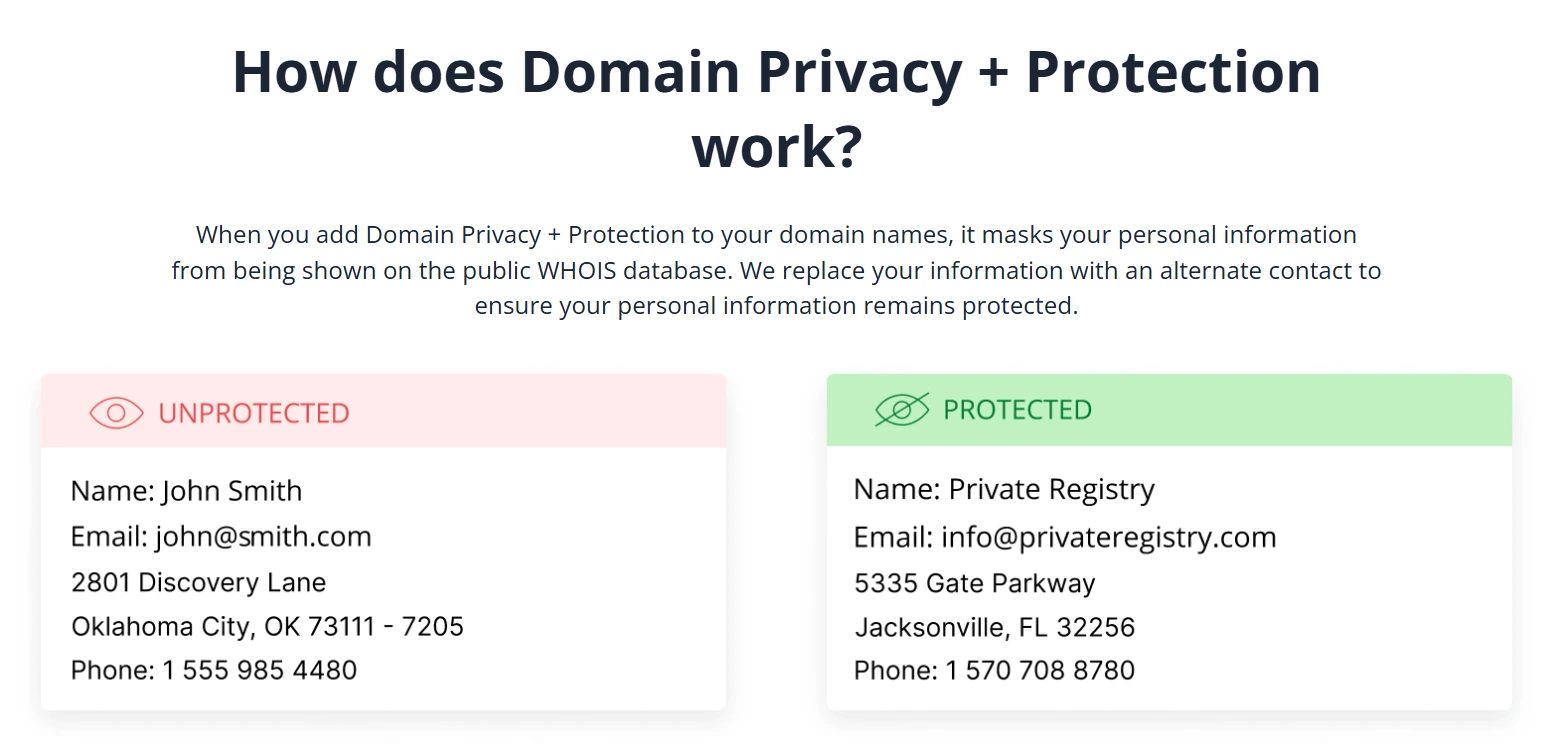
With Domain Privacy + Protection, you keep sensitive information out of public records by replacing your data with proxy records.
Domain privacy protection helps reduce spam, identity theft, and cyberattacks for individuals and small businesses alike. In this guide, we’ll discuss why you might need it, how it can help you, and how you can effectively apply it to your website.
What is domain privacy protection?
Domain privacy protection is a service that replaces your personal contact details in the public WHOIS database with proxy information. That means your name, address, phone number, and email aren’t displayed in a public domain lookup.
When you register a domain, some of your contact information is recorded in the WHOIS database. Since WHOIS is publicly accessible, that information can sometimes attract unwanted attention from spammers, scammers, or other people looking for personal details. Domain privacy protection, also known as WHOIS protection, keeps your personal information private and helps prevent unauthorized access.
Importance of a WHOIS lookup
A WHOIS lookup lets anyone search the public WHOIS database for a domain’s registrant, personal details, and expiration date. When a domain is entered, a request goes to the registrar or registry, which returns the record. Cybercriminals try to access this data for online attacks and data breaches.
Do small businesses need domain privacy protection?
Yes. Most small businesses should use domain privacy protection because it keeps the owner’s personal contact details out of public view and reduces exposure to spam, scams, and identity theft.
It can also help small businesses:
- Your home or office address, phone number, and email stay off the public record, so bad actors cannot harvest them.
- Competitors and data brokers lose an easy way to profile your business and its ownership.
Give your domain a little more privacy
Keep your personal contact details out of public WHOIS records with Domain Privacy + Protection from Network Solutions.

Why you need domain privacy protection
You need domain privacy protection mainly to keep your personal information from being exposed. Other reasons to consider are so you can:
- Protect your personal information
- Mitigate scams and spam
- Prevent people from selling your personal information
- Thwart competitive espionage
- Prevent unwanted internet traffic
Protect your personal information
Domain privacy protection safeguards personal and sensitive data, including addresses, phone numbers, and email addresses, in the WHOIS database, and it prevents hackers from exploiting public info. The stakes are real: in 2024, the Federal Trade Commission received more than 1.1 million identity-theft reports, and consumers reported losing over $12.5 billion to fraud—a 25% increase over the prior year.
Mitigate scams and spam
By shielding your phone numbers and email addresses, you reduce email phishing along with unwanted calls and emails. A 2024 field experiment published in IEEE Access found that domains with public WHOIS contact data received about 4.7 times more unsolicited email than domains with the details redacted (19.7 versus 4.2 emails per domain). Phishing and spoofing were the most-reported type of cybercrime in the United States in 2024, according to the FBI’s Internet Crime Complaint Center.
Prevent people from selling your personal information
Some people scan WHOIS to sell your data to marketers. Without privacy, the risk of your information being harvested and sold is much higher.
Thwart competitive espionage
Competitors may use WHOIS to spy on your business. Privacy prevents them from accessing proprietary data.
Prevent unwanted internet traffic
Some traffic comes from stalkers and hackers. Keeping your info private reduces this unwanted traffic.
As Michael Chattan,, Senior Director of Domain Operations at Network Solutions, puts it: “WHOIS protection is incredibly important for protecting your personal information. If you fail to do this even once, your information is already out there and the spam calls have started. Always make sure it’s added to your cart with every domain purchase.”
To protect your data privacy, you need domain privacy and protection services. Registrars like us offer them, and we make it simple to get Domain Privacy + Protection with one click when you register or renew. Here’s a quick comparison when you avail of our domain privacy services and when you don’t:
| Without privacy | With Network Solutions Domain Privacy + Protection |
|---|---|
| Competitors can see your registration data | Business information stays private |
| High spam and scam risk | Spam and phishing are reduced |
| Personal address exposed | Home or office details remain protected |
Whether you’re running a small business or a personal website, it helps protect your information while still allowing legitimate contacts to reach you.
Domain privacy vs. domain protection vs. domain security
These three safeguards are separate and complementary. Domain privacy hides your WHOIS contact details, domain protection guards the domain asset itself, and domain security covers your broader website and account. Privacy alone doesn’t stop a domain from being hijacked; that’s the job of domain protection and security.
| Safeguard | What it does |
|---|---|
| Domain privacy | Hides your name, address, phone, and email in the public WHOIS database |
| Domain protection | Guards the domain asset from unauthorized transfer, expiration, and hijacking, with tools like registrar lock and expiration protection |
| Domain security | Covers broader website and account security, such as an SSL certificate, malware scanning, and two-factor authentication |
Cases where domain privacy protection may not apply
There are a few situations where domain privacy protection is limited or unavailable:
- Certain country-code domains (ccTLDs): some domains like .us, .au, and .in legally require registrant info to be public.
- Business transparency requirements: regulated businesses and nonprofits may need to keep their WHOIS record public.
- Already protected by regulation: in some regions, the General Data Protection Regulation (GDPR) limits how much registrant data is public, which reduces but doesn’t eliminate the need for privacy services. ICANN’s Registration Data Policy also shapes what registrars publish.
Even if your case falls under one of these, it’s worth noting the risks and exploring other security measures.
How to activate domain privacy protection on Network Solutions
If you manage your website through our services, you can turn on Domain Privacy + Protection from your account dashboard. To enable the feature:
Step 1: Log in to your Network Solutions Account Manager.
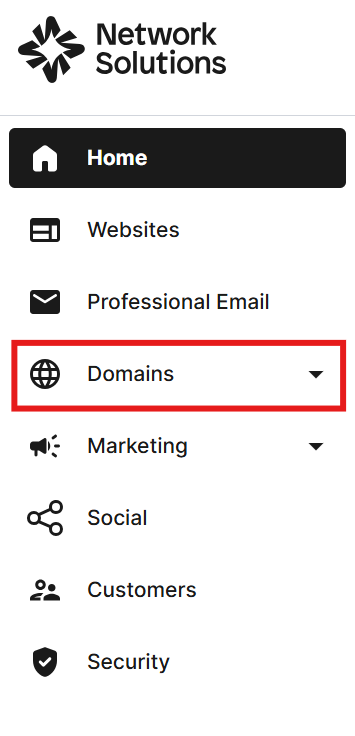
Step 2: Click Domains to view your managed domains.
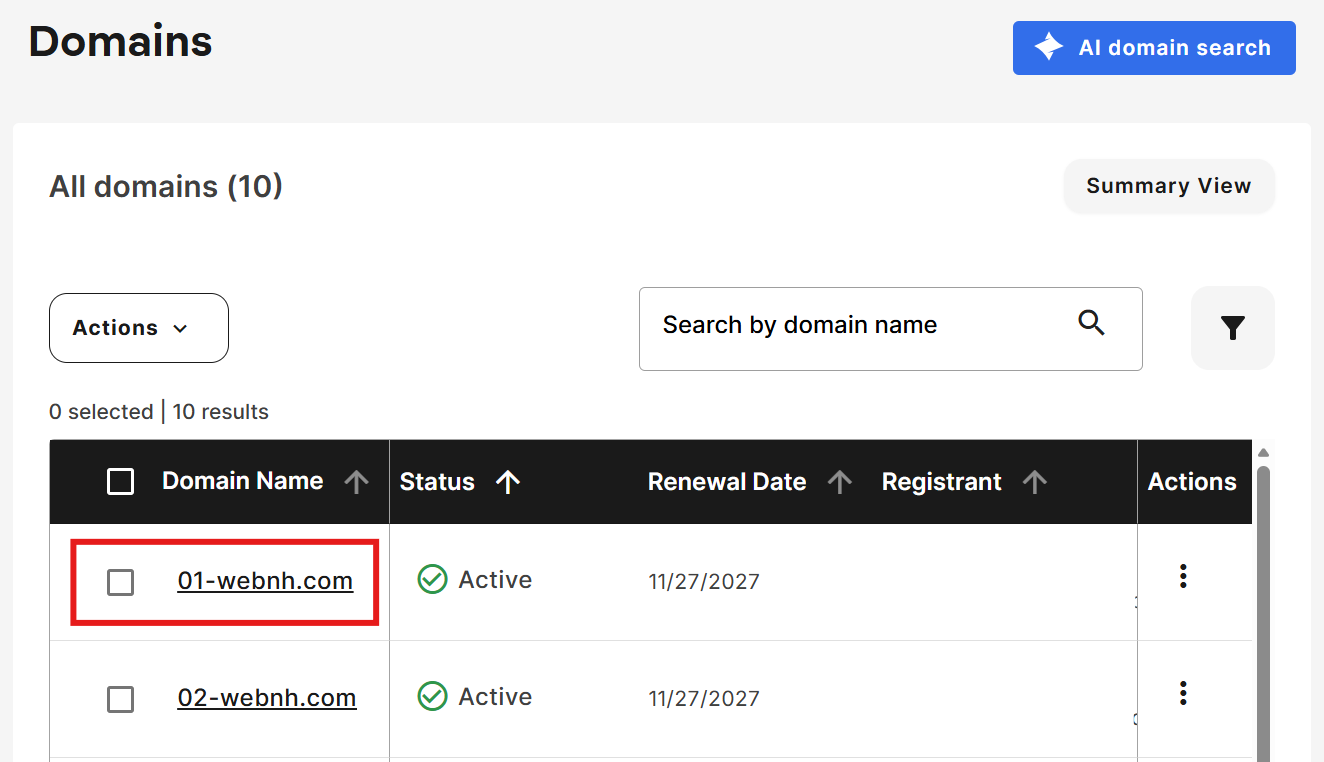
Step 3: Select the domain you want to activate with Domain Privacy.
Step 4: Scroll down to the “Domain Contacts” section. On the right, find “Private Registration” and make sure it shows a green padlock with On. If not, click the button below it to activate.
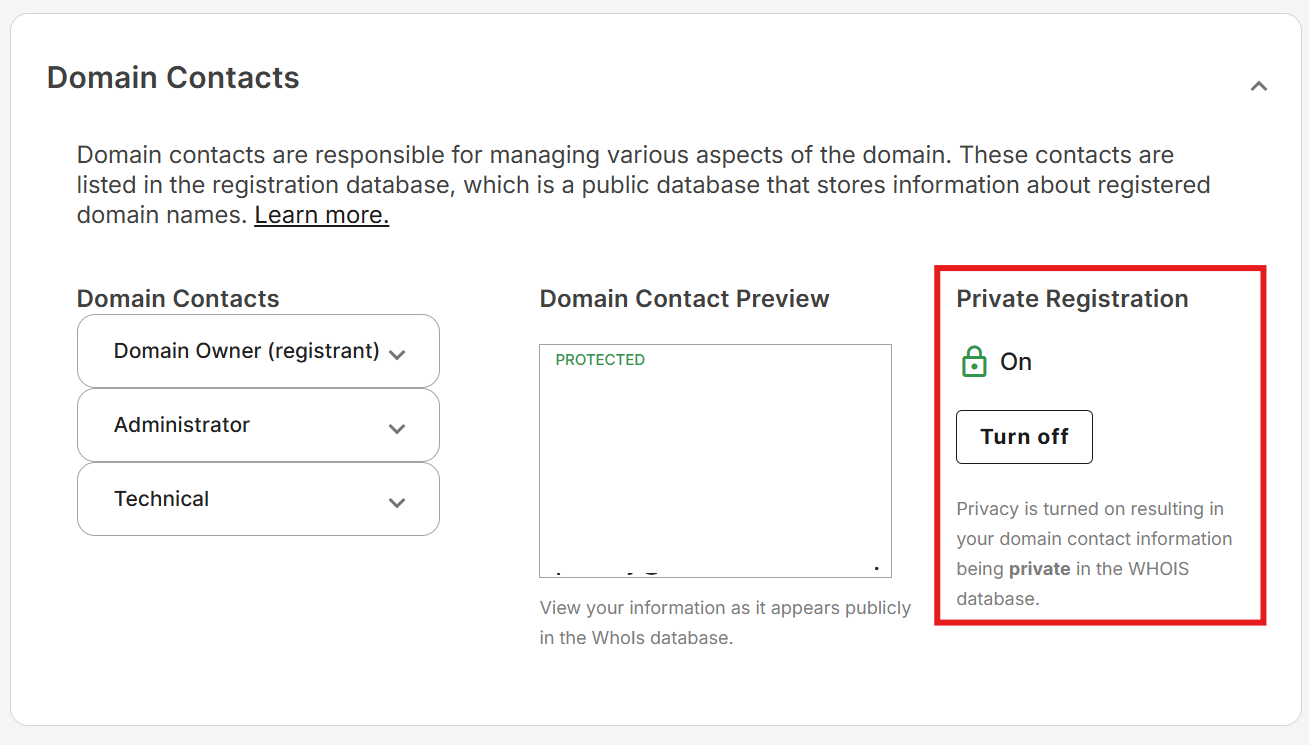
Once completed, your domain privacy should be enabled.
Domain extensions allowed to set up domain privacy vary, so check your extension’s eligibility before you enable the feature. Here are the extensions that support domain privacy:
| A-C | D-H | I-N | O-T | U-Z |
|---|---|---|---|---|
| .academy | .dance | .in | .onl | .us.com |
| .ag | .de.com | .ind.in | .org | .uy.com |
| .ar.com | .democrat | .info | .org.es | .vc |
| .bike | .diamonds | .institute | .org.in | .ventures |
| .biz | .directory | .international | .org.uk | .voyage |
| .builders | .domains | .jpn.com | .ph | .ws |
| .buzz | .education | .kitchen | .photography | .xxx |
| .cab | .kr.com | .photos | .za.com | |
| .camera | .enterprises | .land | .plumbing | |
| .camp | .equipment | .lc | .pw | |
| .careers | .estate | .lighting | .qc.com | |
| .cc | .eu.com | .limo | .recipes | |
| .center | .firm.in | .luxury | .repair | |
| .ceo | .florist | .management | .reviews | |
| .clothing | .futbol | .marketing | .sc | |
| .cn.com | .gallery | .me | .se.com | |
| .co | .gb.com | .me.uk | .shoes | |
| .co.in | .gb.net | .menu | .singles | |
| .co.uk | .gen.in | .mn | .solar | |
| .coffee | .glass | .mobi | .solutions | |
| .com | .graphics | .net | .support | |
| .com.es | .guru | .net.in | .systems | |
| .company | .hn | .no.com | .technology | |
| .computer | .holdings | .nom.es | .tel | |
| .construction | .holiday | .tips | ||
| .contractors | .house | .tk | ||
| .cz | .hu.com | .today | ||
| .training | ||||
| .tv |
Stay ahead of security threats with additional protection
Domain Privacy + Protection safeguards your personal info from spammers, competitors, and malicious actors, but it’s only one part of your security strategy. Consider website security tools and monitoring too.
Here are several security measures that can help protect your site:
- Regular malware scanning: routinely scan your website to catch and remove malicious code before it spreads.
- Blacklist monitoring: watch for your domain appearing on security blacklists so you can act fast if it does.
- Security alerts and notifications: set up alerts that flag suspicious activity so you can respond right away.
Combining domain privacy protection with strong website security practices better protects your information and reputation, and it reduces your risk of cyber threats.
Frequently asked questions
Domain privacy protection is a service that replaces your personal contact details in the public WHOIS database with proxy information, keeping your name, address, phone number, and email hidden from public lookups.
Yes. Legitimate contacts can still reach you through a privacy-protected proxy, while your actual personal details stay out of public view.
No. Domain privacy is optional in most cases, though some country-code domains legally require registrant information to be public.
Registrars often include domain privacy with registration, so check whether it’s already active on your domain and turn it on if it isn’t.
It hides the personal contact details in your WHOIS record, including your name, mailing address, phone number, and email address.
It stays active for as long as it’s applied to your domain, so keep it enabled through your renewals to maintain continuous protection.
If your domain registration would otherwise expose your personal contact details, domain privacy helps keep that information private and reduces spam, scams, and identity-theft risk.
Your personal contact details stay public in WHOIS, which raises your exposure to spam, phishing, data harvesting, and other cyberattacks.
No. It hides your contact details from the public WHOIS database, but it doesn’t hide your ownership from your registrar, regulators, or law enforcement.
Yes. Log in to your Network Solutions Account Manager, click **Domains**, select the domain, and turn on **Private Registration** in the “Domain Contacts” section.
Get complete domain privacy and protection now
Protecting your personal information starts with the right domain privacy solution. With our Domain Privacy + Protection, you can keep your contact details out of public WHOIS records and reduce unwanted spam, scams, and security risks.
You’ll also get added protection against malicious activity, unauthorized domain changes, malware, and blacklisting; you can focus on running your business with confidence. And when you’re ready to grow online, we give you the tools to do it with reliable web hosting, professional email, and an easy-to-use Website Builder.