

Key takeaways:
- A CRM brings all your customer data together so you can manage interactions and improve relationships at every stage.
- CRM benefits include boosting sales productivity, improving customer satisfaction, and nurturing customer loyalty.
- To get the most out of customer relationship management, set clear goals, train your team, and keep data accurate.
What is a CRM? Customer relationship management (CRM) is how your business tracks, manages, and improves every interaction with your customers. It gives you unified customer data. Emails, calls, and messages stay in one place so you can understand customer preferences and respond in a more personal way.
With the right CRM, your team can stay organized and work faster. Sales can find leads, marketing can run better campaigns, and customer service representatives can resolve issues quickly. These CRM benefits help you manage interactions across the entire customer lifecycle, develop customer relationships, and improve business relationships with every interaction.
It works even better when your business has a strong online presence, starting with a domain where your customers can find you.
Find the perfect domain
Ready to register a domain name? Check domain availability and get started with Network Solutions today.
How a CRM works from first contact to repeat sale
A CRM helps you manage each stage of the marketing funnel, from first contact with a lead to repeat sales. It tracks and organizes your interactions so your team can manage relationships at every stage of the sales process.
It also helps you stay on top of your sales pipeline. You can see where each customer stands, follow up at the right time, and build stronger relationships.
To see how this works in practice, here’s how a CRM supports each stage of the customer journey:
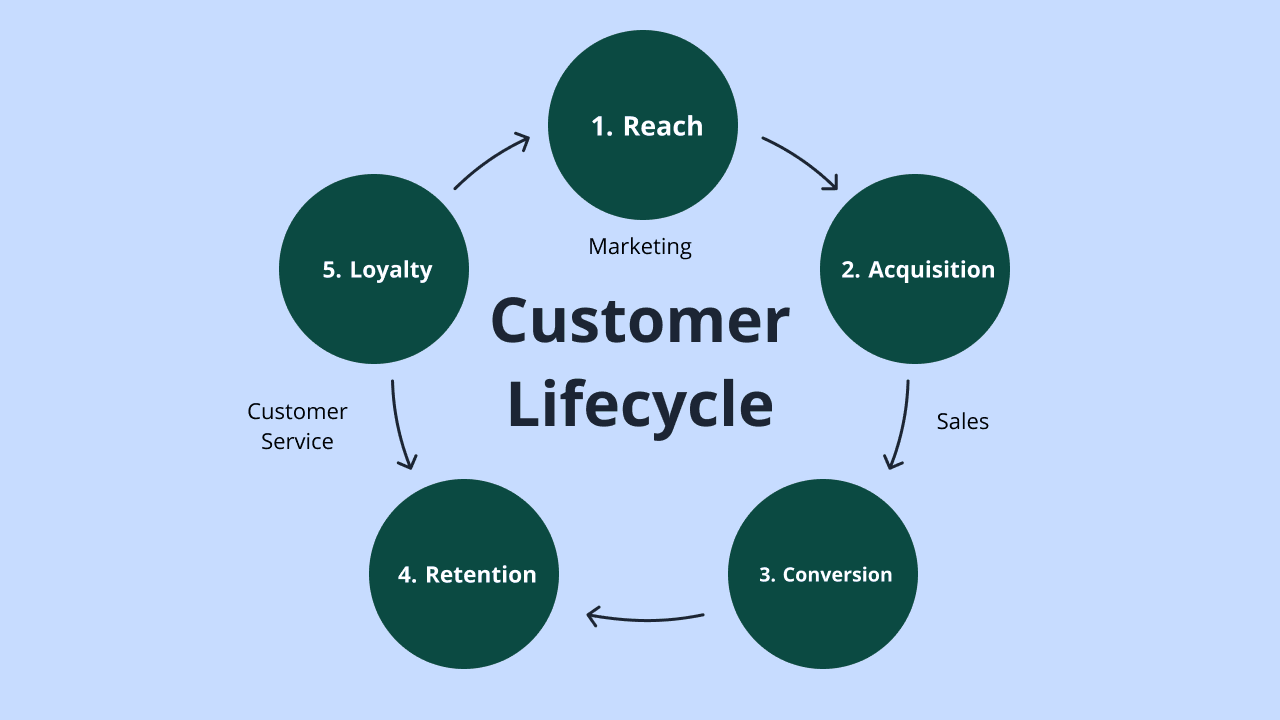
- Reaching potential customers: This is where people first hear about your business. Your website helps attract new customers online and feeds leads into your CRM.
- Customer acquisition: At this stage, you guide leads through the sales process. With better lead management, you can track conversations and help them move closer to a decision.
- Conversion: This is when a lead becomes a customer. Your CRM helps store customer details, so your team has everything they need in one place.
- Customer retention: After the first sale, the focus shifts to keeping existing customers happy and engaged so they keep coming back.
- Customer loyalty: As relationships grow stronger, customers become loyal supporters who choose your business again and recommend it to others.
Most of these interactions start online, especially when you use lead generation tools to capture new customers.
Why small businesses need a CRM today
CRMs offer many advantages that improve customer satisfaction, sales, and overall business efficiency. Here’s how a CRM solution can make a difference:
- Improved customer satisfaction
- Increased sales
- Streamlined operations
- Better data management
- Faster sales cycle
Disclaimer: Results may vary depending on your industry, team adoption, and how the CRM is implemented.
Improved customer satisfaction
CRM systems help improve customer satisfaction by giving your team better access to customer data and faster response times. Many businesses also report better performance overall, with 94% seeing improved sales productivity after adopting CRM.
Increased sales
Businesses that use CRM systems often see higher sales. In fact, 75% of sales managers say CRM helped them increase sales, with some reporting revenue gains of up to 29%.
Streamlined operations
A CRM helps you save time with workflow automation, so routine administrative tasks don’t have to be done manually. With less admin work, your team can focus more on closing deals and keep your sales pipeline on track.
Better data management
A CRM gives you a clearer view of both existing and potential customers. It helps businesses manage interactions in one place, so you can see what customers need and respond faster. With better data, it becomes easier to make decisions and improve your marketing strategy and customer interactions.
Faster sales cycle
CRM systems can help shorten the sales cycle, with some studies showing about an 11% improvement in sales cycle efficiency as teams gain better access to customer data and automation tools.
Core CRM features to look for
When choosing a CRM system, focus on features that actually help you get through your day. The right tools help you manage customer interactions, organize customer data, and spot sales opportunities without adding more manual work.
Here are the essential CRM features to look for and how they help in your day-to-day work:
Feature | What it does | Why it matters |
|---|---|---|
Contact management | Stores and organizes all customer details, including emails, calls, and past interactions | Gives your team a complete view of customer behavior so you can build stronger relationships with both current and potential customers |
Sales pipeline | Tracks deals from first contact to close and shows where each lead stands | Helps a sales rep prioritize leads and identify sales opportunities faster, so no deal slips through |
Automation | Handles repetitive tasks like follow-ups, reminders, and data entry | Saves time and reduces errors so your team can focus on selling and improving business processes |
Reporting and analytics | Tracks performance and turns data into easy-to-read reports | Helps you understand trends, improve decisions, and adjust your marketing campaigns based on real insights |
Task management | Assigns and tracks tasks across your team | Keeps everyone aligned and makes sure nothing gets missed during the customer journey |
Email integration | Connects your inbox to your CRM software and logs conversations automatically | Keeps all communication in one place so you can manage interactions without switching tools |
Mobile access | Lets you access your CRM from your phone or tablet | Gives your team the flexibility to update deals and respond to customers anytime |
Marketing automation | Runs campaigns like email sequences and lead nurturing using built-in marketing tools | Helps you stay consistent with outreach and scale your efforts without extra manual work |
Customer service and support | Tracks support tickets, inquiries, and helps resolve outstanding customer service issues | Helps your business manage post-sale interactions and improve customer satisfaction |
AI capabilities | Uses AI to analyze customer data, predict behavior, and suggest next steps | Helps you work smarter with insights that guide decisions and improve conversion rates |
Security | Protects sensitive customer information with access controls and data safeguards | Keeps your data safe and builds trust with your customers |
Multichannel capabilities | Connects communication across email, social media, chat, and more | Creates a consistent experience across all touchpoints and improves how you manage customer interactions |
A good CRM software brings everything together in one place. It helps you manage interactions from the first message to repeat sales, while keeping your data organized and easy to use. As your business grows, it also helps you spend less time switching between tools and more time building relationships and improving your marketing campaigns.
To get the most out of your CRM, you’ll need a reliable hosting setup behind it. Fast and secure hosting keeps your system running smoothly, so your team can access data, track leads, and respond to customers without delays.
Power your CRM with reliable hosting
Your CRM works best when your website runs fast and stays online. Every form, lead, and customer interaction starts there.
With the right hosting, your data loads quickly, your tools stay connected, and your team never misses an opportunity

Types of CRM and which one fits your business
CRM systems come in different types, and each one is designed to handle a specific part of managing customer relationships. Knowing what each type does makes it easier to choose a CRM solution that fits your business objectives and helps you build strong customer relationships.
CRM type | Focus | Best for | Example use |
|---|---|---|---|
Operational CRM | Focuses on automating daily tasks like sales automation, marketing, and customer service | Businesses that want to streamline processes and boost productivity | Managing customer contacts, handling leads, and automating follow-ups |
Analytical CRM | Focuses on data analysis to understand trends and customer behavior | Businesses that want to analyze customer data and improve decision-making | Using predictive analytics, tracking performance, and running customer segmentation |
Collaborative CRM | Focuses on sharing customer information across teams | Businesses with multiple departments that need aligned communication | Helping teams work together to manage interactions and improve customer experiences |
Strategic CRM | Focuses on long-term planning and relationship building | Businesses that want to improve customer loyalty and meet evolving customer expectations | Developing a strong CRM strategy, improving retention, and strengthening business development efforts |
Each type has a different role, but most modern CRM software brings it all together so you can manage interactions, automate tasks, and build better relationships in one place.
Another thing you’ll come across when choosing a CRM is how it’s delivered, and that’s where cloud CRM comes in.
Cloud CRM
A cloud-based CRM isn’t a separate type like operational or analytical CRM. It’s simply how your CRM solution is delivered and accessed online. Most CRM platforms use the cloud as it offers flexibility, faster updates, and better access to your customer data.
With a cloud CRM:
- Your data is stored on remote servers and accessible from anywhere.
- You can manage customer relationships and update records in real time.
- Your team can collaborate easily, even when working remotely.
Many businesses prefer cloud-based systems because they’re:
- Easy to set up
- Scalable as your business grows
- More affordable upfront
You can also connect your CRM with other tools to support sales, marketing, and customer service within one platform.
12-week CRM rollout roadmap
The goal of a 12-week CRM rollout is to implement your CRM system effectively. This helps your team stay aligned, keeps your data connected, and streamlines your processes. This roadmap gives you a simple timeline for setting up, training, and improving your CRM system:
- Week 0-2: Set goals and objectives
- Week 3-4: Select and customize CRM
- Week 5-6: Data migration
- Week 7-8: Team training and onboarding
- Week 9-10: Test and fine-tune
- Week 11-12: Review metrics and adjust
Week 0–2: Set goals and objectives
Start by defining clear business objectives for your CRM solution. Focus on improving sales management, tracking customer interactions, or increasing customer retention. Set measurable goals to track progress and support long-term business growth.
Week 3–4: Select and customize CRM
Choose the right customer relationship management software based on your business needs. Customize your sales pipeline, dashboards, and workflows. A tailored setup helps your sales reps manage tasks efficiently and supports smoother business processes.
Week 5–6: Data migration
Move your customer data into the CRM and clean it first. Remove duplicates and outdated records to keep your CRM data accurate. This helps you organize customer data better and gives your team a reliable system to work with.
Week 7–8: Team training and onboarding
Train your team to use CRM tools in real-world scenarios. Focus on managing customer interactions and tracking sales opportunities. Strong onboarding improves user adoption and boosts sales productivity across your team.
Week 9–10: Test and fine-tune
Test your CRM system using real workflows. Check automation, integrations, and reporting. Fine-tuning helps your system match customer expectations and improves how your team handles the sales process.
Week 11–12: Review metrics and adjust
Track performance using metrics like sales results, user adoption, and customer satisfaction. Use these insights to improve your CRM strategy, strengthen customer relationships, and support ongoing business growth.
Common mistakes to avoid when using CRM
When you implement your CRM, there are common mistakes you might make that can affect its effectiveness. These are some common pitfalls to watch out for:
- Dirty data: If you fail to clean and verify your data before importing it, you may end up with inaccurate insights and poor decision-making.
- Over-customizing: Don’t go overboard with customizing your CRM because it can become complicated and harder for your team to use.
- Skipping training: When you don’t properly train your team, it can lead to underutilization and frustrated users.
- Ignoring mobile access: Neglecting to set up mobile access and encourage its use among your team can limit their flexibility and productivity.
- Lack of clear goals: Without clear goals, it’s difficult to measure if the use of CRM is successful or if you’re meeting your business needs.
- Not monitoring usage: Not tracking CRM adoption and customer engagement can prevent you from identifying areas where your team may need support or training.
Once you’ve avoided the common mistakes, it’s also important to understand the bigger challenges that can affect your CRM long-term.
Challenges and risks with CRM
A CRM system can support business growth, but it also comes with challenges. If you know these early, you can protect your customer service relationships and get better results from your CRM tools.
Here are some common risks to keep in mind:
- Poor CRM data quality: Even with the right setup, inconsistent or outdated data can accumulate over time and compromise your insights.
- High implementation costs: Some CRM platforms require setup, training, and customization. Without planning, costs can grow quickly and impact your ROI.
- Low user adoption: If sales teams or customer service teams don’t use the system, it won’t deliver value. This can slow down sales productivity and create gaps in your process.
- Poor strategy and planning: If your goals aren’t well defined, your customer relationship management software won’t fully support your sales management or long-term growth.
- Security and privacy risks: Because your CRM stores sensitive customer data, weak security can expose both your business and your customers.
- Lack of integration with other tools: When your CRM doesn’t connect with your existing systems, your data becomes fragmented. This can affect reporting and daily workflows.
- Overcomplicated setup: When your CRM has too many features or custom fields, it can confuse users and slow down your team rather than help them.
So take time to plan ahead and keep your setup simple. This makes your CRM system easier to use and more effective for your team.
Frequently asked questions
CRM stands for customer relationship management. It refers to tools and strategies that help businesses manage customer interactions, track data, and improve relationships across sales, marketing, and support.
CRM pricing varies, but most small teams can expect:
– $7 to $50 per user/month for basic to mid-level plans
– Around $30 to $75 per user/month for more advanced features like automation and analytics
– Free plans from some CRM vendors offer limited features
For a small team, total monthly costs often range from $50 to $150, depending on the number of users and tools included.
Disclaimer: Pricing may vary by provider and plan. Always check with the CRM vendor for the most up-to-date pricing.
Setup time depends on your CRM system and the complexity of your setup. Most timelines look like this:
– Basic setup: a few hours to 1–2 days
– Standard setup: a few days to a couple of weeks
– Advanced setup: several weeks for data migration, customization, and integrations
Setup time can vary based on your data quality, team size, and the tools you connect to your CRM.
Yes. A CRM helps customer service teams track issues, manage conversations, and respond faster. It keeps all customer details in one place, which improves response time and leads to better service.
Yes, for very small teams or simple tasks, a spreadsheet can work.
But it falls short as your business grows. It can’t handle real-time customer interactions, automation, or a structured sales pipeline.
You’ll likely need a CRM system when:
– Multiple people need access
– Data becomes messy or hard to manage
– You want to track customer relationships and improve sales productivity
Make the most out of your CRM
A CRM works best when you keep things simple and focus on how you manage customer relationships day to day.
If you’re not sure where to begin, start here:
- Keep your customer data clean and up to date.
- Use simple workflows to manage customer interactions.
- Track your sales pipeline so you don’t miss opportunities.
As you grow, your customer relationship management setup helps you stay organized, understand customer preferences, and follow up at the right time.
When you have a domain and website in place, it’s easier to bring in leads and manage them through your CRM. You can also use our AI Domain Name Generator or Business Name Generator that comes free with every domain purchase, to build your brand and bring in new leads.
Turn your website into your best lead source
Your CRM performs best when your website brings in the right people.
A drag-and-drop builder helps you create pages and forms that capture leads and send them straight into your CRM.