
Key takeaways:
- Learning how to create a website portfolio helps you show your skills, story, and value in a way that hiring managers, clients, and collaborators can quickly understand.
- A strong online portfolio helps you present your work professionally and grow your reputation as you gain more experience.
- Getting feedback on your portfolio helps you spot gaps, improve faster, and build something you’re proud to share.
You can be amazing at what you do, but if people can’t quickly see your work, you’re basically invisible—you appear to lack job experience, leading to losing opportunities. This is exactly why so many professionals start looking into how to create a portfolio website. A solid online portfolio demonstrates your skills, helps you attract potential clients, and builds your personal brand so people can find you through search engines.
Luckily, you can put together a professional portfolio website successfully without a complicated setup.
Here’s what you’ll do in this guide (using Network Solutions tools):
- Plan and structure your portfolio pages and web pages so visitors quickly understand your value.
- Choose the right platform and portfolio website template for your goals.
- Set up hosting, connect your domain, and publish your digital portfolio.
- Apply basic SEO so your portfolio shows up when people search for services like yours.
Find the perfect domain
Ready to register a domain name? Check domain availability and get started with Network Solutions today.
What is an online portfolio and who needs one?
An online portfolio is a digital, web-based showcase of your work, skills, and achievements displayed on your portfolio website so employers, recruiters, or potential clients can quickly see what you can do. A strong digital portfolio helps you present real projects, strengthen your personal brand, and appear in search engines when people look for your services.
Who usually needs an online portfolio?
- Freelancers who want to show services, past projects, and results to attract potential clients
- Job seekers who want proof of experience beyond a resume, including side work or a student portfolio
- Creative professionals who need visual portfolio pages to showcase design, writing, or media work
- Developers and tech professionals who want to display live builds across structured web pages
- Students or beginners who want to launch a free portfolio website or their own portfolio website while building experience
If you’re learning how to create a portfolio website, remember this: you don’t need dozens of projects or years of experience. You need work samples that speak for you, a layout that guides visitors easily, and the right website builder to bring everything together.
Steps to create your online portfolio
Building an online portfolio is easier when you break it down step by step. And, whether you’re going the DIY route or using ready-made tools, these are the main stages you’ll go through to create a solid portfolio website that highlights your skills and supports your business.
Here’s the full process at a glance:
- Research and find inspiration for your portfolio
- Design your portfolio structure and layout
- Curate and organize your best work
- Create the essential pages for your portfolio
- Optimize for performance, SEO, and mobile
- Use feedback and data to improve UX
- Launch, test, and promote your portfolio
Step 1: Research and find inspiration for your portfolio
Before you start to create your portfolio, spend time looking at real examples. This is your mindset and visual prep stage. You’re not copying anything here. You’re simply figuring out what style, layout, and story resonate with you.
Your portfolio should feel like an extension of you. Browse through strong personal portfolios to get a sense of what kind of portfolio site you want to build and how you want people to experience your work.
Start by checking out platforms where professionals share their work:
- Dribbble and Behance for design and creative inspiration
- Instagram, Pinterest, and industry sites for layout and content ideas
As you explore, notice:
- How do people present personal projects and real client work?
- How do they explain work experience and results?
- How does their homepage or one-page layout introduce them?
- What helps their portfolio leave a strong, lasting impression?
If you plan to use a portfolio website template, this step helps you pick one that fits your content and goals. You’ll also be better prepared when setting up your custom domain name later.
You’re not aiming for perfection at this stage. You’re only building direction, so the next steps come together more smoothly.
Step 2: Design your portfolio structure and layout
A well-designed portfolio helps visitors navigate your content easily and understand your value quickly. Before you add visuals or polish anything, start with structure.
Begin with a simple wireframe. This is just a rough sketch of your portfolio online, showing where the content will go. Ask yourself:
- What pages will I include?
- What do visitors see first on the homepage?
- Where will my projects and contact details go?
You don’t need visuals yet. Focus on flow and content placement first. This helps you build stronger personal portfolios by designing around your work rather than forcing it into random layouts.
As you plan your structure, think about visual hierarchy. This means guiding visitors to the most important things first:
- Your intro or value statement
- Featured projects with high-quality images
- Short summaries with clear project descriptions
- Contact or next-step action
If you’re in a visual field like graphic design, photography, or video production, strong visuals matter even more. Use sharp images, clean spacing, and consistent styling. For example, photographers might highlight portraits or full-body shots if that matches their niche.
Once your structure is clear, you can layer in interactive design features that make your site more modern and engaging:
- Scrolling animations that reveal content naturally
- Hover effects that show extra project details
- Image sliders for project galleries
- Parallax effects to add depth
Many builders also offer beautiful templates to speed up this step. These are helpful starting points, especially if you want something polished without designing from scratch. Just pick one that supports your content and lets you customize sections.
At the end of this step, you should have a page structure, content order, and visual direction that all work well together. That’s the foundation of a strong, creative portfolio that’s easy to update as you grow.
Step 3: Curate and organize your best work
Your portfolio is only as strong as the work you show. Go for quality over quantity. Don’t try to fill your portfolio site with everything you’ve done. Choose work that directly shows your unique skills, results, and value.
If you’re unsure what to include, ask for feedback. Outside input can help you spot your strongest pieces, especially in a competitive market.
How many projects should you show?
Most portfolios work well with 6 to 8 strong pieces. In fast-moving industries, highlight your latest projects first.
How should you present each project?
Use a simple story structure:
- Problem
- Process
- Results
This helps clients and employers quickly understand your services, business value, and real impact.
When adding projects:
- Use high-quality images.
- Add short context about your role and work experience.
- Share results when possible.
Many portfolio website templates include professional features such as project galleries and case-study layouts, which help keep your content organized and easy to scan.
Step 4: Create the essential pages for your portfolio
Your portfolio pages must help visitors understand who you are, what services you offer, and how to contact you. Even a free portfolio website should include these core sections. Most portfolio website template options already support multiple pages, so you can set this up with a few clicks.
The pages you’ll want:
- Home
- About
- Contact
- Testimonials
- Blog
Home page
This is where most people meet you for the first time. Your homepage should quickly show what you do and why it matters.
To do that well, make sure you have these in place:
- Short intro or value statement
- Featured projects with strong images
- Clear navigation to important sections
This page is usually the first interaction someone has with your web presence. It should come across as welcoming, easy to scan, and intentional.

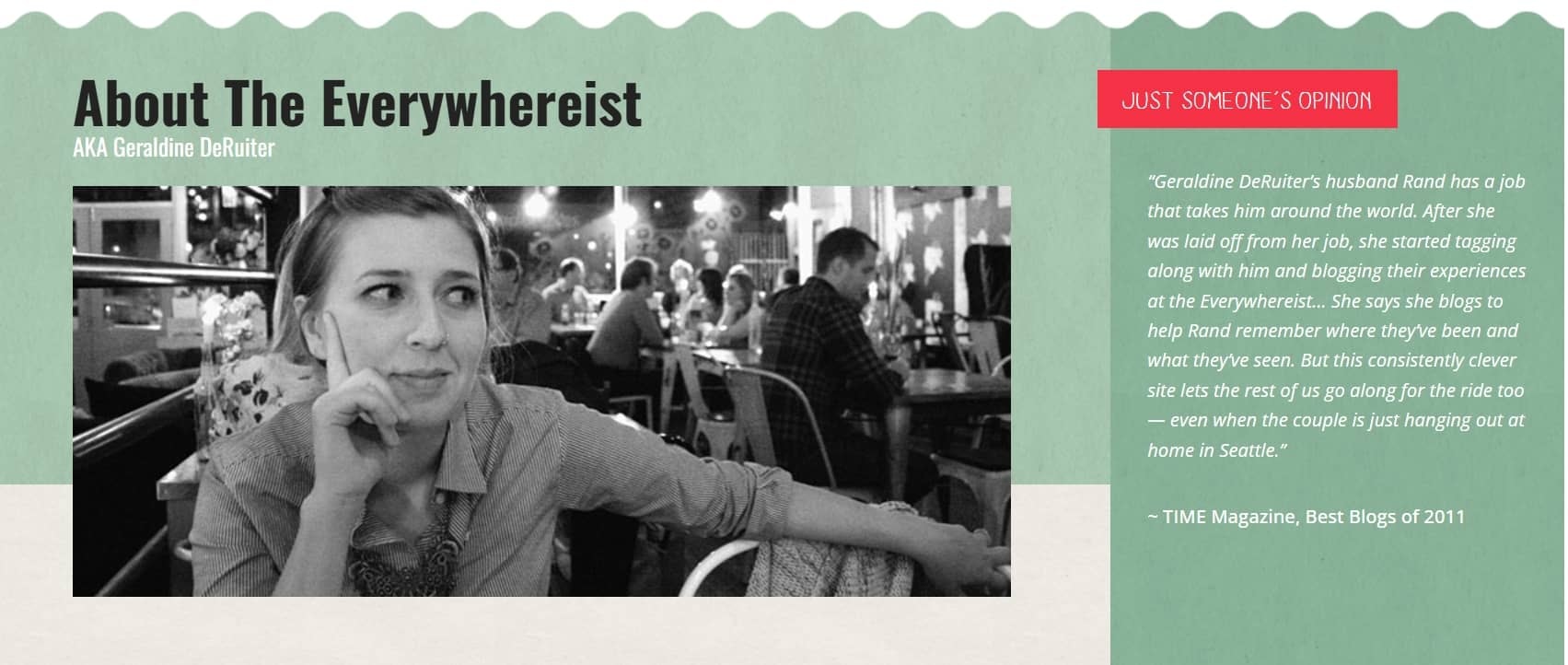
About page
People don’t hire work. They hire people. This is where you show your story and personality.
Here’s what you should include:
- Background and experience
- Your design process or creative approach
- The type of services or projects you work on
This page helps visitors get to know you and see the creative thinking behind your work.
Contact page
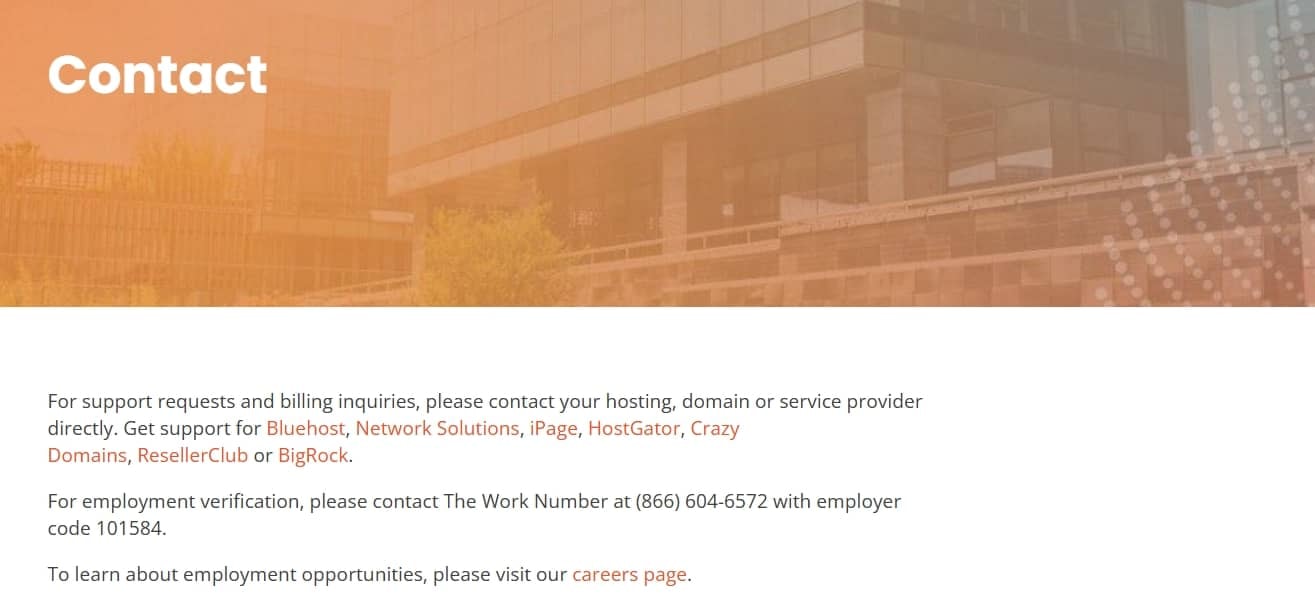
If someone likes your work, they shouldn’t have to search for how to reach you.
So, make it easy with:
- Contact form and email tied to your custom domain name
- Social or portfolio links
- Options to book appointments if you offer client work
Keep this page simple and easy to use.
Testimonials page
This is where others help tell your story.
Here’s what helps this page do its job:
- Client quotes or feedback
- Results or outcomes from projects
- Context about the work
With strong testimonials, your portfolio shows real results, not just promises.

Blog page
A blog gives people a look at how you approach your work. It also helps your web visibility.
If you’re wondering what to write about, try these first:
- Industry insights or tips
- Project breakdowns
- Updates on digital products, launches, or an online store if you have one
If you ever get stuck on what to post next, it helps to look at how strong websites structure and write their content.
Step 5: Optimize for performance, SEO, and mobile
A good portfolio should open fast, be searchable on Google, and work across mobile, tablet, and desktop. This helps you show up ready when real clients or hiring managers check your work.
Here’s what you’ll focus on:
- SEO basics (keywords, metadata, alt text)
- Mobile responsiveness
- Site speed and performance
SEO for portfolio websites
SEO helps your business appear when people search for your services or expertise. You can begin with a few simple updates across your pages.
These are good places to begin:
- Clear page titles and descriptions
- Natural keywords related to your expertise
- Alt text for images so search engines understand them
- Clean structure and working links
SEO tools can help, but simple basics already make a big difference.
Mobile design best practices
If someone finds your portfolio website on their phone and it’s hard to use, they’re not going to fight with it.
So, make sure:
- The text is easy to read.
- Buttons are easy to tap.
- Navigation works across multiple pages or even a one-page layout.
- Key details like contact info are easy to find.
If you’re using a builder or portfolio templates, most of this is already handled. Just double-check and tweak where needed.
Site speed and performance
If your website takes too long to load, most people won’t stick around to see what you’ve built. Speed plays a big role in how professional your site appears.
Here are a few practical ways to improve it:
- Compressing images
- Using reliable hosting
- Limiting heavy animations
- Keeping files lightweight (like optimized HTML file structures)
Once your site runs smoothly, you remove a big reason people click away and give them more time to explore what you offer.
Step 6: Use feedback and data to improve UX
Small UX improvements can make your site feel more professional and easier to navigate, especially if you’re up against other creatives like a graphic designer using similar portfolio website template layouts.
Here are the areas where you should put your energy:
- Get real people to test your site: Ask friends, peers, or past clients to browse around. Watch how they move through your pages, how quickly they load, and where they pause or get confused.
- Try different versions of the same page: Compare two versions of the same page on how they perform. Test different CTAs, layouts, or hero sections to see which best encourages engagement. You can see how this plays out step by step in our piece on A/B testing.
- Use data tools to understand behavior: Analytics and heatmaps show where visitors click, scroll, or leave. This helps you improve layout, content placement, and key features. Tools that can help you analyze data include:
- Hotjar: Studies behavior analytics to examine how visitors interact with your website
- Google Analytics UX Report: Like Hotjar, it can analyze visitor behavior to help you optimize site design to better engage your audience
- Cut out anything that slows people down: Keep menus simple, stick to a consistent style, and make it obvious what to do next, whether you run a portfolio, an online store, or a one-page site.
Step 7: Launch, test, and promote your portfolio
Time to publish, test everything, and get it in front of the right people. But launching isn’t where things wrap up. It’s when your online presence starts doing real work for your business and career.
So, before you go live, you need to run this quick checklist:
- Test all forms, buttons, and key features.
- Check all internal and external links.
- Review your site on mobile and desktop.
- Make sure images and pages load fast.
- Proofread text and confirm branding and style are consistent.
Once you publish, here are a few simple ways to promote your site:
- Share your portfolio on LinkedIn, Behance, and social profiles.
- Add it to your email signature.
- Share new projects or new content regularly.
- Submit your site to Google and keep your profile up to date.
Then, start with simple promotion channels like these:
- Email updates to contacts or leads
- Social posts showing your skills or recent work
- Local networking or community groups
You can also use SEO or marketing tools to track traffic and see how people find your site online.
But think of your portfolio as a living project. As you create new work, update your site as well. Keep in mind that a strong, creative portfolio with fresh work serves as a better example of who you are now and what you can do.
Frequently asked questions
If you want to know how to create a free portfolio website, start with a free website builder that includes basic hosting. From there, pick a template, add your work, and publish your site using built-in tools. You can always upgrade later by adding more features, connecting a custom domain name, or expanding your portfolio website as you grow your creative work.
A portfolio usually looks like a clean, organized portfolio website with a homepage that highlights your top projects, an about section, and contact info. It often has a custom domain name and uses a layout that makes it easy for visitors to see your work and understand what you do.
A good portfolio shows your best, most relevant work with concise descriptions that highlight what you did and the results you got. It should be easy to navigate, visually polished, and tailored to the type of projects or clients you want to attract.
You don’t! Even if companies ask for your portfolio, they typically want a link instead. It’s much easier for them to review, and they can quickly check your social media to see if your values align with theirs. If you’d prefer to hand out something tangible, simply print the link to your online portfolio on your business card.
Think of your portfolio as an upgraded resume. It covers the basics like your name, contact info, and professional background, but it also shows what you bring to the table. This could include examples of your work, your professional vision, and, when possible, testimonials from clients or employers.
It depends on how much you want to include, but typically, it takes about 1 to 5 weeks. Don’t rush it. Take your time to fully explore the design process. If you’re starting small, keep it simple and add more as you go.
Not at all! Our website builder makes it easy to create your portfolio without any coding experience. Plus, there are plenty of tools, plugins, and resources to help you customize it to match your style.
Yes, you can and should! Blogs are a great way to share your voice and keep things fresh. Even if your site is visually focused, a blog can give clients something to connect with. And on that note, additional pages are always welcome as long as they add value to your portfolio.
Use tools to track your portfolio’s performance and update your content regularly. Make sure your site is fast, easy to navigate, and free of malware. Regular maintenance will help keep your portfolio in top shape and appealing to potential clients or employers.
Share it! Your portfolio is meant to be flaunted. A single link is all you need. Plus, social media can help you reach a bigger audience with the right algorithms and ads.
It really depends on how often you’re able to create consistently. As a general rule, try to share something new every 1-2 weeks. But remember, portfolios aren’t like traditional websites, so don’t feel pressured to constantly add content. It’s a nice bonus, but potential clients are there to see your work unless, of course, you’re in the writing niche.
Let your portfolio site do the talking
Don’t wait for your portfolio website to be perfect before launching it. Just be sure to grab a strong domain that’s built on a reliable hosting, then pick a Website Builder with ready-made templates. From there, you can create, showcase, and publish your work without overthinking. Once you get the hang of how to create a website portfolio, we back you up with web design support, marketing tools, and features you can use as you take on bigger projects.
Registering a domain with us also unlocks free apps that support day-to-day site tasks. You can use Link in Bio, Coming Soon Page, Customers App, Social App, and a Marketing Calendar to share updates, plan content, and keep your site moving as your work grows.