Key takeaways
- Scaling your eBay business strategically is key for growth and sustainability.
- Building a strong reputation on eBay is important for long-term success.
- Managing returns and disputes is important for maintaining a positive seller rating and protecting your business.
Selling on eBay has been part of online commerce since 1995. Today, the platform connects millions of buyers and sellers worldwide with around 134 active million users worldwide and 2.4 billion listings, making it a well-established option for individuals and small businesses looking to sell products online.
That reach can create opportunity—but it can also feel overwhelming if you’re unsure how the process works or where to focus first.
Usually, selling on eBay involves setting up a seller account, creating listings with clear photos and descriptions, choosing pricing formats like auctions or Buy It Now, managing shipping and payments through the platform, and providing reliable customer service.
Success typically comes from learning these steps, building buyer trust, and improving listings over time—not from rushing to quick results. This guide walks through each part of the process so you can move forward with clarity and confidence.
How to start selling on eBay
Getting started on eBay works best when you follow the setup process in order. Each step builds on the previous one, helping ensure your account, listings, and payments are properly connected. Breaking the process into steps can make selling on eBay feel more manageable, especially if you’re just getting started.
- Create your eBay seller account
- Choose the right selling plan
- Verify your identity and banking details
- List your products on eBay
- Set your pricing and shipping options
- Choose your payment method
Step 1: Create your eBay seller account
Getting started on eBay is smoother when you follow the setup process in order. Each step builds on the previous one, helping ensure your account, listings, and payments are properly connected. Breaking the process into steps can make selling on eBay feel more manageable—especially if you’re just getting started.
Register for an eBay account
To create an account, you’ll need to do the following:
- Go to eBay’s registration page.
- Enter your name and email address.
- Choose a password and make sure it’s a strong password.
- Select Create account. (When you create an account, you agree to accept the terms of eBay’s User Agreement and User Privacy Notice.)
- Enter your contact address and telephone number.
For other ways to create an eBay account, you can explore the following options:
Step 2: Choose the right selling plan
eBay offers different selling accounts, which can be either for personal or business use. They differ in the number of monthly listings you can create, along with the fees for each listing.
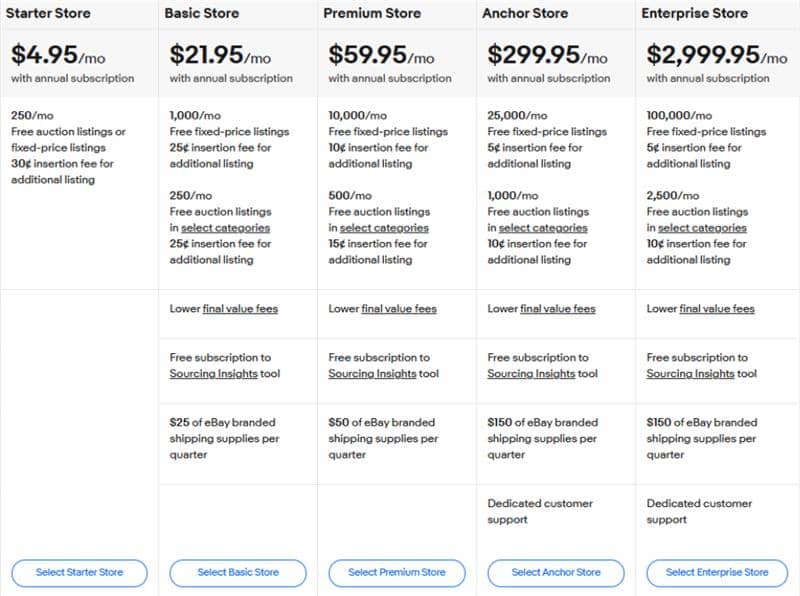
Note: Pricing is current at the time of writing but can change without prior notice.
Step 3: Verify your identity and banking details
To ensure security within the marketplace, eBay will prompt you to verify your identity and confirm your email address and phone number. As an individual seller, you need to provide your full name, address, date of birth, and social security number.
Afterward, you’ll be asked to verify your bank account. To do so, you’ll be asked to provide the name on the checking account, bank name, routing number, and account number.
Step 4: List your products on eBay
Once you’ve set up your eBay seller account, you can start listing your products for your eBay store. This step is where buyers decide whether a listing is relevant and trustworthy. Clear information helps shoppers quickly understand what you’re selling and what to expect if they purchase.
You’ll need to create product listings with clear titles, choose relevant categories, and upload high-quality images. You’ll also need to write catchy product descriptions highlighting your products’ key features and benefits.
To effectively list your products, it’s important to accompany your items with detailed descriptions. Take note of the following points when doing so.
- Start by choosing an appropriate category so buyers can easily find your product on eBay. Next, create a clear title that accurately describes what you’re selling.
- Clearly describe the product’s condition, features, and benefits directly. Be transparent in your descriptions and avoid technical terms that will confuse potential buyers.
- Include high-quality images to show your product from different angles, showcasing its main features.
Consider also using eBay’s listing tools for product descriptions, such as using videos or templates to increase your items’ visibility in eBay search results. For more information, explore eBay’s article on adding pictures to your listings.
Step 5: Set your pricing and shipping options
Setting competitive prices helps you attract buyers. Make sure you’re selling affordably to tap your profit potential. To do this, research similar products to understand the market value. Consider the item’s condition, rarity, and demand to determine the right price.
When selling your items, you have two options: go fixed-price or auction-style. Fixed-price listings let buyers purchase right away at a set price, while auction-style listings let buyers bid on your items for a final price.
When it comes to getting your orders to their buyers, it’s important to know how shipping works. It allows you to manage your expenses effectively to maintain the profitability of your eBay store.
Consider factors such as shipping costs, delivery times, and package sizes. You can choose from eBay’s various shipping options for domestic and international shipping, such as eBay Guaranteed Delivery and Global Shipping Program (GPS)/ eBay International Shipping (EIS), depending on shipping origin and destination.
With eBay Guaranteed Delivery, you can offer buyers guaranteed delivery dates; if not, you’ll compensate them for the inconvenience. What matters is that you offer options to increase buyer interest and encourage them to choose your listings.
Who pays for shipping on eBay?
In most eBay transactions, the buyer pays for the shipping. The cost can be set as a fixed amount or calculated based on the buyer’s location. On the other hand, sellers can also choose to offer free shipping, which is also used as a strategy to attract more buyers. Here, the seller handles the shipping cost.
Tips for managing shipping costs effectively:
- Choose the right shipping carrier: Compare rates from different shipping options to find the most affordable option for your items. Consider factors like delivery speed, reliability, and geographic coverage.
- Utilize eBay’s shipping discounts: eBay offers discounted shipping rates with certain carriers. Take advantage of these discounts to reduce costs.
- Go for bulk shipping supplies: Purchase shipping materials like boxes, envelopes, and labels in bulk to save money in the long run.
- Accurately weigh and measure packages: Avoid extra charges by ensuring your package dimensions and weight are accurate.
- Offer combined shipping: For buyers purchasing multiple items, combined shipping can be more affordable. It’s also an attractive option for your customers.
- Factor shipping into pricing: If you’re offering free shipping, consider the shipping cost in your item’s price to maintain profitability.
- Use eBay’s Global Shipping Program for international orders: The GSP program or currently the eBay International Shipping simplifies the process of shipping internationally by dealing with customs and import charges.
Note: The U.S. fully moved from the Global Shipping Program (GSP) to eBay International Shipping (EIS) in 2023. Other regions still use GSP or regional versions because the transition hasn’t happened globally. When the change applies to your account, eBay switches it automatically—no re-enrollment or listing updates required.
Step 6. Choose your payment method
After setting your pricing and shipping options, you have to set up your payment methods. All eBay sellers are now required to use eBay’s managed payments system, which handles the entire payment process in-house. This system allows buyers to pay using a variety of methods, including credit/debit cards (Visa, Mastercard, American Express, Discover), Apple Pay, Google Pay, and even PayPal.
eBay processes the transaction and deposits the funds directly into the seller’s linked bank account or Payoneer account. This process consolidates all fees, reports, and customer support, and allows sellers to choose their own payout schedule (daily, weekly, etc.).
You should also consider factors such as fees, transaction times, and ease of use. After all, you’ll want to select the most convenient payment method for you and your buyers.
How to optimize your eBay listings
Optimizing your eBay listings helps buyers find your products and understand key details quickly. Clear titles, accurate descriptions, and complete listing information make it easier for shoppers to decide whether a product is right for them and help your listings appear in relevant searches.
The sections below explain how to improve visibility and clarity using keywords, listing details, and eBay’s built-in tools.
Create SEO-friendly listings
Optimizing your eBay listings helps buyers find products that match what they’re looking for and understand key details quickly. Clear titles, accurate descriptions, and relevant keywords make it easier for shoppers to recognize whether a listing fits their needs.
To optimize your listings for search, do the following:
- Start by identifying relevant keywords that buyers might use to find your products.
- Then, incorporate these keywords naturally into your product titles and descriptions so information is easy to scan and understand.
- To increase visibility, use eBay’s listing tools, such as the Promoted Listing feature.
Focusing on clarity and relevance helps your listings appear in appropriate searches while building buyer confidence.
Use eBay’s built-in tools for visibility
eBay’s built-in features are designed to help sellers improve visibility while keeping listings organized and consistent. These tools can make it easier for buyers to discover your products and for you to manage performance over time.
Some of them include the following:
- eBay’s promoted listings: This tool can increase your product’s visibility in search results by displaying listings more prominently. With Promoted Listings, you can pay to boost exposure for specific items.
- Seller Hub: Seller Hub brings together your listings, tracks performance, and provides access to promotional features. It also helps with renewing listings and offering discounts to buyers.
Additionally, eBay offers optional upgrades that can enhance visibility and presentation, such as subtitles or gallery images that allow you to show multiple product photos.
What are the costs to consider when selling on eBay?
Selling on eBay comes with a few standard fees that affect how much you earn from each sale. Understanding listing fees, final value fees, and payment processing costs upfront can help you price items accurately and avoid surprises as your sales activity grows.
Listing fees
Listing fees, or insertion fees, are charged when you create a new listing on eBay. These fees can vary depending on the type of listing, the category of the item, and any optional listing upgrades you choose.
If you’re a casual seller planning to list fewer than 250 items per month, you can start with a personal account. If you exceed this number, you will be charged a fee per listing ($0.35), so staying under this threshold is a good strategy for you.
Take note that this listing or insertion fee is dependent on the category your products belong to.
For complete information on eBay’s selling fees, refer to their Selling fees page.
However, if you sell a high volume of items, have a large inventory, or need to build a long-term business on eBay, then you might need to upgrade to a business account. Note that reverting to a personal account once you’ve upgraded to a business account is not possible.
Note: Price per listing is current at the time of writing but can change without prior notice.
Final value fees
Final value fees are charged when your item sells. These fees are typically a percentage of the total sale amount (including the item price, shipping costs, and any other applicable fees). Please see eBay’s final value for full information.
Payment processing fees
If you use eBay’s managed payments system to process payments, you’ll also incur payment processing fees. These fees are typically a percentage of the transaction amount plus a per-transaction fee.
Pros of selling on eBay in 2026
Selling on eBay offers a lot of advantages, especially for small businesses that are looking to expand their reach and capabilities. Enjoy these benefits once you start selling on eBay:
- Global reach: eBay connects you to an international customer base. This allows you to reach beyond your local market and tap into global demand.
- Diverse customer base: The platform caters to a wide variety of consumer interests. This makes it an ideal marketplace for niche products as well as mainstream ones.
- Seller tools and analytics: eBay provides you with robust tools and detailed analytics that help you understand your customers’ behavior, manage inventory, and optimize your sales strategies.
- Flexible selling options: This platform offers different selling formats, such as auctions and fixed-price listings, giving you the flexibility to choose the best approach for your products.
- Brand building opportunity: eBay allows you to create customized storefronts, helping you in brand development and fostering customer loyalty.
- Ease of use: The user-friendly interface and streamlined processes make it simple for new sellers to get started and manage their online business.
- Community and support: eBay has a large community of sellers and a comprehensive support system, offering guidance and resources for both new and experienced sellers.
- Payment security: The platform ensures secure transactions. It also offers protection policies for you against fraud and non-payment.
Cons of selling on eBay in 2026
To navigate the platform successfully and maximize your profits, you must understand the potential challenges of selling on eBay. Take a look at these drawbacks you may face when selling on this platform:
- Competitive marketplace: eBay is a well-known online marketplace, which means there’s a lot of competition. This can also lead to lower profit margins, especially in popular categories.
- Fee structure: eBay charges various selling fees, including listing and final value fees. These costs can add up and significantly impact your earnings.
- Complexity in shipping: Managing shipping, especially for international sales, can be complex and costly. It’s important to consider these when pricing your items.
- Dependence on eBay’s algorithm: Visibility on eBay often depends on the platform’s search algorithm, which can change and affect your listing’s performance.
- Customer disputes and returns: Handling disputes and returns can be challenging. This is especially true when eBay’s policies often favor buyers.
- Brand limitations: While eBay allows you to have some level of branding, it’s nothing compared to running your e-commerce site.
- Price wars: With many competing sellers, there’s often a race to the bottom in terms of pricing. This can further squeeze profit margins.
What’s the secret to successful eBay selling?
Successful eBay selling is built over time through consistent practices and positive buyer experiences, not quick tricks or shortcuts. Sellers who focus on reliability, communication, and follow-through tend to build stronger trust and more sustainable results.
The strategies below focus on habits that support long-term success:
- Managing customer feedback
- Handling returns and disputes
- Maintaining excellent customer service
Manage customer feedback and build positive reviews
Positive customer feedback and reviews are important to building trust and credibility on eBay. Respond promptly to customer inquiries, resolve issues right away, and build rapport to earn positive reviews from your buyers. Moreover, be a step ahead when communicating and providing updates, especially about issues.
Handle returns and disputes properly
When selling online, you’ll encounter returns and disputes at some point. Here, having a clear return policy and handling disputes can help you keep a positive seller rating and protect your business from negative feedback.
Clearly state your return policy in your listings and handle return requests promptly and professionally. If a buyer is dissatisfied with their purchase, resolve the issue respectfully. If a dispute arises, respond to it promptly and provide any necessary information or documentation to eBay.
Maintain excellent customer service to drive repeat sales
To provide excellent customer service, make sure to put your customers first. Listen to their concerns, especially in times of issues. Anticipate their needs, and make sure you never leave them hanging when they need assistance when purchasing or in other situations.
Frequently asked questions
Downsides include seller fees, high competition, and limited control over platform policies.
eBay typically takes around 10–15% of the total sale, including the item price and shipping.
In the U.S., payment platforms must report $600 or more in annual sales to the IRS for tax purposes.
Beginners start by creating an account, listing items with clear photos and descriptions, and managing payments through eBay.
No, its not entirely free. While you get a certain number of “zero insertion fee” listings each month (250 for casual sellers), eBay charges a Final Value Fee once your item sells. This fee is a percentage of the total sale price, including the item, shipping, and sales tax.
To minimize costs, focus on these:
Don’t go beyond your free listing limits. Use your monthly allowance of zero insertion fee listings to avoid upfront charges.
Offer a lower-cost shipping option. Use the most affordable shipping service that still provides tracking, such as USPS First-Class Mail for small, light items. You can also save on shipping costs by printing your labels directly through eBay, which often provides a discount.
You must weigh the benefits and challenges of each platform when choosing between selling on eBay and through your own online store. While eBay provides a vast marketplace and built-in audience, having your own website offers a different set of advantages (even better). These include better brand control, improved customer relationships, and higher profit margins.
While it’s impossible to avoid all eBay fees, you can minimize costs by understanding eBay’s fee structure and choosing the right listing format and shipping options. Listing fewer than 250 items per month can also help you avoid certain fees.
Yes, eBay allows you to sell internationally, expanding your reach to a global audience. eBay’s Global Shipping Program (GSP) or eBay International Shipping (IES) can help simplify international shipping by handling the logistics and customs paperwork for you.
The best shipping options for eBay sellers vary based on several factors, such as the size and weight of the item, the buyer’s location, and the seller’s preferences. eBay provides a variety of shipping choices, including both domestic and international shipping, along with programs like eBay Guaranteed Delivery and the Global Shipping Program/eBay International Shipping.
Scale your eBay listings with Network Solutions
Selling on eBay often begins with a few listings and grows through experience. Many sellers test products, refine listings, and adjust pricing or shipping as they learn what resonates with buyers.
As your business evolves, you may choose to expand beyond eBay by creating a simple e-commerce store or improving online visibility through business directories. Network Solution can be the perfect partner supporting your eBay selling breakthrough.
There’s no single path or timeline for success. Selling on eBay is a gradual process that adapts over time, and having flexible options can help support each stage as your business grows. Start small and build your confidence over time.
Find the perfect domain
Ready to register a domain name? Check domain availability and get started with Network Solutions today.