
Key takeaways:
- Online scheduling allows customers to book, reschedule, or cancel appointments without manual coordination with staff.
- Online scheduling reduces administrative work and frees up staff time for higher-value tasks.
- Customers benefit from faster booking and greater control over their schedules, which increases their satisfaction.
Juggling appointments, calls, and schedules can easily overwhelm your team. If you’re still using an old-fashioned scheduling system, you could be leaving money on the table. Think of the missed bookings, inefficient use of staff time, and frustrated customers, all of which you can avoid by using a proper online booking system.
The benefits of an online scheduling system can go beyond increasing your workplace efficiency. Online scheduling is an investment that pays off. It could free up your time and improve the experience for your clients.
Let’s explore why now is the perfect time to make the switch and evolve your process.
How online scheduling tools work
Online scheduling tools automate the entire appointment process, allowing customers to book, update, or cancel appointments without needing to call your business. Instead of juggling back-and-forth messages with your staff, the system guides your customers through a simple process that updates your calendar in real-time.
While each platform may differ slightly, most follow the same core procedure:
- Access the platform: The scheduling process begins when customers access your online scheduling system through your website or mobile app.
- Select an appointment time: Customers can view available time slots on the platform. The system displays real-time availability based on your calendar, making it easier for them to select the time that works best for them.
- Enter appointment details: The system prompts customers to provide necessary details such as their name, contact information, and reason for the appointment. Some systems allow customers to select specific options, like the type of meeting room or the name of a stylist.
- Confirm the appointment: The system displays a summary of the appointment, allowing the customer to review their choices after selecting their preferred time slot. Once complete, the tool sends an automated email or SMS to both you and your customer. The system will send another reminder at least a day before the appointment to keep everyone updated.
- Rescheduling or cancellation: If the customer needs to make changes to their appointment, they can reschedule or cancel it directly through the system without needing to call or email.
What are the key features of online appointment scheduling software?
Online appointment scheduling software comes with a set of features that help businesses manage bookings more efficiently. These tools offer real-time availability and calendar syncing, customizable booking forms for collecting the right details, and automated reminders that reduce missed appointments.
Many tools also enable customers to manage their own bookings and offer multi-language support to make the system accessible to a broader audience. Some also integrate with other tools you already use, keeping your workflows connected and organized.
Below are the core features you can expect from a modern online scheduling system:
- Real-time availability and syncing
- Customizable booking forms and recurring appointments
- Automated appointment reminders
- Customer self-service options
- Multi-language support and multiple locations
- Integration with other tools
Real-time availability and syncing
Real-time availability and syncing keep your calendar accurate at all times. When a customer books an appointment, the slot is instantly removed from your availability, so no one else can book it. This prevents conflicts that can confuse your team and hurt the customer experience.
Customizable booking forms and recurring appointments
Customizable booking forms let you capture the exact information you need from each customer, particularly for those with special instructions. The more relevant details you gather, the easier it is for your staff to deliver a personalized experience that feels thoughtful and well-prepared.
Many tools also support recurring appointments, making it easier for long-term clients to secure repeated visits without having to start from scratch each time.
Automated appointment reminders
Automated reminders help reduce no-shows by notifying customers of upcoming appointments through email or SMS. These reminders are sent automatically based on your settings, so your team doesn’t need to follow up manually. This feature provides customers with ample time to prepare, confirm, or reschedule as needed.
Customer self-service options
Self-service features allow customers to book, update, or cancel appointments independently. This reduces the need for phone calls and messages, while giving customers more control over their schedules. It also ensures customers can interact with your business 24/7, even outside office hours.
Multi-language support and multiple locations
Multi-language options make your scheduling tool accessible to a broader audience. It helps customers navigate the booking process in the language they’re most comfortable with. If your business operates across multiple locations, the system can display different branches, staff members, or services to guide customers to the correct location.
Integration with other tools
Many scheduling platforms connect with tools you already use, such as CRM systems, email platforms, payment processors, or website builders. These integrations help centralize your data, automate routine tasks, and streamline your workflow across business operations.
What are the benefits of online appointment scheduling for customers?
Online appointment scheduling offers customers a faster and more convenient way to schedule their visits. They’re no longer tied to scheduling appointments during business hours.
It also removes many of the common frustrations they encounter—unclear availability, delayed confirmations, missed calls, or the need to chase updates.
These benefits and the relief from these frustrations ultimately shape a better experience for customers:
- 24/7 convenience and accessibility
- Instant confirmation and reminders
- No waiting or phone calls
- Greater control over appointments
Customers value the 24/7 convenience and accessibility
Customers can book appointments at any time, even when your business is closed or your team is unavailable. They appreciate it when you respect their time and give them the freedom to schedule on their own terms. For many people, the ability to make decisions outside a traditional 9-to-5 window is a major relief. And it matters for your business too.
In many industries, 40% of online bookings occur after business hours. You can capitalize on the convenience customers expect today and turn missed opportunities into locked-in bookings.
Customers benefit from instant confirmations and helpful reminders
Online scheduling tools confirm appointments immediately. Customers receive instant reassurance that their appointment is secured. Automated reminders also help them stay informed about their visits, making it easier to remember and reducing no-shows.
Customers appreciate booking without waiting or making phone calls
Customers no longer need to wait on hold, repeat details multiple times, or communicate back and forth with the staff. Booking online takes seconds, and the system collects all the necessary information.
This level of convenience reduces friction, providing customers with a more modern and streamlined experience. It also frees up valuable time for your team, as they can now focus on serving customers rather than taking calls and manually managing schedules.
Customers welcome greater control over their appointments
Self-service tools are becoming increasingly valuable as consumers seek convenience, speed, and greater control over their purchasing experience. Gartner’s findings reflect the same trend, noting that Gen Z and millennials show a strong preference for self-service systems.
Being able to manage appointments on their end without having to call puts customers fully in control of their schedule. This level of autonomy increases satisfaction and reduces the stress of managing appointments.
What are the benefits of online appointment scheduling for businesses?
Online appointment scheduling helps businesses save time, reduce administrative work, and create a more organized booking process that fuels growth. When customers can book and manage appointments on their own, your team spends less time coordinating schedules and more time serving clients.
This shift not only enhances your operational efficiency but also unlocks opportunities for higher revenue, improved resource allocation, and a more consistent customer experience. In addition, online scheduling:
- Improves customer experience
- Saves time and resources
- Reduces missed appointments and no-shows
- Improves organization and efficiency
- Enhanced billing and payment process
- Increases revenue potential
- Seamless integration with existing systems
- Prioritized care for urgent cases
Improves customer experience
Offering 24/7 access to customers for booking, rescheduling, or canceling appointments at their convenience improves their experience from the start. No more waiting during business hours or dealing with busy phone lines.
It provides them with a seamless, self-service process that feels modern and reliable, which naturally enhances customer satisfaction.
And when the experience is consistently smooth, customers are far more likely to return. Many businesses that prioritize customer experience see a noticeable lift in long-term revenue.
Saves time and resources
Automating the scheduling process frees up time that would otherwise be spent on manual appointment management. With automated reminders, confirmations, and cancellations, you can focus on more important tasks while reducing the need for administrative work.
Reduces missed appointments and last-minute gaps
Automated reminders help customers stay informed about their upcoming appointments, minimizing missed visits and last-minute cancellations. A more predictable schedule means fewer revenue gaps and a steadier flow of clients throughout the week.
For businesses with high appointment volumes, consistent attendance can significantly impact monthly revenue.
Improves organization and efficiency
A centralized scheduling system gives your team full visibility into upcoming appointments, staff assignments, and service durations. This level of clarity facilitates smooth operations. With everything stored in one place, you’re less likely to double-book, overlook details, or miscommunicate with customers.
Enhanced billing and payment process
Many online scheduling tools offer integrated payment options, enabling customers to prepay, leave deposits, or complete transactions during the booking process. This speeds up the checkout process and helps your business maintain a steady cash flow. It also simplifies record-keeping by automatically syncing payments with your appointments.
Increases revenue potential
With online scheduling, you can effectively manage your time and capacity, resulting in more booking opportunities, reduced downtime, and ultimately, increased revenue. It also allows you to upsell services by adding them as options to the booking process.
Seamless integration with existing systems
Online scheduling systems can integrate with existing tools, such as calendars, CRM software, and email marketing platforms. This means all your data is synchronized across platforms, giving you a more unified experience, eliminating redundancies, and streamlining your workflow.
Prioritized care for urgent cases
For industries like healthcare, scheduling tools can help identify urgent requests and assign them to the earliest appropriate time slot. This ensures high-priority patients receive timely attention.
It also allows your team to allocate resources more strategically and prevent operational bottlenecks. By streamlining this triage process, healthcare providers can improve patient satisfaction while creating a more efficient workflow that supports better overall resource management.
What is an online appointment scheduling tool?
An online appointment scheduling tool is software that automates the booking process. It gives customers the autonomy to schedule, cancel, or reschedule appointments at any time. It replaces manual coordination with a simple, self-service experience that works 24/7.
These tools streamline scheduling by offering customizable booking pages, real-time calendar syncing, automated notifications, and integrated online payment options. Together, these features simplify appointment management for both customers and staff, keeping schedules organized and up to date.
Online scheduling tools are widely used in the hospitality and service-based industries for handling bookings and appointments, but their applications extend far beyond these areas.
They support workforce scheduling, client consultations, healthcare visits, fitness sessions, and many other scenarios where managing time and availability is essential. Overall, they help businesses improve customer experience, boost productivity, and increase efficiency throughout the scheduling process.
What industries benefit from online appointment scheduling?
Online appointment scheduling is widely used across various industries because it streamlines how businesses manage time, staff, and customer demand. Any organization that relies on appointments, reservations, consultations, or scheduled services can benefit from a digital scheduling tool. Here’s how these systems support different industries.
Healthcare providers
Healthcare practitioners use online scheduling to manage patient flow more efficiently. These tools help clinics manage multiple healthcare providers, appointment types, and treatment rooms, while providing patients with quick intervention. Automated reminders from patient scheduling software also reduce waiting room congestion and contribute to improved patient satisfaction.
Service businesses
Salons, spas, and other service-based businesses depend on efficient scheduling to keep their day running smoothly. Online tools display real-time availability, prevent double bookings, and help match clients with the right staff member or service. This improves staff utilization and reduces unexpected gaps in the schedule, ultimately supporting higher daily revenue.
Fitness and wellness centers
Gyms, yoga studios, and personal trainers use scheduling platforms to manage class registrations, private sessions, and recurring appointments. These systems handle capacity limitations, track attendance, and organize instructor schedules. This helps businesses plan ahead and ensure consistent participation across classes.
Professional services
Professionals who rely on consultations and meetings benefit from automated scheduling because it minimizes time spent sorting out availability. Appointment tools reduce the risk of conflicts and keep consultations organized, easing the administrative burden that typically comes with managing a busy calendar. This allows professionals to focus more on client work and less on routine administrative tasks.
Real estate
Real estate agents can use scheduling tools to manage property tours and client consultations. Automated booking enables clients to select times that align with the agent’s availability. This speeds up the scheduling process and helps agents manage multiple listings more efficiently.
Educational organizations
Schools, universities, and training centers can utilize appointment scheduling systems to efficiently organize and schedule teaching sessions, interviews, counseling sessions, and institutional events. These tools keep staff availability transparent and help institutions manage high-volume scheduling during busy academic periods.
Venture capitalists
Investors and VC firms often manage back-to-back meetings with founders, portfolio companies, and partners. Online scheduling tools simplify this process by automating meeting slots, setting boundaries around availability, and reducing the administrative effort required for coordinating pitches. This ensures a more predictable workflow, minimizing scheduling conflicts.
What are the steps for a successful transition from manual to online scheduling?
A successful transition from manual to online scheduling involves preparing your team, informing your customers, and making gradual adjustments as you shift to the new system.
The process typically includes testing the tool with a small group, training staff, clearly communicating changes, monitoring early performance, and providing ongoing support. Taking these steps helps your business adopt the new system smoothly and ensures that everyone feels confident using it.
The following actions guide your team and customers through the transition, helping the new scheduling system fit naturally into your daily operations:
- Start with a test run: You can gradually introduce the system to your clients until they’re comfortable with the new booking process. Test the new system with a small group of appointments first to get a feel for the tool and troubleshoot any issues before the full transition.
- Train your team: Even the most intuitive tools have a learning curve, especially if your team is accustomed to manual scheduling methods. Training your staff will empower them to use the system and eliminate unnecessary tasks.
- Communicate the change to your customers: Customers may be concerned about a sudden change in appointment management. Inform your customers about the upcoming changes. Send emails or post an announcement on your website to inform your audience about the transition. Make it clear that the new system will save them time and make booking easier. Offering a simple “how-to” guide for your clients can also smooth their transition.
- Monitor and adjust the process: The initial transition period will give you a sense of how the tool works in your business environment. But ongoing monitoring helps you identify areas for improvement and optimize your appointment scheduling processes in the long term.
- Provide ongoing support: Even after the transition, offer support for your customers and team in case of difficulties. Provide quick help via email, phone, or through FAQs to address any questions that may arise.
What are the best practices for online scheduling?
Best practices for online scheduling include maintaining accurate availability, offering flexible time slots, giving customers control over their bookings, providing instant confirmations, and being responsive to their needs.
Following these guidelines helps you maintain an efficient scheduling system, creating a smoother experience for your customers.
- Calendar management
- Time slots
- Customer control
- Instant confirmation
- Responsiveness
Calendar management
Keep your calendar updated to ensure customers only book times that truly work for both sides. Accurate availability prevents conflicts, avoids double-bookings, and helps you maintain a predictable schedule.
Time slots
Offer multiple time slots to support customers with different schedules or time zones. The more flexibility you build into your calendar, the easier it becomes for people to find an appointment time that fits their day.
Customer control
Make it simple for customers to reschedule or cancel appointments without needing to contact your business directly. Self-service options reduce administrative workload and give customers more confidence in managing their own appointments.
Instant confirmation
Give customers immediate confirmation of their appointments and easy access to their booking details. Instant updates help them feel secure about their reservation and reduce the likelihood of confusion or missed visits.
Responsiveness
Stay responsive to customer needs by addressing inquiries promptly, resolving issues quickly, and ensuring someone is available to assist when necessary. A quick, friendly response reinforces trust and strengthens the overall booking experience.
How to use Network Solutions’ appointment scheduling tool
If you want to use appointment scheduling with your website, the feature is available as part of our Website + Marketing and E-commerce packages. These plans include a built-in appointment scheduler, making them the best choice if you’re looking for a website builder that already supports online booking.
If you’re currently on the Website basic plan, you can upgrade to a higher package that includes the scheduling function by following the steps below:
1. Log in to your Network Solutions account: Go to networksolutions.com and sign in to your account.
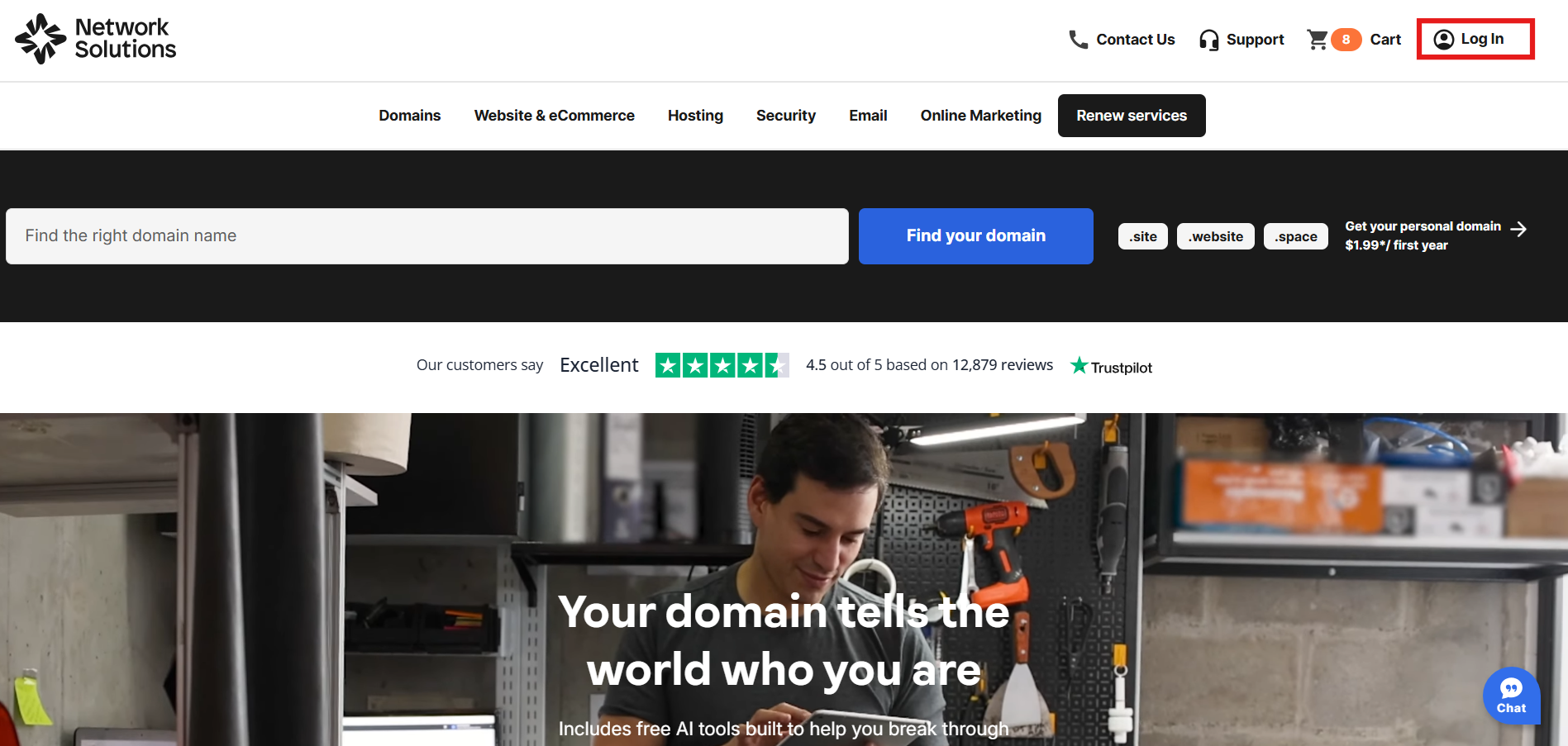
2. Enter your User ID and password: Access your dashboard using your login credentials.
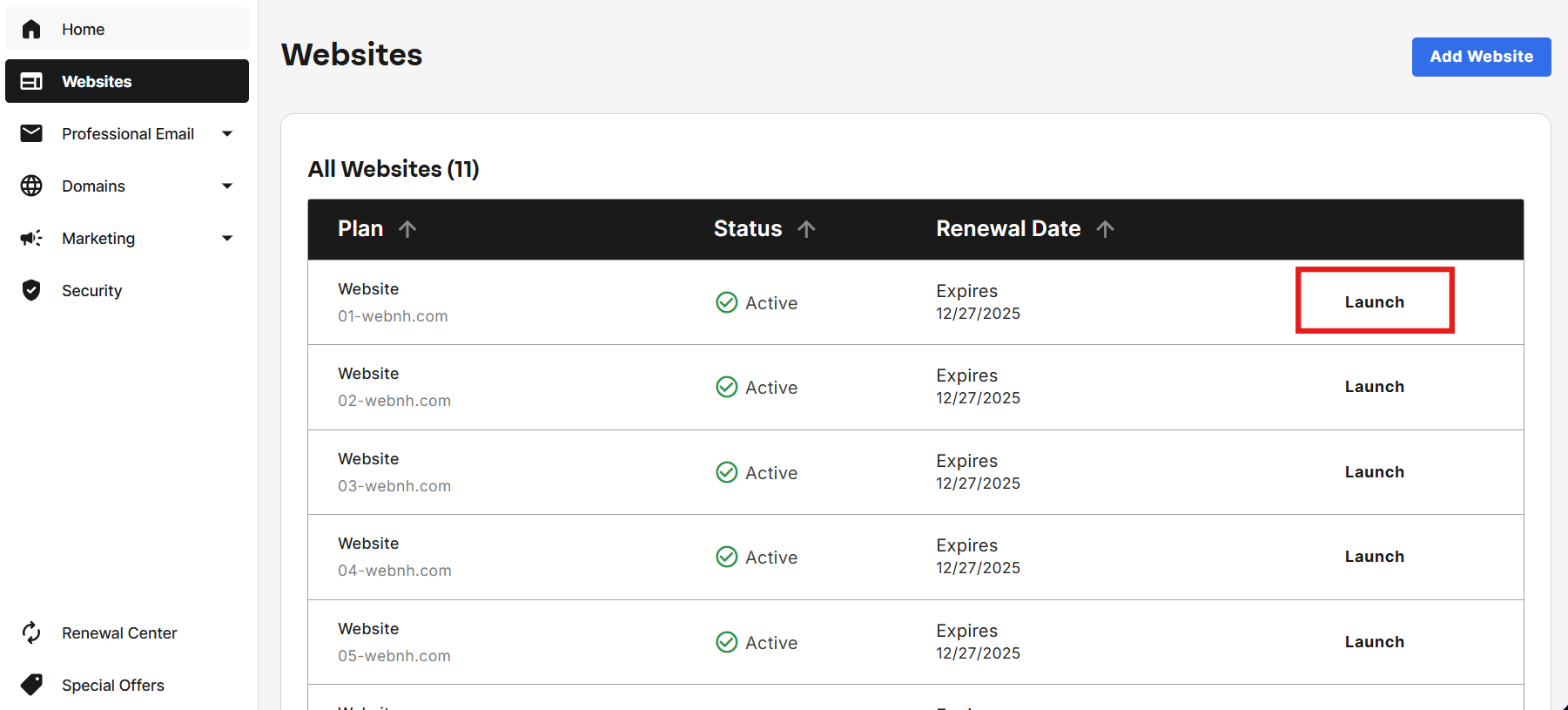
3. Navigate to your website editor: Once logged in, go to the Websites tab on your dashboard, then click Launch to open your website editor.
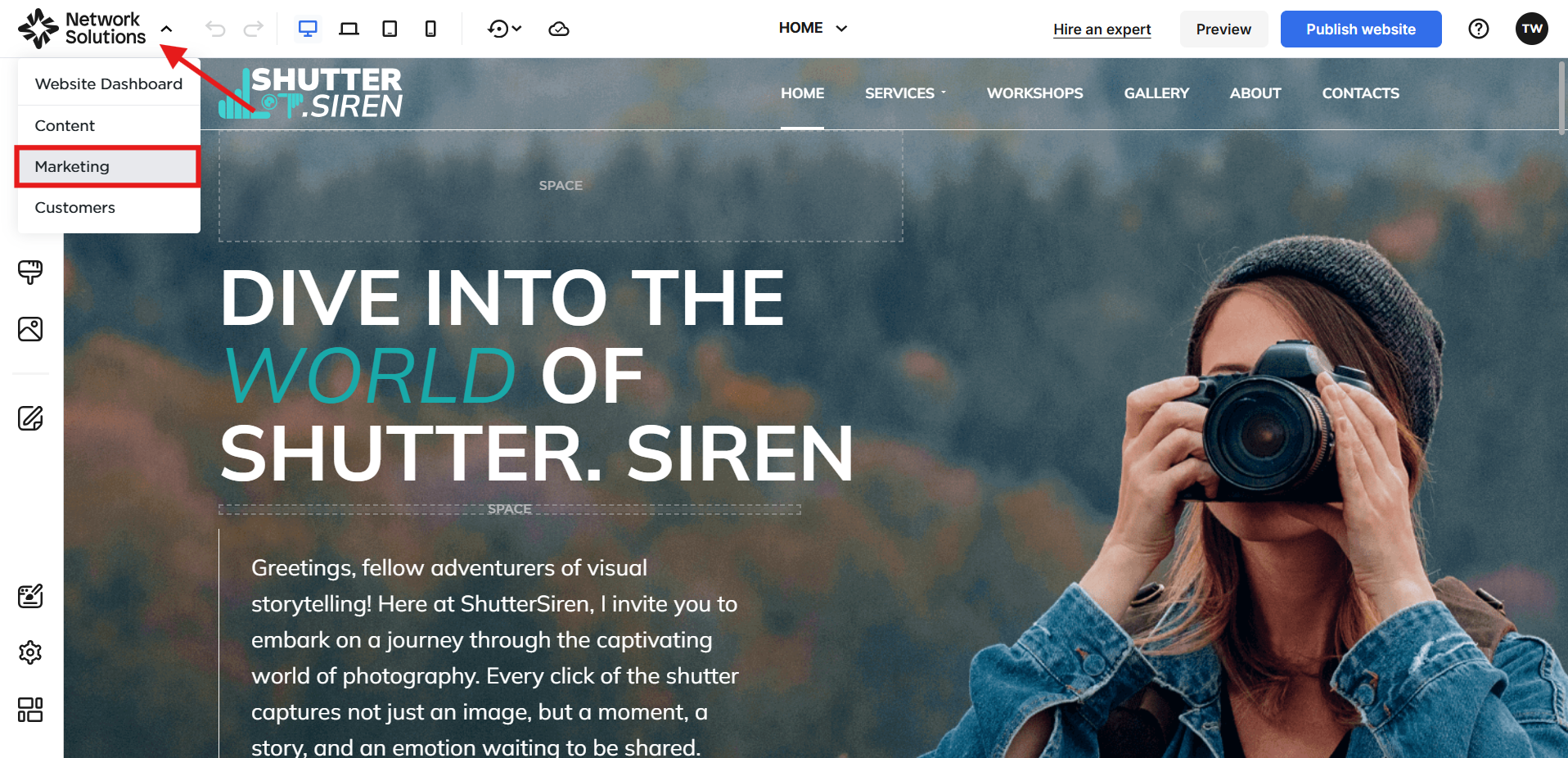
4. Open the Marketing section: Inside the editor, click the Network Solutions logo at the top-left corner. From the menu, select Marketing.
5. Go to the add-ons dashboard: You’ll be redirected to a separate dashboard where additional tools and upgrades are available. Look for Appointments, then click See plans under Effortless appointment scheduling.
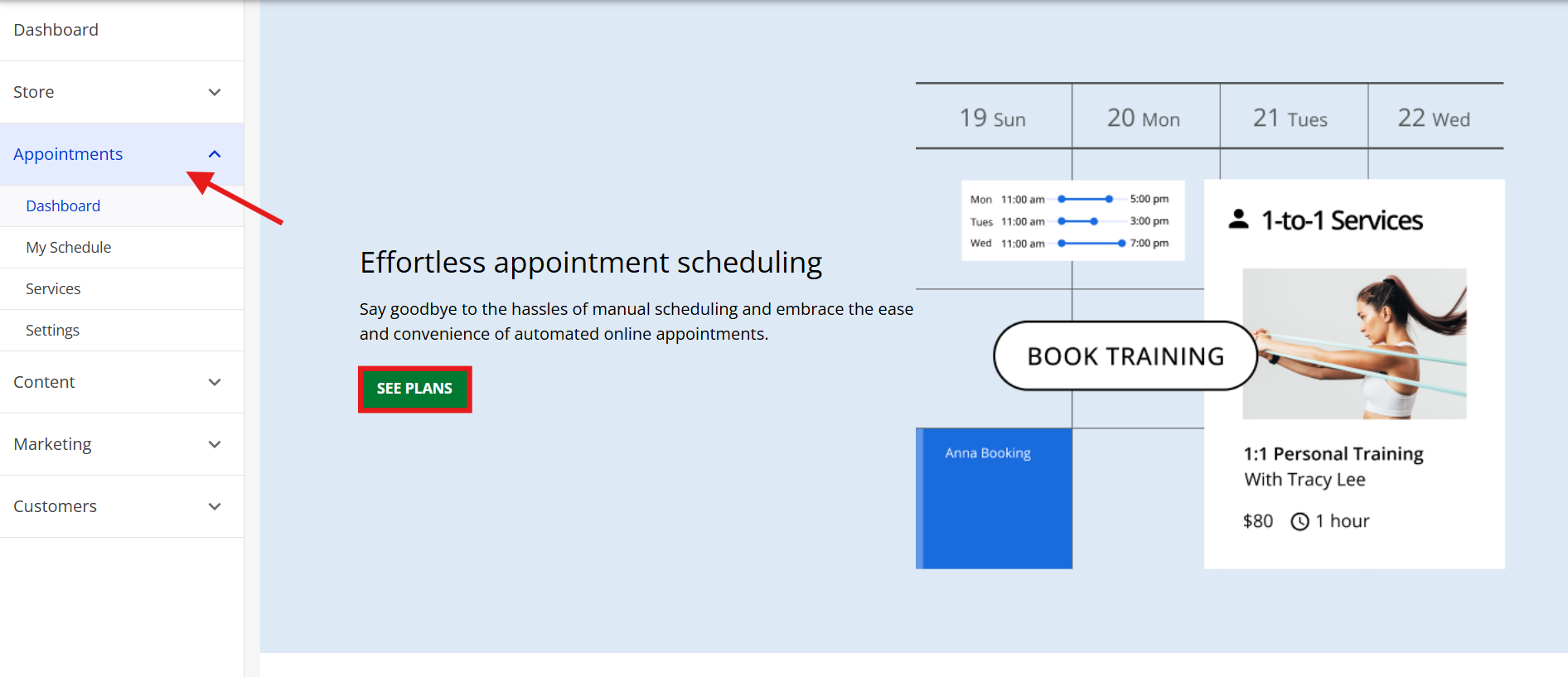
6. Choose your plan: Select the package that includes Appointment Scheduling—either the Website + Marketing plan or the E-commerce plan — then click Upgrade Now.
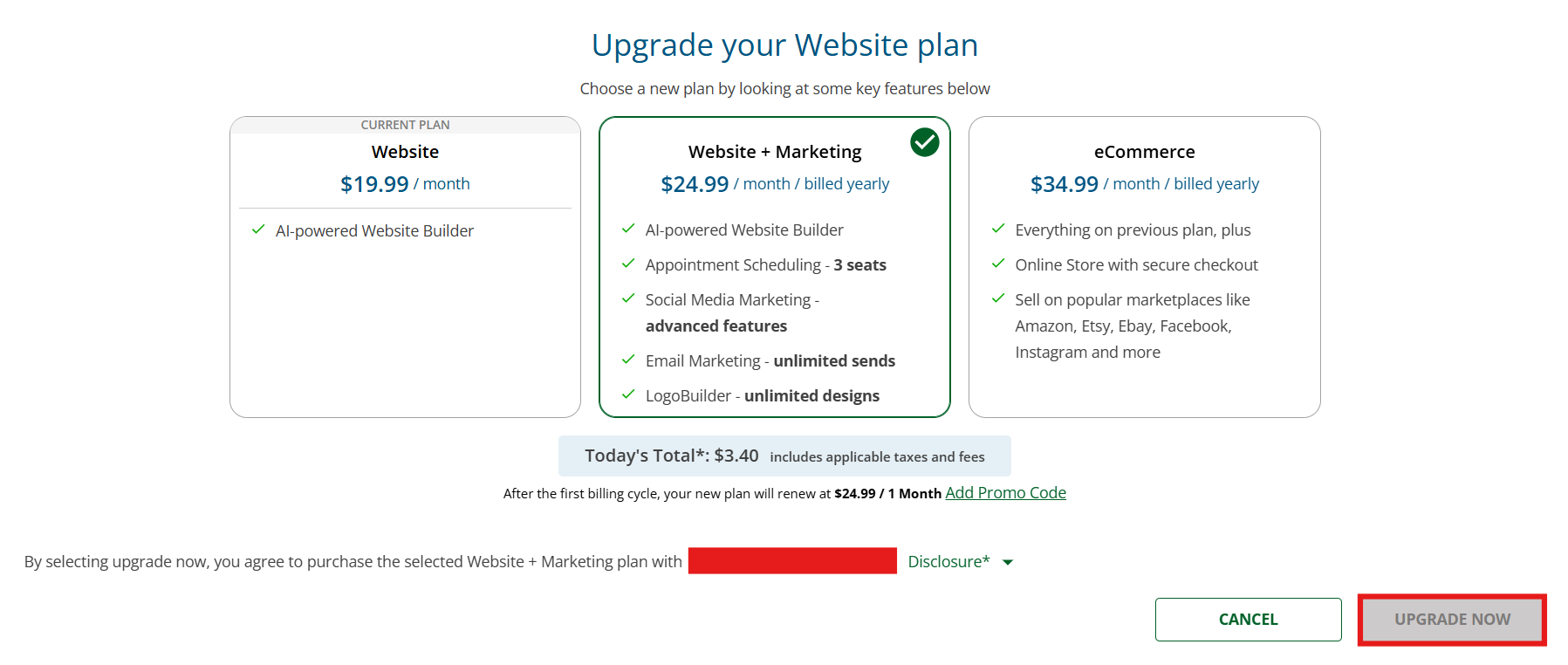
7. Complete your order: Review your plan details, proceed to checkout, and submit your payment. After completing your purchase, you’ll receive an order confirmation, and your account will automatically update with the new appointment-scheduling features. You can then return to your editor to begin setting up your booking options.
Frequently asked questions
Online appointment scheduling streamlines the booking process for both businesses and customers, eliminating manual errors, reducing no-shows, and freeing up valuable time for other important tasks. Customers appreciate the convenience of being able to book, reschedule, or cancel appointments at any time, without having to wait on the phone for hours.
The main drawback of online appointment scheduling is the potential for a lack of personal interaction. Some customers may prefer the “human touch” when booking appointments, especially in situations that require specific guidance or flexibility. Online systems may not fully address more complex or sensitive needs that could benefit from a direct conversation.
Yes. Online scheduling platforms utilize encrypted connections when transmitting information over the internet and employ secure data storage to safeguard customer information. Regular system updates also help safeguard sensitive data.
Automated reminders keep customers informed about upcoming appointments, helping ensure the visit stays top of mind. Some systems also allow deposits or prepayments, further encouraging attendance.
Most modern scheduling tools are fully mobile-friendly, allowing customers to book, update, or cancel appointments from their phones. This makes the process more convenient for mobile device users.
Online booking systems streamline scheduling, reduce administrative work, and provide customers with a faster and easier way to secure appointments.
Transform your appointment scheduling today
Shifting to online scheduling is a step toward running a more efficient, organized, and customer-focused business. When booking becomes effortless, your team gains back valuable time, customers enjoy a smoother experience, and your day-to-day operations start to feel far more predictable. It’s a change that supports long-term business growth.
Build an identity for your brand that customers can trust, and that can make a meaningful difference in how your business grows.
If you’re ready to simplify scheduling and enhance the way customers interact with your business, our Website Builder with built-in appointment scheduling makes it easy for you to get started.