
Key takeaways:
- A taken domain name isn’t always unavailable. The owner may be actively using it, saving it for later, or willing to sell it for the right offer.
- Before you buy a domain that’s already taken, check for trademarks, legal issues, domain history, and SEO risks that could affect your brand.
- You can try to acquire your desired domain by contacting the owner, using a domain marketplace, placing a backorder, or working with a domain broker.
Finding the perfect domain for your business is exciting until you search for it and realize someone else already has it. If you’re a beginner, solopreneur, or small business owner ready to buy a domain name, this can feel like a frustrating roadblock.
The good news is that a taken domain name doesn’t always mean it’s completely unavailable. Some owners are willing to sell their domain name, some are listed on marketplaces, and others may become available later.
In this guide, we’ll show you how to buy a domain that is taken, including how to check its history, evaluate legal and SEO risks, contact the domain owner, negotiate professionally, and transfer ownership safely. We’ll also cover what to do if your dream domain can’t be purchased and how to find a strong alternative for your brand.
Find the perfect domain
Ready to register a domain name? Check domain availability and get started with Network Solutions today.
Understanding domain ownership and how it affects your purchase
When someone registers a domain, they don’t own it permanently. They pay for the right to use it for a set registration period, usually 1 to 10 years. As long as the domain owner keeps renewing it, no one else can register that exact domain name.
That’s why your desired domain may show as unavailable during a domain search, even if there’s no active website attached to it. The current owner may be using it, saving it for a future project, protecting it for brand reasons, or holding it as an investment.
Here’s why your ideal domain name might already be taken:
- Tied to an active website: The current owner may be using the domain for their business, personal brand, blog, or online store. If the domain is important to their online presence, they may not want to sell it or may only consider a high offer.
- Saved for future projects: Some owners register domains for ideas they plan to use later. If their plans have changed, they may be open to selling the domain for the right price.
- Listed for sale: Many taken domains are held as investments. These domains are often listed through marketplaces or broker services and may cost more if they include strong keywords, short names, or popular extensions.
- Protected after expiration: Some domains don’t become available immediately after they expire. Depending on the registrar’s policies and any expiration protection services, the current owner may still have time to renew before the domain is released.
Understanding why a domain is taken can help you choose the right next step. If the domain is actively used, you may need to make a strong offer or consider alternatives. If it’s parked, listed for sale, or close to expiration, you may have a clearer path to acquiring it.
How to buy a domain name that is taken
Learning how to buy a domain name that is taken starts with finding out who owns it, whether it’s safe to purchase, and whether the owner is willing to sell. A taken domain name doesn’t always mean it’s completely unavailable, but you’ll need the right process to avoid legal, SEO, and transfer issues.
Start by using a domain search tool to confirm whether your desired domain name is registered. From there, you can evaluate the domain, contact the domain owner, negotiate a purchase, or explore acquisition options if you want help securing it.
These are the steps to buying a taken domain name:
- Check for trademarks and legal issues.
- Research the domain’s history.
- Examine the SEO performance of the domain’s website.
- Determine the domain’s value.
- Identify the domain owner with WHOIS lookup.
- Reach out professionally.
- Change domain ownership.
Step 1: Check for trademarks and legal issues
Before you buy a domain that’s already taken, check for legal risks that could affect your brand later. A domain may look like the perfect fit, but if it conflicts with an existing trademark or was registered in bad faith, it could lead to disputes, extra costs, or even the loss of the domain.
Here’s what to watch for:
Trademark infringement
Some domains are protected by trademarks, and using them without permission could put your business at risk. Trademark violations may lead to disputes, fines, or having to give up the domain after purchase.
To avoid this, search the United States Patent and Trademark Office database to see if the domain name or a similar phrase is already trademarked. You should also check international trademark databases, such as the World Intellectual Property Organization (WIPO) or the European Union Intellectual Property Office, especially if you plan to serve customers outside the United States.
It also helps to understand how domain names and intellectual property overlap. A domain name itself is not always treated the same way as a trademark, but it can still create legal issues when it closely resembles a protected brand name.
General Data Protection Regulation protected domains
Privacy laws like the General Data Protection Regulation (GDPR) can limit how much owner information appears in WHOIS records, especially for domains tied to individuals or businesses in the European Union.
For U.S.-based buyers, this usually matters when the domain owner is located overseas or the registrar masks ownership details for privacy reasons. If the owner’s information is hidden, you may need to contact them through a privacy service, domain marketplace, registrar, or domain broker instead of reaching out directly.
Cybersquatting and domain disputes
Watch out for cybersquatting, which happens when someone registers a domain that is identical or confusingly similar to an existing trademark, often with the goal of selling it back at a high price. This can create legal complications for both the seller and buyer.
Two important policies to know are:
- Anti-cybersquatting Consumer Protection Act: This U.S. law protects trademark owners from bad-faith domain registrations that infringe on their brands.
- Uniform Domain Name Dispute Resolution Policy: This global process helps resolve disputes over domain names that may violate trademark rights.
If you encounter trademark conflicts, signs of cybersquatting, or unresolved legal disputes, it may be better to walk away. In some cases, buying a taken domain is not worth the risk. Protecting your brand may mean choosing a different name instead of forcing a purchase that could create problems later.
When in doubt, consult a legal professional before committing to a domain that may put your business at risk.
Step 2: Research the domain’s history
Before you buy a taken domain, look into how the domain was used in the past. A domain may seem like a great fit today, but its history could affect your brand reputation, search visibility, and customer trust later.
Start by checking whether the domain was previously used for scams, spam, misleading content, or anything unrelated to your business. If the domain has a questionable history, you may need to spend more time rebuilding trust after you purchase it.
Here are a few ways to check a domain’s history:
- Review past website versions: Tools like the Wayback Machine can show snapshots of how the domain looked in previous years. This can help you see whether it was used for a legitimate business, a parked page, spam content, or something unrelated to your brand.
- Search the domain on Google: Look up the exact domain name and see what results appear. You may find old mentions, customer complaints, blacklist warnings, forum discussions, or signs that the domain was tied to suspicious activity.
- Check for SEO issues: SEO tools like SEMrush, Ahrefs, or Moz can help uncover backlinks, ranking patterns, and potential red flags. If the domain has a history of spammy backlinks or low-quality content, it may take extra work to clean up.
For a deeper walkthrough, read our guide on how to find the history of a domain name before you buy one. It covers useful tools like WHOIS, the Wayback Machine, Google Safe Browsing, Spamhaus, and SEO platforms that can help you spot risky ownership records, blacklists, and shady backlinks before you commit.
If the domain’s history raises concerns, it may be better to choose another name. You can explore cheap domains that still fit your brand and budget.
Step 3: Examine the SEO performance of the domain’s website
If the domain has an active website, run a quick SEO audit before making an offer. A domain with clean backlinks, steady traffic, and relevant history can give your website a stronger starting point. But one with spammy links, traffic drops, or past penalties may create problems you’ll need to fix later.
Here’s what to check:
- Backlink quality: Use tools like Moz, Ahrefs, or Semrush to inspect the domain’s backlink profile. Look for links from reputable and relevant websites. Avoid domains with too many backlinks from spammy, unrelated, or low-quality sources.
- Traffic and penalty history: Review the domain’s traffic patterns using tools like Semrush, Ahrefs, or Similarweb. Sudden drops may point to poor content, algorithm updates, spammy SEO tactics, or a manual penalty from Google. If you can access Google Search Console, check for manual actions, indexing issues, and security warnings.
- Relevance to your brand: Make sure the domain’s past content, backlinks, and audience align with your business. Even strong SEO metrics may not help if the domain was previously used for an unrelated industry.
For a more detailed walkthrough, read our guide on how to do an SEO website audit. It can help you check technical issues, backlinks, content quality, mobile performance, and other factors that may affect the domain’s value.
Step 4: Determine the domain’s value
A taken domain name comes at a cost, and you’ll need to know whether or not it’s within your budget. Here are a few things to factor in:
- Domain age: Older domains tend to cost more because they’ve had time to build authority. A newer domain might be cheaper but could lack the same reputation or search engine trust.
- Keywords and searchability: Domains with high-demand keywords are often more valuable because they’re easier to find in search results. For example, a name like Coffeeshop.com is broad, highly searchable, and appeals to a wide audience. In contrast, LatteForTwo.com is more niche and may not attract as much general traffic.
- Comparable sales: See what similar domains have sold for. For example, if CoffeeShop.com is your target, look into past sales for names like CoffeeHouse.com or LocalCafe.com. These could have sold for anywhere between $2,000 and $5,000.
Here are three of the best tools you can use to evaluate the domain’s worth:
- Estibot: A leading domain appraisal tool that provides an instant estimate based on factors such as domain age, keyword strength, backlinks, and traffic potential. It’s a good option for getting a solid ballpark figure for a domain’s value.
- DomainIndex: DomainIndex offers detailed appraisals and a scoring system based on search engine performance, backlinks, and other metrics. It’s useful for understanding a domain’s market value and SEO potential.
- Sedo: Sedo offers paid domain appraisal services, which can help you understand a domain’s market value based on current trends and comparable sales.
Note: These tools will at least give you a number to work with, but ultimately, it comes down to how much the owner values the domain.
Step 5: Identify the domain owner with WHOIS lookup
Find out who owns the domain. Knowing the domain owner helps you determine whether the domain is for sale and how to approach the negotiation.
The current owner also plays a key role in determining how valuable the domain might be:
- Big companies: If a large business owns the domain, it’s likely tied to their active website or branding. This could make it expensive, or even impossible, to acquire.
- Small businesses or individuals: These owners are often more open to selling, especially if the domain isn’t critical to their operations. They may also be willing to negotiate a fair price.
- Domain investors: Investors buy domains as assets and are usually open to selling. However, they tend to hold onto high-value domains for better offers. These domains often include premium domains with strong keywords or market appeal.
The WHOIS database stores ownership details for a registered domain. Use these steps to find the contact details of the owner:
- Visit ICANN or WHOIS lookup.
- Enter the specific domain name you’re interested in.
- Look for contact details, such as an email address or phone number.
What if the details are private?
Some domain owners use privacy protection to hide their WHOIS information. If that happens, a privacy service email will appear instead. You can send a message to this email. Some registrars will still forward your inquiry to the domain owner.
If not, then here are alternative methods to find the domain owner when WHOIS details are private:
- Look for domain-related content or a website.
- Check with your domain registrar.
Look for domain-related content or a website
Look for any domain-related content or a website associated with the domain. Even if the WHOIS details are protected, you might find the owner’s information elsewhere.
Check if there’s an active website. It might have a contact form or email address you can use to contact the domain owner. If the site’s down, social media accounts might also provide a way to reach the owner.
Check with your domain registrar
Your own registrar may have domain marketplaces you can use to secure the taken domain name. They may not advertise these services upfront, but it’s easy to spot. If the domain you want is unavailable, you’ll usually see an option below it to either backorder or make a certified offer.
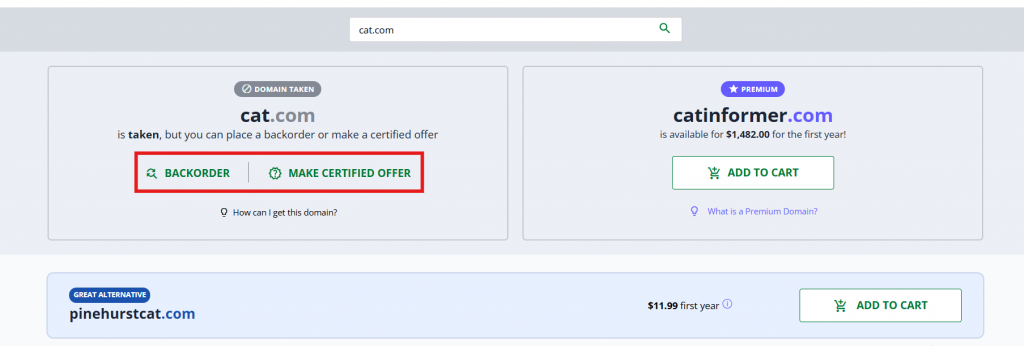
- Backorder: When a domain expires, it doesn’t return to circulation right away. The current owner is given a chance to reclaim it. Backorder services allow you to acquire the domain as soon as it becomes available after the owner’s grace period runs out.
- Make a certified offer: A more proactive approach. You submit an offer for the domain, and the registrar passes it on to the owner, who can then accept or reject it. It’s essentially a way to put your best offer forward without direct negotiation.
The downside to this method is that you’re not really negotiating, so you won’t really know why the seller turns down an offer or if they’re asking for a higher rate.
The good news is that if you conduct the transaction through your registrar, payment channels are secure, and they typically handle the ownership transfer for you, making the process smoother and safer.
Step 6: Reach out professionally
When it’s time to contact the domain owner, how you approach them can make all the difference. Here’s how to position yourself for success:
- Maintain a friendly yet professional tone: Be respectful and professional in your approach. Introduce yourself clearly and explain why the domain matters to your project or business.
- Be direct: A thoughtful message can spark interest. However, respect the owner’s time by keeping your communication clear and to the point.
- Negotiate with confidence: Come prepared with a fair price based on your research. Most domain owners appreciate it when a buyer makes thoughtful offers that reflect the domain’s value.
Sample email to contact the owner
Here’s an example of an email you can use:
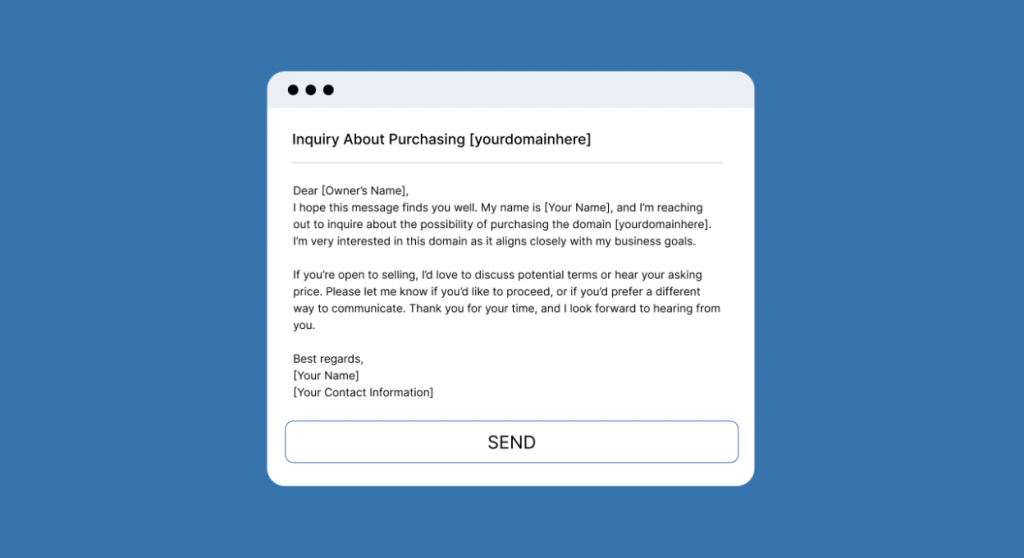
If the owner doesn’t respond right away, don’t lose hope. Follow up politely after three to five days and limit yourself to two or three attempts. Persistence is valuable, but you want to avoid overwhelming the owner.
If you don’t hear back from the owner or you’re not comfortable reaching out directly, consider:
- Buying through a domain marketplace (if listed there)
- Hiring a domain broker
If you’d like to know how to do these, we’ve covered them both in more detail below.
Buying through a domain marketplace
Buying a domain listed on a marketplace is the easiest and most secure way to make a purchase. If the domain name is available there, reach out through the platform directly. Here’s why it’s a smart choice:
- Ease of negotiation: Marketplaces often have pre-set processes for making offers. This can make negotiations smoother and faster.
- Transparency: Marketplaces typically display the domain’s asking price, recent bids, or fixed sale prices. You can gauge the value of the domain name right away and decide whether or not it’s right for you.
- Secure transactions: Many marketplaces offer built-in escrow services to ensure secure payments and domain transfers, protecting both buyers and sellers.
One thing to keep in mind is that domain marketplaces primarily handle pricing, negotiations, and the finalization of sales. After that, the transfer and re-registration process is in your hands. The good news is that many registrars offer their own domain marketplaces, making the purchase and transaction process easy and secure.
Hiring a domain broker
If you’re not comfortable negotiating directly with the domain owner, you can hire a domain broker to handle it on your behalf. Brokers specialize in buying and selling domains, especially when it comes to securing the best deal.
However, they take a commission from the sale. This is why most buyers first reach out to the domain owner directly and only work with a broker as a last resort.
Here’s how a broker can help if you need one:
- Handle negotiations: Brokers are skilled at getting deals done and can manage tricky back-and-forth discussions.
- Save time: Can’t find the contact details or don’t have the bandwidth? A broker will do the heavy lifting for you.
- Provide market insights: Brokers know the domain market and can help you make a fair offer without overpaying.
A broker can be especially helpful when dealing with high-value or premium domains, but their fees mean it’s worth trying direct contact first.
How to choose the right domain broker
Choosing the right broker is important when securing your domain. Here’s what to look for and why it matters.
- Experience: Look for a broker with a strong track record. Experienced brokers are skilled at handling complex negotiations and ensuring successful deals.
- Specialization: Some brokers focus on premium or niche domains. A specialist is better equipped to handle high-value transactions and provide targeted advice.
- Clear terms: Make sure the broker provides a detailed breakdown of their fees and services. Be cautious of extra charges, such as appraisal fees or rush services.
- Strong reviews: Check out testimonials from previous clients. Look for reviews on their website, industry forums, or trusted review platforms to ensure reliability.
Pros and cons of a domain broker
Hiring a domain broker can be a great move, but it may not always be the right choice. Here’s a closer look at the benefits and drawbacks of domain brokers:
Pros
- Saves time: Brokers handle everything from finding contact details to negotiating the final deal. This is especially helpful if you’re short on time or unfamiliar with the process.
- Expert negotiators: Brokers are skilled in navigating complex discussions and can often secure better terms than you might on your own.
- Industry insights: With their deep knowledge of the domain market, brokers can help you make fair offers and avoid overpaying for your domain.
Cons
- Costly fees: Brokers typically charge a percentage of the domain’s price. For high-value domains, this fee can add significantly to the overall cost.
- Less control: When working with a broker, you hand over the reins for communication and negotiations. This means you won’t have direct input during the process.
- Limited expertise: Not all brokers specialize in the type of domain you’re looking for. If they lack experience with niche or premium domains, you might not get the results you’re hoping for.
List of domain brokerage services for acquiring a taken domain
If you decide to hire a broker, choosing a reliable service is important. Here are some trusted options to consider:
Platform | Domain type | Key features | Best for |
|---|---|---|---|
GoDaddy Auctions | Premium, Expiring | Search filters for expired and premium domains | Buyers looking for auction-based or expired domains |
Sedo | Premium, Brokered | Extensive domain marketplace with international reach | Premium domain buyers and international reach |
Flippa | Premium, Used domains | Easy to navigate interface | Entrepreneurs looking for used domains and websites |
Afternic | Premium, Brokered | Large inventory of premium domains | Buyers looking for premium domains and fast transfer |
DomainAgents | Premium, Brokered | Direct negotiation with domain owners | Buyers looking for a negotiated domain acquisition with privacy |
Premium, Brokered | Allows anonymous offers to domain owners | Buyers who want to discreetly acquire a specific domain that’s already registered |
Step 7: Change domain ownership
Once you’ve purchased the domain, the final step is transferring ownership. To do this correctly, it’s important to understand the difference between a domain transfer and an ownership transfer.
- A domain transfer is moving a domain from one registrar to another, with the owner remaining the same. This typically happens when you want to manage all your domains from a single provider or streamline your services.
- An ownership transfer involves transferring the legal rights of a domain to another entity. This occurs when you purchase a domain from someone else, making you the official owner.
Since you’ve bought the domain from someone else, you’re performing an ownership transfer. Afterward, if the domain isn’t with your registrar, you can do a domain transfer.
How to change domain ownership
Here’s a quick and general overview:
- Unlock the domain: The current owner will need to unlock the domain through their registrar’s account settings.
- Update the contact information: Both the current and new owners must ensure their contact details are accurate.
- Initiate the transfer: The current owner can initiate the ownership transfer directly within their registrar account, sending an ownership request to the new owner.
- Authorize the transfer: The new owner will receive a transfer request, which they need to authorize. This often involves entering a code provided by the registrar.
- Accept the transfer: The new owner receives the request, reviews the details, and accepts the transfer.
Domain transfer usually takes five to seven days to finalize, depending on the registrar and how quickly both parties act. For detailed assistance, contact your current registrar’s customer service.
What if the domain is not for sale?
If your attempts to contact the domain owner haven’t worked and the domain remains unavailable, it’s time to explore other options. Here are some alternatives to consider:
- Slight domain name variations: Try adding prefixes, suffixes, or small spelling changes to make the domain unique. For example, if CoffeeShop.com is taken, consider MyCoffeeShop.com or CoffeeShopOnline.com. Need inspiration? Use our AI Domain Generator to brainstorm ideas. It can suggest variations that fit your branding while keeping your domain name relevant and memorable.
- Alternate domain extensions: Consider using another top-level domains (TLDs) like .net, .org, or .co. Specialized extensions, such as .tech or .io, can also work if they align with your industry or audience. And if you really have your heart set on the domain name, you could also add hyphens. Just make sure you don’t infringe copyright.
- Consider rebranding: Sometimes, a creative name change opens more possibilities. Rebranding gives you the flexibility to choose a domain that reflects your business while maintaining originality.
What to do after purchasing a taken domain
Buying a domain that’s already taken is a big step, but the work doesn’t stop once the purchase is complete. After the domain ownership transfer is finalized, set up the domain properly so it’s secure, connected, and ready to support your website.
- Transfer the domain to your preferred registrar: If you bought the domain through a marketplace, broker, or another provider, consider transferring it to your chosen registrar. Keeping it in your preferred registrar account makes domain management easier, especially if you own multiple domains.
- Enable domain privacy protection: Update your WHOIS contact information so your ownership details are accurate. Then, enable domain privacy protection, if available, to help keep your personal information off public records.
- Connect the domain to hosting: Point your domain to a hosting plan before your site goes live. You may need to update DNS settings inside your registrar account or chosen registrar, especially after a domain transfer.
- Set up a professional email address using your new domain: Create a professional email address that uses your new domain, such as [email protected]. This helps strengthen your brand identity and makes your business look more credible from day one.
- Build or redirect your website: Use our Website Builder to create a new site for your domain. If you already have a website, you can redirect the domain to your existing site instead.
- Optimize your website: Add your site to Google Search Console, create a sitemap, and verify that your site loads quickly, works well on mobile devices, and uses HTTPS. As you build your pages, use relevant keywords naturally to improve SEO and help customers find your business online.
Frequently asked questions
Start by checking whether the domain is active, parked, listed for sale, or close to expiration. Then research its legal history, SEO performance, and value before contacting the owner, making an offer, using a domain marketplace, or working with a domain broker.
Use a domain search tool to check if the domain is available. If it’s already registered, you can run a WHOIS lookup, visit the website, or check domain marketplaces to see whether the owner has listed it for sale.
Yes, but only if the current owner is willing to sell. You can contact the owner directly, make an offer through a marketplace, place a backorder, or use a domain broker to help negotiate the purchase.
Wait a few days, then send a polite follow-up. If you still don’t get a response, consider using a domain broker, placing a backorder, or choosing a similar domain name with a different extension or variation.
It can be safe if you research it first. Check for trademarks, legal disputes, spam history, bad backlinks, manual penalties, and ownership issues before making an offer or completing the transfer.
Yes, but there’s no guarantee you’ll get it. The current owner may renew it, and other buyers may also try to claim it. If the domain matters to your business, consider using a backorder service or exploring domain acquisition options.
Look for close alternatives using a domain search tool or domain name generator. You can try a different extension, add a relevant keyword, adjust the wording, or choose a new name that still fits your brand.
Taken doesn’t always mean off the table
A taken domain name can feel like a dead end, but it may still be within reach with the right approach. Start by checking whether the domain is available, reviewing its legal and SEO history, estimating its value, and contacting the owner professionally before making an offer.
If the domain is too risky, too expensive, or not available for purchase, you still have options. Search for available domains, explore acquisition options, or find alternative name ideas that keep your brand moving forward. A better domain decision starts with knowing what’s possible and taking the next smart step.