

Key takeaways:
- The Checkout App (free with every domain purchase) lets you create a live checkout page in minutes by adding a product image, description, price, and payment provider like Stripe or PayPal.
- Once a customer places an order, their information is saved in the Customers App, giving you a way to follow up, stay connected, and bring buyers back when you’re ready to launch your next offer.
- It’s designed as a low-risk starting point for first-time sellers to test a product idea without building a full store, with an easy upgrade path when you’re ready to scale.
Selling online can sometimes feel complicated, even when you only sell one thing. It could be a new product, a seasonal offer, a service, or an idea you just want to test with real customers.
But for many small businesses, the real challenge is not the product itself. It’s everything that goes along with selling it online: a full website, product catalog, tax settings, shipping rules, payment setup, and store management tools.
That is the problem the Checkout App is built to solve.
Take your product from idea to order
Set up your checkout link, share it anywhere, and give customers a simpler way to buy from your domain.
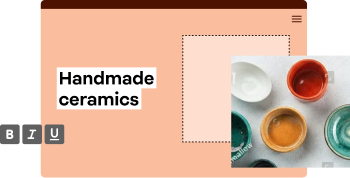
What is the Checkout App?
The Checkout App is a free tool that lets Network Solutions domain customers sell one product from their domain without setting up a full online store.
You can add a product image, product name, description, price, business information, and payment provider. Checkout App connects with Stripe and PayPal, so your customers can pay through the provider you set up.
Once everything is set up, Checkout creates a simple checkout experience that you can share through a link. That link can be used on social media, in a Link in Bio, in emails, on an existing website, or anywhere else you promote your product.
Jennifer Weir, Senior Product Manager at Network Solutions, explains, “It gives you the ability to use your domain to sell products without having to go through setting up an entire store.”
“This allows you to try out selling a single product without having to put up a big investment to set up a whole store or e-commerce solution. So, it’s a way to test the water to decide if what you’re thinking of selling is sellable. And if there’s a market out there,” she added.
How the Checkout App helps you start selling online
The Checkout App gives you a simpler way to move from product idea to checkout page. Here’s how it makes selling one product easier, clearer, and more manageable from the start:
- Set up your checkout page.
- Sell one physical or digital product.
- Take payments and manage orders.
- Share your checkout link and keep buyer details connected.
- Follow up on abandoned carts.
Set up your checkout page
With the Checkout App, the setup focuses on the information needed to sell one product clearly. You add the product details, connect to a payment provider, and publish a checkout link customers can use to place an order.
To set up your checkout page, you need to add:
- A product image
- A product name
- A product description
- A price
- Your preferred currency
- Your business information
- Your payment provider
Weir emphasizes, “The biggest thing would be it’s free. The next biggest thing is that t is a very simple setup. So, you go in, you add your product image, a couple of details about your product, your price, and a little bit of information about your business. And then your checkout page is live. There’s very, very little setup required.”
The page is automatically formatted as you enter your information. You can see what the checkout experience will look like before you publish it, which removes some of the uncertainty that comes with selling online for the first time.
Sell one physical or digital product
Think of the product or offer that your customers can buy without needing a lot of explanation. If someone can understand what it is, what they get, and how much it costs from one page, it’s a good fit for selling.
For example, you can use it to sell:
- A handmade item
- A seasonal product
- A digital file or guide
- A simple service
- A limited-time offer
- A specialty product
- A mystery box or bundle
- One physical product you want to test
The Checkout App is designed for one product without variations. It’s not designed for products with different sizes, colors, tiers, or custom options. If you sell shirts in five sizes and four colors, a full e-commerce store will be a better fit.
But if you have one clear offer, that can work more in your favor.
Weir gave a practical example of how this works for a seller with one clear physical product:
“It’s really any physical product for which you just have that product. No variations, no different sizes… That is your product, and that is what you’re selling. For example, I make a garden spade. That’s all I make, but I make it really, really, really well. And that’s all I want to sell. I can get that up and be sold in minutes.”
“You can also do a digital product. So, imagine I have an e-book. My e-book talks about the best way to create your own song from scratch… and I want to sell just that e-book, nothing else. It takes just a few minutes to create that e-book product, put my digital file that contains my book into it, and I can be up and selling in minutes from my domain.”
Take payments and manage orders
Once your customer places an order, the payment goes through the payment provider you connected it to. If you are selling a digital product, the confirmation email includes a link so your customer can access what they purchased.
Weir said, “Whichever payment provider you chose, that payment provider will receive the funds. So, none of the funds come to us. They all go directly to that account you configured. You will see an order confirmation screen, but they will also receive an order confirmation email.”
Your orders appear in the Checkout App orders dashboard. From there, you can review orders, resend order confirmations, cancel or refund orders, and print invoices when needed.
This also gives you a way to manage the sale after checkout. You get an order flow that helps you keep track of what has been purchased and what still needs follow-up.
Share your checkout link and keep buyer details connected
The Checkout App may seem like a simple way to collect payment for a single product. But its value goes beyond taking orders; it also gives you a checkout link you can share wherever customers already find you and helps keep track of those buyers after the sale.
That matters for small businesses because selling often starts in different places. A customer might hear about your product through social media, email, conversation, or an existing website. It provides a clear path to purchase during those moments while keeping customer information connected within Network Solutions.
Weir expounds:
“There’s not a whole website that you have to build around it. You just create the product, give it a really nice product image, and the Checkout App creates a single-page checkout experience that they can use anywhere. You can put that link in your Link in Bio, on their social media, or wherever you want to put those links, and it’ll start taking orders right away.”
The value does not stop after the order comes in. When someone buys from your checkout page, their information is saved in the Customers App (also free with every domain purchase) inside Network Solutions. This helps you keep track of buyers, follow up after a purchase, and stay connected if you launch another product or offer later.inside Network Solutions. This helps you keep track of buyers, follow up after a purchase, and stay connected if you launch another product or offer later.
“You can go into your Customers app, you can look at your first-time buyers list, or you can just look at your customer list, and you can see all the people who’ve purchased from you,” Weir added.
Follow up on abandoned carts
Your visitors may click on your checkout link, start entering their information, and leave before completing the order. But that does not always mean they changed their minds for good. They may have gotten distracted, needed more time, or planned to come back later.
Checkout also includes abandoned cart follow-up. If a customer enters their email address before leaving checkout, you can reach out to them and invite them to complete the purchase.
When should you upgrade to full e-commerce?
The Checkout App is best when you want to sell one simple product quickly.
A full e-commerce plan makes more sense when your business needs more flexibility, more products, or more advanced selling features.
You may be ready to upgrade when you want to:
- Sell multiple products
- Offer product variations
- Manage shipping options
- Configure taxes
- Track inventory
- Offer appointment scheduling
- Build a full storefront
- Add product categories
- Support more complex payment or fulfillment options
The Checkout App does not have to be the final version of your online business. It can be the starting point.
Weir adds, “The great news though is if you find that that thing is working for you really, really well, and you’ve started to get sales and you’re having some success, and now you want to branch into your second product, you can do so easily by upgrading the free app into the e-commerce plan, and then you can add as many products as you want.”
You can use it to test your idea, take your first orders, and learn what customers want. Then, when you are ready to sell more products or build a larger e-commerce experience, you can move to a more comprehensive e-commerce solution.
That makes the one-product focus a benefit and not a drawback. It gives you a simpler way to begin selling.
Give your product an easier path to its first sale
Your domain can do more than hold your business name. It helps you take the next step toward selling online.
The Checkout App gives small businesses, creators, and first-time sellers an easier way to turn one product into a big selling opportunity, with less complexity and a clearer path to break through online.
Start selling your product with less setup and more confidence with the Checkout App by Network Solutions. It comes with every domain purchase, together with other useful marketing tools and apps to help your brand break through online.