
- Shopify alternatives can help reduce costs, improve customization, and better match your business model.
- Based on user reviews, many alternatives offer greater flexibility, scalability, and lower pricing than Shopify.
- Network Solutions offers an all-in-one e-commerce website builder with a free domain, SSL, and professional email.
As of 2025, there are over 36 million small businesses in the U.S., and the e-commerce industry is projected to surpass $8.1 trillion by 2026. In such a competitive landscape, choosing the right platform is critical to your success.
A reliable website builder helps you establish a strong online presence and launch your e-commerce store efficiently. While Shopify is a popular e-commerce platform, it’s not always the best fit. This is especially true for small business owners looking for a simpler, more cost-effective, and all-in-one solution.
This guide explores the best Shopify alternatives, highlighting platforms that offer better pricing, flexibility, and features tailored to small businesses and startups.
How we developed this list
Rather than conducting extensive hands-on product testing, we focused heavily on consolidating and analyzing over 110 user experiences from reputable review platforms to give you a more user-based perspective.
We curated this list based:
- User feedback from Trustpilot, Reddit, YouTube, G2, and Capterra
- Cross-platform review analysis to identify consistent pros and cons
- Feature and pricing comparisons using internal tools and public data
- Limited hands-on testing via free trials and demo accounts
Disclaimer: This article is for informational purposes only. Listed third-party prices (or pricing estimates), product specifications and package inclusions may change without prior notice. Terms and conditions may apply per brand/provider. Please check with them directly for real-time information.
Before choosing a platform, secure your domain first
Before you decide which platform to use for your e-commerce store, why not secure your domain name first? With Network Solutions, you get more than just a domain.
Enjoy free apps like professional email, SSL, and tools designed to help you launch and grow with confidence.

Comparison of the best alternatives to Shopify
Choosing the right e-commerce platform depends on your business goals, budget, and the level of control you want over your online store. While Shopify is a popular choice, several alternatives offer better flexibility, pricing, or features tailored to different needs.
- Network Solutions
- BigCommerce
- Squarespace
- WooCommerce
- Wix
- Weebly
- Shift4Shop
- Adobe Commerce (Magento)
- GoDaddy
Platform | Best for | Starting price | Key highlight |
|---|---|---|---|
Network Solutions | Beginners | $9.99/month | All-in-one platform with domain, hosting, and marketing tools |
BigCommerce | Scaling businesses | ~$39/month | Scalable platform with advanced e-commerce features and multiple sales channels |
Squarespace | Design-focused brands | ~$16/month | Sleek templates and drag and drop editor |
WooCommerce | WordPress users | Free (plugin) | Self-hosted solution with full customization |
Wix | Small businesses | ~$29/month | Easy-to-use website builder with marketing tools |
Weebly | Budget sellers | Free plan available | Simple online selling with Square Online integration |
Shift4Shop | U.S.-based sellers | Free (with conditions) | Hosted platform with enterprise-level features |
Adobe Commerce (Magento) | Large enterprises | Custom pricing | Advanced functionality for complex product catalogs |
GoDaddy | Quick setup | ~$20/month | Simple website builder to quickly sell online |
1. Network Solutions: Best all-in-one platform for beginners
Network Solutions is a long-standing provider of domain registration, web hosting, website security, and online marketing services. Its e-commerce website builder is designed for small to mid-sized businesses that want a simple, integrated way to sell online without relying heavily on third-party tools.
As a Shopify alternative, it stands out for offering a unified platform that lets you manage everything—from your domain to your website and marketing—in one place. This makes it especially useful for business owners who want to get online quickly without dealing with complex setups.
Key features
- All-in-one platform: Manage your domain, hosting, website builder, email, and SSL in a single dashboard. With the e-commerce plan, you also get a free domain and privacy protection for the first year.
- Cost-effective entry point: Plans start at $9.99/month (introductory pricing) and renew at $29.99/month, making it more affordable upfront compared to many Shopify competitors.
- AI-powered tools: Use AI to generate domain names and website content, helping you launch faster with less manual work.
- Business-ready templates: Choose from professionally designed layouts tailored for retailers, service providers, and small businesses.
- Built-in marketing tools: Promote your business with integrated email marketing, social media tools, and a Google Business Profile listing.
- Online payments and selling: Accept payments through major gateways like credit cards and PayPal, and manage your products with ease.
- SEO tools: Customize meta tags, URLs, and alt text to improve your visibility in search results. If you want to go deeper, this e-commerce SEO guide can help you further optimize your store.
- Features included with your domain: Every domain purchase comes with professional email, SSL, and additional features to help you launch and grow your online business.
- 24/7 support: Access expert help anytime through chat and support channels.
Who it’s best for
- Small business owners and entrepreneurs who want a straightforward, all-in-one e-commerce platform
- Users who prefer simplicity and reliability over advanced customization
- Businesses looking to bundle domain, hosting, and online selling tools into one solution
What users are saying
Business owners often appreciate Network Solutions for its reliability and integrated services. Many users mention that the platform makes it easy to manage domains, hosting, and email in one place.
Cybernews took the time to do an in-depth review of Network Solutions plans and services and gave us a high rating. They even said, “…it’s clear that the builder could be a good option for small businesses with tight purse strings. The builder is cheap, easy to use, and very fast.”
One customer also praised Network Solution’s Website Builder and maintenance saying, “We are very pleased with our website as built and maintained through Network Solutions. The artist/[IT] people are wonderful.”
Pricing and plans
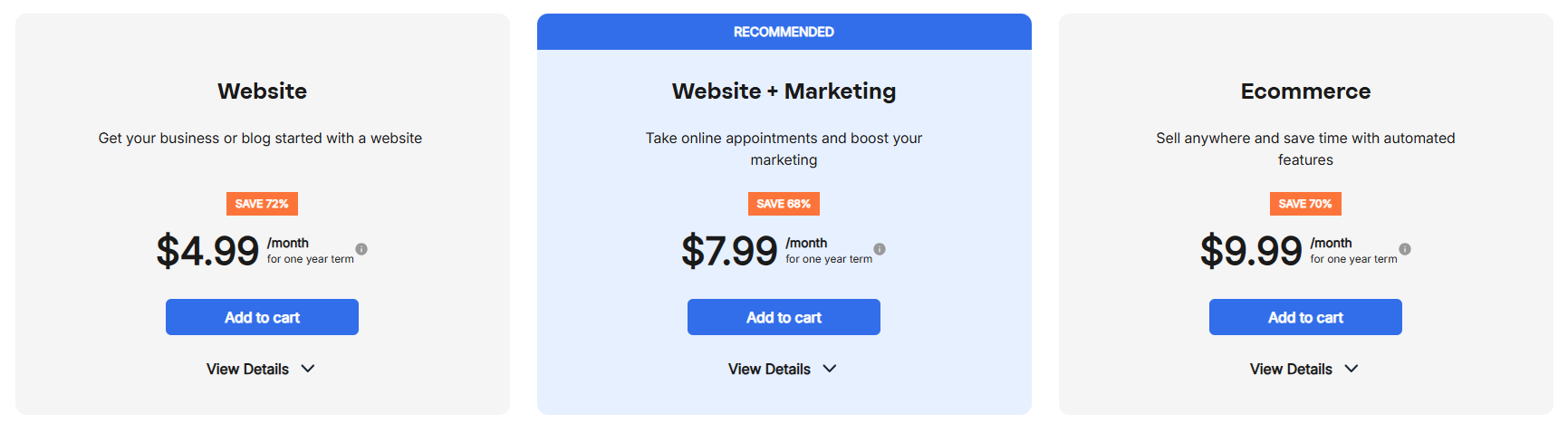
Compared to Shopify’s Basic plan, Network Solutions’ e-commerce plan is more budget-friendly upfront at $9.99 on your first month, then $29.99/month after.
2. BigCommerce: Best alternative for scaling businesses
BigCommerce is a powerful e-commerce platform built for businesses that plan to grow quickly. It offers advanced e-commerce features out of the box, making it a strong alternative to Shopify for companies that want more built-in functionality without relying heavily on third-party apps.
One of BigCommerce’s biggest advantages is its scalability. Whether you’re a small business preparing to expand or an established brand managing high sales volume, the platform is designed to support growth without requiring frequent upgrades or major changes to your setup.
Key features
- Scalable platform: BigCommerce supports businesses at every stage, from startups to enterprise-level operations, without limiting product listings or bandwidth.
- 0% platform transaction fees: BigCommerce does not charge additional transaction fees on any plan, regardless of payment provider.
- Unlimited products, bandwidth, storage, and staff accounts: All plans remove common growth caps that appear on other platforms, even at lower tiers.
- Built‑in advanced selling tools (fewer paid apps required): Features like discounts, coupons, gift cards, abandoned cart recovery, customer groups, and product filtering are included natively, depending on plan.
- Multi‑storefront capability: Merchants can manage multiple storefronts, brands, or regions from one dashboard (with tier‑based storefront limits).
- Strong B2B and wholesale functionality: Native customer groups, price lists, SKU‑level pricing, and segmentation support both B2C and B2B use cases.
- Omnichannel selling without platform penalties: Built‑in integrations with Amazon, eBay, Walmart, Facebook, Instagram, and POS systems are available across plans.
- Single‑page optimized checkout: Fast, mobile‑friendly checkout supports Apple Pay, Google Pay, Amazon Pay, and 55+ payment providers.
- International selling support: Multi‑currency (100+ currencies), localized payment methods, and global shipping integrations are standard features.
- 24/7 live support on all plans: Phone, chat, and ticket support are included even on entry‑level plans (not restricted to enterprise tiers).
- Enterprise‑grade flexibility: Higher tiers unlock advanced APIs, headless commerce support, priority routing, and strategic account management.
Who it’s best for
- Growing businesses that need a scalable platform with built-in advanced features
- Sellers managing multiple sales channels and expanding into marketplaces
- Companies that want to reduce reliance on third-party apps
What users are saying
Business owners often choose BigCommerce for its ability to handle complex e-commerce needs without relying heavily on third‑party apps. Many users point to the platform’s strength in managing advanced catalogs and scaling operations as their business grows. One long‑time customer on Capterra noted,“One of BigCommerce’s biggest strengths is its true hierarchical category structure. Shopify’s collections simply couldn’t replicate our deep category/subcategory structure without relying on apps.”
Industry reviewers echo this sentiment. In its in‑depth evaluation, Forbes Advisor highlighted BigCommerce’s built‑in capabilities and cost structure, noting that all plans include unlimited products, storage, and staff accounts with no additional transaction fees, which helps growing businesses keep costs predictable.
Real users also emphasize reliability and support. A verified reviewer on G2 described BigCommerce as “a solid B2B choice for smaller B2B organizations that require commerce,” adding that the platform makes it easier to handle complex buying systems from a single backend.
That said, some customers caution that costs can rise as sales grow. One Trustpilot reviewer warned, “As your sales increase, they charge you more every month based on your revenue,” reflecting a common concern about BigCommerce’s revenue‑based pricing structure.
Plans and pricing
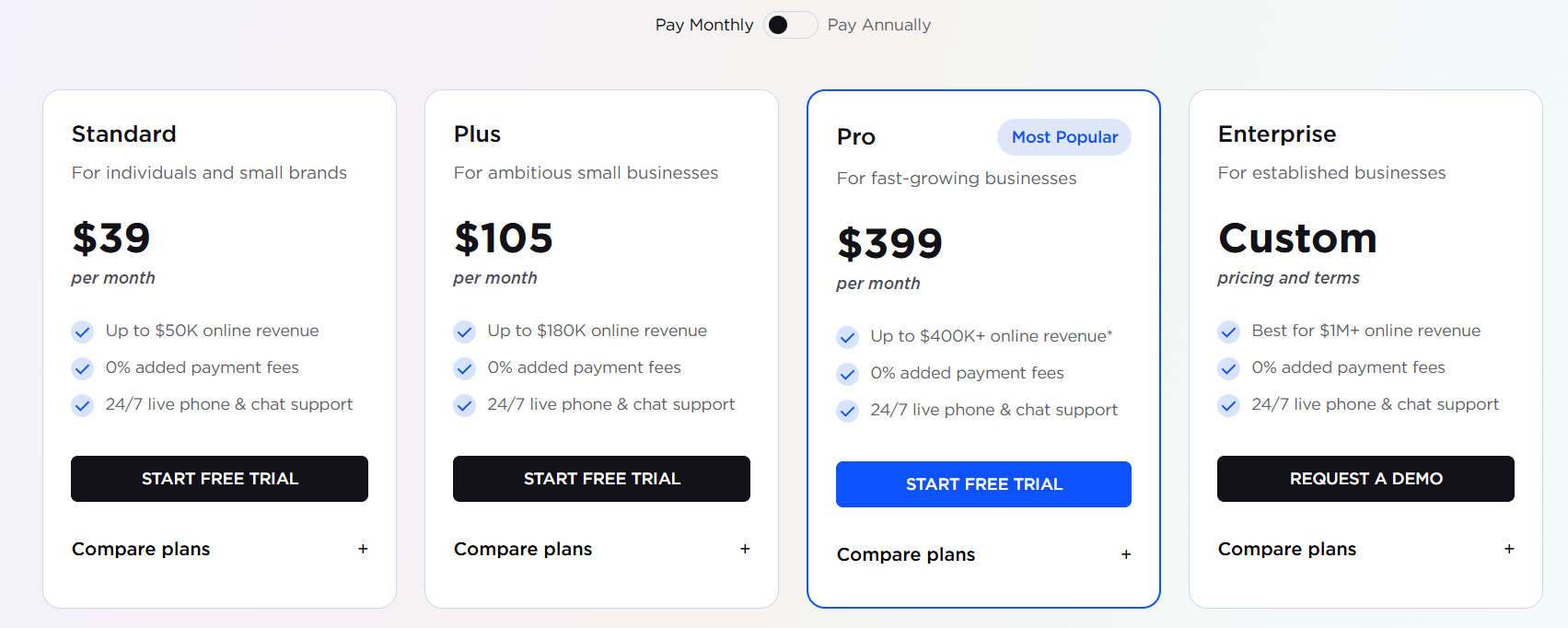
Both BigCommerce Standard and Shopify Basic start at around $39/month, but they differ in how costs scale for small businesses. BigCommerce includes unlimited products and no additional transaction fees on its base plan, which can help SMBs keep costs predictable when using third‑party payment gateways. Shopify does not impose revenue limits but may introduce extra costs through transaction fees or paid apps as business needs grow.
3. Squarespace: Best Shopify alternative for design-focused brands
Squarespace is a popular e-commerce platform known for its sleek templates and strong visual design capabilities. Originally built for creatives, it has evolved into a full-featured solution that lets users build a professional e-commerce site without advanced technical skills.
What sets Squarespace apart is its balance between design and functionality. Its drag-and-drop editor makes it easy to customize layouts, fonts, and branding elements, allowing businesses to create a polished online presence with minimal effort.
Key features
- Design‑first website builder: Professionally designed templates and a built‑in visual editor that allow SMBs to create polished websites without third‑party themes or custom development.
- All‑in‑one platform (fewer required apps): Hosting, security, templates, e-commerce, content, SEO, and basic marketing tools are included in one subscription, reducing reliance on paid add‑ons.
- Native selling for services and appointments: Built‑in tools for selling services, bookings, scheduling, and invoices make Squarespace especially suitable for service‑based small businesses.
- Built‑in memberships and digital content sales: Sell gated content, subscriptions, courses, and digital products without installing separate apps.
- Integrated invoicing and payments: Send invoices, accept payments, and manage client projects directly within the platform.
- Strong content and blogging capabilities: Native blogging, galleries, portfolios, and content management tools are well-suited for creators, consultants, and content‑driven businesses.
- Built‑in email and marketing tools: Includes email campaigns, promotional pop‑ups, and basic audience insights without requiring external marketing plugins.
- Industry‑specific solutions: Purpose‑built flows and templates for creatives, professional services, education, fitness, nonprofits, and personal brands.
- Lower complexity for small teams: Centralized dashboard and consistent tooling reduce setup and maintenance overhead for non‑technical SMBs.
Who it’s best for
- Creatives, designers, and service-based businesses that prioritize aesthetics
- Brands that want a visually polished e-commerce site without a complex setup
- Users who prefer an intuitive interface with a minimal technical learning curve
What users are saying
Squarespace earns high marks for its design quality and brand presentation. Users love the sleek templates and built-in tools for scheduling and selling services. It’s especially popular among creatives and consultants.
Though it is praised for benefiting artistic users, there are also mentions of limited customization features, unless you know how to code. Other reviews say the pricing is higher than that of platforms with similar features.
Here’s a review of a Squarespace user at G2, “I love the easy drag and drop features and also the clean and high-quality pictures.” They also voiced out their dissatisfaction, “Just the fact that it’s limited to designs. You can’t add some effects.”
Pricing and plans
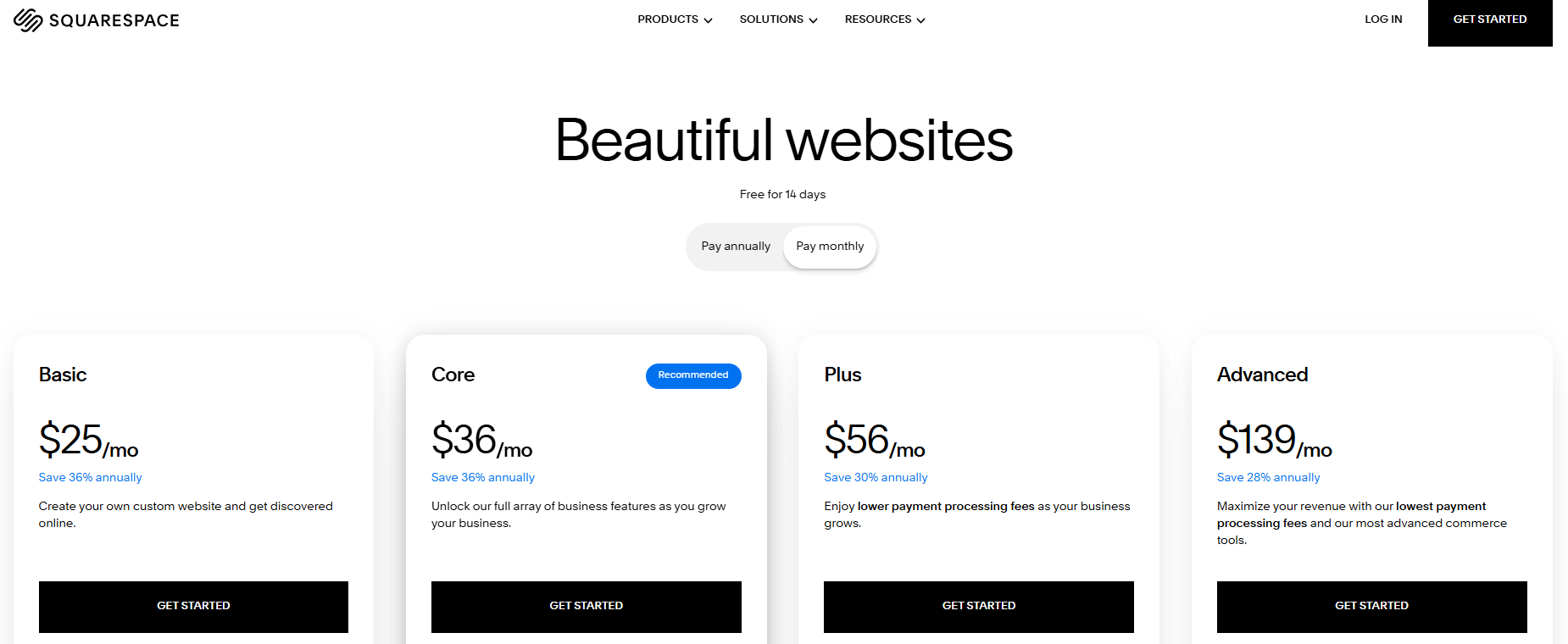
Squarespace’s entry‑level plans start at $25/month when billed monthly, with e-commerce‑capable plans beginning at $36/month (Core) and scaling up to $56/month (Plus) and $139/month (Advanced) for more established sellers. All plans include hosting, SSL security, professionally designed templates, and built‑in tools for selling products or services, which can simplify setup for SMBs that want an all‑in‑one solution.
Squarespace structures its plans by layering additional commerce tools and lower transaction fees at higher tiers. For example, entry‑level plans include transaction fees on online stores and digital content, while higher plans reduce or eliminate those fees and add features like advanced analytics, deeper customization, and lower payment processing rates.
4. WooCommerce
WooCommerce is a free WordPress plugin that turns any WordPress site into a fully functional e-commerce store. Unlike hosted platforms like Shopify, WooCommerce is a self-hosted solution, giving you complete control over your store’s design, functionality, and data.
Because it runs on WordPress, WooCommerce is especially popular among WordPress users who want flexibility and ownership without being locked into a single platform. However, that flexibility comes with added responsibility, including managing hosting, security, and updates.
Key features
- Free, open‑source e-commerce platform: WooCommerce is a free WordPress plugin with no monthly subscription, platform fees, or revenue share. Merchants own their store, data, and code from day one.
- No pricing tiers or forced upgrades: All core e-commerce functionality is available without upgrading plans. Merchants add features only when needed, rather than unlocking them through higher-priced tiers.
- Pay‑as‑you‑go extensions model: Functionality such as subscriptions, memberships, bookings, shipping rules, and advanced analytics is added through individual extensions—many free, others paid annually.
- Full control over hosting and infrastructure: Users choose their own hosting provider, scaling performance and costs based on traffic, store size, and business needs rather than platform limits.
- No transaction fees from the platform: WooCommerce does not charge transaction fees. Merchants pay only the processing fees set by their chosen payment gateway.
- Flexible payment gateway support: Supports hundreds of global payment providers and allows merchants to run multiple gateways simultaneously without penalty, including BNPL and local processors.
- Large ecosystem and marketplace: Access to hundreds of official extensions and thousands of third‑party plugins, along with a global developer and agency ecosystem.
- Transparent, modular total cost of ownership: Overall costs depend on hosting, extensions, development, and payment processing; rather than fixed monthly plans tied to sales volume.
Unlike software-as-a-service (SaaS) platforms with fixed plans, WooCommerce takes a modular approach, making it best suited for businesses that want full ownership and flexibility over how their store grows.
Since WooCommerce depends on your hosting setup, choosing the right hosting plan is critical. If you’re unsure which option fits your needs, this comparison of WordPress hosting vs. web hosting can help you decide.
Who it’s best for
- WordPress users who want to turn an existing WordPress site into an online store
- Businesses that need advanced customization and full control over their website
- Developers or users comfortable managing a self-hosted environment
What users are saying
WooCommerce is often praised for its flexibility and customization, especially by users already familiar with WordPress. Many appreciate that it’s open source and allows full control over store functionality and data.
At the same time, reviews frequently point out challenges for small businesses, including a learning curve, reliance on multiple plugins, and performance or maintenance issues as stores grow.
One G2 user highlighted a key strength, saying, “WooCommerce being open source is amazing, and the platform is very customizable… we haven’t come across a business need we couldn’t find a solution for.”
However, critical feedback is common as well. A Trustpilot reviewer noted, “WooCommerce might look appealing at first, but it quickly becomes a headache. The interface is clunky, and behavior across plugins is inconsistent.”
Pricing and plans
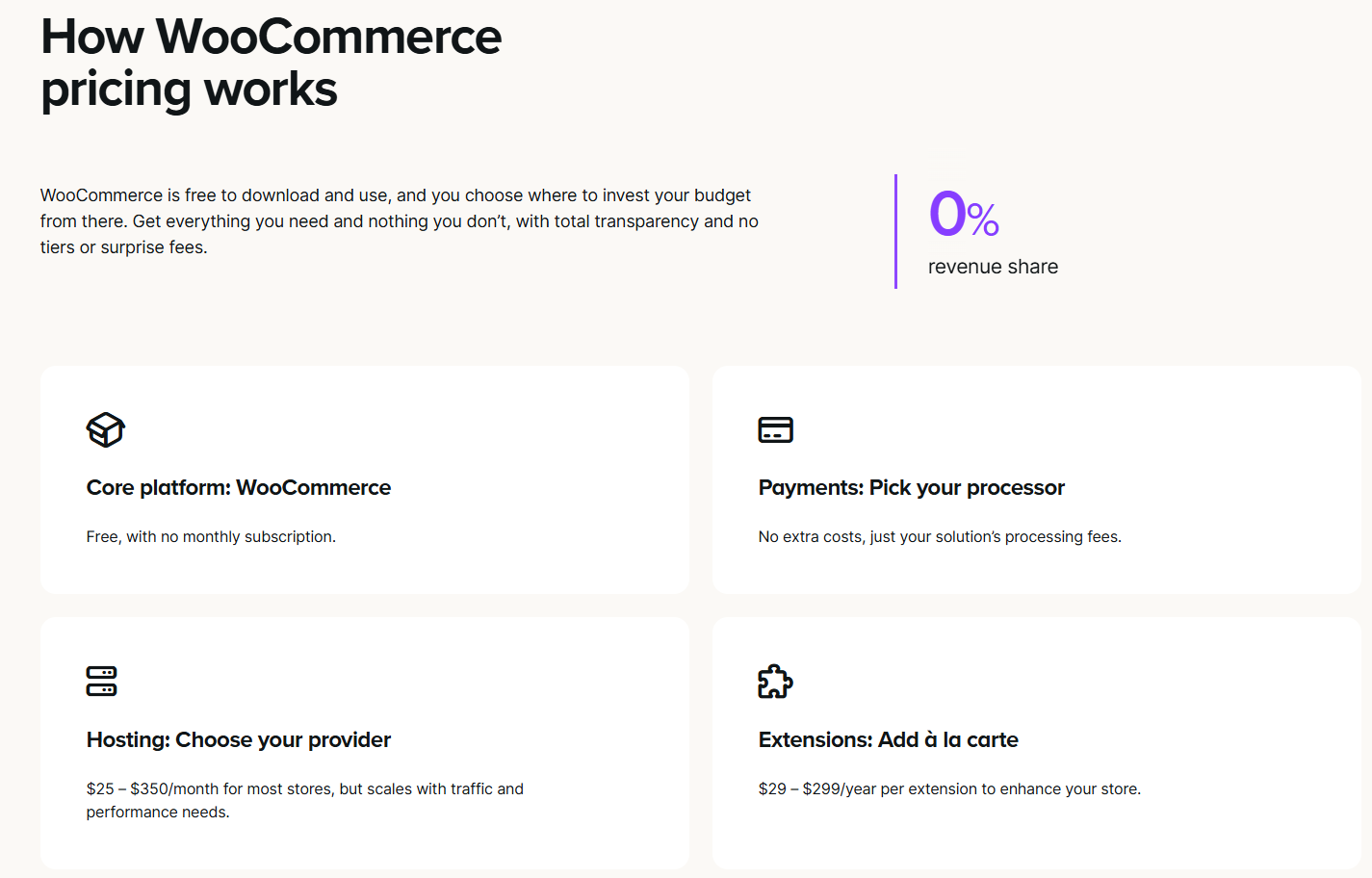
WooCommerce and Shopify take fundamentally different approaches to pricing. Unlike Shopify, WooCommerce does not use plans or tiers. The core platform is free, with costs based on hosting, extensions, and services chosen by the business.
Shopify’s subscription model offers simplicity and predictable monthly costs, which can be appealing for an all‑in‑one solution with minimal setup. However, additional expenses may arise over time, including paid app subscriptions or transaction fees when using third‑party payment providers.
WooCommerce’s pricing is more flexible. There are no revenue caps or automatic upgrades as sales grow, giving entrepreneurs full control over when and how they invest. The trade‑off is less cost predictability, since total spend depends on infrastructure and feature choices rather than a fixed plan.
5. Wix
If you want to build a professional website without a coding background, Wix is a Shopify alternative worth considering. Launched in 2006, it offers a wide range of features suitable for various business needs. For small to medium-sized businesses, Wix provides an accessible entry point into e-commerce.
While customers know Shopify for its e-commerce features, Wix offers a more straightforward approach and integrates essential tools within its platform. This makes it suitable for businesses looking for simplicity and design flexibility.
Key unique features
- Drag-and-drop design: Wix lets users customize their site without coding know-how. It’s perfect for small businesses that want full control over their brand’s look without hiring an expert.
- AI site builder (Wix ADI): This feature automatically generates a website based on user input.
- Free domain for one year: Includes a complimentary domain registration for the first year.
- 50 GB storage: Provides up to 50 GB of space for website content, media, and files.
- Multi-cloud hosting: Uses a distributed hosting infrastructure to support site performance and reliability.
- Basic marketing tools: Offers foundational tools for email campaigns and social media integration.
- Online selling capabilities: Supports product listings, payment processing, and order management for e-commerce.
- Up to 5 site collaborators: Allows multiple users to manage the site with assigned roles.
- Site analytics: Provides access to basic visitor and traffic data.
- 24/7 customer support: Offers round-the-clock assistance via chat or phone.
Who it’s best for
- Creatives, freelancers, and boutique brands who want design flexibility without needing to code
- Business owners who value aesthetics
- Users who prefer intuitive tools and AI assistance
What users are saying
Users love Wix for its design flexibility and ease of use. Many reviews mention their drag-and-drop builder, especially from those without technical backgrounds.
A review from G2 specifically said, ” I like that Wix makes it really easy to design a professional-looking website without needing coding skills.” However, there are also points that they didn’t like, “Sometimes the editor can feel a little heavy and slow, especially if the website has a lot of elements. Also, once you pick a template, it’s not easy to switch to another one without starting over, which can be a bit limiting.”
Pricing and plans
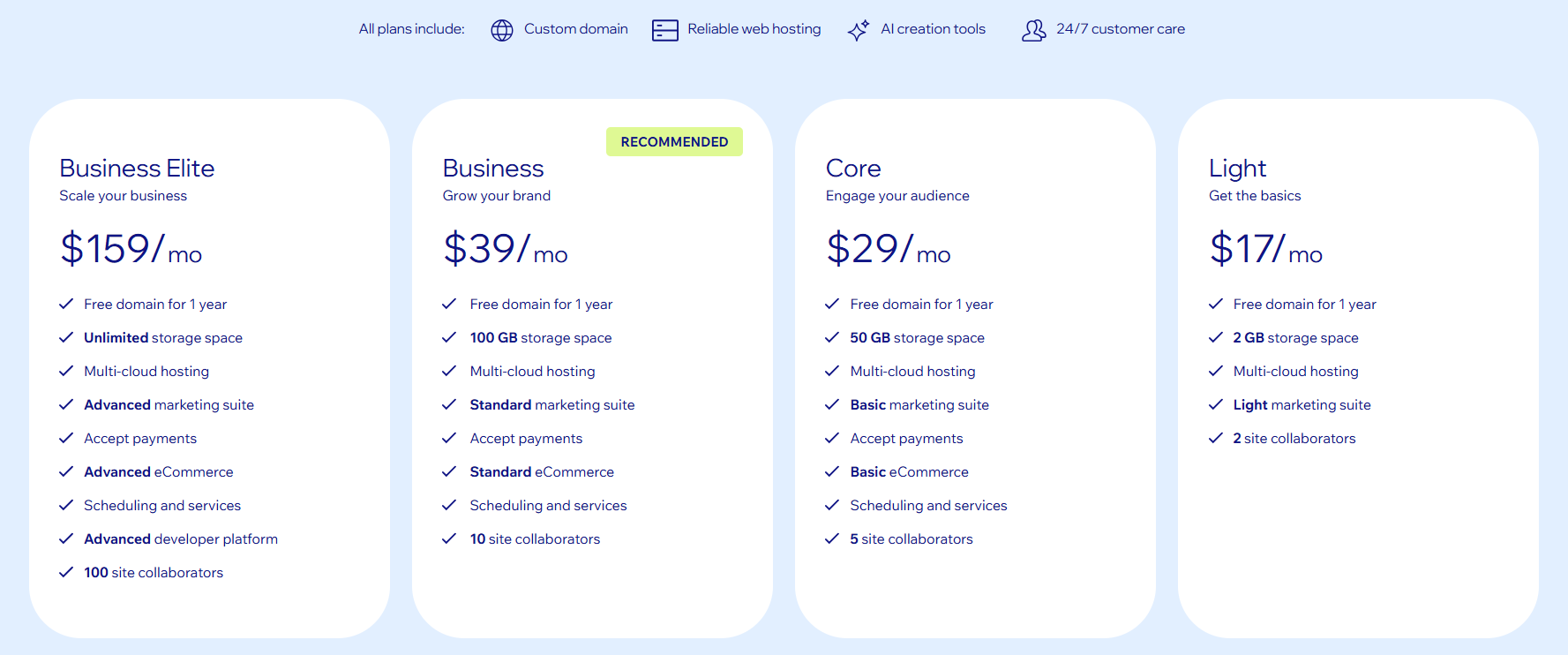
Although Wix Core (starter plan for basic commerce) bills at $29/month, its counterpart Shopify Basic includes a generous 3-month promo at $1/month, making it more attractive for new users testing the platform. Wix Core, while slightly more expensive on a monthly basis, includes a free domain, professional email, and built-in marketing tools, which may reduce the need for third-party apps and extra costs.
6. Weebly: Best budget-friendly option for simple online selling
Weebly, now part of Square, is a beginner-friendly e-commerce platform designed for small businesses and individuals who want a simple way to sell online. It’s especially appealing to users who already use Square Online for in-person sales, as it seamlessly connects online and offline transactions.
Compared to more advanced platforms, Weebly focuses on ease of use and affordability. While it may not offer the same level of customization or advanced e-commerce tools, it provides enough functionality for small-scale online selling.
Key features
- Square Online integration: Sync your online store with Square’s point-of-sale system for seamless inventory and payment management across channels.
- Free plan available: Start selling online with a free plan, though it includes Weebly branding and limited features.
- Simple e-commerce tools: Manage products, inventory, and orders with built-in tools designed for ease of use.
- Drag-and-drop builder: Create and customize your website without coding using an intuitive editor.
- Basic online selling features: Support for physical products, digital goods, coupons, and in-store pickup.
- Automatic tax calculator: Simplifies checkout by calculating applicable taxes.
- Built-in SEO and lead capture tools: Optimize pages and collect customer information with forms and basic SEO settings.
Who it’s best for
- Small businesses and side hustlers looking for an affordable way to start online selling
- Sellers already using Square Online for in-person transactions
- Users who prioritize simplicity over advanced customization
What users are saying
Weebly is often praised for being beginner‑friendly and easy to use, especially for small businesses that want to get a site online quickly. Many users appreciate its drag‑and‑drop editor and the built‑in e-commerce tools powered by Square, making it a common choice for simple websites and small online stores.
However, reviews often highlight limitations that can affect growing businesses. Users mention restricted customization, outdated templates, and capped features unless upgrading to higher‑priced plans. Customer support also appears to be a recurring pain point, with some reviewers reporting slow or difficult-to-reach assistance.
A Trustpilot reviewer shared, “Weebly turned what should be a simple website builder into a headache. The editor is glitchy, things randomly change, and I’ve had pages act like they disappeared.”
Pricing and plans
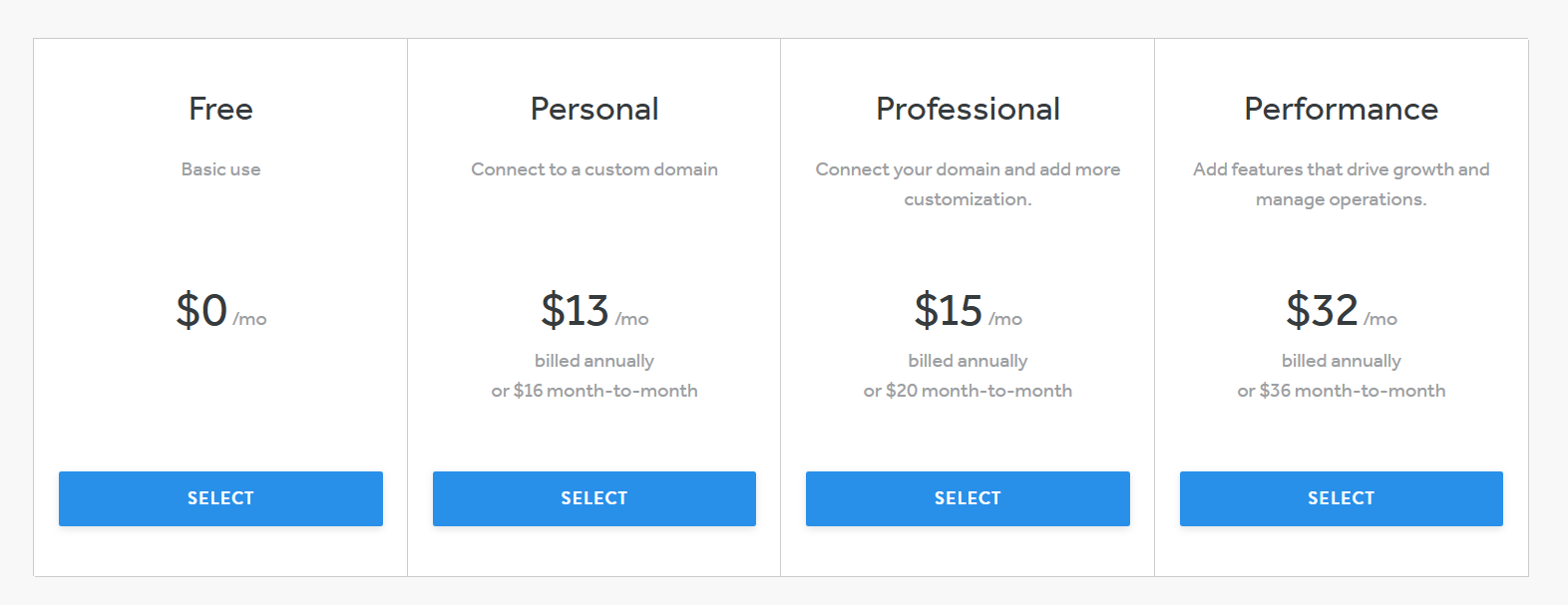
Weebly offers a free plan and paid plans starting at $13/month when billed annually, whereas Shopify’s Basic plan starts at around $39/month and does not include a free tier. This makes Weebly appealing to business owners who want to launch a simple website or small online store with minimal upfront investment.
However, Weebly’s lower price point comes with trade‑offs. Key business features, such as ad removal, unlimited storage, advanced analytics, and stronger e-commerce tools, are locked behind higher‑tier plans, such as Professional and Performance. Shopify, by contrast, offers a broader set of e-commerce and reporting features at lower tiers of its pricing structure, which may reduce the need for upgrades as a business grows.
7. Shift4Shop: Best Shopify alternative with a free plan (U.S.-based sellers)
Shift4Shop is a hosted e-commerce platform that offers a rare advantage—a free plan for U.S.-based businesses. It’s designed to provide a full e-commerce solution with built-in tools, making it a practical alternative for users who want to launch an online store without paying monthly platform fees upfront.
Unlike many competitors, Shift4Shop includes a wide range of features out of the box, from product management to marketing tools. However, the free plan is only available if you use Shift4 Payments as your payment processor and meet certain eligibility requirements.
Key features
- Free plan (with conditions): U.S.-based users can access a free plan if they use Shift4 Payments, making it one of the few platforms with no monthly subscription cost.
- Hosted platform: As a fully hosted platform, Shift4Shop handles hosting, security, and maintenance, so you don’t need to manage technical infrastructure.
- Enterprise-level features: Includes advanced tools such as real-time shipping calculations, customer groups, and built-in SEO features—often without needing additional apps.
- Unlimited products: Add and manage a large inventory without restrictions.
- Built-in marketing tools: Access email marketing, promotions, and SEO features to support growth.
- Multi-channel capabilities: Sell across different platforms and manage your store from a centralized dashboard.
Who it’s best for
- U.S.-based small businesses looking for a free plan to start online selling
- Sellers who want a hosted platform with built-in features
- Businesses that need a cost-effective e-commerce solution with room to grow
What users are saying
Users often highlight the platform’s generous feature set, especially considering its free plan. Many appreciate having access to advanced tools without needing to pay for multiple add-ons.
However, some users note that the platform’s interface can feel dated, and the requirement to use Shift4 Payments may limit flexibility for certain businesses.
8. Adobe Commerce (Magento): Best for enterprise-level e-commerce businesses
Adobe Commerce (formerly Magento) is an enterprise-grade e-commerce platform designed for large businesses with complex requirements. It offers advanced functionality and extensive customization options, making it a powerful Shopify alternative for companies that need full control over their online operations.
Unlike most hosted platforms, Adobe Commerce provides both cloud-hosted and self-hosted options, giving businesses flexibility in how they manage their infrastructure. However, this flexibility typically requires technical expertise or a dedicated development team to implement and maintain.
Key features
- Enterprise-grade e-commerce platform: Built to support large enterprises handling high traffic, large inventories, and complex operations.
- Advanced functionality: Includes features like customer segmentation, personalized experiences, and advanced analytics tools.
- Handles complex product catalogs: Ideal for businesses managing thousands of SKUs, multiple product variations, and global storefronts.
- Developer flexibility: Highly customizable with access to the platform’s codebase, APIs, and integrations.
- Scalable architecture: Supports multi-store management, international selling, and enterprise-level growth.
- Extensive integrations: Connect with ERP systems, CRM tools, and third-party services to streamline operations.
Who it’s best for
- Large enterprises with complex product catalogs and high-volume sales
- Businesses that require advanced functionality and deep customization
- Companies with access to developers or technical teams
What users are saying
Adobe Commerce is widely praised for its flexibility and ability to handle complex e-commerce needs. Businesses appreciate the level of control it offers, especially for customization and scalability.
However, users often point out that the platform can be expensive and requires significant technical expertise to manage effectively, making it less suitable for small businesses or beginners.
9. GoDaddy
GoDaddy is another household name for domain registration, but its website builder also provides a full-service platform for small businesses.
In terms of usability, GoDaddy is straightforward and beginner-friendly, though it may lack the advanced customization options found in platforms like Shopify. The platform’s competitive pricing is especially appealing for local business tools like appointment scheduling and directory listings.
Key unique features
- All-in-one dashboard: GoDaddy combines website building, marketing, and e-commerce tools in one place, streamlining setup for busy business owners.
- Unlimited product listings: Sell as many products as you want without restrictions.
- Inventory synchronization: Automatically sync stock levels across all connected sales channels to avoid overselling.
- Local business tools: The service includes appointment scheduling, directory listings, and social media posting—Ideal for service providers and brick-and-mortar shops.
- Marketing and SEO tools: Includes built-in tools for email marketing, SEO optimization, and social media promotion.
- Multiple payment options: Accept payments via credit cards, PayPal, Apple Pay, Google Pay, Venmo, Stripe, and Square.
- Security features: SSL encryption, firewall protection, malware scanning, and one-click backups.
- 24/7 customer support: Access live chat, phone support, and a knowledge base anytime.
Who it’s best for
- Local service providers and small businesses that need a cohesive platform for managing tools like scheduling, listings, and marketing
- Entrepreneurs who want a quick setup
- Users who prefer having access to built-in advertising and promotional tools
What users are saying
GoDaddy reviews are more mixed. Users appreciate the convenience of managing domains and websites in one place, and some mention that the platform is easy to use for basic websites.
However, they often encounter roadblocks for advanced e-commerce features and customization options. One user even stated, “Found it expensive, hard to understand the dashboard, complicated login process to access the account.”
Pricing and plans
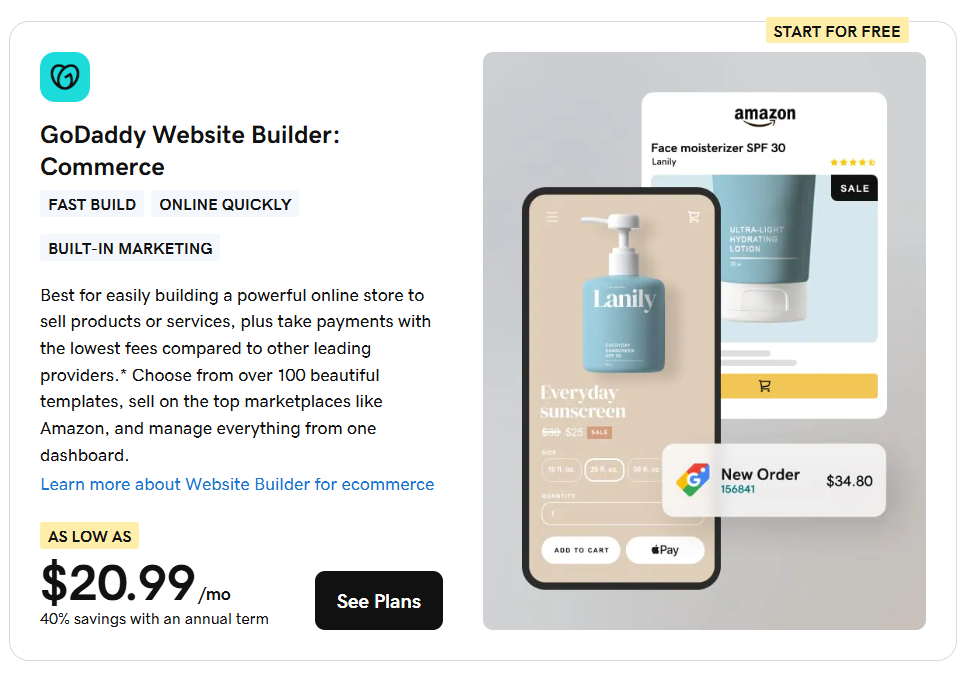
GoDaddy Commerce Plan is slightly more affordable and includes a wide range of built-in features like marketplace integration, inventory sync, and AI-driven personalization. It’s ideal for small businesses looking for an all-in-one solution with minimal reliance on third-party apps.
Shopify Basic, while more expensive, offers stronger scalability, a broader app ecosystem, and advanced e-commerce tools like abandoned cart recovery and basic POS integration. It’s better suited for businesses planning to grow quickly and needing more customization and control.
What is Shopify?
Shopify is a cloud-based e-commerce platform that lets you create, customize, and manage an online store. It’s built for all types of businesses, from small startups to large enterprises, and allows you to:
- Build your store using ready-made templates
- Add and organize products with photos, prices, and descriptions
- Accept payments, manage orders, handle shipping, and track inventory
- Sell on your website, social media, marketplaces, or in person
- Run your business from one dashboard
As a SaaS platform, Shopify handles hosting, security, and updates. You don’t need to install or manage backend tech. Plus, it’s scalable, allowing you to start small and add new features as you expand.
The Shopify App Store also offers thousands of tools for marketing, analytics, reviews, and more.
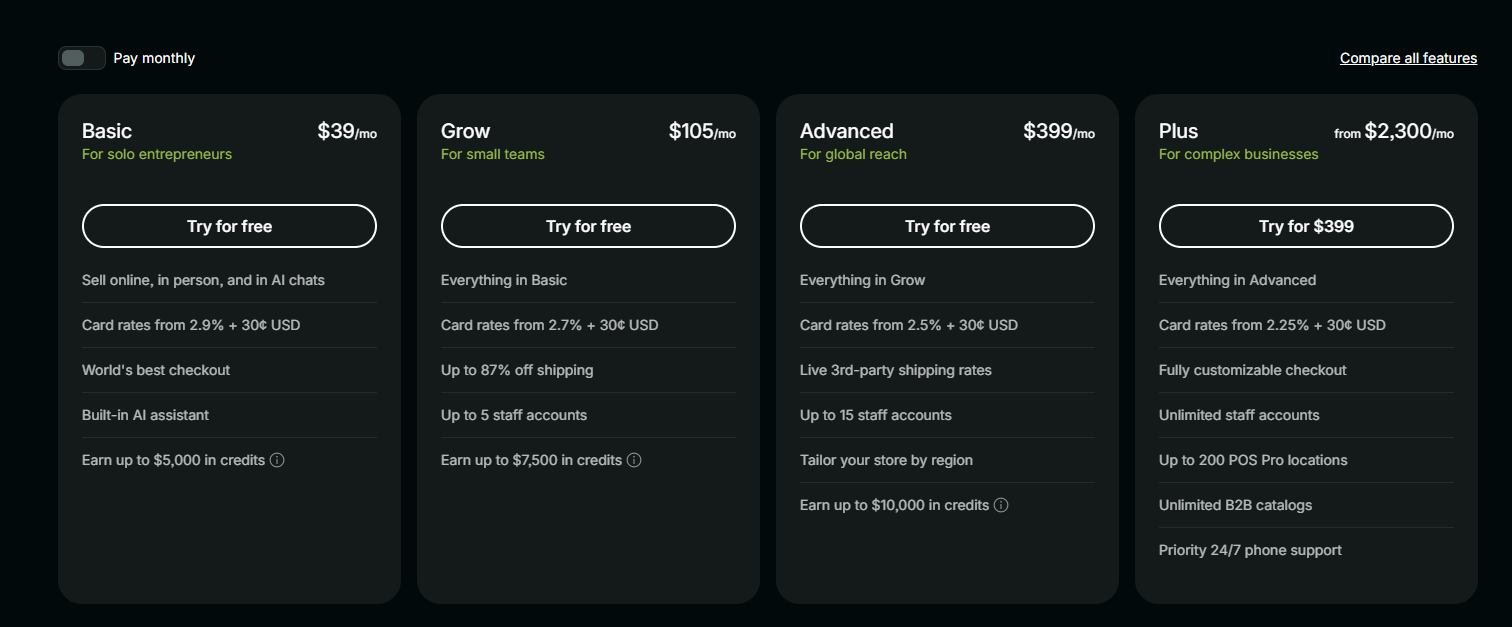
It also accommodates customers with different needs thanks to its various pricing plans. These include Shopify for small to medium stores and Shopify Plus for high-volume businesses needing advanced features and support. While there’s no free plan, options like Shopify Lite let you add a buy button to an existing site.
Shopify also handles secure hosting and payment processing, so you can focus on selling.
Why do you need Shopify alternatives?
While Shopify is a powerful e-commerce platform, it’s not always the right platform for every business. Depending on your goals, budget, and technical needs, exploring Shopify competitors can help you find a better fit.
Here are some common reasons why users look for alternatives to Shopify:
- Additional transaction fees: Shopify charges transaction fees when you don’t use Shopify Payments, and costs can increase further with paid themes and third-party apps.
- Limited customization: While Shopify offers flexibility, deeper customization often requires coding or upgrading to higher-tier plans, which may not suit every user.
- Reliance on third-party apps: Many advanced features depend on third-party apps, which can increase costs and complicate store management.
- Scalability needs: As your business grows, you may need advanced features like multi-store management, custom workflows, or enterprise-level tools that other platforms offer natively.
- Different business models: Some businesses need a simpler website builder, while others require a self-hosted solution or a more customizable e-commerce setup.
If you’re still evaluating your options, it helps to understand how different platforms support your long-term goals. Our in-depth review of Shopify covers all the details if you’re interested in learning more about the platform.
Frequently asked questions
The top e-commerce platforms include Shopify, WooCommerce, BigCommerce, Wix, and Squarespace. Each offers different e-commerce features, from ease of use to scalability and customization.
Shopify can get expensive due to additional transaction fees, paid themes, and reliance on third-party apps. Customization may also require coding or higher-tier plans.
Wix, Squarespace, and GoDaddy are generally easier to use. They offer simpler setup and design tools but fewer advanced e-commerce features.
Wix is better for ease of use and design flexibility. Shopify is better for advanced e-commerce features and scaling an online store.
Weebly and Shift4Shop offer free plans with limitations. WooCommerce is free to install but requires hosting and add-ons. Costs vary based on your setup.
There’s so much beyond Shopify. What’s your next move?
Choosing the right e-commerce platform is just one part of building a successful online business. Whether you prioritize design, scalability, or ease of use, the best option depends on how you want to sell online and grow over time.
But if you’re looking for an all-in-one solution that combines affordability, reliability, and essential e-commerce tools, Network Solutions stands out.
We can help you build a business-focused website that is easy to create, design, and launch. We have all you need: domain registration, website hosting, an e-commerce website builder, website design, and even digital marketing services.
But before you commit to any platform, there’s one step that sets the foundation for everything: your domain name.
Your domain is your online identity. It’s how customers find you, remember your brand, and build trust with your business. Securing the right domain early helps you avoid limitations later, no matter which e-commerce platform you choose.