

Key takeaways:
- Shopify offers affordable pricing, modern templates, and responsive support, making it ideal for small businesses.
- Hidden fees, costs, and customization challenges as businesses scale are common user complaints, especially for growing brands.
- While Shopify offers numerous advantages, businesses should carefully consider its pricing structure, content management constraints, and the complexities of platform migration before making a decision.
Thinking of launching your online store but unsure if Shopify is the best e-commerce platform for you?
If you’re a small business owner, startup founder, or budget-conscious entrepreneur looking to build your first online store, choosing the right platform can feel overwhelming. With dozens of options offering sleek designs and easy setup, it’s not always clear which one truly delivers long-term value.
This guide will give you an honest look at Shopify before committing. We break down the Shopify pros and cons, explore real user experiences, and answer the big question: Is Shopify worth it for your specific needs?
With hidden fees and scalability concerns often overlooked, this review cuts through the noise. We’ve analyzed real user feedback and tested key features to help you make a confident, informed decision, whether you’re just starting out or planning to scale your online business.
How we developed this review
We chose to review Shopify in detail because it’s one of the most widely used e-commerce platforms among small businesses and solopreneurs. It’s often the first choice for entrepreneurs looking to launch an online business—but popularity doesn’t always mean it’s the best fit.
To evaluate Shopify fairly, we focused on five key criteria:
- Core features: What tools are available for building and managing an online store?
- Pricing: Are there hidden fees or upgrade costs that affect long-term value?
- Ease of use: Can non-technical users build and manage their site easily?
- Flexibility: How well does Shopify adapt to growing business needs?
- Customer support: Is help readily available when users need it?
Our analysis is based primarily on 100 customer reviews from trusted third-party platforms, including G2, Reddit, BBB, Capterra, and Trustpilot. These sources helped us identify consistent patterns in user satisfaction and common pain points.
We also conducted hands-on testing using Shopify’s free trial to validate user claims about setup, design customization, and store management. This allowed us to experience the platform from a small business owner’s perspective and assess how well it delivers on its promises.
Disclaimer: This article is for informational purposes only. Listed third-party prices (or pricing estimates), product specifications and package inclusions may change without prior notice. Terms and conditions may apply per brand/provider. Please check with them directly for real-time information.
Overview of Shopify
Shopify is a subscription-based software-as-a-service (SaaS) platform that enables businesses to build, manage, and grow their online stores. It provides a streamlined dashboard where users can manage sales, market products, and accept payments all in one place. The platform offers several subscription plans, including Basic, Grow, Advanced, and Plus, designed to support businesses at different stages.
Shopify allows business owners to sell across multiple channels. In addition to their Shopify store, users can list products on marketplaces like Amazon and social media platforms such as Facebook and Instagram. Merchants can also use the Shopify POS app to sell in physical locations, including retail stores, pop-up shops, and events.
Overall, Shopify is known for its ease of use, flexible selling options, and support for a wide range of sites, from small startup stores to more established online businesses.
Shopify at a glance
- Best feature: Modern templates and responsive customer support
- Biggest drawback: Hidden costs from apps and limited customization on lower-tier plans
- Best for: Small businesses, startups, and solopreneurs
- Starting price: $39/month (Basic plan) when you pay monthly; $29/mo when you pay yearly
- Free trial: Typically a short free trial (varies by promotion)
Key features and functionalities
Now that we’ve outlined how this review was developed, let’s take a closer look at Shopify’s core features—what it does well, where it falls short, and how it performs in real-world use.
Website builder interface
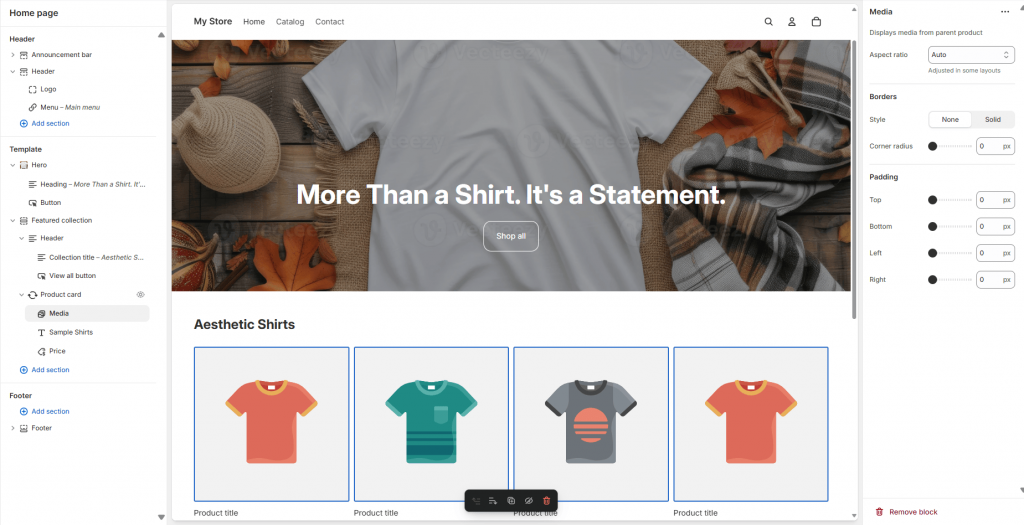
Shopify’s website builder is designed to help users launch a store quickly, even without technical experience. During setup, you’re guided through a clean dashboard where you can choose a theme, add products, and configure basic settings. The editor uses a section-based, drag-and-drop layout that allows you to add and rearrange content blocks.
For example, when we tested the builder, adding an image banner and tagline was simple. However, adding products and images took a bit of time to navigate. Customizing the layout—such as moving the “Add to Cart” button or changing font styles—may still require editing Liquid code or installing a third-party app. This makes the builder beginner-friendly at first, but less flexible for users who want more granular control.
Themes and mobile responsiveness
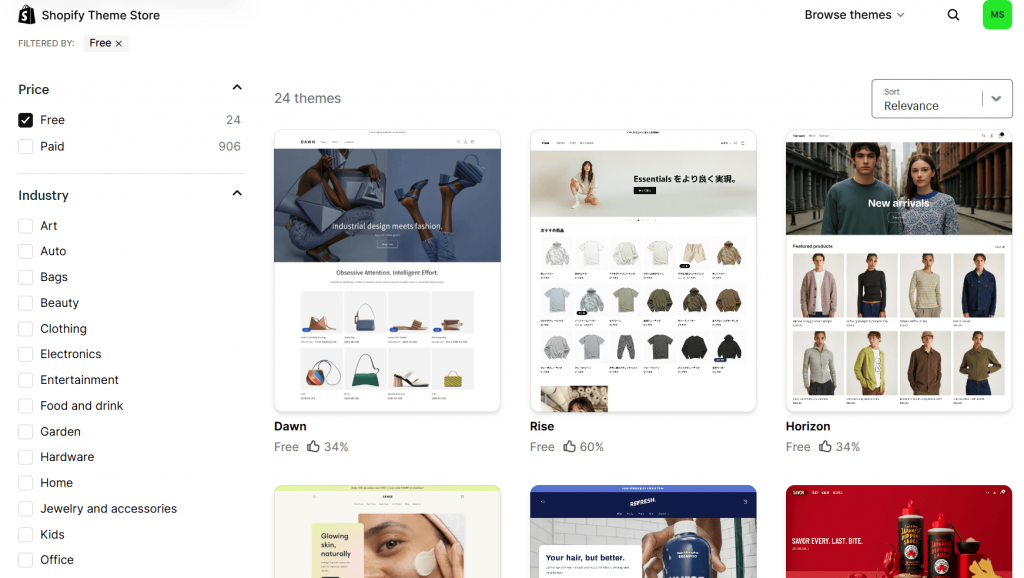
Shopify offers a library of free and paid themes, many of which are optimized for mobile by default. When we tested the “Craft” theme, content automatically adjusted to smaller screens, stacking sections and resizing images for a seamless mobile experience. This is a major advantage for users who want professional-looking Shopify website themes without needing to manually optimize for mobile.
Advanced users can further customize themes using Liquid, Shopify’s proprietary coding language. However, for most small businesses, the built-in editor and theme settings are sufficient to launch a polished, responsive online store.
Products and inventory
Shopify allows unlimited product listings, making it suitable for businesses with large catalogs. You can add product variants like size and color, and track inventory in real time to prevent overselling.
Advanced features include automated inventory forecasting, bulk import/export tools, and SKU management across multiple locations. These tools help streamline operations for growing businesses managing more complex inventories.
Payments and checkout
Shopify Payments simplifies payment processing and eliminates additional transaction fees when used as the primary gateway. Businesses can also integrate third-party providers such as PayPal, Stripe, and Apple Pay.
Shop Pay enhances the checkout experience by enabling fast, secure payments that can improve conversion rates.
Multi-currency checkout
Shopify supports international selling through multi-currency checkout via Shopify Payments and Shopify Markets. Customers can view prices and pay in their local currency, although payouts are typically processed in the merchant’s base currency on lower-tier plans.
Built-in fraud analysis
Shopify includes fraud analysis tools that flag orders as low, medium, or high risk based on factors such as IP addresses and billing details. This helps merchants make more informed fulfillment decisions.
While the checkout process is secure and optimized, customization remains limited on standard plans. Full checkout customization is generally reserved for Shopify Plus users.
Shipping and fulfillment
Shopify allows users to print shipping labels directly from the dashboard and access discounted rates from major carriers. It also integrates with dropshipping platforms and third-party logistics providers.
Carrier-calculated shipping, which provides real-time rates at checkout, may require higher-tier plans or additional fees depending on the setup.
More advanced fulfillment solutions, such as outsourced logistics and automation tools, are typically available to high-volume businesses or through premium services.
Marketing and sales
Shopify includes built-in tools for discounts, basic SEO, and abandoned cart recovery. Businesses can also sell across multiple channels, including social media and online marketplaces, while managing everything from a single dashboard.
However, more advanced marketing features like loyalty programs, subscriptions, and AI-driven upsells are usually handled through third-party apps. While this expands functionality, it can also increase costs over time.
Analytics and reporting
Shopify provides a dashboard with insights into sales, traffic, and customer behavior. Users can track order summaries, product performance, and customer data.
All plans support integration with tools like Google Analytics for deeper insights. However, advanced reporting and forecasting features are typically limited to higher-tier plans.
Security and hosting
Every Shopify store comes with an SSL certificate to ensure secure data transmission and is hosted on a platform optimized for speed and uptime. All payments are Level 1 PCI DSS compliant, meaning your store automatically meets the highest industry standards for protecting sensitive financial information.
While basic plans are highly secure, advanced compliance tools such as GDPR apps and monitoring solutions for regulated industries are not included. Businesses that need to meet these specific requirements typically use third-party apps from the Shopify App Store or rely on features exclusive to the Shopify Plus plan.
Pricing and plan inclusions
Shopify offers a tiered pricing structure designed to accommodate businesses at different stages, from solopreneurs to enterprise-level operations. Below is a breakdown of the main plans, their inclusions, and what to watch out for. Keep in mind that these prices are for monthly billing.
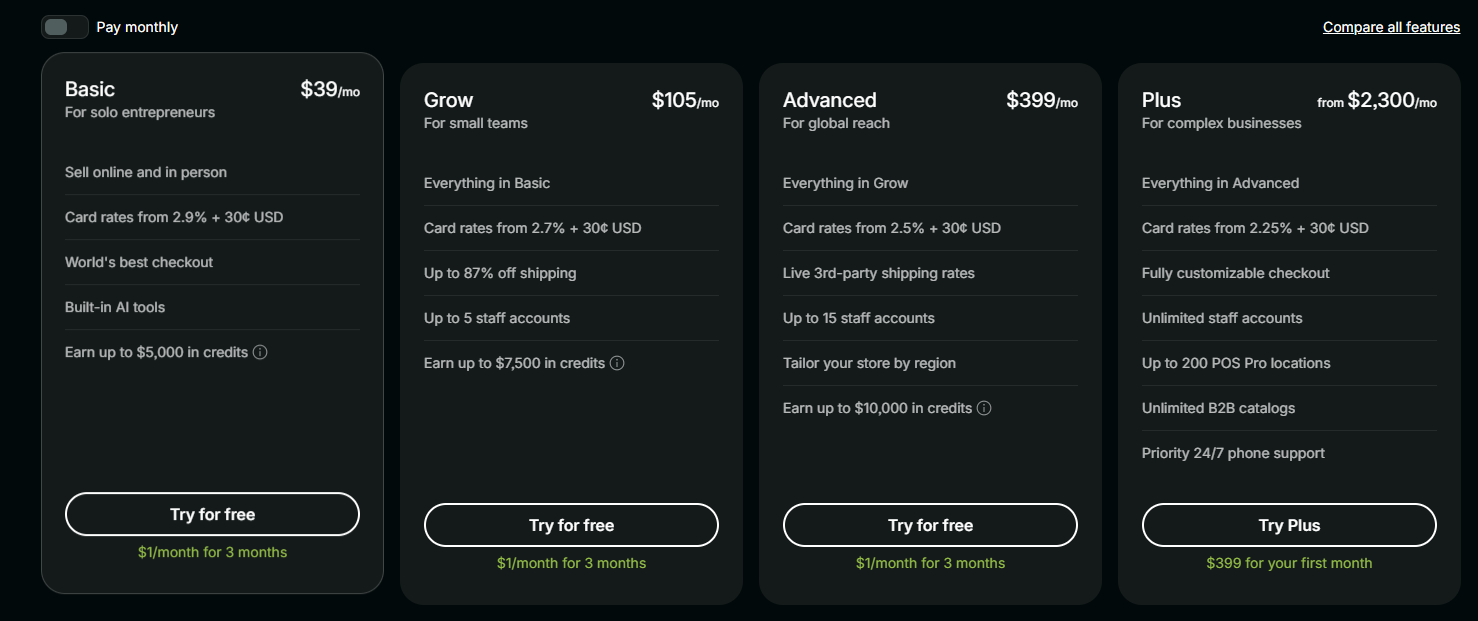
Shopify typically offers a short free trial, sometimes followed by promotional pricing for new users. Since these offers change frequently, it’s best to check Shopify’s official website for the latest details.
Hidden costs to watch for:
- Apps and themes: Many advanced features require paid apps or premium themes. Costs can add up quickly, with most apps ranging from $10 to $50 per month.
- POS hardware: Devices for in-person selling can range from around $49 to $459, depending on your setup.
- Currency conversion fees: Additional fees may apply when selling in multiple currencies.
Basic plan ($39/month)
This plan is the most popular and is suitable for solo entrepreneurs starting out.
- Online store builder with product collections, informational pages, and blogs
- Unlimited web hosting
- Free SSL certificate
- Streamlined checkout
- Collaborator accounts for designers and developers
- Access to templates and themes
- Ability to sell across multiple platforms, including social media and marketplaces
- Dropshipping integrations
- Reporting tools and performance tracking
- Shopify Academy resources
- Fraud analysis
- In-person selling via mobile
- Shipping discounts from major carriers
- Up to 10 inventory locations
- 24/7 live chat support
Grow Plan ($105/month)
Best suited for small teams looking to expand.
- Includes all Basic plan features
- Higher shipping discounts from major carriers
- Up to 5 additional staff accounts
Advanced Plan ($399/month)
Designed for businesses scaling into multiple markets.
- Includes all Grow plan features
- Up to 15 staff accounts
- Enhanced reporting capabilities
- More advanced international selling tools
Shopify Plus (custom pricing, starting around $2,300/month)
An enterprise-level solution for high-volume businesses.
- Includes all Advanced plan features
- Unlimited staff accounts
- Significantly expanded inventory and POS capabilities
- Customizable checkout
- Wholesale and B2B functionality
- Priority support (phone and chat)
How it performs from actual user experience
For this section, we’ve combined hands-on experience with Shopify and insights from real users across forums, YouTube tutorials, and expert reviews.
Setup and learning curve
Setting up a Shopify store is relatively straightforward. Once you log in, you’ll see a clean, intuitive dashboard that makes it easy to explore features and begin building your store.
However, there can be some friction during the initial setup. For example, there are limited prompts or guided walkthroughs for first-time users, which means you may need to figure out how to add products, images, and layouts on your own.
As you move beyond the basics, the learning curve becomes more noticeable. Many users describe Shopify as “easy to start but harder to customize,” a sentiment echoed in user reviews on platforms like G2 and in discussions across communities such as Reddit’s r/shopify.
While the section-based editor is beginner-friendly, more advanced design control, such as pixel-level customization, often requires working with code or using third-party apps. This can make deeper customization more time-consuming for non-technical users.
Website performance and reliability
Shopify is praised for its fast load speeds and stable uptime. An article from a Cybernews tester reported that their Shopify store was live within 30 minutes and ran smoothly across devices. The platform automatically optimizes storefronts for mobile, and basic SEO settings are pre-configured, which helps with visibility.
That said, some users noted that image-heavy pages can slow performance, especially if not properly optimized. Theme switching also introduces quirks; certain design elements may not transfer cleanly, requiring manual adjustments.
Overall, Shopify delivers reliable performance for most use cases, but businesses with complex design needs or large catalogs may need to invest in optimization tools or developer support.
Customer support responsiveness
Shopify offers 24/7 live chat support across all plans, but the experience varies. Wait times can take longer than expected, about 14 minutes, despite a 5-minute estimate. Once connected, the support agent was helpful and responsive, but the answers felt scripted and limited to basic troubleshooting.
Reviews on platforms like Trustpilot and Capterra frequently mention inconsistent support experiences, particularly for more technical issues. Users report being passed between agents or receiving vague responses. There are also complaints about how phone and email support are reserved for Shopify Plus users, which many feel is a drawback given the platform’s pricing.
The Help Center is well-organized and genuinely useful, with detailed articles and a chatbot that can escalate queries. But for urgent or complex problems, support may not be as fast or personalized as users expect.
What customers are saying
Shopify’s reputation among small business owners and solopreneurs is mixed. It’s widely praised for ease of use and flexibility but often criticized for its pricing structure and support experience.
Here’s a summary of what real users are saying across multiple review platforms.
Pros
Many users, especially those with limited technical experience, find Shopify empowering. It simplifies the process of launching and managing an online store, and its ecosystem offers tools that help businesses grow without needing a developer.
- Intuitive store builder: Many users highlight Shopify’s section-based editor as a major advantage, allowing them to build and customize their stores without needing to code.
- Ease of use: Shopify makes it easy to set up and manage an online store with built-in tools for payments, inventory, and shipping—making it especially appealing for beginners.
- App ecosystem and customization: Users appreciate the wide range of apps available to extend functionality, from marketing automation to inventory management.
- Scalability for growing brands: Shopify supports multi-channel selling and integrations, making it easier for businesses to expand as they grow.
Cons
Despite its strengths, Shopify isn’t without its drawbacks. Many users are frustrated by hidden costs, inconsistent support, and platform limitations.
- Support can be frustrating: A recurring complaint is inconsistent customer service, with some users reporting slow response times or limited resolution for technical issues.
- Hidden costs through apps: While the base plan is affordable, many essential features rely on paid apps, which can quickly increase monthly expenses. This often leads to frustration among users who expected an all-in-one platform.
- Platform limitations: Some users report restrictions in customization, particularly around checkout and design flexibility on lower-tier plans.
- e-commerce challenges beyond the platform: Beyond Shopify itself, broader frustrations with e-commerce, such as poor site performance or usability issues, can impact customer experience. These challenges are discussed further in our guide on common reasons customers leave e-commerce websites.
Frequently asked questions
The pros and cons of Shopify depend on your business needs. On the plus side, Shopify offers ease of use, modern Shopify website themes, and a wide app ecosystem that allows you to expand functionality. It’s also a strong option for building and managing Shopify sites without advanced technical skills.
On the downside, many users point to recurring costs, reliance on paid apps, and limited customization—especially on lower-tier plans. These factors can affect long-term scalability and overall value.
Yes, Shopify can be a great option for small businesses, especially those looking for an easy way to launch and manage an online store. If you’re asking, “Is Shopify worth it?”, the answer depends on your budget and long-term goals.
For startups and solopreneurs, Shopify offers a simple setup process, built-in tools, and reliable performance. However, as your business grows, additional costs from apps and upgrades may impact your overall investment.
Shopify is generally considered easy to use, especially for beginners with little to no technical experience. Its intuitive dashboard and guided setup make it accessible for first-time users.
That said, while Shopify is easy to use at the start, customization can become more complex over time. Advanced design changes or feature enhancements may require coding knowledge or third-party apps.
Some of the most common disadvantages highlighted in reviews include:
– Recurring monthly costs and additional app expenses
– Transaction fees if you don’t use Shopify Payments
– Limited customization for checkout and site structure
– Basic built-in SEO features compared to more flexible platforms
– Platform dependency, which can make migration more challenging
These limitations are important to consider when evaluating the full benefit of Shopify versus its long-term costs.
Shopify’s fees depend on your plan and payment method.
Using Shopify Payments:
– Basic plan: approximately 2.9% + $0.30
– Grow plan: approximately 2.6% + $0.30
– Advanced plan: approximately 2.4% + $0.30
Using third-party payment providers adds an extra transaction fee, potentially increasing total costs.
On a $100 sale, Shopify may take around $2.70-$5.20, depending on your setup.
Disclaimer: These figures are estimates and may vary based on your region, plan, and payment provider. Always refer to Shopify’s official pricing for the most accurate details.
The most commonly cited drawback is the accumulation of costs over time. While the base subscription is relatively affordable, many essential features require paid apps, which can significantly increase monthly expenses.
Other concerns include limited checkout customization and reliance on Shopify’s ecosystem, which may not suit businesses looking for full control.
The main benefit of Shopify is its balance of ease of use and scalability. It allows users to quickly launch professional-looking Shopify sites while offering tools to grow across multiple sales channels.
Compared to other platforms, Shopify stands out for its reliability, app ecosystem, and strong support for e-commerce features. However, businesses that need more control or lower long-term costs may explore alternatives.
Ready to build your online store? Here’s how to decide
Choosing the right e-commerce platform comes down to your business goals, budget, and the level of control you want over your store.
This review of Shopify pros and cons shows that Shopify is a strong choice for beginners and growing businesses. It offers an intuitive setup, modern Shopify website themes, and the flexibility to build and scale Shopify sites across multiple sales channels. For many users, this makes Shopify an appealing starting point, especially if ease of use is a priority.
However, it’s important to weigh the trade-offs. Ongoing app costs, limited customization on lower-tier plans, and reliance on Shopify’s ecosystem can become challenges as your business grows.
If you want a platform that’s easy to use, quick to launch, and supported by a large ecosystem, Shopify is a solid option. But if you’re looking for a more straightforward, cost-effective way to build and manage your website, with fewer dependencies on third-party apps, it’s worth exploring alternatives.
A flexible and reliable option is Network Solutions’ DIY website builder. It’s designed for small business owners who want a simpler way to create and grow their online presence without the complexity or added costs of managing multiple apps.
You can also check out our e-commerce website builder if you’re in the market for a straightforward, cost-effective way to build your online store. It’s a great place to start and grow your e-commerce website! And if you want to compare more options, check out our blog for the best Shopify alternatives.