
Key takeaways:
- A domain ownership transfer changes the legal owner of a domain, while a domain transfer moves the domain from one registrar to another without changing ownership.
- Most domain ownership transfers require updated registrant information and verification from both the current domain owner and the new domain owner before the change can be completed.
- After the transfer, review your domain’s services, security settings, and renewal options to help maintain uninterrupted control and protection.
Many people assume that transferring domain ownership and transferring a domain are the same thing, but they’re actually two different processes. A domain ownership transfer changes the legal owner of the domain, while a domain transfer moves the domain from one registrar to another without changing ownership.
Whether you’re selling a domain, handing it to a client, transferring control to a business partner, or assigning it to a successor, understanding this distinction can help you avoid unnecessary delays and confusion. The good news is that transferring domain ownership is a straightforward process when both parties prepare in advance.
This guide covers how to transfer domain ownership, eligibility requirements, what the new owner should do after the transfer, how to cancel a transfer request if needed, and how ownership transfers differ from registrar transfers.
Transfer your domain to Network Solutions
Need a new home for your domain? Transfer it to Network Solutions and get access to domain management tools, protection features, built-in business apps, and dedicated support.

Preparing for domain ownership transfer
Before starting a domain ownership transfer, verify that you have access to the account that currently manages the domain. Registrars typically require the current owner or another authorized contact to approve ownership changes and help protect domains from unauthorized transfers.
In general, you should prepare the following:
- Access to the account that currently manages the domain
- Accurate contact details for both the current owner and the new owner
- Identity verification documents when requested
- Supporting legal documentation (for business-owned domains that have undergone business name changes resulting from a merger, acquisition, or business name change)
- Confirmation that both parties agree to the transfer
At Network Solutions, a domain ownership transfer is typically initiated by the current registrant or an authorized account contact. In many cases, the primary user can update ownership information by editing the domain’s contact details and completing the required email verification process.
If the current owner cannot access the existing email address or additional verification is required, the request may need to be submitted through the Account Recovery process.
If additional verification is required, we may request supporting documentation such as:
- A valid government-issued photo ID (required for both the current owner and new owner if registering as individuals)
- Supporting business documentation, such as a current business license or utility bill issued within the last 90 days, plus documentation identifying the authorized signing authority (required for both the current owner and new owner if registering as a business, organization, or corporation)
- Additional legal documentation validating the ownership change (may be required when the current or new owner’s business name has changed due to a merger, acquisition, or business name change)
Keep in mind that a domain ownership transfer only changes ownership of the domain registration. When a domain is transferred to a new Network Solutions account, associated services such as Privacy Protection may be removed and must be repurchased or recreated by the new owner. Hosting, email, privacy protection, and other active services should be reviewed after the transfer to determine whether additional setup, migration, or subscriptions are needed.
Processing times can vary depending on the transfer method and whether additional verification is required.
Note: Domain ownership transfer requirements and verification procedures vary by registrar. The information above reflects Network Solutions support guidance and ownership-transfer requirements available at the time of writing.
How to transfer domain ownership
The exact process for transferring domain ownership varies by registrar. However, most ownership transfers follow the same general pattern: the current owner initiates the request, updates the registrant information, and both parties complete any required verification before the ownership change is approved.
At Network Solutions, the primary user can update the domain’s registrant information through Domain > Domain Contacts > Edit. Once the information is updated, verification emails are sent to both the current registrant’s and the new registrant’s email addresses. Both parties must approve the request before the ownership change can be completed.
If the current owner cannot access the existing email address on file, additional verification may be required through the Account Recovery process. In these situations, Network Solutions may request supporting documentation before approving the ownership change.
Follow the steps below to transfer domain ownership through your Network Solutions account:
- Confirm the current owner has account access
- Update the domain’s registrant information
- Approve the ownership change request
- Complete any additional verification (if required)
- Wait for confirmation
- Confirm the transfer is complete
Step 1: Confirm the current owner has account access
The current owner or an authorized account contact should have access to the account that manages the domain. Before starting the transfer, verify that the account information and contact details are accurate and up to date.
Step 2: Update the domain’s registrant information
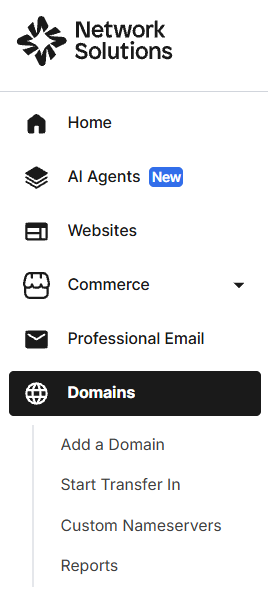
- Log in to your Network Solutions Account Manager.
- Click Domains.
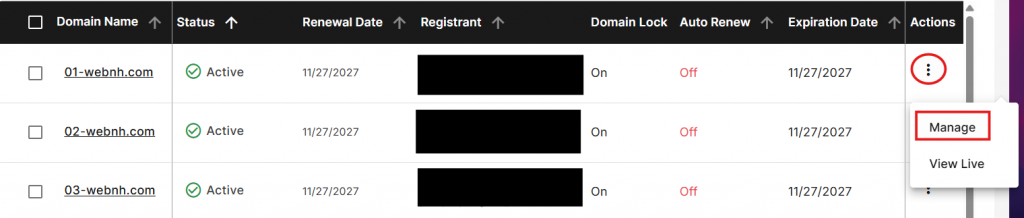
- Select the domain you want to transfer.
- Click the kebab menu (⋮) under Actions.
- Select Manage.
- Under Domain Contacts, click Edit.
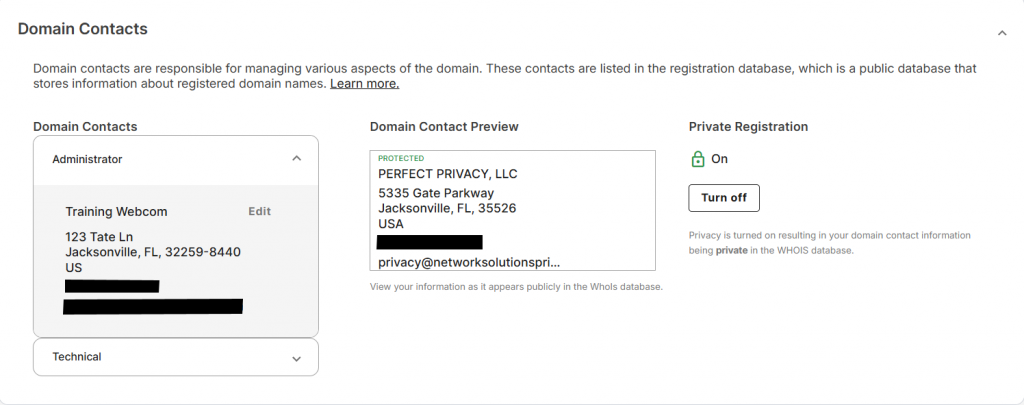
- Replace the current registrant information with the new owner’s details.
- Save your changes.
Step 3: Approve the ownership change request
Once the registrant information is updated:
- The current owner must open the verification email sent to the current registrant’s email address.
- Approve the ownership change request.
- The new owner must open the verification email sent to the new registrant’s email address.
- Approve the ownership change request.
Both parties must complete the verification process before the ownership transfer can proceed.
Step 4: Complete any additional verification (if required)
In some cases, Network Solutions may require additional verification before approving the ownership change.
- Government-issued photo identification for individual registrants
- Business documentation and authorized signer information for organizations
- Legal documentation supporting mergers, acquisitions, or business name changes, when applicable
If the current owner cannot access the existing email address on file, the ownership change request may need to be submitted through the Account Recovery process.
Step 5: Wait for confirmation
After all required approvals and verification steps are completed, Network Solutions will review and process the ownership change request.
Step 6: Confirm the transfer is complete
Once approved, the new registrant becomes the official domain owner. Review the domain’s registration details and confirm that all information is accurate.
Keep in mind that some registrars may apply a 60-day transfer lock after a change of registrant per ICANN policy. During this period, the domain cannot be transferred to another registrar unless the registrar offers an opt-out mechanism before the ownership change is submitted.
Important: A domain ownership transfer changes who owns the domain. It does not automatically move the domain to a new registrar. If you want to transfer a domain from one registrar to another, you’ll need to complete a separate domain transfer process, which may require an authorization code (EPP code), transfer approval, and applicable transfer fees.
Next steps for the new domain owner
Once the ownership transfer is complete, take a few minutes to review the domain and its associated services. While the domain registration moves to the new owner, some services may require separate setup, migration, or repurchasing.
Use the following checklist after the transfer:
- Verify that the domain’s registration details and contact information are accurate.
- Review any hosting, email, privacy protection, or other active services linked to the domain.
- Confirm that website and email services are functioning properly.
- Update account security settings, including passwords and two-factor authentication (2FA).
- Review domain renewal settings and expiration dates.
- Recreate or repurchase services that did not transfer to the new account.
If the domain was transferred to a new Network Solutions account, services such as Privacy Protection may be removed during the transfer process and must be purchased again by the new account holder.
For additional protection, consider enabling Domain Privacy + Protection to help protect your personal information and explore Domain Management tools to simplify ongoing administration.
To reduce the risk of accidental expiration, you can also review Domain Expiration Protection options and confirm that renewal settings are configured correctly.
Owning a domain means taking responsibility for its ongoing protection. When discussing how domain owners can safeguard their online assets, Michael Chattan, Senior Director of Domain Operations at Network Solutions, advises.
“Lots of different services out there, but at the end of the day, you are your own best protection. Use auto-renewal, get expiration protection, and check in on your domain.”
Taking a proactive approach to domain management can help ensure your newly acquired domain remains secure and accessible.
How to cancel the ownership transfer
If you’ve changed your mind or submitted ownership information by mistake, you may be able to stop the ownership transfer before it’s completed.
At Network Solutions, ownership changes require approval from both the current and new registrants via verification emails. If either party does not approve the request via email, the ownership change will not push through.
If the request was sent to the wrong person or contains incorrect information:
- Do not approve the verification emails.
- Review the transfer status and ownership details.
- Restart the process with the correct registrant information, if necessary.
- Update any exposed contact information or account credentials if they were shared incorrectly.
Once all required approvals have been completed and the ownership change has been processed, cancellation may no longer be possible. If you’re unsure about the status of a request, contact Network Solutions support before taking additional action.
What is the difference between a domain ownership transfer and a domain transfer?
A domain ownership transfer changes the legal owner of a domain name. Once the transfer is completed, the new registrant becomes the official domain owner and assumes responsibility for managing the domain. This type of transfer is commonly used when selling a domain, adding a business partner, or assigning ownership to a successor.
A domain transfer, on the other hand, moves a domain from one registrar to another while keeping the same owner. The domain remains under the same ownership, but management of the registration is transferred to a new domain service provider.
If you’re planning to move a domain from another registrar to Network Solutions, visit our Domain Transfer page to get started.
Below is a comparison between a domain ownership transfer and a domain transfer:
Aspect | Domain ownership transfer | Domain transfer |
|---|---|---|
Process | Transferring the legal ownership of the domain to a new person/entity | Moving the domain from one registrar to another |
Who is involved | Current domain owner and new owner | Current domain registrar and new registrar |
Reason | Selling a website, transferring ownership to a partner, or changing business structure | To take advantage of better pricing or services |
Time to complete | Can take a few days to a week depending on registrar | Can take up to 7 days |
Impact on website | Transfer of ownership; website’s functioning remains intact, but legal rights change | Minimal impact on the website itself (may cause short downtime) |
Note: Registrar transfers normally do not cause downtime on their own. Downtime typically occurs when DNS, nameservers, hosting, or email settings are changed simultaneously.
Frequently asked questions
You can transfer domain ownership by updating the domain’s registrant information and completing the required verification process. At Network Solutions, both the current and new owner must approve the ownership change through verification emails before the transfer can be completed.
Yes. You can change domain ownership without changing registrars. A domain ownership transfer changes the legal owner of the domain, while the domain registrar remains the same unless you separately initiate a domain name transfer.
No. An EPP code, also known as an authorization code (Auth ID), is generally used to transfer a domain from one registrar to another. Domain ownership transfers rely on registrant verification rather than an EPP code.
The transfer process can take anywhere from a few hours to several business days, depending on the registrar’s verification requirements. Delays may occur if additional documentation or identity verification is required before the ownership transfer completes.
In many cases, yes. At Network Solutions, the current and new owner must approve the ownership change through verification emails. If the required verification is not completed, the transfer request will not proceed. Once the ownership change has been fully processed, cancellation may no longer be possible.
Stay in control of your domain ownership transfer
A successful domain ownership transfer starts with accurate information, proper verification, and proactive domain management. Taking the time to review your registration details, security settings, and associated services after the transfer can help prevent future issues.
Most importantly, remember that transferring domain ownership and transferring a domain to a new registrar are separate processes. Knowing which one you need will make it easier to protect your domain and ensure a smooth transition for the new domain owner.
As you take ownership of your domain, it’s also a good time to strengthen its security and simplify ongoing management. With our Domain Privacy + Protection, you can help safeguard your personal information from public WHOIS records, while our Domain Management tools make it easier to organize and maintain your domain settings as your online presence grows.