
Key takeaways:
- Domain forwarding involves redirecting domains to a website of your choice.
- It impacts both SEO performance and user experience.
- Depending on the type of redirect, domain forwarding can be a permanent or temporary solution.
Domain forwarding, also known as web forwarding or URL forwarding, is the process of redirecting website visitors to a different domain or section of your website. When users type a specific website address into the browser address bar, domain forwarding diverts their browsers to a webpage or website you designate.
Domain forwarding is helpful if you own multiple domain names and don’t want to confuse your visitors. It also improves your website’s chances of getting found by consolidating traffic to your original domain.
This article provides a thorough overview of domain forwarding, including its benefits, how to set it up, and best practices.
Find the perfect domain
Ready to register a domain name? Check domain availability and get started with Network Solutions today.
What is domain forwarding? How does it work?
Domain forwarding automatically sends visitors from one domain to another destination URL. Also called domain name forwarding, URL forwarding, or domain redirection, it lets you connect one domain to another without creating a separate website for each address.
For example, if your business moves from example.net to example.com, you can create a domain redirect from the old address to the new URL. Anyone who enters example.net will be redirected automatically, so visitors land on the current website instead.
So, how does domain forwarding work? When someone enters the forwarded domain, they’re automatically redirected to the destination URL you selected. This can help connect a domain to another website, a landing page, a microsite, or even a social media profile.
Domain pointing works differently. See our guide to domain pointing for a closer look at the distinction.
What are the types of web forwarding?
The most common forms of web forwarding include:
- 301 redirects
- 302 redirects
- Wildcard forwarding
Each serves a different purpose depending on whether the redirect is permanent or temporary and whether you need to forward a single URL or multiple subdomains.
301 redirects
A 301 redirect is a permanent redirect that tells search engines and browsers that a page or domain has moved to a new URL permanently. It is commonly used during rebranding, domain migrations, or URL changes that are not expected to be reversed. Search engines generally pass ranking signals, including link equity, from the old URL to the new one.
For example, if your company moves from oldurl.com to newurl.biz, a 301 redirect can send visitors to the new address while helping search engines transfer ranking signals from the old site to the new one.
302 redirects
A 302 redirect signals that the move to a new URL is temporary. It is appropriate when a page is unavailable for a limited period, such as during maintenance, testing, or a short-term campaign.
Unlike a permanent redirect, a 302 tells Google to generally keep the original URL in search results rather than treat the new URL as its permanent replacement. This helps preserve the original page’s search visibility while the temporary redirect is in place.
For example, you might temporarily redirect visitors to another page while your main website is undergoing maintenance.
Wildcard forwarding
Wildcard forwarding redirects multiple subdomains under a domain to another destination using a single forwarding rule. This can simplify management when you do not want to configure each subdomain separately.
For example, if multiple subdomains under your domain should redirect to the same destination, wildcard forwarding can handle those requests automatically without requiring separate forwarding rules for each one. The exact setup process depends on your provider and DNS configuration, and some providers may require additional DNS settings as part of the setup.
Be careful when combining forwarding rules. Incorrect configurations can create redirect chains or redirect loops that prevent visitors and search engines from reaching the intended destination.
How to forward your domain
Most domain registrars let you configure domain forwarding through a control panel, although the exact setup process varies by provider. With Network Solutions, once you reach the Manage Web Forwarding screen, you can configure where your domain sends visitors in just a few clicks. Your domain’s nameservers must point to Network Solutions for forwarding to work. Domain forwarding on Network Solutions is a five-step process:
- Choose what you want to forward
- Enter the destination URL
- Select your forwarding method
- Apply the forwarding record
- Save your changes
Step 1: Choose what you want to forward
Select your forwarding source. For your first forwarding rule, Network Solutions lets you forward the primary domain URL. After that, you can also forward a subdomain, subdirectory, or a combination of both.

Step 2: Enter the destination URL
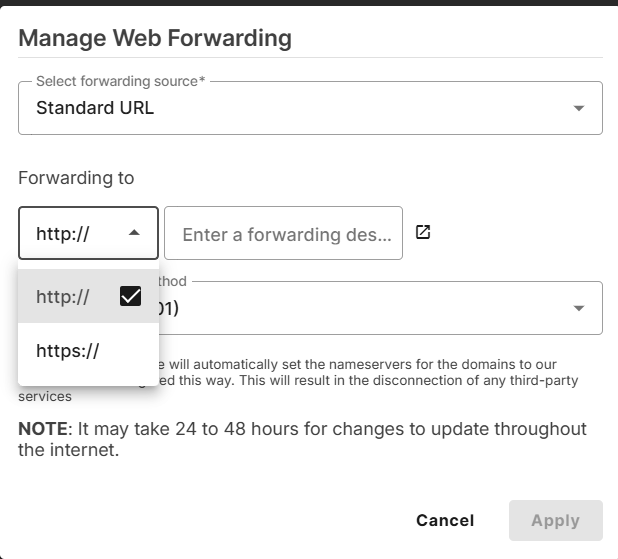
Choose http:// or https://, then enter the destination URL where you want visitors to land. You can use the Preview option to confirm that the address leads to the correct page before continuing. If the destination supports HTTPS, select HTTPS.
Step 3: Select your forwarding method
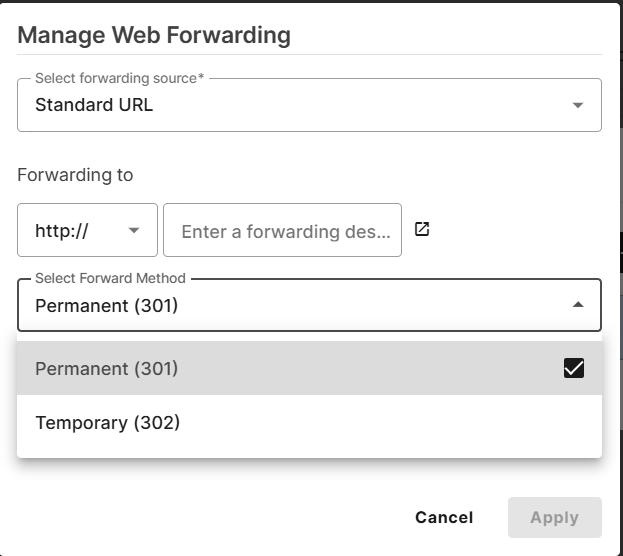
Choose whether you want to forward the domain using a 301 redirect or 302 redirect. A 301 redirect is intended for permanent moves, while a 302 redirect is used when the redirect is temporary.
Step 4: Apply the forwarding record
Click Apply. The new forwarding record will appear in the Domain Forwarding table, where you can review, edit, or add additional forwarding rules.
Step 5: Save your changes
Click Save to finish the setup. Network Solutions advises allowing four to six hours for the forwarding changes to propagate. During this period, updates may not appear everywhere immediately.
Once your domain is using Network Solutions nameservers, you generally do not need to manually edit DNS records while completing these steps. For the complete process, including how to access the forwarding controls and manage different forwarding sources, see our Network Solutions Domain Forwarding guide.
Find the perfect domain, boost your discoverability and credibility!
Use our selection of premium domains to expand your reach and brand awareness.

Why use domain forwarding?
Domain forwarding helps direct visitors to the right place while making it easier to manage multiple web addresses. It can also support SEO, protect your brand, improve the user experience, and reduce the need to maintain multiple websites.
Key benefits include:
- Improved SEO
- Brand protection
- Simplified management
- Better user experience
- Cost savings
It improves SEO
Domain forwarding can help preserve existing SEO value when you move from one URL or domain to another. A properly configured permanent redirect can help pass link equity and other ranking signals to the destination page. It can also reduce duplicate content issues by consolidating multiple domain versions into one primary location, making it easier for search engines to understand which URL should receive credit.
It protects your brand
Owning variations of your domain, including different top-level domains (TLDs), can help maintain brand consistency. You can forward those addresses to your primary site so direct traffic still reaches the right destination. This also lets you use memorable URLs while keeping one domain as the main home for your brand.
It simplifies domain management
Web forwarding makes it easier to manage an entire domain portfolio without building and maintaining a separate website for each address. You can direct one domain to another or send multiple domains and subdomains to your main website, reducing the amount of content, hosting, and configuration you need to manage individually.
It improves the user experience
Domain forwarding helps redirect visitors when they enter an alternate, outdated, or similar web address. Instead of reaching a dead end or a 404 error, visitors land on the intended page. This reduces the chance that multiple domain names confuse visitors and gives them a clearer path to your current website.
It can reduce costs
Domain forwarding can reduce the need to host and maintain separate websites for every domain you own. Instead, multiple addresses can direct visitors to the same destination site, potentially reducing hosting and maintenance costs.
Understanding the difference between a domain name and a hostname can also make it easier to see how domain forwarding fits into your overall website setup.
When to use domain forwarding
Domain forwarding is useful when you need one web address to send visitors to another destination without building or maintaining a separate website. For small businesses, it is especially useful during domain changes, marketing campaigns, and situations where several domains point to the same destination. You need them for:
- When you move to a new domain
- When you own multiple domain variations
- When you run a marketing campaign
- When you consolidate websites or domains
When you move to a new domain
If you replace an old domain with a new domain, forwarding can send visitors from the old site to your current main website. This is especially helpful when customers may still use bookmarks, saved links, or older marketing materials that reference the previous address.
When you own multiple domain variations
Businesses often register similar domain names, alternate spellings, or different extensions. You can forward each one to your primary site instead of maintaining separate websites. This helps maintain brand consistency while capturing traffic from visitors who enter those alternate addresses.
When you run a marketing campaign
Marketing campaigns often use short, memorable URLs that are easier to promote than longer webpage addresses. Domain forwarding lets those URLs lead directly to specific pages, such as a product launch, promotion, event, or signup page.
When you consolidate websites or domains
If you no longer need multiple websites or domains, you can redirect visitors to a primary website using domain forwarding. This is useful after a merger, rebrand, or site consolidation when an old site still receives traffic but is no longer actively maintained.
Common mistakes when forwarding a domain
Domain forwarding is usually straightforward, but a few common setup mistakes can prevent redirects from working as intended.
Common mistakes include:
- Leaving conflicting DNS records
- Assuming HTTPS works automatically
- Changing DNS without checking email
- Sending visitors to the wrong destination
Leaving conflicting DNS records
Old A or CNAME records can conflict with the new forwarding configuration and send traffic to the wrong destination. Review your domain’s DNS records before making changes and remove or update any records that conflict with your provider’s forwarding requirements. DNS updates may also take time to propagate, so a new forward may not work everywhere immediately.
Assuming HTTPS works automatically
HTTPS forwarding requirements vary by provider. In some cases, the source domain must support HTTPS before visitors can be securely redirected. If HTTPS forwarding is not configured correctly, visitors may see a security warning instead of reaching the destination URL. Check what your registrar supports before activating the redirect.
Changing DNS without checking email
Website forwarding and email forwarding are separate. Changing nameservers or DNS records without reviewing existing mail settings can disrupt email because email services rely on their own DNS records, including MX records. Check which DNS records must remain in place before changing your forwarding setup.
Sending visitors to the wrong destination
Always test the destination URL before relying on the forward. A typo, outdated page, or incorrect protocol can confuse visitors or send them somewhere unintended. Test both the source domain and destination after setup to verify the redirect leads to the correct page.
What are the best practices for domain forwarding?
Domain forwarding can be a powerful tool for enhancing brand recognition when used effectively. Here are some best practices to get the most out of web forwarding:
- Use the appropriate types of redirects: Apply 301 redirects when you’re transferring to a new site or rebranding. On the other hand, 302 redirects reroute to your temporary page while your main site undergoes maintenance.
- Avoid redirect loops: Ensure your redirect location doesn’t point to itself. Redirect loops can confuse users and search engines, leading to customer dissatisfaction and lower site ranking.
- Ensure the destination is relevant: Ensure the forwarded domains are relevant to your users’ search intent. For example, if you redirect blog.newurl.biz to your home page, verify that your website has visible blog entries.
- Test regularly: Inspect your redirects before committing them to your live site. Ensure that each redirect leads to the intended destination and doesn’t create any redirect loops.
- Monitor analytics and tools: Use tools like Google Analytics 4 (GA4) and Google Search Console (GSC) to observe your domain forwarding performance. Adjust your forwarding rules if your domains start losing traffic.
Our glossary on domain terms can help you better digest the information found in this guide.
Does domain forwarding affect SEO?
Yes, domain forwarding can affect SEO, and its impact depends largely on how it is implemented. When set up correctly, forwarding can preserve existing SEO signals and help search engines understand where content has moved. Poorly configured redirects can create indexing, crawling, and ranking issues instead.
For a permanent domain move, a 301 redirect tells search engines that an old URL has moved to a new location. This can help transfer link equity and other ranking signals associated with the old URL to the new one. Google also states that permanent redirects do not negatively affect PageRank.
Forwarding can also help consolidate duplicate content. If multiple domains or URL variations lead to the same content, directing them to one preferred URL gives search engines a clearer signal about which version should appear in search results.
The destination URL matters, too. Avoid sending every old URL to an unrelated homepage when a corresponding page exists. Google recommends mapping old URLs to relevant new URLs because unrelated redirects can confuse users and may be treated as soft 404s.
Redirect chains, redirect loops, incorrect HTTPS configurations, and poorly planned URL changes can also create SEO challenges. Even when forwarding is implemented correctly, rankings may fluctuate temporarily while search engines recrawl and process the changes.
Frequently asked questions
Domain forwarding automatically redirects visitors from one domain or URL to another destination. It is commonly used when a business changes domains, owns multiple domain variations, or wants a memorable web address to lead to a specific page.
A 301 redirect is used for a permanent move, while a 302 redirect is intended for a temporary change. A 301 tells search engines that the original URL has permanently moved, whereas a 302 generally keeps the original URL as the primary address.
Yes. You can forward multiple domains to the same website by creating a forwarding rule for each domain. This is useful when you own different domain extensions, alternate spellings, or campaign-specific domains that should all lead to one primary website.
Open your registrar’s domain management or control panel, choose the domain you want to forward, and enter the destination URL. You may also need to select a 301 or 302 redirect. Save the changes and allow time for DNS updates to take effect.
Domain forwarding does not automatically forward email. However, changing nameservers or DNS records during setup can affect email if MX records or other mail-related settings are changed. Review your DNS configuration before making changes.
Go to your registrar’s domain settings, locate the forwarding rule, remove or disable it, and save your changes. The exact steps vary by provider, and DNS changes may take time to propagate.
Many registrars include basic domain forwarding with domain registration, but availability varies. Some providers may charge for advanced forwarding features or include them only with certain plans.
Make the best use of your domain portfolio with domain forwarding
Domain forwarding has benefits, such as providing a better user experience. If you own several domains and subdomains, you can use our domain forwarding to funnel traffic into your preferred primary domain.
We make domain forwarding simple and accessible, so you can create a future-proof website with brand consistency.