
Key takeaways:
- Most small business websites perform well with 5–10 core pages, then expand strategically as the business grows.
- An organized website structure enhances user experience, credibility, and SEO.
- Trust-building pages build confidence and turn visitors into customers.
Your website plays an important role in helping your business succeed. It’s often the first place potential customers go to learn more about your brand, what you offer, and how your products satisfy a particular need they have.
But success doesn’t come from simply having a website. The pages on a website and how they’re organized within your website’s structure determine whether visitors get the answers they are looking for or move on and search elsewhere.
So what pages should you include to support real business growth? In this guide, you’ll find a clear breakdown of essential business website pages, how many you actually need, and how to structure them to build trust, improve performance, and turn traffic into results.
How many business web pages should a website have?
Most small business websites do well with 5 to 10 core pages to start. This covers essential business web pages, including the home page, about page, services or products page, contact page, and key legal pages. As your business grows, you can expand your website pages based on new services, content, or audience needs.
There’s no fixed number of pages a website should have. The right amount depends on your goals, industry, and growth plans. What matters more is avoiding two common mistakes: creating too few pages or adding too many too quickly.
Too few pages can leave important information gaps, limiting your ability to rank for relevant searches and making it harder to provide your customers with the information they need. Too many pages without a clear website structure can overwhelm your customers, dilute your messaging, and make it harder for search engines to understand your content.
Instead of chasing a specific number, focus on structuring your website to make it a reliable, centralized source of information about your business for your customers.
What pages should a website have?
Most business websites should include a Home page, About page, Products or Services page, Contact page, a Blog, and key legal pages like a Privacy Policy and Terms of Service. These are the core pages a website should have to communicate your business’s value, provide relevant information to your customers, build trust, and generate and convert leads.
Below, we’ll break down each of these website pages and explain how to make them effective.
- Home page
- About us page
- Service/Product page
- Contact us page
- Privacy policy page
- Terms of service page
- Sitemap
- Robots.txt page
- 404 page
Home page
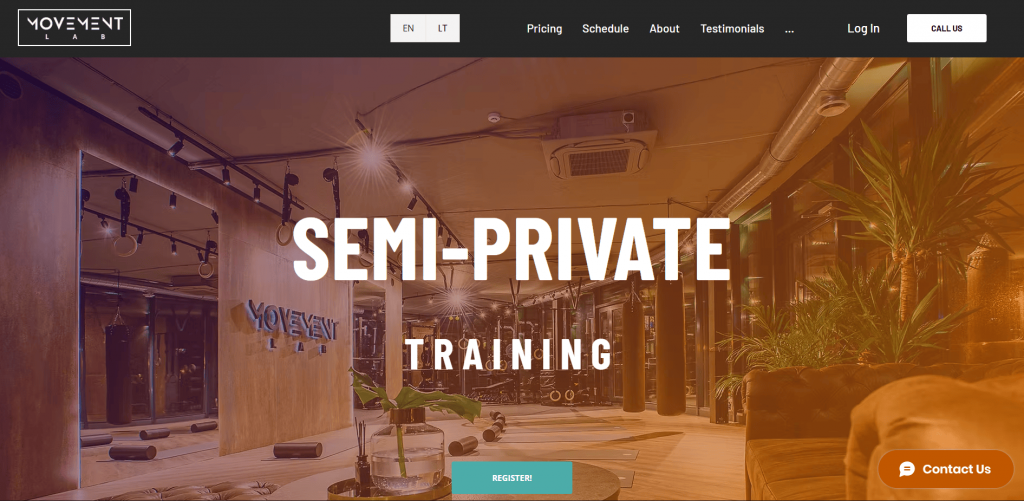
(Image source: https://www.movementlab.lt/)
Your home page is the main entry point to your website. It should quickly tell visitors who you are, what your business does, and where they should go next, whether that’s your Services, About, or Contact page.
Because many visitors decide within seconds whether to stay or leave, your homepage design can directly impact your business success. A well-designed homepage creates a strong first impression and makes it easy for people to understand your value. If visitors feel confused or overwhelmed, they’re more likely to leave than to explore further.
From an SEO perspective, your home page should primarily target branded terms and one or two broad, high-level service or industry phrases, such as “web design agency in [city].” Avoid trying to rank it for every keyword. Instead, let supporting website pages focus on specific services or topics, while your homepage anchors your overall website structure.
To make your homepage effective, include:
- Clear branding, such as your logo, tagline, or mission statement
- A visible and compelling call-to-action (CTA) that guides visitors toward the next step
- Featured sections highlighting your core services or products
- Simple navigation that helps users quickly find relevant information
- A clean layout that prioritizes clarity over clutter
When your home page is focused, structured, and intentional, it sets the tone for the rest of your website pages and encourages visitors to keep exploring.
About us
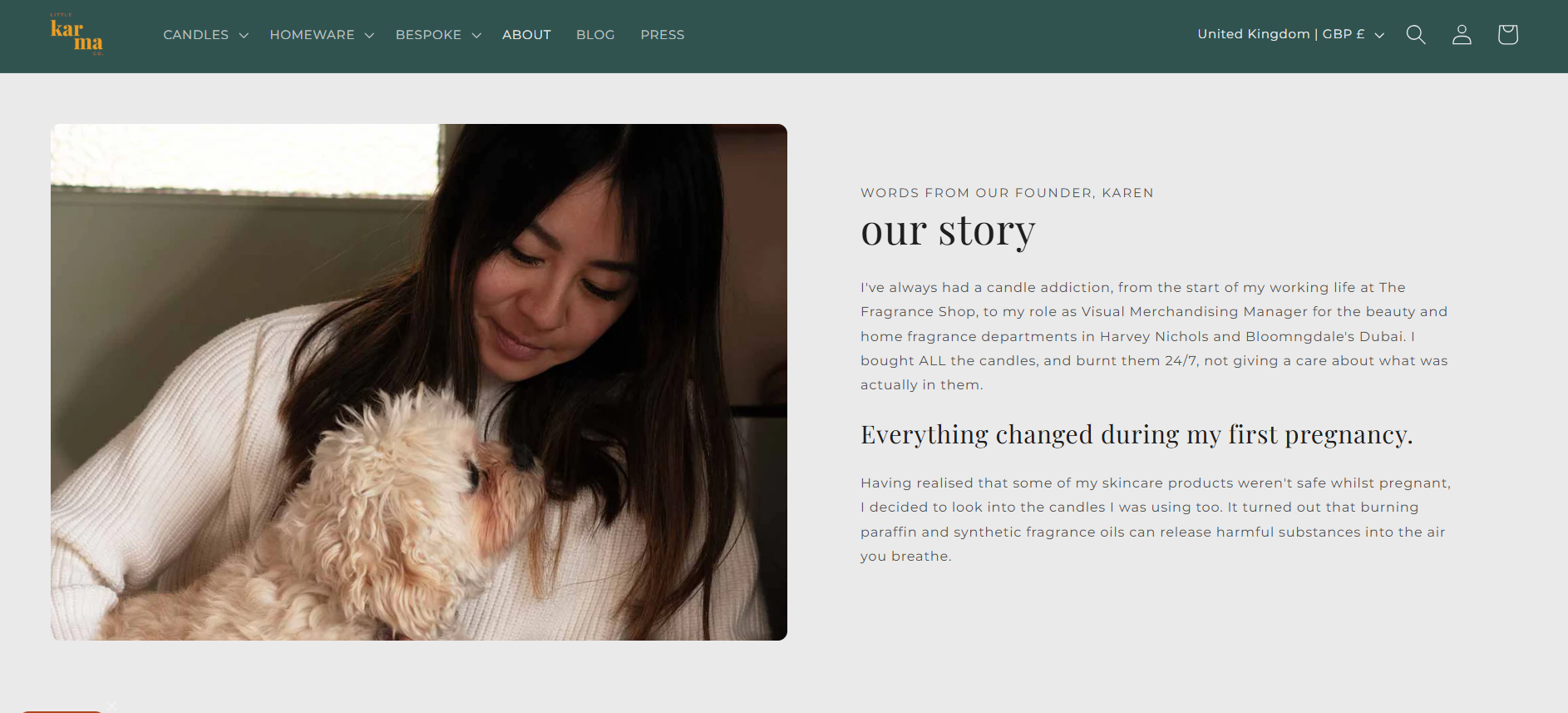
(Image source: https://littlekarmaco.com/pages/about-us)
The about us page tells your company’s story, mission, and values. It helps customers connect with your brand and learn about the people behind the business. This page is important because visitors want to know who they’re dealing with before they purchase or inquire.
The following are some of the important elements you should consider adding to your ‘About us’ page:
- Brief history of your company
- Company’s mission, vision, and values
- Key team members
- Notable achievements or certifications that show expertise
Services/Products
This page outlines what you offer, whether services, products, or both. It’s where visitors can learn in detail about your offerings. Potential customers need clear information about what you’re selling, how it works, and why it’s valuable. Without this page, visitors may leave because they can’t find what they’re looking for.
When creating product pages, make sure to add:
- Clear descriptions of each service/product
- Pricing (if applicable)
- High-quality images or videos to showcase the product/service
- Calls to action to encourage inquiries or purchases
- Special offers, promotions, or packages
Contact us
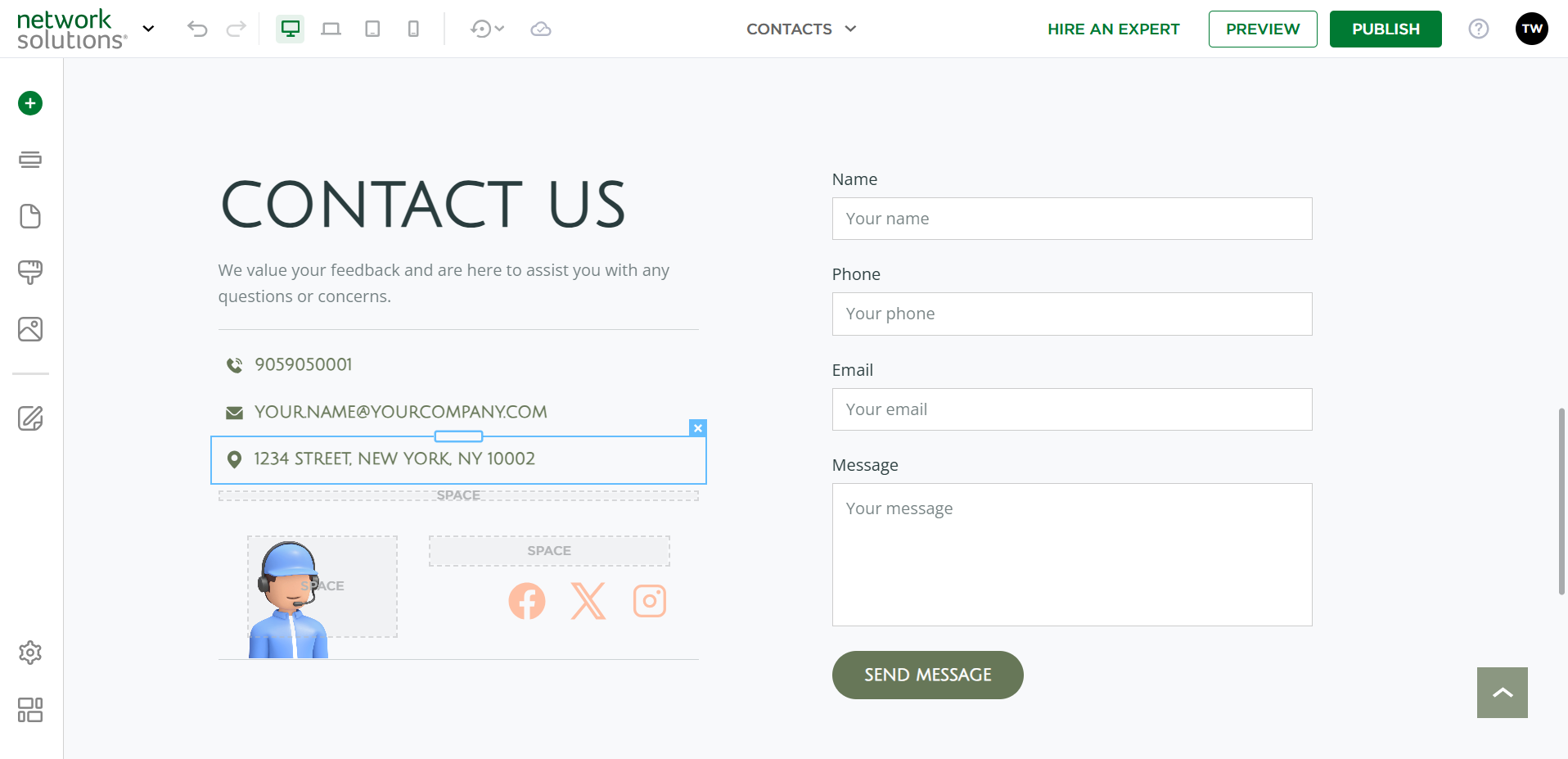
This page gives visitors clear, easy ways to contact your business, whether they have a question, need support, or are ready to buy. It should be simple to scan and offer at least one low-friction option to get in touch.
Some visitors may want to ask a quick question before committing. Others may need customer support. Some are prepared to move forward and are looking for the fastest way to reach you. Your Contact page should accommodate these different intents.
To make it effective, include:
- A contact form with clear fields and a short explanation of what happens after submission
- A phone number for immediate inquiries
- A professional email address
- A physical address, if you operate from a storefront or office
- Social media links, if you actively respond on those platforms
- A map for physical locations, when relevant
Keep the layout clean and direct. Make your primary call to action clear, whether it’s “Request a quote,” “Schedule a consultation,” or “Contact support.” When visitors can quickly find the right way to reach you, you reduce friction and increase the likelihood of turning their interest and intent into a conversion.
Privacy policy
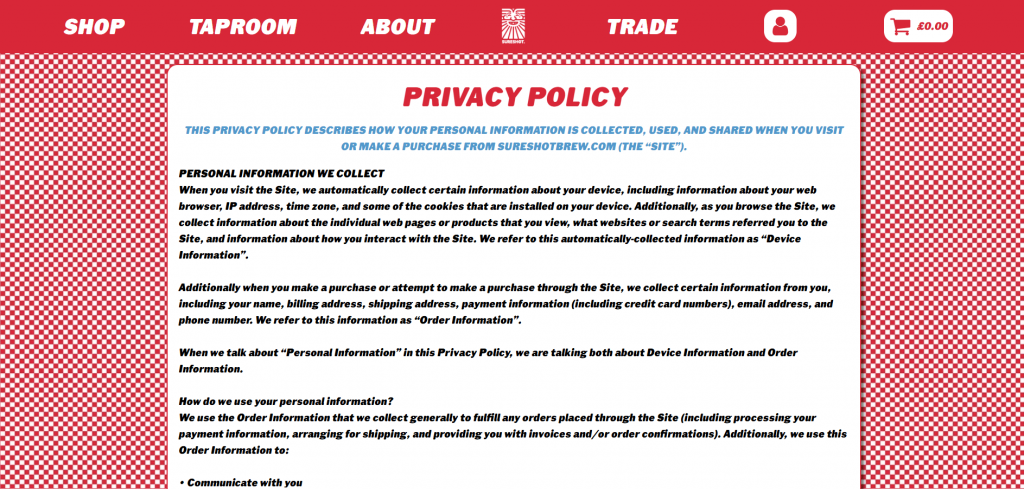
(Image source: https://sureshotbrew.com/privacy/)
The privacy policy page explains how your business collects, uses, and protects customer data. This page is a legal necessity, especially if you handle sensitive information such as personal data, credit card details, or email addresses. It assures visitors that you handle their personal information responsibly.
Below is some information you need to include on your Privacy policy page.
- What data is collected
- How you use customer data
- Data protection measures
- How users can manage their data
Terms of service
The Terms of Service (TOS) page is a legal agreement between your business and website users. It outlines the rules, responsibilities, and guidelines for using your website or services. This page is important for protecting your business and setting clear user expectations. For most businesses that provide services and sell products (especially e-commerce), having a TOS page is strongly recommended.
Make sure to include the following components when creating your TOS page:
- Terms regarding the use of your website or services
- Payment terms (if applicable)
- Refund and cancellation policies for services or products
- Dispute resolution procedures
- Limitation of liability and other legal disclaimers
Sitemap
A sitemap is a structured list of your site’s pages that helps both visitors and search engines find important content. It serves as a roadmap for your website’s structure, showing how all the pages are organized and connected.
For users, an HTML sitemap can make website navigation easier, especially on larger websites. It provides a simple, text-based overview of key sections and helps visitors quickly locate relevant information if they can’t find it through the main menu. This improves usability and enhances the overall experience.
For search engines, an XML sitemap plays a different but equally important role. It tells search engines which pages on a website exist, when they were last updated, and which ones are most important. This helps crawlers discover and index content more efficiently, particularly on sites with deeper navigation levels.
It’s important to understand that HTML and XML sitemaps serve different purposes, and most businesses benefit from having both.
If you’re unsure how to create or upload a sitemap, follow this step-by-step guide to ensure your website structure is clear and accessible to humans and search engines.
Robots.txt page
A robots.txt file is a small text file placed on your website that tells search engine crawlers which parts of your site they can or cannot access. It helps manage how search engines interact with your website pages and ensures they focus on your most relevant content.
When configured properly, it supports a clean website structure and helps improve how your pages appear in search results.
For SEO, robots.txt guides crawlers away from low-value or sensitive areas, allowing them to prioritize important, indexable pages on a website. This is useful if your site includes admin sections, duplicate pages, staging environments, or filtered search results that shouldn’t compete with your core content.
It’s important to note that robots.txt does not protect confidential information. It only manages crawling behavior. Sensitive pages should always be secured through passwords or other security measures.
When creating or reviewing your robots.txt file, make sure it clearly addresses:
- Admin or backend areas (such as /wp-admin or similar directories)
- Test or staging environments
- Duplicate or filtered website pages
- Internal search result pages
- Any low-value sections that shouldn’t appear in search results
When combined with a sitemap, this file helps search engines understand which pages on a website matter most and how your site is organized.
404 page
A 404 error page appears when a visitor tries to access a page that no longer exists. Instead of showing a generic error message, a custom 404 error page helps guide users back to active website pages without negatively affecting their overall experience on the site.
A well-designed 404 page reassures customers and offers clear next steps on what to do or where to go instead.
When creating your 404 error page, include:
- A clear message explaining that the page cannot be found
- A link back to the home page
- Navigation to key sections such as Services, Blog, or Contact
- A search bar to help users quickly find what they need
A thoughtful 404 page turns a potential dead end into an opportunity to keep visitors on your site and guide them toward meaningful action.
Additional website pages to enhance user experience
Additional pages can enhance your website by improving customer experience, increasing engagement, and providing more relevant information to site visitors. While core pages lay the foundation, these other pages help answer specific questions, showcase expertise, and address different user needs.
Below are examples of pages that can add value and strengthen your overall website structure.
- Blog page
- Knowledge base page
- Portfolio page
Blog
A blog page is where you publish relevant content that educates, informs, or answers questions your audience is searching for. This can include:
- How-to articles
- Step-by-step guides
- Case studies
- Industry insights
- Company updates
From an SEO perspective, a blog page plays a major role in driving organic traffic. By creating content around topics your audience is interested in, you increase your chances of appearing in search results and improving your search engine rankings.
To make your blog effective, structure and organization matter. Focus on:
- Clear, descriptive headings that improve readability and help search engines understand your content
- Internal links to related service pages and other blog posts to strengthen site hierarchy
- Related content suggestions that keep visitors exploring your website
- Logical formatting that makes content easy to scan
A well-structured blog page enhances search engine visibility, strengthens your website’s structure, and improves user retention. When visitors find relevant content that answers their questions, they’re more likely to trust you and come back to your site.
Knowledge base
A knowledge base is a centralized library of in-depth resources that help customers better understand your products, services, or industry. Unlike a blog page, which often targets broader topics for organic traffic, a knowledge base focuses on structured, practical information designed to solve specific user problems.
This section can include:
- Step-by-step tutorials
- Product setup guides
- Troubleshooting documentation
- FAQs organized by topic
- Downloadable resources or white papers
A well-organized knowledge base improves customer experience by offering self-service support. Instead of contacting your team for every question, users can quickly find answers on their own, which saves time for both your business and your customers.
When structured properly, a knowledge base builds authority and turns your website into a practical resource rather than just a promotional platform.
Portfolio
A portfolio page showcases real examples of your past work so potential clients can see what you’re capable of before reaching out. For businesses that offer design, consulting, development, photography, or other creative services, this page provides proof of quality and results.
Your portfolio can include:
- Completed projects with short descriptions
- Before-and-after comparisons
- Case studies outlining challenges and results
- Client success stories
- Visual work samples, such as images, mockups, or videos
A well-curated portfolio builds credibility by showing, not just telling. Instead of simply listing your services, you demonstrate how you’ve delivered value to real clients.
For an even stronger impact, consider organizing your portfolio by service type or industry. Clear headings and brief explanations provide context, while internal links to related service pages help guide visitors deeper into your site.
Trust-building pages that help visitors say “yes”
Some website pages exist not just to share information, but also to build trust and reassure customers that they’re making the right decision. These pages signal that your business is credible, qualified, and safe to work with.
These are the pages worth considering because they ease your customers’ concerns and move them closer to taking action.
- Testimonials and reviews page
- Certifications, warranties, and guarantees page
Testimonials and reviews
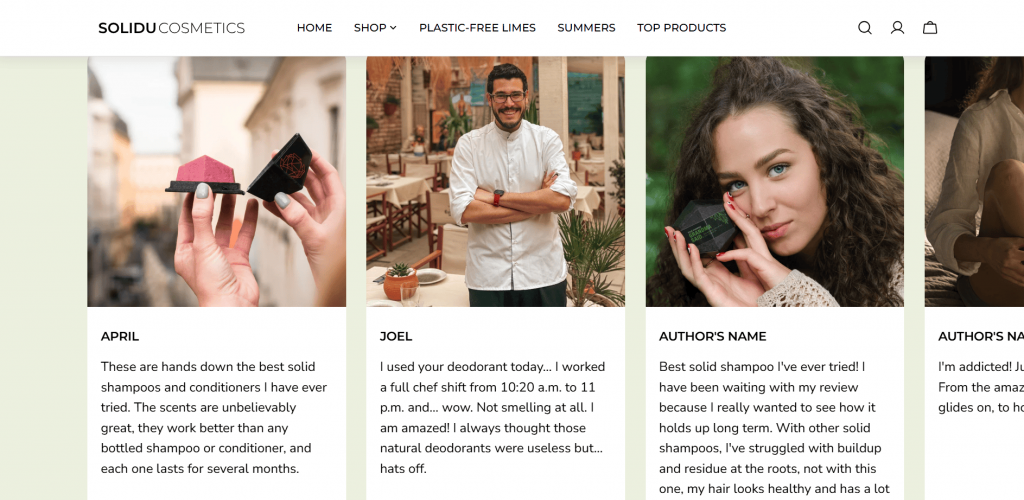
(Image source: https://soliducosmetics.com/)
A testimonials and reviews page showcases real customer feedback about your products or services. It provides social proof that helps build credibility and shows potential customers that others have had positive experiences with your business.
This page plays a direct role in conversions. When visitors see honest feedback from real clients, it increases their confidence in your products.
To make this page effective, include:
- Testimonials organized by product or service category
- Short, specific quotes that highlight measurable outcomes
- Full names, company names, or locations where permitted
- Star ratings to provide quick visual validation
- Links to third-party review platforms for added transparency
This page also offers SEO benefits. Adding review or rating schema markup can help your testimonials appear as rich results in search results, improving the site’s visibility. Well-written customer feedback that references your services can also reinforce relevance for search engines.
Make review collection an ongoing process. Regularly adding new testimonials shows that you are actively showcasing customer feedback and being honest in your reviews.
Certifications, warranties, and guarantees
Certifications, warranties, and guarantees are trust signals that show your business is qualified, accountable, and willing to stand behind its work or products. These elements help build credibility by giving website visitors visible proof that you meet recognized standards and stand by your promises.
Displaying certifications and credentials provides reassurance that your business operates professionally and ethically. Depending on your industry, this may include:
- Memberships in recognized industry associations
- Professional licenses or accreditations
- Security or compliance badges, such as SSL or PCI
- Official partner badges
- Awards or recognitions
Including logos with short descriptions makes relevant information easy to spot. When potential customers see familiar certification marks, they are more likely to trust your products or your expertise.
Warranties and guarantees further ease their doubts. Examples include:
- Satisfaction guarantees
- Money-back guarantees
- Product warranties
- Service guarantees
These statements create clear expectations about what customers can expect if something goes wrong. By outlining your commitment upfront, you lower perceived risk and make potential clients feel safer choosing you over a competitor.
How many pages should a business site have?
The number of pages your business site requires depends on your business type and goals. There is no specific number, and in some cases, a one-pager website will do. Nevertheless, a minimum of 5 to 10 pages is a good starting point for most websites.
Small businesses going for a simple online presence should aim for 5 to 15 pages. This number provides enough content to improve your search engine visibility while maintaining a smooth and intuitive user experience. While there’s no one-size-fits-all answer, a multi-page website is often a wise choice for most businesses looking to establish a strong online presence.
Factors influencing how many pages are on a website
Several factors can influence the number of website pages. Understanding these can help you create a site that’s optimized for users and search engines:
- Business type and industry
- Content strategy
- SEO goals
- User experience
Business type and industry
The nature of your business is important in determining how many web pages you need. For instance, e-commerce sites require many pages to showcase all products and categories. On the other hand, service-based businesses might only need a few core pages that highlight their services.
Content strategy
If you plan to post blogs or articles on your site regularly, you’ll need more pages. Blog posts can help you target a variety of topics and offer more entry points for visitors.
SEO goals
In SEO, having more pages that target specific long tail keywords can boost your ability to rank for various search queries. However, make sure that you’re creating quality content rather than just sheer numbers that don’t provide value to your audience.
No time to do this yourself? Our experts are ready to help you win in SEO.
User experience
Your website’s design and content organization also influence the number of pages you need. Splitting content into multiple pages is ideal rather than overwhelming users with a single long page for a better user experience.
What are the recommended website pages by industry?
Different industries benefit from different website structures to meet their audiences’ needs. Below is a breakdown of recommended pages for different industries:
Industry | Suggested pages | Key inclusions |
|---|---|---|
Local service | 8–12 | Home, About, Services, Reviews, Blog, Contact |
E-commerce | 15–30+ | Home, Product Categories, Product Pages, Policies, Terms, FAQ, Blog |
Coaching | 10–15 | Home, About, Services, How It Works, Testimonials, Contact |
Restaurants | 5–10 | Home, Menu, Location, Reviews, Contact |
Nonprofits | 10–20 | Home, Mission, Programs, Donate, Team, Events, Contact |
Real estate | 12–25 | Home, Property Listings, About, Testimonials, Contact |
Health and wellness | 8–15 | Home, About, Services, Blog, Contact, FAQ |
Education | 10–20 | Home, Course Offerings, About, Blog, Testimonials, FAQ, Contact |
Design/Graphic design | 8–15 | Home, Portfolio, About, Services, Contact |
Local service
Local service websites typically require 8–12 pages to present the necessary information. These key pages help website visitors quickly understand the services offered, the company’s mission, and customer feedback. A blog can also enhance local SEO and engagement.
At the same time, a contact page ensures users can easily reach out for more information. and engagement. At the same time, a contact page ensures users can easily reach out for more information.
E-commerce
E-commerce sites require detailed product pages that clearly explain offerings and outline policies, especially those related to payments and returns. FAQs and blog pages also help improve user experience and site engagement.
Coaching
Coaches need a website that establishes their authority and clearly explains their services. Simplified navigation ensures potential clients can easily find relevant details. The 10–15 page range balances showcasing services and maintaining a clean, focused design.
Restaurants
Restaurant websites should showcase the menu and location details. Reviews help boost customer engagement, while clear contact information supports seamless bookings. The compact five- to ten-page range ensures the site is quick to navigate so diners can find what they need without feeling overwhelmed.
Nonprofits
Nonprofit websites should highlight their mission and cause, and provide clear steps for donating or getting involved. Including team details and promoting events fosters community engagement and trust.
Real estate
Real estate websites need a strong property page with filters and detailed descriptions. Contact forms and testimonials are important for generating leads and inquiries.
Health and wellness
Health and wellness websites benefit from clear, informative services, blogs, and FAQ pages. These resources help users understand the services and know what to expect from them. Trust and transparency are important in this industry.
Education
Educational institutions typically need 10–20 pages on their website to provide a well-rounded, user-friendly experience. The key pages offer prospective students the information they need about courses, the institution’s mission, success stories, and other important details, such as admissions and program specifics.
Design/Graphic design
Design businesses should showcase their portfolio to highlight their skills and attract clients. The 8–15 page range helps maintain a clean, professional site that showcases design skills while providing essential information to prospective clients.
Common mistakes to avoid with website pages
When building a business website, there are several pitfalls you should avoid. Mistakes like those outlined below can negatively impact conversions, user experience, and search rankings.
- Cluttered layout
- Slow loading times
- Lack of clear CTAs
- Non-mobile-friendly design
- Overuse of stock photos
- Inadequate contact information
- Neglecting SEO
- Poor navigation structure
Let’s explore each in detail and learn how to avoid them:
Cluttered layout
A cluttered website layout can overwhelm visitors with too much information and too many elements fighting for attention.
To create a positive experience, keep your pages clean and easy to navigate. Use ample white space, break up text with headers and bullet points, and prioritize the most important content.
Slow loading times
A slow website drains visitors’ patience and makes them leave before they can even explore your site. Users typically expect a website to load within three seconds or less. If it takes longer, you could lose their attention to a competitor.
Test your website’s speed regularly using tools like Google PageSpeed Insights or GTmetrix. Improve your website speed by:
- Compressing images without sacrificing quality.
- Minifying your website’s CSS and JavaScript files.
- Using a content delivery network (CDN) to speed up load times globally.
Lack of clear CTAs
Without clear calls to action, users may not know what steps to take next. Failing to guide them could result in lost opportunities, whether you want them to complete a purchase, join your newsletter, or book a consultation.
To avoid this, ensure each page includes at least one clear, direct CTA. A prominently displayed “Shop Now,” “Get a Free Quote,” or “Learn More” can make a difference. Place them at strategic points on the page, such as after a compelling argument or piece of content, so visitors are immediately prompted to take action.
Non-mobile-friendly design
As mobile traffic rises, websites that aren’t optimized for mobile devices create a frustrating experience for many users. Mobile visitors may leave the site if it isn’t responsive, appears disorganized, or is difficult to navigate on smaller screens.
Make your website mobile-friendly. Implement a responsive web design that adjusts site content and layout based on the device users use. Test your site on various devices and screen sizes to ensure everything looks and functions as it should.
Overuse of stock photos
While stock images are convenient, they often feel generic. They don’t reflect your brand’s identity, and visitors may see them as inauthentic.
Use original images that reflect your products, services, or team whenever possible. Custom visuals help tell your brand’s unique story and foster a deeper connection with your target audience.
Inadequate contact information
If your contact details are missing or hard to find, potential customers may give up trying to reach you.
Place your contact information prominently on your website, such as in the footer or header. Include multiple contact methods, like email, phone number, social media, and contact forms, so users can easily get in touch.
Neglecting SEO
Without SEO, your website will struggle to appear organically in search engine results. Missing out on SEO best practices means your website is less likely to be found by potential customers, even if you have great content and services.
Optimize your website for search engines by using relevant keywords, meta descriptions, image alt tags, and a clean URL structure. Regularly update your content with useful, keyword-rich material that provides valuable information. Additionally, ensure your website loads quickly and is optimized for mobile, as both factors contribute to better search engine rankings.
Poor navigation structure
Disorganized navigation makes it hard for users to find what they need.
Simplify your site’s navigation by grouping related pages and using descriptive labels. Limit the number of menu items in the nav bar to prevent visitors from feeling overwhelmed.
Your main navigation should also focus on your most important content—services, about, and contact details. Add a search bar to help visitors quickly find specific information without unnecessary clicks, if possible.
Frequently asked questions
At a minimum, every business website should include the following pages:
Home page – provides an overview and first impression
About page – shares your background, mission, and values
Services/Products page – highlights what you offer
Contact page – makes it easy for visitors to reach you
Privacy Policy page – explains how you collect, use, and protect visitor data
A business website should include content that reflects your brand’s identity, detailed descriptions of your products or services, trust-building elements like testimonials, clear calls to action, and easy navigation to help users find information quickly and efficiently.
The Home page is the most effective because it provides a first impression, communicates your value proposition, and directs visitors to other key pages. A strong home page with clear CTAs can increase user engagement and drive conversions.
Not every business must have a blog, but it is highly recommended. A blog helps drive organic traffic, improve search engine rankings, and position your business as an authority by publishing relevant content that answers customer questions.
Legal pages, such as a Privacy Policy and Terms of Service, protect your business and set clear expectations for users. They explain how you handle data, outline usage terms, and help ensure compliance with privacy regulations, especially for e-commerce sites.
Build a strong online presence with the right pages
Well-planned website pages turn your site into a revenue-driving business asset. When your structure is clear and your trust signals are strong, visitors are guaranteed to take action. That’s the difference between a site that exists and a site that performs.
If you’re ready to build a website designed to generate leads and support real growth, Network Solutions’ DIY Website Builder gives you the tools to make it happen. Start with professionally designed templates that already include the essential business pages. Customize everything with simple drag-and-drop editing. Launch with built-in blog and contact features that help you attract traffic and convert it.
The structure you choose today shapes the results you see tomorrow. Get started now and launch a website built to move your business forward.