
Key takeaways:
- Knowing how to check if a website is legit means looking at multiple trust signals, including the URL, HTTPS security, site design, contact information, payment methods, policies, reviews, and overall online reputation.
- A fake website can put your personal and financial information at risk, so it’s important to use strong passwords, secure internet connections, and other protective measures when browsing or shopping online.
- Legitimate websites often build trust through secure domains, HTTPS encryption, transparent contact details, clear policies, and consistent business information across their website and other online channels.
One wrong click on a fake website could put your personal information, financial accounts, and even your identity at risk. As AI-powered tools become more accessible, scammers can create convincing websites that closely resemble legitimate businesses, making them harder to spot.
Knowing how to check if a website is legit can help you distinguish suspicious sites from legitimate websites before you share personal information, create an account, or make a purchase. The key is knowing how to identify fake websites by looking for warning signs in the URL, security indicators, website content, and business information.
But how can you tell whether a website is trustworthy or just a scam in disguise? In this guide, we’ll walk you through practical steps to help you verify a website before you trust it with your information or money.
Find the perfect domain
Ready to register a domain name? Check domain availability and get started with Network Solutions today.
8 steps to check if a website is real or not
A fake website can look surprisingly similar to legitimate websites, but a few simple checks can help you spot important warning signs. If you’re wondering how to check if a website is legit, use these eight steps before sharing personal information, making a payment, or relying on information from an unfamiliar site.
- Check the URL
- Check for HTTPS and the padlock icon
- Review the website’s design and content for red flags
- Watch out for unrealistic pricing or deals that seem too good to be true
- Look for clear contact details and business information
- Be cautious with links from emails, texts, or social media posts
- Check reviews and the site’s online reputation
- Use online tools for additional verification
1. Check the URL
Scammers often register domains that closely resemble legitimate websites. They may change a single letter, replace characters with similar-looking numbers, add extra words or hyphens, or use a different top-level domain (TLD), such as .net instead of .com.
For example, amaz0n.com might look legitimate at first glance, but the zero in place of the letter “o” is a common warning sign. Before interacting with a website, take a moment to check the URL carefully in your browser’s address bar.
Subdomains can also be misleading. A scam URL such as netflix.com.movies.com may appear trustworthy because it includes a familiar brand name, but the actual domain is movies.com. In most cases, the registered domain appears immediately before the TLD. Focus on that part of the web address to verify where the site actually leads.
If you’re unsure whether a website is genuine, visit the company’s official website by typing its known web address directly into your browser or by using a trusted search result rather than clicking an unfamiliar link.
Tip for business owners: Register your domain through a reputable domain registrar and consider securing common variations of your business name. Doing so can help protect your brand, reduce customer confusion, and make it harder for scammers to impersonate your business online.
2. Check for HTTPS and the padlock icon

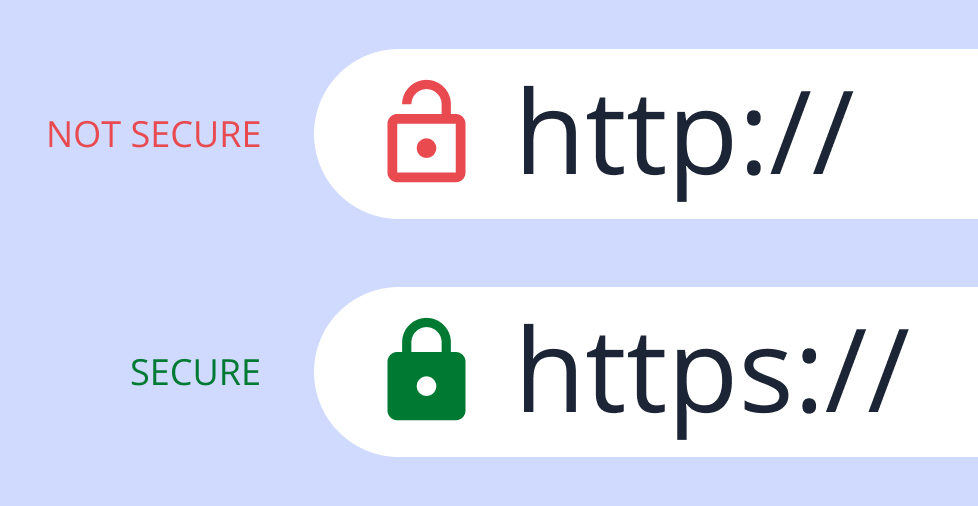
A secure website should use HTTPS and display a padlock icon in your browser’s address bar. HTTPS encrypts the data exchanged between your browser and the website, helping protect sensitive information such as passwords, contact details, and payment information from interception.
However, HTTPS alone does not guarantee that a website is legitimate. Scammers can also obtain SSL/TLS certificates and use HTTPS on fraudulent websites. That’s why it’s important to look for other trust signals as well, such as the correct URL, accurate business information, clear policies, and genuine customer reviews.
If you’re unsure about a website, click the padlock icon to view available security information and confirm that the connection is encrypted. If anything seems suspicious or doesn’t match the business you’re expecting to visit, avoid entering personal information and leave the site.
Tip for business owners: Make sure your website uses HTTPS and has a valid SSL/TLS certificate. You may also want to use website security tools and monitoring services that help identify malware, vulnerabilities, or other threats. These measures not only improve security but can also help build trust with your customers.
3. Review the website’s design and content for red flags
A website’s design and content can provide useful clues about its credibility. Poor-quality design, blurry images, frequent spelling or grammar mistakes, broken links, and outdated information may indicate that a website is not trustworthy. However, keep in mind that appearance alone is not enough to determine whether a site is legitimate.
Look for signs of consistency throughout the website. Scam websites sometimes use copied product descriptions, stolen images, mismatched branding, or content that appears to have been pasted from multiple sources. These inconsistencies can suggest that the site was created quickly or without much attention to detail.
You should also check whether important pages, such as the About Us, Contact Us, Privacy Policy, and Terms of Service pages, are present and contain clear, relevant information. Legitimate businesses typically provide this information to help customers understand who they’re dealing with.
While any single issue may not be a red flag on its own, multiple warning signs together could indicate that a website deserves closer scrutiny before you share personal information or make a purchase.
Tip for business owners: A professional, consistent website design can help build trust with customers. If you don’t have the time or expertise to create a website yourself, consider working with experienced web designers or using reputable website-building tools to create a polished online presence.
4. Watch out for unrealistic pricing
Scam websites often attract buyers with unusually low prices on popular products or luxury goods. Whether it’s designer shoes at 80% off or the latest tech at a fraction of its typical price, deals that seem too good to be true deserve extra scrutiny.
Scammers may also create a false sense of urgency using countdown timers, flash sales, or claims that only a few items remain in stock. These tactics are designed to pressure visitors into making quick decisions before they have time to verify whether the website is trustworthy.
It’s also important to pay attention to the website’s payment methods. Be cautious if a site only accepts wire transfers, gift cards, cryptocurrency, or certain peer-to-peer payment methods. Transactions made through these channels may be difficult or impossible to reverse if the seller turns out to be fraudulent.
Before entering your payment details, take a moment to research the business, review its policies, and look for independent customer reviews. A legitimate seller should be transparent about pricing, shipping, returns, and customer support.
Tip for business owners: Price your products transparently and provide clear explanations for promotions or discounts. Fair pricing, honest marketing, and straightforward policies can help build customer trust and reduce the likelihood that your business will be mistaken for a scam website.
5. Look for clear contact details
Legitimate businesses typically make it easy for customers to get in touch. A trustworthy website should provide clear contact information, such as an email address, phone number, physical address, contact form, or other verifiable business details. If a site provides very limited or vague information about who operates it, that may be a warning sign.
Take a few minutes to verify the information whenever possible. For example, you can search the business address on Google Maps, check whether the phone number is active, or look for the company’s presence on social media and business directories. Scammers often use fake, incomplete, or outdated contact details to appear legitimate.
You should also review the website’s privacy policy and other key business pages. If a company collects personal information but provides no clear privacy policy or explanation of how that information is used, consider that a potential red flag.
While no single warning sign proves that a website is fraudulent, a lack of transparency about who runs the business should prompt additional caution before you share personal information or make a purchase.
Tip for business owners: Provide clear and up-to-date contact details on your website, along with a privacy policy and customer support information. Transparency helps build trust and makes it easier for potential customers to do business with you.
6. Be cautious with links from emails or texts
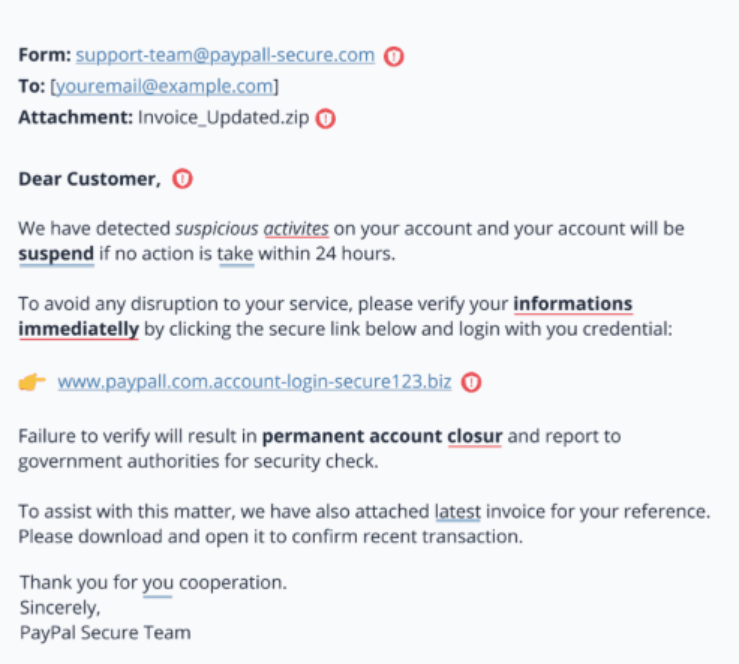
One common way people end up on fake websites is by clicking a link in phishing emails or text messages. These messages often appear to come from trusted brands, banks, delivery services, or other familiar organizations, but they’re actually scams designed to steal personal information, login credentials, or payment details.
Following a suspicious link can lead you to a fake login page, a fraudulent online store, or a website that attempts to install malware on your device. If you receive an unexpected message asking you to verify an account, reset a password, confirm a payment, or claim a prize, avoid clicking any links.
Instead, visit the company’s official website by typing the address directly into your browser or using a trusted bookmark. This simple step can help you avoid many common phishing scams.
Tip for business owners: Use a professional email address that matches your domain name when communicating with customers. A domain-based email address can help reinforce your brand’s credibility and make it easier for customers to recognize legitimate communications from your business.
7. Check reviews and the site’s online reputation
Before trusting a website, look for customer feedback outside the site itself. Search the company name on platforms such as Trustpilot, Google Reviews, or other independent review sites. You can also use a reputation checker to learn about other users’ experiences.
Pay attention to how the reviews are written. Genuine feedback often includes specific details about the product, service, delivery experience, or customer support. By contrast, reviews that are overly positive, vague, repetitive, or filled with generic praise may deserve closer scrutiny. A sudden surge of nearly identical five-star reviews can also be a warning sign.
You can also check the company’s social media presence for additional context. Established businesses often maintain consistent branding, share regular updates, and interact with customers. However, keep in mind that some legitimate small businesses may have a limited social media presence, so this should be considered alongside other trust signals.
No single factor can determine whether a website is trustworthy. However, reviewing customer feedback, researching the company’s online reputation, and evaluating multiple trust signals together can help you identify potential scam sites before sharing personal information or making a purchase.
Tip for business owners: Encourage satisfied customers to leave honest reviews on reputable platforms. Authentic customer feedback can help build trust, improve your online reputation, and reassure potential customers that your business is legitimate.
8. Use online tools for extra confirmation
If you’re still unsure about a website, online verification tools can provide additional information. Free tools such as Google Transparency Report can help you check whether Google has flagged a website for known unsafe content or security concerns.
For everyday browsing, you can also use website reputation and security tools such as Web of Trust (WOT). These tools combine security data, reputation checks, and user feedback to help identify potentially suspicious websites before you interact with them further.
While these tools can be useful, they shouldn’t be your only method of verification. It’s still important to check the URL, review the website’s content, verify contact information, and look for independent reviews before sharing personal information or making a purchase.
These additional checks can help you spot potential malware, phishing attempts, and other security risks that may not be obvious at first glance.
Tip for business owners: Regularly scan and monitor your own website using reputable security tools. Proactive monitoring can help identify vulnerabilities, malware, or other issues early, protecting both your customers and your business’s reputation.
Tools to confirm a website’s safety
Even after checking the basics, you may still feel unsure about a website. These tools can support your verification process by helping you identify security risks, phishing activity, malware, reputation issues, and other warning signs. Many are available as a free tool and can provide additional context before you trust a domain.
Google Transparency Report
Google Transparency Report lets you check whether Google has identified a website as potentially unsafe. It can alert you to known malware, phishing activity, or other security concerns associated with malicious websites.
VirusTotal
VirusTotal can scan a URL using multiple security engines and threat intelligence sources. It checks for malware, phishing attempts, suspicious behavior, and other indicators commonly associated with fraudulent websites.
URLVoid
URLVoid checks a website against multiple security and domain reputation databases. It also functions as a reputation checker by providing information about a site’s reputation, hosting details, and potential security concerns.
Sucuri SiteCheck
Sucuri SiteCheck scans websites for malware, security issues, and blacklist status. It can also identify outdated software or other weaknesses that may leave a website vulnerable or compromised.
Mozilla Observatory
Mozilla Observatory evaluates a website’s technical security configuration. It reviews factors such as SSL/TLS settings, security headers, encryption practices, and other security controls to highlight potential weaknesses. This tool can be particularly useful for website owners who want to improve their site’s security posture.
WHOIS Search
WHOIS Search provides information about when a domain was created and, in some cases, details about its registration. While some registration information may be hidden due to privacy protections, domain age and other publicly available records can still provide useful context during the verification process.
For example, if a website claims to represent a long-established company but its domain was registered only recently, that discrepancy may be worth investigating before you proceed.
6 ways to stay safe before making a purchase online
Shopping online is convenient, but it also comes with risks. Before making a purchase, take a few simple steps to verify the seller, keep your information secure, and watch for suspicious activity.
- Stick to trusted or well-reviewed retailers
- Avoid public Wi‑Fi or use a VPN
- Use strong, unique passwords and enable 2FA
- Pay with credit cards or virtual cards for added fraud protection
- Review refund and return policies before buying
- Monitor your accounts for suspicious activity
Stick to trusted or well-reviewed retailers
One of the safest options is to buy from retailers you already know or businesses with a strong reputation. Before purchasing from a new website, spend a few minutes checking reviews on Google, Trustpilot, or other independent review platforms. If a store has no reviews, very limited information, or a large number of recent complaints, proceed with caution.
For added confidence, look beyond star ratings. Read individual reviews to see whether they include specific details about products, shipping times, or customer service. Genuine feedback is usually more detailed, while fake reviews often use generic language and provide little useful information. Doing this can help you determine whether a retailer is legitimate.
Avoid public Wi‑Fi or use a VPN
Public Wi‑Fi networks can expose your information to additional security risks, especially if the network is unsecured or compromised. When shopping online, it’s generally safer to use your mobile data connection or a trusted network whenever possible.
If you need to make a purchase while on public Wi‑Fi, consider using a reputable virtual private network (VPN). A VPN encrypts your internet traffic, helping protect sensitive information such as login credentials and payment details while you browse.
Use strong, unique passwords and enable 2FA
A strong password is one of your first lines of defense against unauthorized access. If you reuse the same password across multiple websites, a security breach on one site could put your other accounts at risk.
Use long, unique passwords or passphrases for each account, and consider using a password manager to generate and store them securely. Whenever available, enable two-factor authentication (2FA). This adds an extra verification step, such as a one-time code sent to your phone or authentication app, making it much harder for someone to access your account even if they know your password.
Pay with credit cards or virtual cards for fraud protection
Credit cards often provide stronger fraud protections than many other payment methods when shopping online. If unauthorized charges occur, you may be able to dispute the transaction without having money immediately withdrawn from your bank account.
Some banks and payment providers also offer virtual card numbers. These temporary card numbers are linked to your real account but help limit the exposure of your actual card details. If a website later turns out to be fraudulent, your financial information may be better protected.
Review refund and return policies before buying
A legitimate company should clearly explain its refund and return policies. Before completing a purchase, review information such as return deadlines, refund eligibility, shipping responsibilities, and available customer support channels.
Be cautious if these policies are missing, difficult to find, or written in vague language. Understanding the terms in advance can help you avoid unpleasant surprises if something goes wrong with your order.
Monitor your accounts for suspicious activity
Your online safety responsibilities don’t end after you make a purchase. Regularly review your bank and credit card statements for transactions you don’t recognize. Even small unauthorized charges can be a warning sign of potential fraud.
Consider enabling transaction alerts so you’re notified whenever activity occurs on your account. If you notice suspicious activity, contact your bank or card issuer immediately. Acting quickly can help prevent additional losses and reduce the impact of fraud.
Secure your site. Build customer confidence!
Protect sensitive information with an SSL certificate that helps keep your website secure and shows visitors they can trust your business.

What should you do if you land on a fake website?
Landing on a fake website can have serious consequences, especially if you enter personal information, download files, or interact with suspicious content. Acting quickly can help reduce the risk of falling victim to fraud and limit any potential damage.
- Don’t interact: If a website seems suspicious, close the tab or browser window as soon as possible. Avoid entering information, clicking pop-ups, downloading files, or calling phone numbers displayed on the page. If the site opens repeated pop-ups or prevents you from closing it normally, force-close your browser or use your device’s task manager. If a file was downloaded unexpectedly, delete it without opening it.
- Disconnect from the internet if necessary: If you believe a suspicious website may have downloaded malware or compromised your device, temporarily disconnect from the internet by turning off Wi‑Fi or enabling airplane mode. This can help limit further communication between your device and potentially malicious services while you investigate the issue.
- Scan your device for malware: Run a full scan using reputable antivirus or anti-malware software and remove any threats it identifies. Make sure your operating system and browser are up to date, and review your installed browser extensions for anything unfamiliar. If you use multiple browsers, check each one for suspicious extensions or settings.
- Change your passwords: If you entered login credentials on the website or suspect a password may have been compromised, change it immediately. Use a strong, unique password for each account and enable two-factor authentication whenever possible. If the same password was used elsewhere, update those accounts as well and sign out of active sessions where available.
- Report the website: Report the fake site to Google Safe Browsing so it can be reviewed and potentially flagged. You can also report fraud and scams to the Federal Trade Commission or submit an internet crime complaint to the FBI’s Internet Crime Complaint Center. If you can identify the site’s hosting provider or domain registrar using a WHOIS lookup tool, consider reporting the website there as well. You may also notify your antivirus or security software provider so the site can be evaluated for future threat detection.
- Monitor your accounts: Keep a close eye on your bank and account activity for unfamiliar transactions. Consider enabling transaction alerts so you’re notified of new activity. If you notice anything suspicious, contact your bank immediately to report the issue, secure your accounts, and dispute unauthorized transactions. If sensitive personal information was exposed, you may also want to consider placing a fraud alert or credit freeze where available.
Frequently asked questions
The fastest way to check if a website is legit is to verify the URL, look for HTTPS, and use a website safety tool such as Google Safe Browsing. You should also check for contact information, reviews, and other trust signals to confirm whether the site shows any obvious warning signs.
Check whether the site uses HTTPS and displays a padlock icon in your browser’s address bar. You can also review the site’s security information and use tools such as Google Safe Browsing or VirusTotal for an additional check. Keep in mind that HTTPS helps protect your connection, but it does not guarantee that a website is legitimate.
Hover over the link on a desktop device or long-press it on mobile to preview the destination URL. If the domain appears misspelled, unfamiliar, or doesn’t match the brand it claims to represent, avoid clicking it. Instead, visit the company’s official website directly by typing the address into your browser.
Before making a purchase, confirm that the retailer is legit by checking its URL, contact information, customer reviews, return and refund policies, payment options, and overall online reputation. Be cautious of websites with unusually low prices, limited business information, or other warning signs.
Stay vigilant and safely shop online
Fake websites are becoming increasingly convincing, but protecting yourself or your business doesn’t have to be complicated. A little caution can go a long way. Check the basics, stay alert to warning signs, and take a few moments to verify a website before sharing personal information or making a purchase on the internet.
If you run a business, building a legitimate online presence starts with creating a trustworthy and secure website. By working with us, you can secure your domain, add SSL certificates, and use website security services to help protect your site and build customer confidence.
Every domain purchase also includes access to free tools, such as our slogan maker and QR code generator, designed to help you establish your brand and grow your online presence with confidence.