

Key takeaways:
- Small businesses can use AI to save time by reducing repetitive work across customer service, marketing, admin tasks, and scheduling.
- AI can help business owners respond to customer inquiries faster, but sensitive or complex issues still need human judgment.
- The most viable way small businesses can start using AI is to choose one routine task, test the results, review the output, and expand once the process feels reliable.
As a small business owner, you often handle daily business tasks with limited time and support. Even simple routine work can be hard to keep up with, especially when customers expect quick, consistent service from you.
With today’s AI tools, you can hand off parts of repetitive work and make everyday tasks easier to manage. How AI helps small businesses is not by replacing the people behind them, but by giving you and your team more time to focus on important decisions and creative work.
The easiest way to understand how small businesses can use AI is to start small. You do not need to overhaul your entire business at once. In fact, nearly 60% of small businesses now use AI in their operations, showing that many are already finding practical ways to integrate it into their daily work.
As AI adoption continues to grow, more businesses are discovering that adopting AI tools can help reduce repetitive work and improve day-to-day efficiency. With the right oversight, AI can help small businesses save time, work smarter, and stay focused on the decisions that still need human judgment.
This article breaks down how you can use AI to save time in everyday workflows. You’ll also see simple ways to get started, sample AI prompts you can customize, and key risks to watch for so you can use AI with more confidence and control.
One AI tool can’t do it all.
Different tasks call for different AI models. Access ChatGPT, Claude, Gemini, and Grok in one place so you can choose the right tool for every job.

What AI means for small businesses
Small business owners and lean teams often wear several hats in one day. You may shift from managing operations to helping a customer or preparing marketing work with little room to slow down. The workload keeps growing, but the time, budget, and staff available to handle it do not always keep pace.
That is where AI for small businesses becomes useful. Modern AI technology can analyze data, generate content, and automate certain types of tasks. It can help business owners handle routine work faster and organize business information with less manual effort.
AI does not have to mean complex AI systems or expensive enterprise software. Many tools small businesses already use now include AI features, from email and scheduling apps to accounting, customer management, and marketing.
Business.com’s 2026 Small Business AI Outlook Report found that the average small-business worker saves 5.6 hours per week by using AI, highlighting how businesses are leveraging AI to reduce manual work and reclaim valuable time.
Still, AI works best as support, not a replacement for human expertise. It can make repetitive work faster and easier, but business owners still need to use human judgment before acting on AI-generated suggestions.
How small businesses are using AI to save time in daily workflows
Small businesses save the most time with AI when it supports everyday work, not just one-off tasks. The goal is to reduce repetitive steps that slow the business, so business owners can spend more time on tasks integral to business growth.
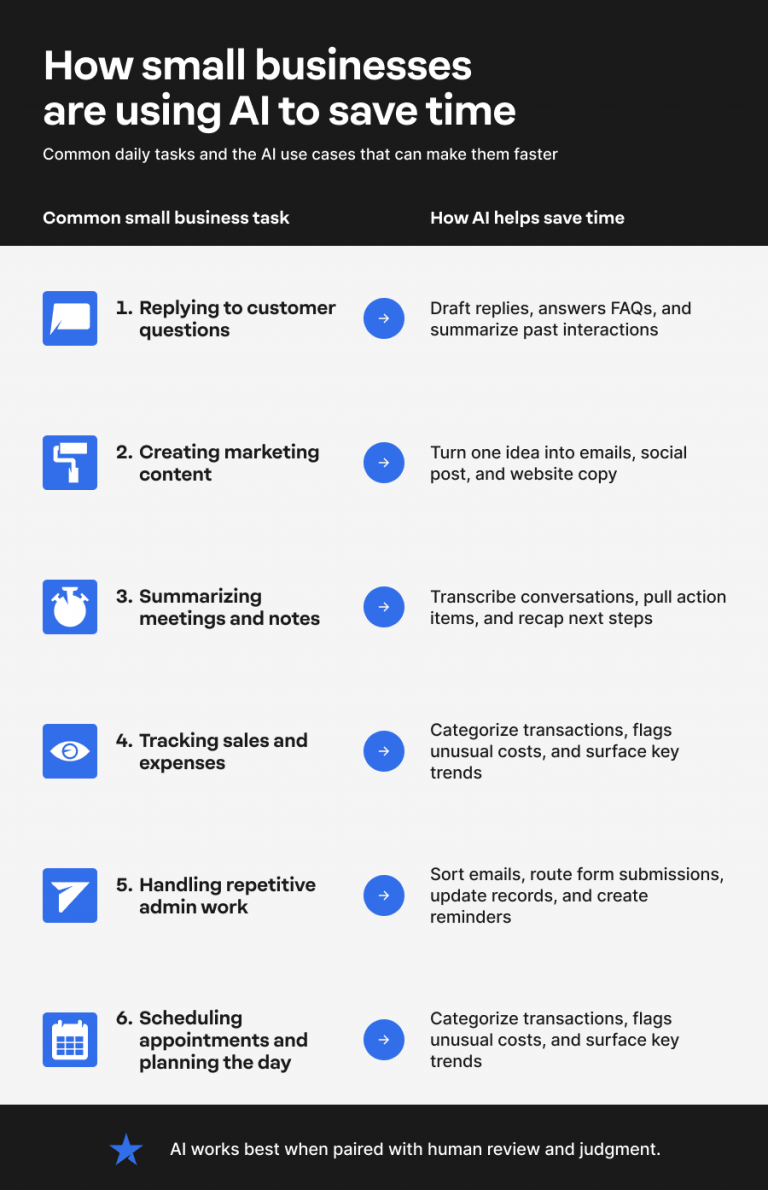
Here are the daily workflows where AI can help small businesses save time:
- Replying to customers faster
- Creating marketing content faster
- Summarizing meetings and notes
- Tracking sales, expenses, and financial health
- Handling repetitive admin work
- Scheduling appointments and planning the day
Incorporating AI into your workflow can enhance the efficiency of your day-to-day operations. Jacqueline Galison, Network Solutions Product Manager, explains that the Network Solutions Website Builder includes many functions that can streamline your website maintenance and updating tasks.
Galison lists several of its AI content generation tools:
- AI will generate content for you if you add a new page to your site (creates copy + sources free to use photos and icons)
- AI will generate content if you drag a new section onto your site (creates copy + sources free to use photos and icons)
- AI will generate copy for you based on a post topic you give it, providing options for tone and translation into other languages
- AI informs the onboarding process. By asking the user short, simple questions, we generate a website that matches the user’s business out of the box.
Galinson adds, “What’s great about our AI is that it asks for relatively little input from the customer yet produces relevant, high-quality results. For many of our competitors’ AI tools, there’s a higher level of effort needed just to make the AI work, whether that’s hitting a character limit or simply knowing how to craft prompts to yield good results. Our AI uses your business name, the business’s vertical information, and its unique selling point (which the customer shares with us via prompt) to produce an excellent starting point that the customer can use as a springboard for further customization.”
Replying to customers faster
Customer inquiries can pile up quickly. AI assistants and AI agents can help small business owners respond faster by handling common customer inquiries that don’t require in-depth or nuanced responses.
AI-powered tools can also summarize customer interactions for you and your team. Instead of reading through the full message history, you can go straight to viewing the most important details you need to take the right next step.
For example, if a customer has exchanged multiple emails about a delayed order, a billing concern, or a product issue, a tool like Gemini can help summarize the conversation and highlight the key points that need attention. Rather than reviewing every message individually, you can ask it to identify the customer’s main concern, list previous actions taken, and suggest response options based on the conversation history.
This helps save time because Gemini can quickly process large amounts of information and surface the details that matter most. Small business owners can use those summaries as a starting point for crafting thoughtful, accurate responses while spending less time digging through lengthy message threads.
The time-saving benefit is clear: fewer repetitive conversations and faster response times. AI assistance works best when people stay involved, especially for customer issues that need empathy and careful judgment. Used this way, AI can save time on routine support while keeping the customer experience thoughtful and personal.
Creating marketing content faster
Marketing often gets pushed aside when other business tasks demand your attention. Even when you have a valuable idea, it can slip away before you turn it into something useful for your audience.
Generative AI tools can help you move from idea to draft faster. You can use AI to create a first version of social media posts, email newsletters, blog outlines, ad copy, and product descriptions. It can also help you repurpose one idea across multiple channels, so a single campaign gives you more content to work with.
For example, a tool like Grok can help small business owners brainstorm campaign concepts, generate blog outlines, draft social posts, and explore different content angles from a single idea. If you’re planning a seasonal promotion, you can ask Grok to generate headline ideas, promotional messaging, audience-specific variations, or a content calendar that supports the campaign across multiple channels.
This can be especially helpful during the early stages of content creation when you’re trying to turn a rough concept into something actionable. By quickly generating ideas and draft content, Grok can help reduce the time spent brainstorming and give you a starting point that you can refine to match your brand and marketing goals.
This can also support more consistent customer engagement by helping businesses maintain a steady flow of relevant content across multiple channels. However, AI tools still need to be reviewed. Business owners should check every draft for accuracy, alignment with brand voice, and relevance to their target audience.
Summarizing meetings and notes
Quick, accurate notes are important for tracking decisions or ideas. AI-powered note-taking tools can help by transcribing conversations, summarizing key points, and pulling out action items from meetings or calls.
Instead of relying on manual notes alone, you can use AI-powered tools to turn a conversation into a short recap that is easier to review later. This can help you remember what was discussed during client calls, vendor conversations, and team planning, and focus on what needs to happen next. For busy teams, that makes it easier to manage tasks with one less routine task after every meeting.
A tool like Claude can help review meeting transcripts and organize information into clear summaries, action items, and follow-up tasks. If your team finishes a planning session covering multiple projects, you can use Claude to identify key decisions, highlight unresolved questions, and create a structured recap that is easier to share with stakeholders.
Claude excels at analyzing large amounts of information and extracting the details that matter most. Business owners and teams can quickly review a concise summary and focus on execution rather than documentation.
Still, AI summaries should not be shared or acted on without review. You still need to check jotted details for accuracy before acting on or disseminating the notes to stakeholders.
Tracking sales, expenses, and financial health
AI is not a replacement for a bookkeeper, accountant, or any finance professional, but it can make financial management easier to keep up with. Instead of spending as much time sorting transactions or preparing basic reports, you can use AI to handle routine financial work.
As business data comes in, AI can help you:
- Categorize transactions with less manual data entry
- Flag unusual expenses that may need a closer look
- Track key metrics tied to cash flow, revenue, and expenses
- Identify trends that may affect your financial health
- Spot cost-saving opportunities before small issues become bigger problems
- Support more accurate business forecasting with clearer patterns from past data
Tools like Claude can help make financial data easier to analyze. You can ask Claude to identify spending patterns, highlight unusual transactions, or summarize trends in your monthly financial reports. Because financial management often requires careful attention to detail, Claude can be useful for precision-focused tasks that involve working through large amounts of structured information.
As you save time automating tedious tasks, you can spend more time understanding what the numbers mean and turning these insights into better business decisions.
Handling repetitive admin work
AI and automation tools can help business owners reduce the manual steps involved in recurring admin tasks. Forms, emails, reminders, records, and spreadsheets often need to be tediously handled before the information is acted upon.
AI can help with admin tasks by:
- Routing form submissions to the right person or folder
- Sorting emails based on topic, urgency, or customer type
- Creating task reminders from messages or notes
- Updating spreadsheets or records with new information
- Moving details between apps so teams do not have to copy and paste the same data
Automating routine tasks works best when the process is predictable and repeated often. For example, if every new inquiry follows the same path, an AI automation tool can collect the information. At the same time, a Large Language Model (LLM) such as ChatGPT, Claude, Gemini, or Grok helps categorize the request, summarize important details, or draft a response for review. In this setup, the AI automation tool handles the workflow, while the LLM acts as a decision-support layer that organizes information before a person reviews it.
The time-saving benefit is fewer repetitive tasks, fewer manual handoffs, and less time spent handling routine tasks across disconnected systems.
Scheduling appointments and planning the day
Manual scheduling becomes time-consuming when you have to check availability, send reminders, and update calendars every time plans change. More often than not, even a simple appointment can take several back-and-forths before everyone agrees on a time.
AI tools can help with scheduling appointments by finding open calendar slots, drafting appointment reminders, and rescheduling meetings when plans change. Some tools can also turn priorities into task lists, making it easier to plan the day around what needs attention first.
When it comes to organizing daily priorities, ChatGPT can help you structure your workload more effectively. For instance, if you have a mix of customer meetings, administrative responsibilities, and ongoing projects competing for attention, ChatGPT can help turn those priorities into a clear action plan.
You can ask it to create a daily schedule, organize tasks by urgency and importance, or recommend the most efficient order for completing recurring work. It can help reduce time spent deciding what to tackle next and make each workday feel more organized.
There are fewer calendar conflicts and less time spent coordinating availability. This can make your day feel more organized and give you more room to focus on the work behind each appointment.
How to start using AI to save time
You do not need to automate your whole business to see the value of AI. The most practical way to use AI is to start with one repetitive task that takes too much time, then expand once the process feels useful and reliable.
The sections below break this down into two practical ways to get started: first, with a single, focused task, then by connecting AI to the tools and workflows your business already uses.
Method 1: Start with one repetitive task
The easiest way to use AI is to choose a task that happens often and takes longer than it should. Think of a repeating yet vital step your business handles each day, such as answering basic customer inquiries, creating reminders, summarizing notes, or organizing information. The point is not to automate everything at once. It’s to find one repetitive task where AI can remove a few manual steps and help you work faster.
This method lowers the barrier to getting started by letting you test AI in one focused area. You can compare the output against how you normally do the task, make adjustments, and decide whether it truly helps you save time.
What this method does not do is transform every workflow overnight. It gives you a practical way to use AI with less pressure, less risk, and more control over how the process improves.
Steps to save time using one AI workflow
Once you choose one task, keep the workflow simple. The goal is to test whether an AI solution can save time without creating extra review work for you or your team.
- Choose one repetitive or time-consuming task: Pick one that happens often, such as drafting customer replies, creating reminders, or summarizing notes.
- Write down the current manual process: List the steps you already follow so you know which part takes the most time.
- Pick an AI tool or AI feature that supports that task: Look for AI tools inside the apps you already use before adding something new. If you expect to use AI for multiple tasks, consider an AI access bundle that provides access to different LLMs under one subscription.
- Test the output with low-risk work first: Start with routine tasks that do not involve sensitive information.
- Review the results for accuracy and tone: AI can speed up the work, but human judgment still matters before anything is sent, published, or used.
- Adjust the process before using it more often: Refine the steps or process until the workflow feels reliable.
This makes it easier for business owners to automate tasks gradually and build confidence before applying AI to larger workflows.
Why limit yourself to one AI model?
From content creation and customer support to analysis and planning, access ChatGPT, Claude, Gemini, and Grok from a single AI toolkit.

When this method is best
This method is best for small business owners who want to save time without making too many changes at once. It also works well for a solopreneur who needs help drafting emails or social media posts, or for service-based businesses that want to reduce manual scheduling.
It is a good fit for businesses with easy-to-access tasks that happen often and do not require a full system change. The smaller the starting point, the easier it is to test whether AI can improve everyday tasks.
Limitations of this method
Starting with one task is useful, but it may not solve larger workflow problems. If your AI tools are disconnected from the rest of your business data, you may still spend extra time fixing gaps between systems.
AI capabilities also depend on the quality of the underlying process. If a task is unclear, inconsistent, or too dependent on context, human judgment becomes even more important. As your routine tasks grow more connected, you may need AI systems that work across the tools your business already uses.
Method 2: Connect AI to daily business systems
Once a task works well, business owners can look for ways to integrate AI with the tools they already use. This matters because AI should reduce manual work, not create another system that stores information separately.
For example, a CRM like HubSpot or Zoho CRM can connect with email, so important details stay tied to the right contact record. This kind of customer relationship management workflow helps teams spend less time updating information manually while maintaining accurate customer records.
Accounting software like QuickBooks or Xero can use existing financial data to help categorize transactions, match bank activity, and flag items that may need review. These tools are useful because they work within systems the business already uses, rather than creating another place to manage the same information.
This method helps workflows scale. When AI-powered tools connect with your existing systems, their benefits are amplified rather than nullified.
Like with all AI-powered tools, they still need human oversight. They also do not remove decision-making from the business owner; they simply help routine information flow through the right systems with less manual effort.
Steps to connect AI across workflows
Once you are ready to connect AI across workflows, start with the places where information already moves between tools.
- Identify duplicate data entry: Look for tasks where the same data or content gets entered in more than one place.
- Check your existing tools for AI features: Review the software you already use before adding a new AI automation tool.
- Choose one connected workflow: Start with a workflow that links two or more tasks, such as a customer inquiry that leads to a follow-up email or a calendar reminder.
- Decide what AI should handle: Define which steps you want to automate tasks for and which parts still need human review.
- Test with a small batch of information: Use a limited set of customer data, content, or internal notes before applying AI automation more broadly.
- Track whether it saves time: Check whether the workflow reduces manual steps, improves accuracy, or helps you track key metrics faster.
AI workflows should be reviewed regularly. As your tools, team, and business needs change, the workflow may need to be adjusted to stay useful.
When this method is best
This method is best when your business uses multiple tools that don’t work well together. If you’re a growing business that wants better visibility into customer interactions but is struggling to keep details up to date across your platforms, a connected AI tool can help reduce manual work.
This method can also help when a business owner wants better reporting across marketing, sales, or finance. Instead of checking separate dashboards and pulling numbers manually, AI can help bring key metrics together, making it easier to see what is working, what needs attention, and how the business is doing overall.
The main goal is to make your tools work as a single workflow rather than as separate systems. Use AI to bridge gaps across systems, so you and your team can spend more time on more important tasks.
Limitations of this method
Connected AI workflows are only as good as the process behind them. If it’s unclear, an AI solution may route the wrong data or create extra work for someone to fix later, defeating the purpose of automation.
Clean business data matters too. Duplicate records, outdated details, or unclear labels can limit what AI systems can do well. Permissions also need to be set carefully so the right people and tools can access the right information.
Human judgment is still needed for sensitive business information. Before relying on a workflow, test it regularly and review its performance. Clear prompts can also help guide AI toward better, more useful outputs.
AI prompts small business owners can copy and customize
Generative AI tools work best when you give them enough context to understand what you need. You need a strong, simple prompt that includes the task, audience, goal, tone, and any limitations you want the output to follow.
For example, instead of asking AI to “write an email,” tell it who the email is for, what the customer is asking, how long the response should be, and what is the next step you want them to take. That gives the tool clearer direction and helps business owners save time on everyday tasks without having to start from scratch.
Here are a few practical ways to use AI with copy-and-customize prompts:
- Customer inquiries: “Draft a friendly email response to a customer asking about [service/product]. Keep it under [word count] and include a clear next step.”
- Social media posts: “Turn this promotion into three social media posts for [platform]. Use a helpful, professional tone and include a call to action.”
- Meeting summaries: “Summarize these meeting notes into decisions, action items, owners, and deadlines.”
- Expense review: “Review this list of expenses and identify possible categories, unusual items, and follow-up questions.”
- Weekly planning: “Create a weekly task list for a small business owner based on these priorities: [insert priorities].”
These prompts give you a starting point, not a final version. Review every AI-generated response before sending, publishing, or using it to make business decisions. Check for accuracy, tone, customer fit, and missing details.
For more prompt ideas, read our guide on ChatGPT prompts for small businesses.
Risks of AI use for small businesses
AI tools can save time, but they should not run unchecked. Like any business tool, they work best when we understand where they help, where they fall short, and where human judgment is necessary.
The main risks of AI use usually stem from relying on systems without sufficient oversight. Watch for these areas:
- Inaccurate or outdated information: AI can produce answers that sound confident but are incomplete, outdated, or outright wrong. Accuracy matters when the output affects the quality of service you provide to your customers, as well as the quality of information your company depends on to make decisions.
- Generic content: AI-generated emails, social posts, or website copy may sound polished but lack specificity to your brand. Review the content so it matches your voice, offer, target audience, and customer expectations.
- Privacy concerns: Be careful when entering customer data, business data, financial records, or internal notes into AI tools. Use platforms with clear privacy controls, and avoid sharing sensitive information unless the tool is approved for that use.
- Impersonal customer interactions: AI can handle routine replies, but excessive automation can make customers feel unheard. Nuanced complaints or sensitive conversations still need the expertise of a real person.
- Workflow errors: Automations can create problems if the starting process is unclear. A form may route to the wrong place, a task may be assigned incorrectly, or a record may be updated with the wrong information.
AI does not replace human expertise. Always review its outputs before taking action based on them.
Frequently asked questions
How small businesses can use AI depends on where repetitive tasks slow them down most. Small businesses can use AI tools to draft replies, summarize notes, create reminders, and support other basic administrative tasks. The best starting point for automation is a task that occurs frequently and requires excessive manual effort.
Some of the best AI uses for small business owners include answering customer inquiries, drafting social media posts, summarizing meetings, automating routine tasks, and helping with basic admin work. AI tools are most useful when they simplify and automate repetitive work, giving business owners time back in their day.
Yes. AI chatbots can help answer common customer inquiries, while AI assistants can summarize customer interactions before a person replies. This can speed up routine support, but human judgment is still needed for nuanced complaints, sensitive issues, or conversations that need soft skills.
AI systems should support employees, not replace them. They can help business owners reduce repetitive work, but people still need to review outputs to maintain quality. Despite the benefits AI brings, human judgment remains essential.
The easiest way to use AI is to choose one task that is repetitive and time-consuming. Start with practical ways to save time, such as drafting emails, summarizing notes, or creating reminders. Test the results, review the output, and expand when the process feels reliable.
Stay in control of how AI saves your business time
You do not need to use AI everywhere at once or rebuild every workflow overnight. Start with one routine task, review the results, and expand only when the process feels reliable.
AI for small businesses works best when it supports human judgment, not replaces it. Use AI to draft and automate repetitive parts of your system, but keep people involved to review output for quality.
AI helps small businesses work smarter. Businesses that use these tools effectively can improve productivity, respond faster to changing demands, and gain a competitive edge in increasingly crowded markets.
We can also support that progress with tools like Google Workspace, which helps your team manage email, meetings, and documents in one place; Website Builder, which uses AI to help you create and update your site faster; and SEO Tool, which can help improve your online visibility.