

Key takeaways:
- Site Health Advisor checks key areas of website health in one report, covering performance, SEO, security, email, domain health, and agent readiness.
- As AI agents become another way people discover and interact with businesses, websites need to account for how AI systems access and understand their content.
- Site Health Advisor helps small businesses see what’s happening across their websites, prioritize issues, and understand what to focus on next.
Your website can look fine on the surface while issues sit behind it. A missing page title, a slow-loading page, or missing email records can be easy to miss without a closer check. And as AI agents become another way people discover and interact with businesses, there’s a newer question worth asking too: can they actually access and understand your website?
That’s why Network Solutions has introduced Site Health Advisor—a free AI-powered website assessment tool that brings your website’s health into one report. Instead of manually checking multiple tools, Site Health Advisor scans your website, highlights issues that need attention, and provides an overall health score across key areas including performance, SEO, security, email, domain health, and agent readiness.
What is Network Solutions Site Health Advisor?
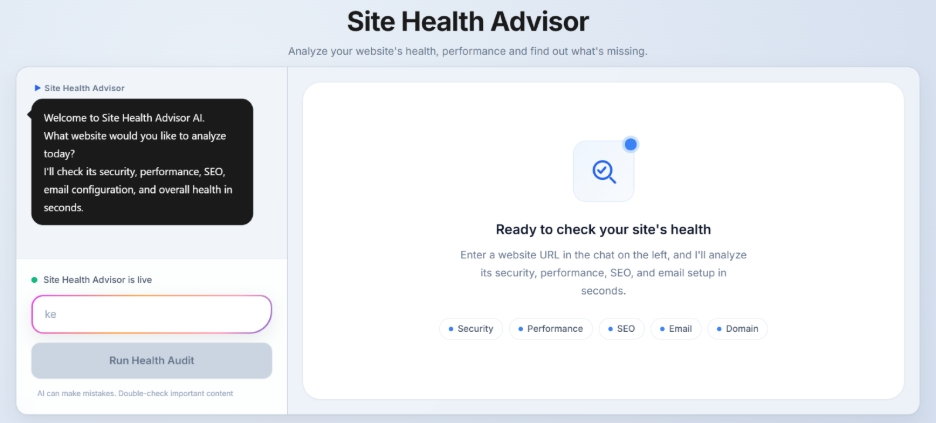
Site Health Advisor is a free AI-powered website assessment tool that gives you a closer look at how your website is performing. Instead of manually checking multiple tools, you can get a high-level overview of your website’s health in just a few clicks.
Using your website URL, Site Health Advisor analyzes important areas including:
- Website performance and experience
- Website security
- Email health
- SEO
- Domain and DNS health
- Authority and spam metrics
- Technology stack
- Agent readiness
- Additional technical recommendations that may help improve your site’s overall health
Instead of jumping between multiple services, you’ll receive a consolidated report with actionable insights, helping you quickly identify issues that may affect your website’s performance, trust, or discoverability.
For example, a report might show:
- Security: 100/100
- Email Health: 0/100
- SEO: 72/100
- Performance: 55/100
- Domain Health: 92/100
The report gives you a starting point for understanding what’s working and what you may want to address.
How to use Site Health Advisor
Getting started only takes a few moments.
- Visit the Site Health Advisor page.
- Enter your website URL.
- Start the scan.
- Review your website health report.
- Use the recommendations to identify areas for improvement.
What does Site Health Advisor check?
Rather than providing a single performance score, Site Health Advisor evaluates multiple areas that contribute to your website’s overall health.
Website performance and experience
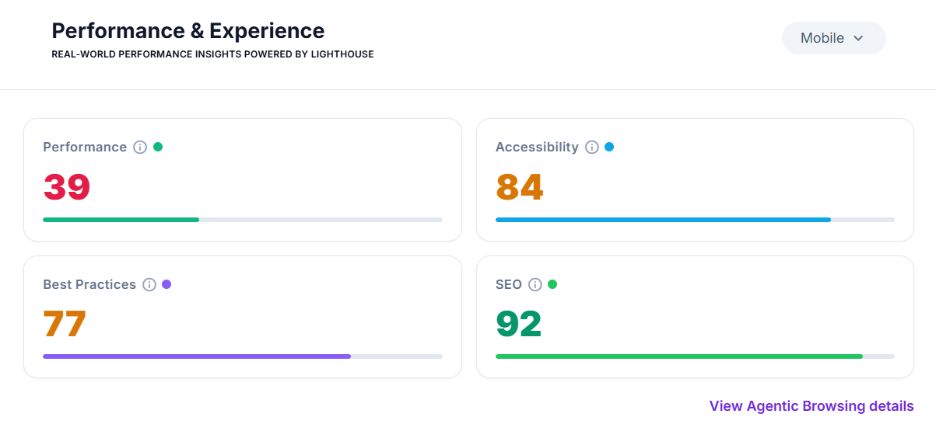
Site Health Advisor assesses performance, accessibility, best practices, and SEO, along with Core Web Vitals and other performance measurements. Instead of simply showing scores, the report highlights the issues contributing to those results, helping you prioritize improvements that can make the biggest impact.
The report can flag things that may be affecting your site’s performance, such as unused JavaScript, large network payloads, or a slow Largest Contentful Paint (LCP). Instead of stopping at the score, the results point to the areas worth reviewing.
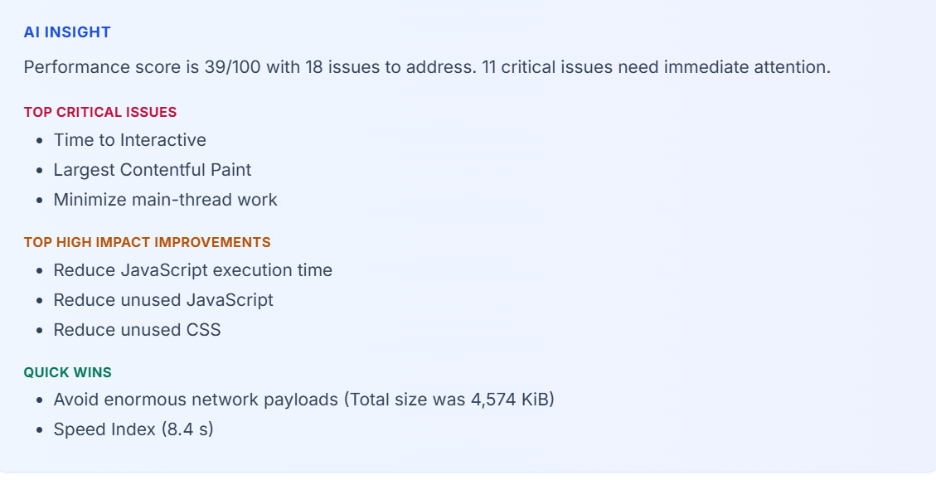
The built-in AI Insights summarize key findings, identify critical issues, and group recommendations based on priority, so you know where to start.
Security
Site Health Advisor checks your website’s security setup, including HTTPS, SSL certificates, and certificate validity. If issues are detected, they’re highlighted within the report so you can investigate them further.
Email Health
Your website and domain can also affect your email setup.
The Email Health check looks at records such as SPF, DMARC, and DKIM. These records help with email authentication and can help protect your domain from email spoofing.
If records are missing, Site Health Advisor flags them, so you know where to look.
Anthony Matera, Network Solutions Senior Director for Email Products, advises, “Ensure SPF, DKIM, and DMARC records are set up correctly in your domain settings to prevent your domain from being used for phishing.”
SEO
The SEO assessment reviews key technical elements that help search engines understand your website, including page titles, meta descriptions, structured data, robots.txt, and your sitemap. Rather than manually checking each item, you’ll receive a summary highlighting any missing or incomplete elements.
Take your time to fix them properly, and don’t just go after quick adjustments.
Kate Furnifer, Network Solutions Senior Product Director, reminds, “SEO is a long-term strategy that requires consistent optimization, quality content, and ongoing improvements to achieve sustainable results.
Domain and DNS health
Your report also reviews important domain information, including DNS configuration, MX records, name servers, WHOIS privacy, registrar details, domain age, and renewal information.
These checks provide additional visibility into the technical foundation supporting your website.
Authority and technology insights
Site Health Advisor also includes Authority and Spam Metrics alongside a Technology Stack overview, giving you additional context around your website’s backlink profile and the technologies powering your site.
These insights help you better understand your website’s overall online presence—not just its technical performance.
Agent readiness
One of Site Health Advisor’s newest capabilities is its Agent Readiness assessment.
Instead of browsing a website themselves, a customer can now ask an AI assistant to find a product, compare options, or help with a task. This shift toward agentic commerce is changing how people can discover and evaluate businesses online.
Chris Day, VP of Customer Fulfillment at Network Solutions, explains, “For years, businesses optimized for search engines. Now they’re beginning to optimize for AI that can help customers discover, compare, and eventually purchase products on their behalf.”
Site Health Advisor evaluates 14 areas related to agent readiness, including robots.txt, sitemaps, AI bot rules, content signals, API discovery, and other technical indicators that help AI agents understand and access your website.
You don’t need to understand every technical term in the report. Instead, the assessment provides an early indication of whether your website includes the signals AI agents increasingly rely on.
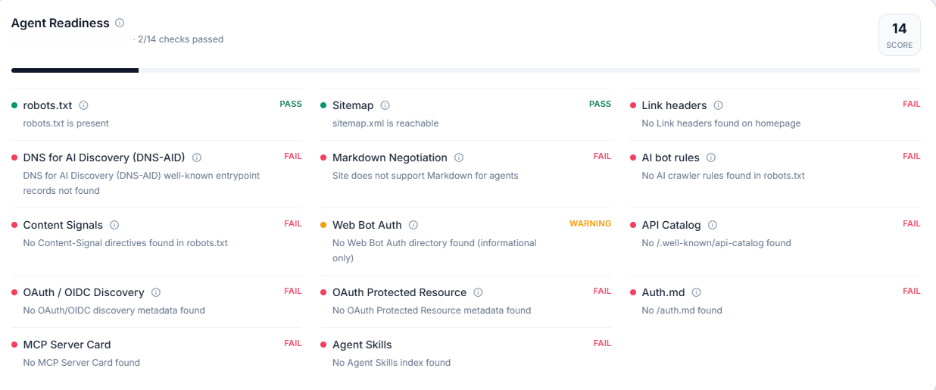
A failed check here isn’t necessarily a website bug. It can show that your site is missing something AI agents rely on to access and understand it. Those checks are one part of the broader conversation around agentic commerce readiness, including how businesses can prepare as AI takes on a bigger role in customer journeys.
Prioritize what needs attention first
A long list of technical issues can be overwhelming. Site Health Advisor organizes your results into an easy-to-understand report that helps you prioritize what to address first.
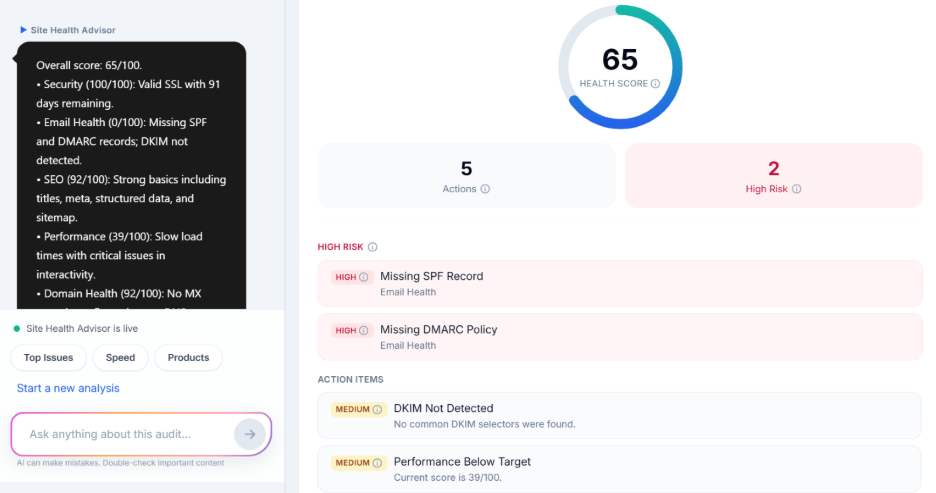
Your report includes:
- An overall health score: A single number out of 100 that reflects how your website scored across every area checked in the audit
- Prioritized actions: The specific issues the audit found, pulled from across all categories, so you don’t have to dig through each section separately
- High-risk issues: The items flagged as most urgent, separated out from the rest, so they don’t get lost in a longer list
- Priority issue timeline: Your results laid out in the order worth tackling them, so you know what to look at first and what can wait
Together, these provide a clear roadmap for improving your website without having to interpret dozens of technical reports.
Ask questions about your audit
If you’re unsure what a particular finding means, Site Health Advisor includes an AI assistant that can explain your audit results.
Simply ask a question like:
“Why is my health score 65?”
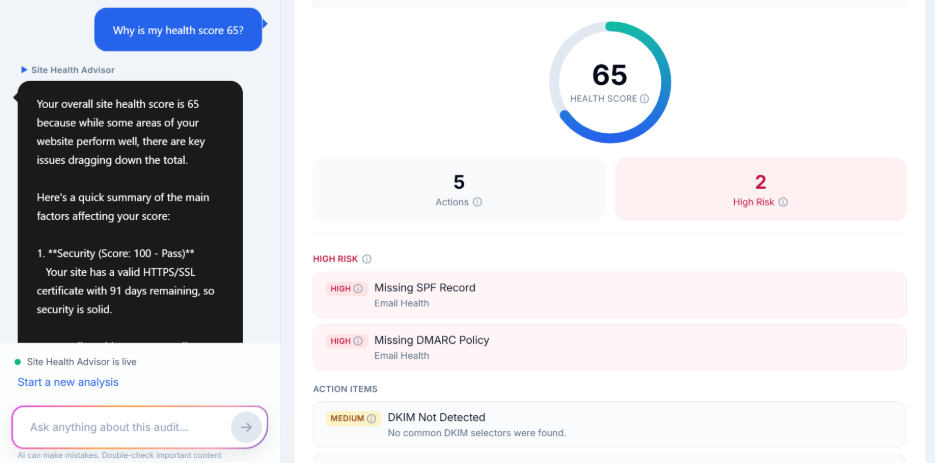
This gives you another way to work through the report when you’re not sure how to interpret a result or where to start.
Explore product recommendations
Based on your audit results, Site Health Advisor may also suggest Network Solutions products related to areas that need attention. These recommendations give you a starting point if you want to explore a product that may help address an issue identified in your report.
The recommendations are based on your audit, but they aren’t a guarantee that a particular product is the right solution for your website. Review the issue and the suggested product details to decide what makes sense for your needs.
Keep your website health in check
Website issues aren’t always obvious. Problems with SEO, security, DNS, email configuration, performance, or the technical signals AI agents rely on can quietly affect how your business is discovered and trusted online.
Site Health Advisor brings these insights together in one place, helping you identify issues, prioritize improvements, and better understand your website’s overall health.
Run a free scan with Site Health Advisor to see your website health report.