
Key takeaways:
- Transferring your domain from Weebly to Network Solutions is a quick, straightforward process that only takes a few steps.
- Before starting the transfer, check your domain’s eligibility, copy the authorization code, and back up any important content from your Weebly site.
- After the move, be sure to update your DNS settings, if needed, and test your website to avoid service issues with your custom domain.
Perhaps you’ve been using Weebly to manage your domain, but feel like it’s time to move on. Maybe you’ve outgrown the platform. Or you just want more flexibility and control for your Weebly site.
Transferring your domain to Network Solutions gives you access to reliable tools, expert support, and a platform built for growth. Whether you’re consolidating your domains, connecting a custom domain, or planning your next big move, this guide will help you switch from Weebly with ease.
We’ll break down what a domain transfer is, how to prepare, and the step-by-step process to get it done without the stress.
What is a domain transfer?
A domain transfer is the process of moving a domain name from one domain registrar (the company that manages a domain) to another. When you transfer a domain, you’re essentially changing the company that’s responsible for managing your domain name.
There are several reasons why you might consider transferring your domain:
- Better services: It could be a good reason to switch if you find another domain provider that offers better customer support, more features, or improved domain management tools.
- Cost-effectiveness: Moving to a new provider may save you money on domain registration fees or offer you more competitive pricing.
- Business expansion: If your business is expanding, you may transfer your domain to a provider that aligns with your new plans or supports your growing online presence.
- Rebranding: When your business rebrands or changes its name, you might consider transferring your domain to match the new brand identity.
- Consolidation: You could transfer your domain to a single registrar to manage all your domains.
Domain transfer vs domain change of ownership
One common misconception people often encounter is confusing a domain transfer with a change of ownership, especially when managing multiple domains.
A domain transfer involves moving a domain from one domain registrar to another while keeping the ownership details the same. The purpose is usually to switch to a different domain provider for various reasons, such as better services, pricing, or management tools. This option can make sense when you decide to move your domain for easier management, but the domain still stays under the same person or business.
On the other hand, a change of ownership is the transfer of the legal ownership of a domain from one person or business to another. This typically occurs when the current owner sells or transfers their domain to a new owner, often requiring changes to contact and administrative information.
To know more about the different terms used for anything related to domains, you can read our glossary of domain terms for more information.
How to transfer your domain from Weebly
Transferring your domain from Weebly may seem technical at first, but the process is fairly simple when you break it into steps. Whether you’re moving .org domains, a .net domain, or another extension, taking time to prepare first can help prevent delays and make the transfer smoother.
- Prepare your domain for transfer
- Initiate the domain transfer from Weebly to Network Solutions
- Begin the transfer with Network Solutions
Step 1: Prepare your domain for transfer
Before you transfer your domain from Weebly, there are a few important steps to check off. These ensure the process goes smoothly and avoid any unexpected delays.
To prepare:
- Make sure your domain is eligible for transfer. Most domains must be at least 60 days old and not locked or in dispute.
- Unlock your domain in your Weebly account and disable privacy protection.
- Back up any website files or content linked to your Weebly domain.
You’re now ready to transfer your Weebly domain to Network Solutions.
Step 2: Initiate the domain transfer from Weebly to Network Solutions
After completing the previous step, you can begin the transfer process in your Weebly account.
- Log in to your Weebly account.
- Go to the Domains tab in your dashboard.
- Under Registration Lock, click DISABLE to unlock your domain.
- Find and copy your authorization code (EPP code) located in the same Registrar Lock box. You’ll need this to begin the transfer.
Note: Weebly’s interface, process, and terminology can change over time. Please refer to their official channels for the most up-to-date instructions.
Step 3: Begin the transfer with Network Solutions
Now that you’ve copied your authorization code from Weebly, you’re ready to begin the domain transfer process with Network Solutions.
1. Enter your domain name(s)
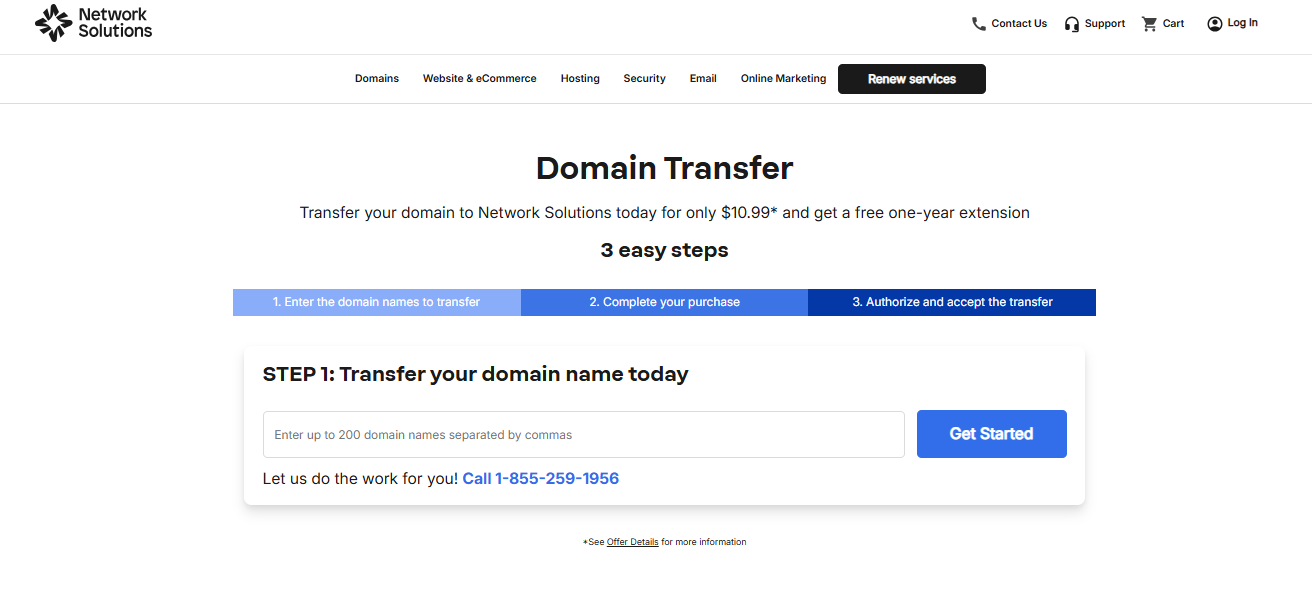
Go to the Network Solutions’ Domain Transfer page. Enter your domain name into the field provided. You can transfer up to 200 domains at once by separating them with commas.
2. Complete your purchase
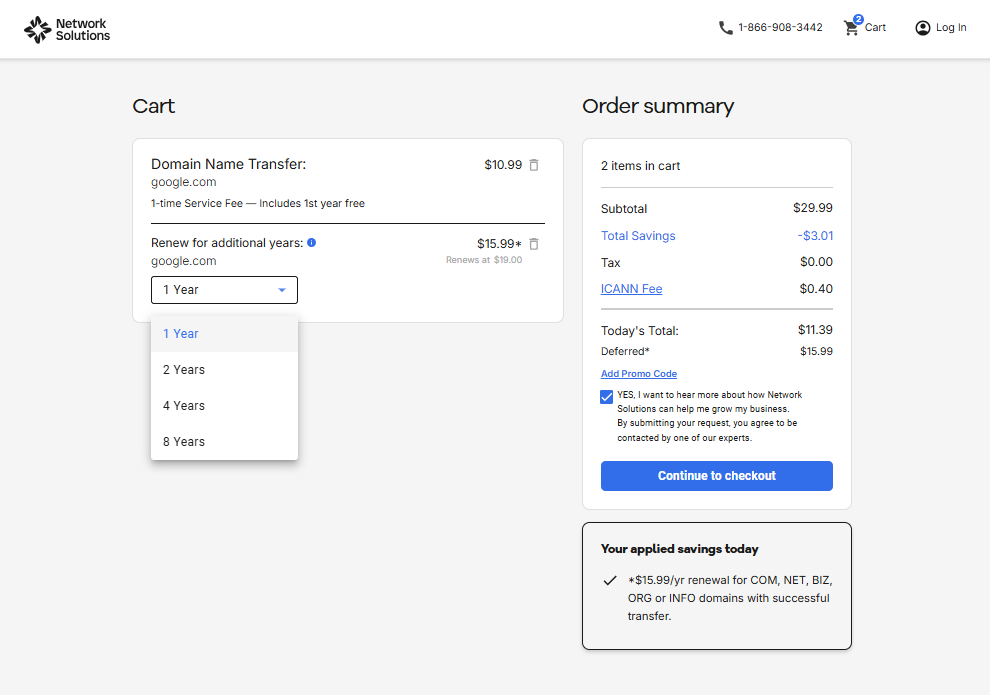
After entering your domain, you’ll see a summary of your order. The domain transfer fee is $10.99*, which usually includes the first year free. You can also choose to renew your domain for additional years during this step, but you’ll have to pay extra.
- Add extra years by selecting the renewal term from the dropdown.
- You may also see promotional savings applied automatically.
- An ICANN fee (typically $0.40*) will be added to the total.
When you’re ready, click Continue to checkout to finalize your order and submit payment.
3. Fill out your contact and billing information
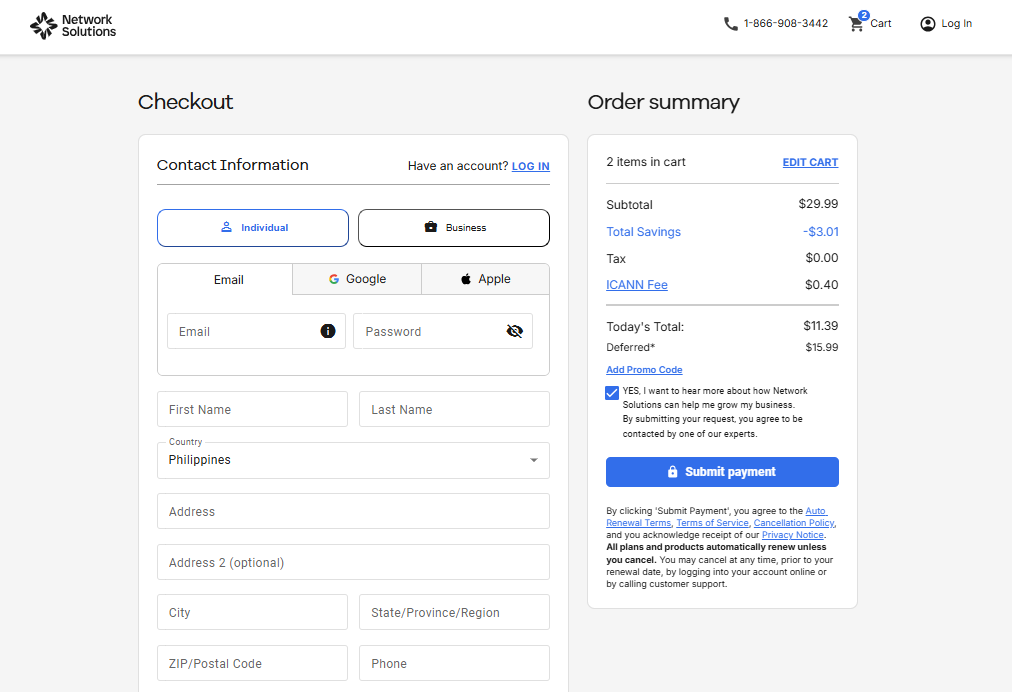
After clicking Continue to checkout, you’ll be asked to enter your details:
- Select your account type (Individual or Business Organization).
- Enter your name, country, address, and contact details (email and phone).
- Choose a password to create your Network Solutions account.
- Add your payment information, including card details and billing address.
You’ll see your order summary on the right-hand side, which includes:
- Transfer cost ($10.99* with first year free)
- ICANN fee
- Optional multi-year renewal pricing
- Any promo code savings applied
Once everything is complete, click Submit payment to finalize your purchase and start the domain transfer process.
Disclaimer: Price is current as of the time of writing. Please refer to Domain Transfer for up-to-date pricing and terms and conditions.
Once you submit your request, you may need to wait a short time for the transfer to complete, so it’s a good idea to keep your old website settings accessible during the process. To know more about the processing time, you can read about how long does a domain transfer take for your reference.
How to manage the domain transfer transition period
Once your domain transfer to Network Solutions is complete, there are a few post-transfer steps to keep your site and services running smoothly. These updates help prevent disruptions and ensure everything stays connected during the transition.
- Updating DNS settings and nameservers
- Test website functionality after the transfer
Step 1: Updating DNS settings and nameservers
Once the domain transfer is complete, the records associated with the domain name will be distributed based on where the nameservers point in the registry’s database. So, initiating a transfer on a domain name that uses Weebly nameservers without changing it to Network Solutions could result in website and email downtime.
Here are some scenarios where you may need to make some changes after the transfer is complete.
- Hosting is still with Weebly: If your website hosting or email services are bundled with Weebly, then you’ll need to update your DNS settings to maintain functionality.
- New services are provided by Network Solutions: If you plan to use services offered by Network Solutions—like website hosting or email—you’ll need to update your DNS settings accordingly.
- You’re adding third-party tools or services: If the transfer includes setting up tools like Google Workspace, Microsoft 365, or other integrations, you may need to manually update DNS records (such as MX, TXT, or CNAME) within your Network Solutions account.
Head over to our help section to learn more about updating your DNS settings with Network Solutions.
Being unfamiliar with web hosting and its role on your website while still learning about domains can be difficult. To add some clarity, you can read about the difference between a hostname and a domain name.
Step 2: Test website functionality after the transfer
After the transfer, test your website’s functionality, including all webpages, forms, and interactive elements. Don’t forget to test the contact forms, e-commerce functionality, and any third-party integrations on your website after the transfer.
Testing ensures that everything is working properly, and your website is fully operational. Address any issues immediately to shorten website downtime and guarantee a positive user experience.
Frequently asked questions
To transfer your Weebly domain, unlock it in your Weebly account, get the authorization code, and start the transfer with your new registrar. You’ll also need to confirm the transfer and update your DNS settings if needed after the move.
Yes, you can transfer a domain from one provider to another or point it to a different website. Just make sure the domain is eligible for transfer and that your DNS settings are updated correctly.
Not necessarily, but your email may be affected if your DNS or nameserver settings are not properly updated. To avoid downtime, review your MX records and email settings before and after the transfer.
Transfer your domain name to Network Solutions today
Domain transfers usually happen when you prefer to look for providers who can offer better perks than what your current provider offers. This guide can help you ensure a seamless transition to maintain your website’s functionality during the transition. To get started, visit the Network Solutions domain transfer page and enter your domain name.
If you’re building beyond a single site, we also give you a convenient place to handle both domain transfers and new domain registrations. It makes domain management easier in one account, plus you can enjoy our free marketing tools with every domain you register with us.
Keep building on your momentum after the transfer by tracking customer engagement with our free Customers App, or expand your reach even further with our Social App. Because a domain transfer shouldn’t just move your website forward, it should also help you break through for what comes next.
Find the perfect domain
Ready to register a domain name? Check domain availability and get started with Network Solutions today.