

Key takeaways:
- The Domain Name System (DNS) translates human-readable domain names into IP addresses, helping users reach websites without memorizing numerical addresses.
- DNS servers work together through a hierarchical DNS lookup process that locates and returns the information needed to connect users with the correct website.
- DNS supports both website accessibility and DNS security through features such as DNS caching, DNSSEC, and DNS records that help manage online services.
Visiting a website feels instantaneous. You type in a name, hit enter, and the page immediately loads. But behind that smooth experience is a system quietly doing plenty of heavy lifting.
That system is called the Domain Name System (DNS). It works like a phonebook for the internet, helping your browser find the correct destination without requiring you to remember a string of numbers. Most people interact with it every day without realizing it, yet it’s one of the technologies that makes the modern web possible.
Whether you’re launching your first website or managing a domain name for your business, understanding the domain name system can help you make sense of how websites connect with visitors online. In this guide, we’ll explain what DNS is, how it works, and why it matters.
Find the perfect domain
Ready to register a domain name? Check domain availability and get started with Network Solutions today.
What is the Domain Name System?
The Domain Name System is often called the internet’s phonebook. Instead of requiring you to remember numerical IP addresses, DNS lets you use easy-to-remember domain names when visiting websites. When you enter a domain name in your browser, the DNS finds the corresponding IP address and directs you to the correct destination.
Think of it like looking up a person’s name in a phonebook. You search for the name, find the phone number, and use that number to reach them. DNS works similarly by matching human-readable domain names (e.g., domain.com) with the numerical addresses (e.g.,192.0.2.1) that computers use to communicate.
Without the domain name system, visiting websites would be much less convenient. You’d be entering an IP address every time you wanted to access a site rather than typing a memorable web address.
Before DNS, the internet relied on a centralized file called ‘HOSTS.TXT’ that matched hostnames with IP addresses. You either needed access to an up-to-date copy of this file or had to know the numerical address of the computer you wanted to reach. As the internet grew, keeping these records current became increasingly impractical.
To solve this challenge, Paul Mockapetris created DNS in 1983, introducing a distributed system that could automatically translate domain names into IP addresses at scale.
How does DNS work?
DNS works by mapping a domain name to the server that hosts a website’s files. When someone enters a web address into a browser, the system identifies where that website is hosted and directs the browser to the correct destination.
Think of it as an extension of the phonebook example. Finding a name in a phonebook gives you a number, but placing the call still requires the telephone network to connect you to the right person. In the same way, DNS helps your browser find the information it needs to reach the correct website.
Behind the scenes, multiple DNS servers work together to complete this request. Rather than relying on a single source of information, DNS uses a distributed system that helps it remain efficient as the internet continues to grow.
To better understand how DNS works, let’s look at the different servers involved and the role each one plays in the process.
Types of DNS servers
Multiple DNS servers work together to map domain names to the correct destinations. Each server has a specific role, but to understand how they work together, it helps to first look at how DNS itself is organized.
DNS hierarchy
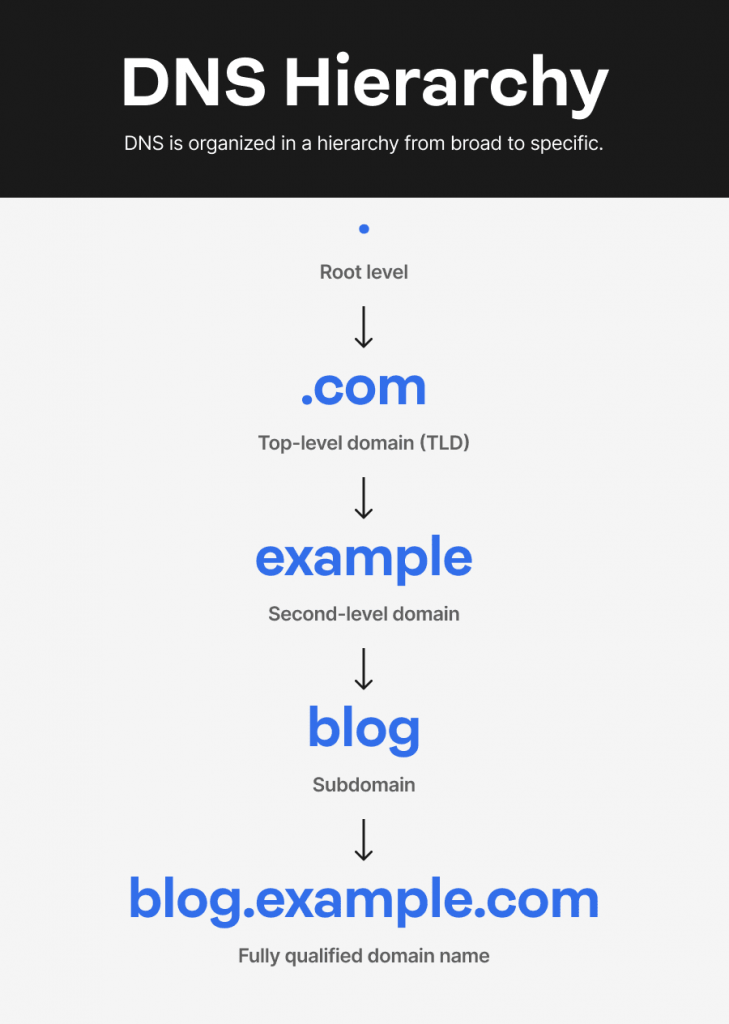
Note:Technically, a fully qualified domain name ends with a trailing dot that represents the DNS root, although it is usually omitted.
DNS is organized as a hierarchy that helps manage domain names across the internet. At the top is the root level, represented by a dot (.), followed by top-level domains (TLDs) such as .com, .org, and .net. Beneath those are second-level domains, which are the names people register, followed by subdomains that help organize different parts of a website. This layered structure allows DNS to organize and locate information efficiently as the internet continues to grow.
The servers behind DNS are designed to navigate this hierarchy and locate the information needed to complete a request. Each server handles a different part of the process.
Recursive DNS server
A recursive DNS server, or recursive DNS resolver, acts as the primary point of contact for DNS requests. When someone enters a domain name into a browser, the recursive resolver works on the user’s behalf to locate the information needed to fulfill that request. It may also cache or temporarily store previous results to improve efficiency.
Root name server
A root name server sits at the highest level of the DNS infrastructure. Its role is to help organize and route DNS requests by identifying the appropriate TLD associated with a query. The root server serves as an important reference point within the DNS system.
TLD name server
A TLD name server manages information for a specific top-level domain. It helps narrow a request to the correct domain within that extension, making it easier to locate the information being sought.
Authoritative name server
An authoritative DNS server, also called an authoritative name server, stores a domain’s DNS records. These records contain the DNS information associated with a domain, including its IP address and other configuration settings. Because it maintains the official DNS data for a domain, it’s often considered the source of truth for that information.
What are the steps in a DNS lookup?
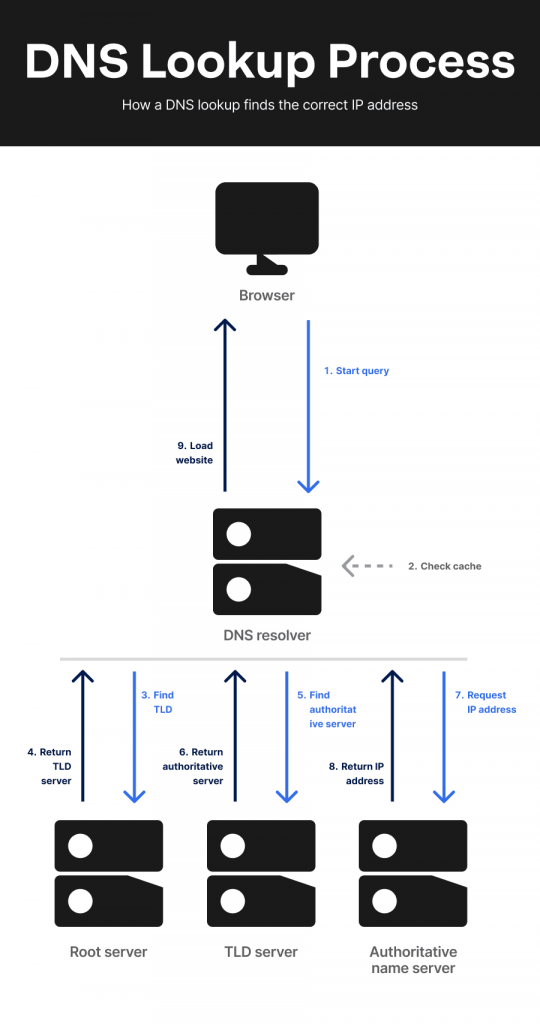
Now that you know the different DNS servers involved, let’s look at how they work together during a DNS lookup. From the moment you enter a domain name, the DNS follows a series of steps to find the correct IP address and connect you to the website.
- Query initiation: When you enter a website address into your browser, it sends a DNS query to find the domain’s corresponding IP address.
- Recursive resolver: The request first reaches a recursive resolver. It checks its cache for a recent answer. If the information is available, it returns the result immediately. If not, it begins the DNS lookup process.
- Root name server: The resolver contacts a root name server, which identifies the appropriate TLD for the request and points the resolver in that direction.
- TLD server: The resolver then queries the relevant TLD server. The TLD server identifies the domain being requested and provides the location of the appropriate authoritative name server.
- Authoritative name server: The authoritative name server looks up the domain’s DNS records and returns the requested information, including the correct IP address.
- Query resolution: The resolver returns the answer to the browser, completing DNS resolution. Using the IP address it receives, the browser connects to the web server and loads the website.
Why DNS matters
DNS matters because it helps people reach the websites and online services they intend to access. Every time you visit a website, send an email, or use a cloud application, DNS works behind the scenes to direct your request to the correct destination. Without it, navigating the internet would be far less intuitive and significantly more difficult for everyday users.
DNS also plays an important role in protecting online activity. Because it sits between users and the websites they visit, DNS can serve as an early layer of defense against threats. Attacks such as DNS spoofing attempt to redirect users to malicious sites by supplying false DNS information.
To help prevent this, DNS Security Extensions (DNSSEC) verify that DNS responses are authentic. Some DNS services can also block requests to known phishing or malware domains before a connection is established. Together, these protections help strengthen DNS security and make the internet a safer place to browse.
What are DNS records?
Besides DNS servers, another important part of the Domain Name System is DNS records. These records store the information that allows DNS to connect domain names with IP addresses and manage other domain-related settings. When a DNS lookup is performed, these records provide the details needed to direct requests to the correct destination.
Let’s look at the most common DNS records and what they do:
- A record (Address record): An A record links a domain name to an IPv4 address, which identifies the server hosting a website. For example, an A record can tell DNS servers that domain.com corresponds to the IP address 192.0.2.1.
- AAAA record (IPv6 address record): Like an A record, an AAAA record maps a domain name to an IP address. The difference is that it uses IPv6 instead of IPv4. An example of an IPv6 address is 2001:0db8:85a3:0000:0000:8a2e:0370:7334.
- Canonical name (CNAME) record: A CNAME record aliases one domain name to another. For example, you might point www.domain.com to domain.com. This ensures visitors reach the same website regardless of which version they enter.
- Mail exchange (MX) record: An MX record identifies the mail server responsible for receiving email for a domain. If someone sends a message to [email protected], the MX record tells the system where to deliver it.
- Text (TXT) record: A TXT record stores text-based information associated with a domain. It’s commonly used for domain verification and email security. For example, Sender Policy Framework (SPF) records are often stored as TXT records to identify which mail servers are authorized to send email on behalf of a domain.
- Name server (NS) record: An NS record specifies which DNS servers are authoritative for a domain. These servers store the domain’s DNS records and respond to queries about them. NS records help direct DNS requests to the correct authoritative name servers.
- Pointer (PTR) record: A PTR record is used for a reverse DNS lookup. Instead of mapping a domain name to an IP address like an A record, it maps an IP address back to a domain name. This record is commonly used to help verify the identity of a mail server.
Types of DNS queries
A DNS query is a request that asks DNS for information about a domain name. During the DNS lookup process, different types of queries may be used to help locate the information needed.
The three main types of DNS queries are:
- Recursive query: A DNS client asks a DNS server to return the final answer to a request.
- Iterative query: A DNS server returns the best information it has available, often directing the requester to another DNS server that is closer to the answer.
- Non-recursive query: A DNS server returns an answer immediately because it already has the information or is authoritative for the domain being queried.
What is DNS caching?
DNS caching temporarily stores information retrieved during a DNS lookup. This stored information often includes the DNS data that maps a domain name to its corresponding IP address.
When you visit a website for the first time, the DNS resolver performs the full lookup process to find the information it needs. Once the request is resolved, the result is cached for a specified period known as the Time to Live (TTL). As long as the TTL has not expired, the resolver can use the cached information instead of repeating the entire lookup process.
DNS caching helps improve internet performance by reducing the number of DNS lookups that need to be performed. This allows websites to load more quickly and helps DNS operate more efficiently across the internet.
Common DNS tasks for website owners
Once you understand the basics of DNS, you’ll likely encounter a few common tasks while managing your website. Most of these involve updating DNS records, connecting services, or directing visitors to the right destination.
- Checking DNS propagation: Changes to DNS settings don’t take effect everywhere at once. After updating a DNS record, it can take time for the new information to spread across the internet. Use our guide to understand how DNS propagation works and why updates can take time to appear worldwide.
- Pointing a domain to a website: If you change hosting providers, launch a new website, or connect a domain to a website builder, you may need to update DNS settings so visitors reach the correct location. If you’re connecting a domain to a new website or hosting provider, our guide to domain pointing walks through the process in more detail.
- Updating nameservers: Nameservers determine where a domain’s DNS information is managed. Website owners commonly update them when transferring DNS management to a hosting provider or another DNS service.
- Managing service records: Many online tools rely on DNS. Adding or updating records can help connect business email, verify domain ownership, enable website security, or support other website services.
Most domain owners only need to make occasional changes, but having access to reliable DNS services and domain management tools makes these tasks much easier. At Network Solutions, we provide DNS management tools that let you manage DNS records, nameservers, and domain settings in one place.
How to check DNS issues
When a website won’t load or displays an error such as “DNS server not found,” the problem may be related to DNS. The issue could stem from your local device, your DNS provider, or recent changes to a domain’s settings.
Here are some common ways to troubleshoot DNS issues:
- Check your internet connection: Before investigating DNS, confirm that your internet connection is working properly. If multiple websites fail to load, the problem may be related to general connectivity rather than the DNS resolution process.
- Clear your DNS cache: Occasionally, cached DNS information can become outdated. Flushing the cache forces your device to retrieve fresh DNS information.
- On Windows, open Command Prompt, type ipconfig /flushdns, and press Enter.
- On Mac, open Terminal, type sudo killall -HUP mDNSResponder, and press Enter.
- Use a different DNS server: If your current DNS provider is experiencing problems, switching to another DNS service may help determine whether the issue originates from your DNS configuration.
- Check DNS server status: Sometimes the issue is outside your control. If a domain or DNS provider is experiencing an outage, online status-checking tools can help verify whether the problem is affecting other users as well.
- Check for DNS propagation delays: If you recently updated your DNS records, changed nameservers, or moved your website to a new host, DNS changes may still be propagating across the internet. This process can take anywhere from a few hours to 48 hours. If you’ve recently made DNS changes, our guide to DNS propagation explains what to expect and how to monitor progress.
Frequently asked questions
DNS servers process DNS queries and help translate domain names into IP addresses. Different DNS servers work together to locate the information needed to connect users with websites and other online services.
If DNS fails, your device won’t be able to find the correct destination for a domain name. As a result, websites and online services may become inaccessible even if they are still online.
You can check your DNS settings using DNS lookup and propagation tools. These tools help verify that your DNS records are configured correctly and resolving to the intended destination.
Either option can work well. Public DNS services are often chosen for their performance and additional security features, while ISP-provided DNS services are typically sufficient for everyday browsing.
DNS Security Extensions (DNSSEC) help verify that DNS responses are authentic and haven’t been altered. If you manage a website or domain name, DNSSEC can add an extra layer of protection against threats such as DNS spoofing.
No. DNS and IP addresses serve different purposes. DNS translates domain names into IP addresses, while an IP address identifies the location of a device or server on a network.
The four main types of DNS servers are:
– Recursive DNS server
– Root name server
– TLD name server
– Authoritative name server
Empower your website with reliable DNS and hosting solutions
The Domain Name System helps connect people with your website, but keeping that connection reliable requires the right tools behind the scenes. From managing DNS records to directing visitors to the correct web server, your DNS setup influences how people find and access your website.
Whether you’re launching a new website, moving to a different host, or growing your business online, having greater control over your website’s infrastructure can help you stay prepared for what’s next. At Network Solutions, we provide the tools you need to manage your domains, DNS, and hosting from one place. Every domain registration also includes built-in apps designed to help you establish and grow your business online.
Your next breakthrough starts with a strong foundation. With reliable DNS services, domain management tools, and hosting solutions, we’re here to help you keep building what’s next.
Your domain deserves reliable hosting
Build on a strong foundation with hosting designed to deliver consistent performance and dependable uptime.