Key takeaways:
- VPS hosting gives growing websites more control, faster performance, and stronger security than shared hosting, with dedicated resources to support their needs.
- Unlike shared hosting, VPS ensures consistent performance by allocating specific CPU, RAM, and storage to your website, preventing slowdowns.
- If managing a VPS feels too technical, consider managed hosting for a secure, hassle-free solution with expert support.
A growing website is a sign of success, but if pages are loading slowly or performance drops during busy periods, you may be wondering: What is VPS hosting, and is it time to upgrade from shared hosting? Virtual private server (VPS) hosting offers greater control, flexibility, and dedicated resources than shared hosting, while typically costing less than a dedicated server. In this guide, we’ll cover:
- What VPS hosting is
- How it works
- Its advantages and limitations
- Who VPS hosting is best suited for
We’ll also compare VPS hosting with other hosting types and explore available VPS options, helping you determine whether VPS hosting is the right fit as your website grows. Curious about WordPress hosting, too? Explore our comparison of web hosting and WordPress hosting.
Find the perfect domain
Ready to register a domain name? Check domain availability and get started with Network Solutions today.
What is virtual private server (VPS) hosting?
VPS hosting is a type of web hosting that uses virtualization technology to partition a single physical server into multiple virtual machines, each running in its own virtual environment. It lets you share a physical server with other users while still having your own independent environment and dedicated resources.
Think of hosting as renting. Shared hosting is like sharing a room with others, where everyone uses the same space and resources.
VPS hosting, on the other hand, is like renting your own apartment. You’re still in the same building as other tenants, but you have your own space, your own utilities, and more control over how everything is set up.
Dedicated hosting takes it a step further. It’s like renting the entire building, where all the space and resources are yours alone.
In other words, VPS hosting sits between shared hosting and dedicated hosting. With a VPS, your website runs in its own isolated portion of a server, with resources allocated specifically to you. This gives you more consistent performance and greater flexibility without paying for an entire physical server.
How does VPS hosting work?
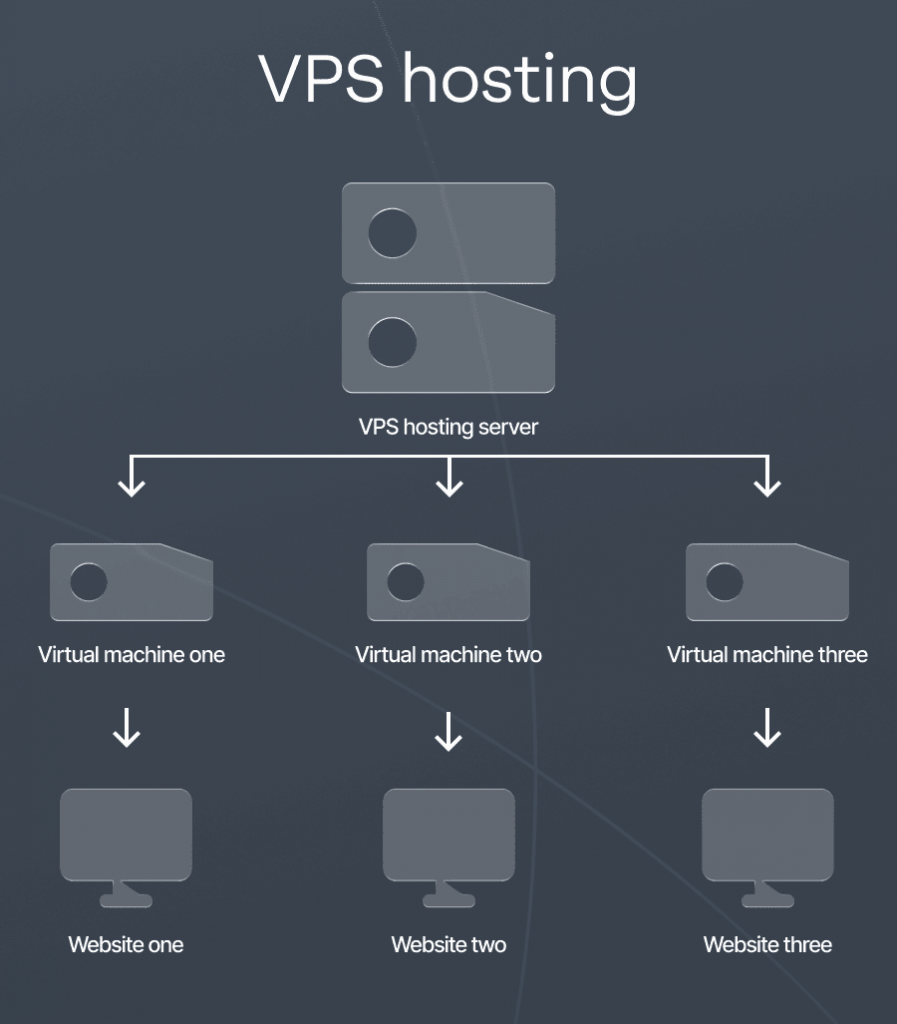
Hosting companies take a single physical server and use virtualization to split it into multiple virtual machines, each acting as an independent server. Each VPS acts like a mini server, with dedicated server resources (e.g., CPU, RAM, storage) that no one else can access.
So even though you’re still technically sharing a physical machine with others, your VPS is completely separated. This means:
- More reliability: No other websites will be eating up your resources.
- More control: You can install software, tweak settings, and customize as you like.
- Better security: Your data is isolated from other users on the same server.
- More operating system freedom: You can run your own operating system (OS) (Linux, Windows, etc.), install software, and configure settings however you like.
How resources are allocated
In shared hosting, all websites pull from the same pool of CPU, RAM, and bandwidth. If one site suddenly gets a surge in traffic, the other sites’ performance within the same hosting environment is affected.
With VPS hosting, resources are split and allocated in advance. That means your website gets its own guaranteed slice of:
- CPU power: Handles processing and tasks. More CPU means faster performance.
- RAM (Memory): Stores temporary data for quick access. More RAM means better multitasking and smoother performance.
- Storage (SSD or HDD): Holds your website files, databases, and emails. Solid state drives (SSDs) are much faster than traditional hard disk drives (HDDs).
Since your resources are reserved just for you, your website won’t slow down even if another site on the server gets more traffic.
Operating systems supported
VPS hosting supports various OS, so you can choose the one that best fits your website. Common VPS operating systems are:
- Linux VPS: The most common option. It’s lightweight, secure, and works well for most websites. Popular choices include Ubuntu, CentOS, and Debian.
- Windows VPS: Ideal for businesses using Windows-based applications. Requires a license, so it’s usually a bit more expensive than Linux.
Who is VPS hosting best for?
VPS hosting is a good fit for websites that are starting to outgrow shared hosting but don’t need the full power of a dedicated server yet.
Here’s who VPS hosting is best suited for:
- Small businesses that need better performance and security
- Growing websites that need reliable uptime
- Online stores that can’t afford slow load times or security risks
- Developers who want full control over their hosting environment
Small businesses that need better performance and security
If your business website is experiencing slow load times or security concerns on shared hosting, VPS hosting provides dedicated resources and enhanced protection to keep your site running smoothly.
Growing websites that need reliable uptime
As your website gains more visitors, you need a hosting solution that can handle sudden traffic spikes without crashing or slowing down. VPS ensures stable performance, so your site remains fast and accessible.
Online stores that can’t afford slow load times or security risks
E-commerce websites require fast page speeds and strong security to protect payment information. With VPS hosting, you get a secure and high-performance environment for smooth transactions.
Developers who want full control over their hosting environment
Unlike shared hosting, a VPS allows developers to install custom software and configure server settings without restrictions. It’s good for those who need flexibility and full administrative access.
Performance matters for a growing website. A slow website can frustrate users, hurt your search engine rankings, and even lead to lost sales for an online business.
VPS hosting pros and cons
VPS hosting offers more performance, flexibility, and control than shared hosting, but it can also require more hands-on management. The level of responsibility depends on whether you choose a managed or unmanaged VPS plan.
Pros | Cons |
|---|---|
Better performance and reliability: Dedicated or guaranteed resources, such as CPU, memory, and storage, help your website handle higher traffic levels and reduce slowdowns caused by other users. | More resource management: You may need to monitor resource usage and upgrade your plan as your website’s needs increase. |
More affordable than dedicated hosting: You gain access to dedicated resources and greater control without paying for an entire physical server. | Greater security responsibility: With unmanaged VPS plans, you are typically responsible for configuring security settings, installing updates, and maintaining backups. |
Greater control and customization: You can install software, adjust server configurations, and choose an operating system that supports your needs. | More involved domain management: Connecting a domain or making DNS changes may require some manual configuration, depending on your hosting setup. |
Scalable resources: You can increase processing power, memory, or storage as traffic and business demands grow. | More involved website migration: Moving files, databases, and configurations can be challenging without migration tools or provider support. |
Stronger isolation and security: Your hosting environment is separated from other users, reducing the risk of neighboring websites affecting your site’s performance or security. | Ongoing maintenance: Unmanaged VPS users are generally responsible for server updates, monitoring, troubleshooting, and other routine administrative tasks. |
If you want to leverage the benefits of VPS hosting, you can check out our VPS hosting package.
Who may not need VPS hosting yet?
VPS hosting offers more resources, flexibility, and control than shared hosting, but it is not always necessary for websites with simple requirements or limited traffic.
Shared hosting or managed WordPress hosting may be a better fit for:
- New website owners who are still building an audience
- Bloggers and content creators with modest traffic
- Freelancers who need a simple portfolio website
- Small businesses with basic website requirements
New website owners who are still building an audience
A new website typically does not need dedicated server resources right away. Shared hosting can provide an affordable starting point while you build content, attract visitors, and learn how much traffic your website receives.
Bloggers and content creators with modest traffic
A personal or small business blog with steady but limited traffic can usually run smoothly on shared hosting. If your audience grows or your website begins using more resource-intensive features, you can upgrade to VPS hosting later.
Freelancers who need a simple portfolio website
A portfolio website that primarily showcases your work, services, and contact information may not require the additional control and resources offered by VPS hosting. Shared hosting is often sufficient for these straightforward websites.
Small businesses with basic website requirements
A local business website focused on service information, business hours, location details, and contact information may be well-suited to shared hosting. Managed WordPress hosting can also be a practical choice for businesses that want their hosting provider to handle updates, backups, security, and routine maintenance.
Choosing a simpler hosting plan can help you avoid paying for resources you do not yet need. As your traffic, website features, or performance requirements grow, you can upgrade to VPS hosting when the additional resources and flexibility become more valuable.
Ready for more power from your hosting?
Give your growing website dedicated resources, greater control, and room to handle more traffic with VPS hosting.

VPS hosting vs. other hosting types
Each hosting type offers a different balance of performance, flexibility, cost, and technical control. Comparing these options can help you choose a hosting environment that fits your website’s current needs without paying for resources you may not use.
- Shared hosting: Multiple websites share the same server and its resources. It is typically an affordable, beginner-friendly option for new or low-traffic websites. However, activity from other websites can affect your site’s speed and performance. VPS hosting provides dedicated or guaranteed resources and greater control, making it a practical next step when shared hosting begins to feel restrictive.
- Dedicated hosting: Your website receives an entire physical server and full control over its resources, operating system, and configurations. This can support resource-intensive websites and applications, but it usually costs more and requires greater technical expertise. VPS hosting offers many of the control and performance benefits of dedicated hosting without the cost of leasing an entire server.
- Cloud hosting: Your website uses resources from a network of connected servers rather than relying on a single physical machine. This setup can provide high availability and flexible scaling for websites with unpredictable traffic or changing resource needs. Cloud hosting may be better suited to rapidly fluctuating workloads, while a traditional VPS can offer dedicated or guaranteed resources and more predictable monthly costs.
Your decision should depend on how much traffic, control, scalability, and server management your website requires. If you are exploring your options further, our comparison of shared hosting vs. dedicated hosting explains how these hosting environments differ and where VPS hosting fits between them.
If you want to learn more about which hosting type can benefit your business, our blog on dedicated hosting vs. shared hosting delves more into the topic.
Hosting type | How it works | Pros | Cons | Best for |
|---|---|---|---|---|
Shared hosting | Multiple websites share the same server and resources | Cheapest option | Slower performance if other sites use too many resources | Small websites, blogs, or personal projects |
VPS hosting | A physical server is split into multiple virtual servers, each with its own dedicated resources | More reliable and faster than shared hosting | Costs more than shared hosting | Growing websites and online stores |
Dedicated hosting | A single website gets an entire physical server to itself | Full control over the server | Expensive | Large businesses, high-traffic websites, and enterprise applications |
Cloud Hosting | Websites are hosted on multiple interconnected servers (the cloud) | Add resources as needed | Costs vary based on usage | Websites with unpredictable traffic, SaaS applications, and startups |
Types of VPS hosting
VPS hosting plans vary based on how much server management you handle and how much support your hosting provider includes.
- Unmanaged VPS hosting: You are responsible for server setup, software installation, security, updates, maintenance, and troubleshooting. This option is best suited to developers, system administrators, and other technically experienced users who want full control over their server environment.
- Semi-managed VPS hosting: You handle most server administration tasks, while your provider may offer limited support, such as monitoring, software updates, or basic troubleshooting, depending on the plan. This option can suit users who want some assistance but are comfortable managing many aspects of their server.
- Managed VPS hosting: Your provider handles many server administration tasks, including maintenance, updates, monitoring, and security. This makes managed VPS hosting a practical choice for business owners and website operators who want VPS performance without managing the technical details themselves.
Frequently asked questions
Yes. VPS hosting offers faster load times, stronger security, and dedicated resources, all of which are essential for online stores. It keeps your site running smoothly during traffic spikes and gives you more control over security and payment processing.
If your VPS hosting provider offers migration services, it can take just a few hours. If you move everything manually, expect it to take a day or two. Back up your site and test your virtual dedicated server before switching to avoid downtime.
Managed VPS hosting services take care of setup, security, updates, and maintenance, so you don’t have to. It’s ideal if you need better performance without handling technical tasks in a shared hosting environment or on the same physical server.
Yes. Unlike shared and dedicated hosting, VPS lets you install any software, configure settings, and run custom applications. If you’re using a managed VPS, check with your web hosting provider for any restrictions on the entire server.
VPS and VPN serve different purposes, so one is not better than the other. A VPS is a hosting solution for running websites or applications, while a VPN is a tool that protects your internet connection and privacy. They solve different problems and are often used together rather than compared.
VPS hosting is ideal for growing websites that need better performance, security, and control than shared hosting can provide. It’s a good fit for small businesses, e-commerce sites, developers, and any website experiencing increased traffic or requiring custom configurations.
Most VPS hosting plans are not free. They typically come with a monthly cost based on the RAM, CPU, storage, and other resources you use. Some providers may offer limited free trials, but a fully functional VPS usually requires a paid plan.
VPS hosting requires more hands-on management compared to shared hosting. You’re responsible for tasks like server setup, security, updates, and maintenance unless you choose a managed plan. It can also be more complex for beginners and may cost more than basic shared hosting plans.
Get the best out of VPS hosting
If your website is outgrowing shared hosting, VPS is the next logical step. It gives you more power, better security, and the flexibility to customize your hosting environment, all without the high cost of a dedicated server. Plus, you get consistent performance since your resources aren’t shared with other websites.
When your website starts demanding more from your hosting, the setup you choose becomes more important. With our hosting solutions, we give you the tools and reliability you need to move past performance limits and keep your site running smoothly as your business evolves. Our VPS hosting solutions enable ownership of your hosting environment to match the services that your business needs.
We handle the technical side so you can stay focused on managing and growing your website with confidence.
Looking into other hosting setups? Here’s a breakdown of the different types of web hosting you can choose from.