Key takeaways:
- Share links on Instagram through Stories, your profile, Reels, and other built-in features.
- Use Instagram links to guide followers to your website, products, or content.
- Choose the right linking method to make it easier for your audience to take action.
So, you’ve got amazing content just waiting to be shared! Why not post it on social media platforms like Instagram?
With more than three billion active users, Instagram offers huge potential. The right approach can turn views into valuable clicks to your site and meaningful connections that can grow your brand. However, Instagram’s link limitations can create challenges when you’re trying to drive traffic and boost engagement.
Sharing links on Instagram isn’t always as straightforward as it is on other platforms. Links added to captions or images aren’t clickable, which means users may need to take extra steps to reach your content. Since most people won’t manually retype long or complex URLs, understanding Instagram’s supported linking features can help you drive traffic without adding unnecessary friction.
The trick is knowing where to put your links. This guide will show you exactly how to share a link on Instagram effectively. You’ll discover simple ways to use IG Stories, posts, and your bio to reach more people, spark engagement, and create real impact.
Ready to dive in and make each link-sharing effort count? Let’s get started!
Why linking on Instagram is important
Sharing links on Instagram can do more than send people somewhere else. The right linking method can help you connect with your audience, bring more visitors to your content, and support your broader online presence.
Here’s what those links can do:
- Increased engagement
- SEO benefits
- Enhanced brand credibility
Increased engagement
Links on Instagram can help people interact with your content. When you make it easy for visitors to explore, they’re more likely to take action.
Taking this approach will bring your visitors closer and spark genuine interest. Whether it’s a link in your Instagram Story, Instagram bio, or even a little “link in bio” message in post captions, each link is like an open door from the Instagram app to what you have to offer beyond your social content.
SEO benefits
Sharing links on Instagram can help bring more people to your website, landing pages, products, or other online content. While an Instagram bio or Story link isn’t a direct Google ranking signal, the traffic and engagement generated through social media can support broader marketing and visibility goals.
For example, a well-placed link can encourage followers to visit your website, explore your content, or take an action such as signing up for a service or making a purchase. Instagram can also help people discover your brand and content, complementing your broader search and digital marketing efforts.
Enhanced brand credibility
Links on Instagram can do more than send people to your website. They can also give your audience an easy way to learn more about your brand. When people can quickly find your products, services, or helpful content, they may feel more comfortable doing business with you. Over time, those small moments of accessibility can help build lasting customer relationships.
“It keeps your identity consistent and helps customers find you more easily, especially since social profiles often show up in search results alongside your website,” said Nicole Cassis, SVP of Content and Communications at Network Solutions.
Key methods to share a link on Instagram
Sharing a link to your Instagram post takes a little creativity, but there are simple ways to get it in front of your audience.
Here are some practical ways to share links and connect with your audience:
- Instagram Stories
- Direct linking in Instagram posts using external tools
- Link-in-bio tools
- Instagram Reels
- Instagram Shopping
- Instagram Business Profile CTA buttons
Instagram Stories
Connecting your audience directly with your content is easy through Instagram Stories. Instagram Stories offer one of the most direct ways to share clickable links using link stickers. These stickers allow users to tap and immediately reach their destination without leaving the app or navigating through your profile, making them ideal for time-sensitive promotions, announcements, or featured content.
Here’s how you can add a link sticker to your Instagram story and make it even more engaging.
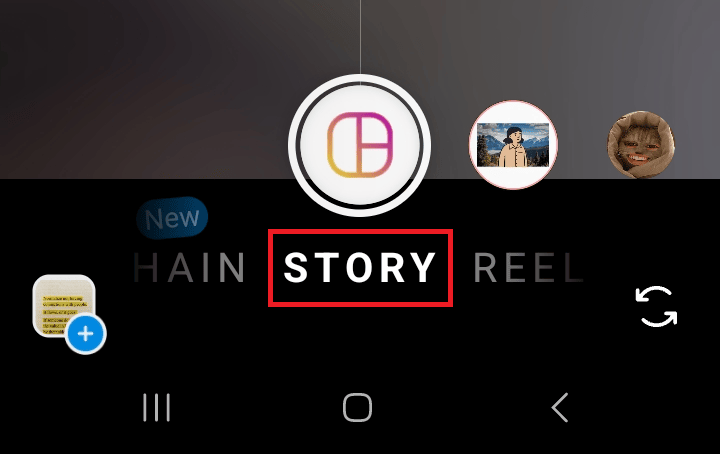
Step 1: Open your Instagram app and create an Instagram Story. Tap the “+” icon and select “Story.”
Step 2: Add your media content. Upload content such as photos, videos, or other visuals you want to include in your Instagram Story.
Step 3: Access the sticker tool. Tap the sticker icon found at the top of your screen.

Step 4: Choose the “Link” sticker. Select it to insert your link.
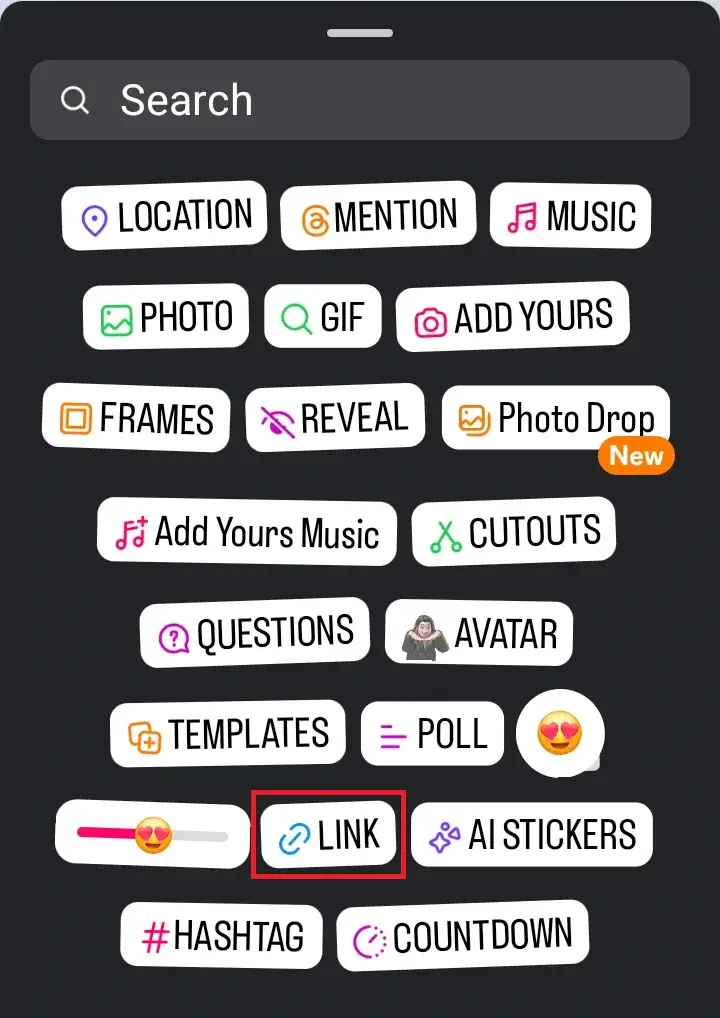
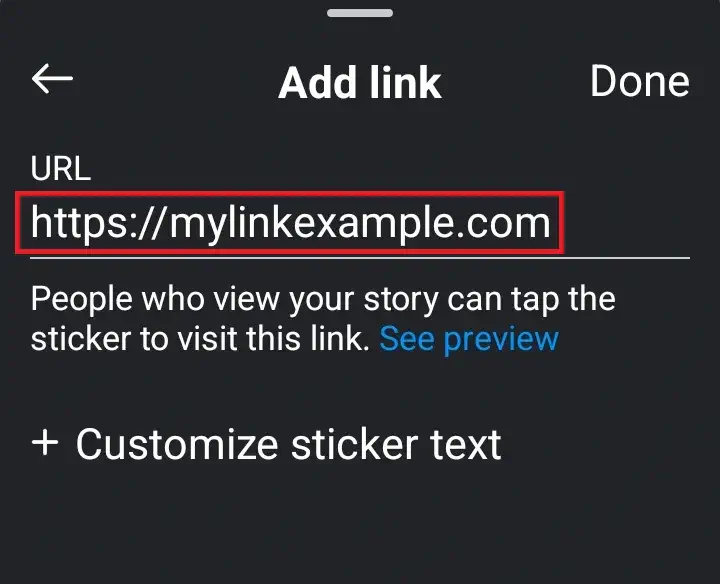
Step 5: Enter the website or product link you want to share.
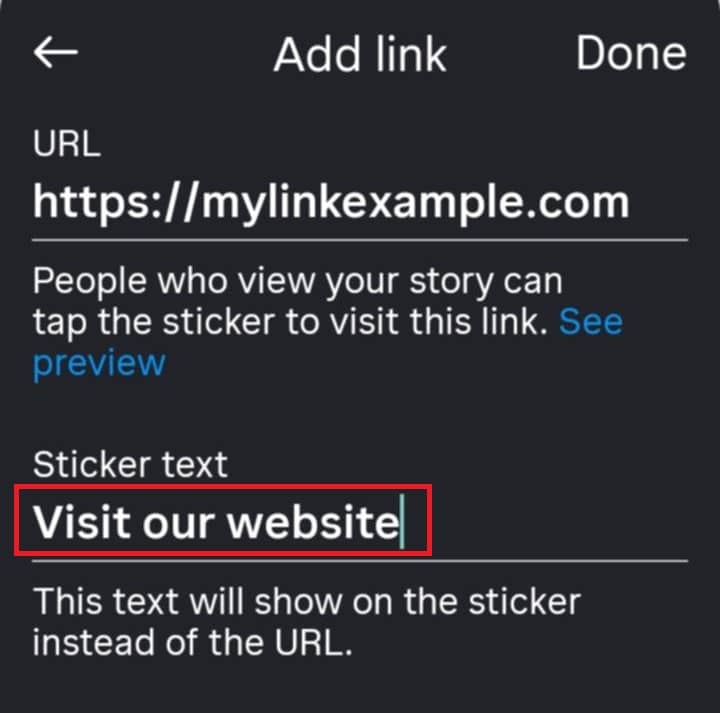
Step 6: Add an engaging call to action (CTA) as the link text. Customizing the text on your link sticker can make a noticeable difference. Instead of displaying a raw URL, you can use short calls to action like “Visit our website” or “Get the guide.” This makes the link feel more intentional and encourages users to interact rather than scroll past. You can also add GIFs, emojis, or design elements around the link sticker to make it stand out in your Story.
Step 7: Adjust the sticker. Resize, move, and change the sticker’s color to fit your Story design.
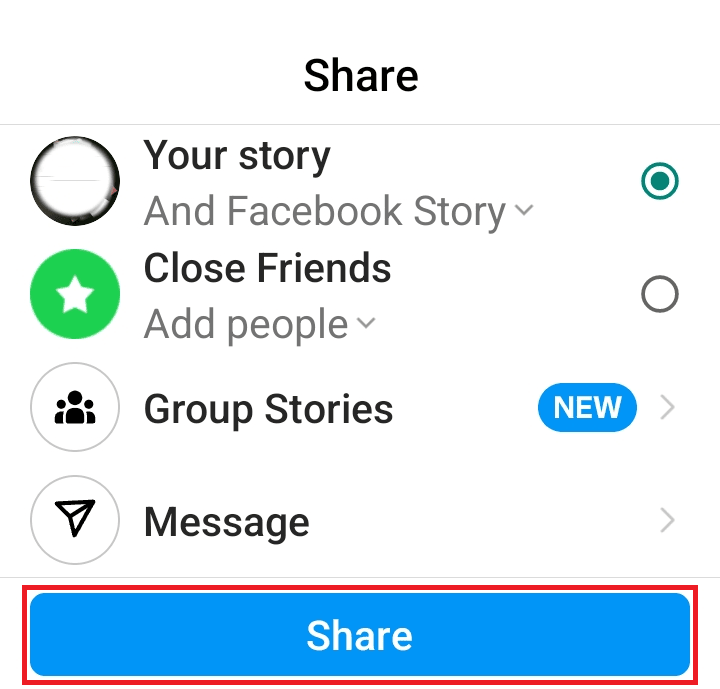
Step 8: Share your Story. Once you’re happy with the setup, add it to your Instagram Story. Your followers can now click the link directly.
Direct linking in Instagram posts using external tools
Since Instagram doesn’t allow clickable links in post captions, there are creative solutions that get around the platform’s limitations. You can still guide followers to the desired link or content you mention in your post caption using tools that let you add links in your Instagram profile or set up a clickable photo grid.
Let’s look at tools that help connect followers to what you’re sharing links to.
Custom-branded URL shorteners
URL shorteners, like Bitly, shorten links to make them easy to share. When you add a link in your Instagram profile bio section or mention it in an Instagram post, a shorter URL like bit.ly/mybrand is simpler for followers to remember and use. This keeps long, hard-to-read links out of your posts and bio and makes your content look tidier.
You can also customize your shortened links, so they don’t look like suspicious spam links. When you customize your shortened URL, it can go from bit.ly/2KEOXNx to bit.ly/mybrand. Bitly also lets you track clicks, which gives Instagram business profiles insights into how many people engage with their content.
Pros
- Custom-branded short links can increase trust by making the source of your Instagram link recognizable.
- Shortened URLs look clean and professional, making posts more visually appealing.
Cons
- Shortened links can look suspicious to users and may reduce click-through rates if not customized to include your domain name.
- Your links may stop working if the link shortener service goes offline or updates its policies.
Interactive photo grids
Interactive photo grids help users find specific content. These tools create a clickable grid that mirrors your Instagram feed. When someone taps a photo, they go straight to the link you’ve set, like a blog or product page. This approach simplifies sharing more content with your audience.
Pros
- Interactive grids encourage deeper engagement by allowing users to click on specific images within Instagram posts to learn more.
- Grids help users navigate Instagram links more intuitively by creating a visually cohesive way of sharing content.
Cons
- Posting multiple parts of a grid at once can overwhelm followers, which may lead to lower engagement per individual post.
- Since the links often point to third-party aggregator sites, grids may not directly benefit your website’s SEO.
Link-in-bio tools
The link in your Instagram profile is a simple way to give your audience access to your most important content. Instagram lets you add multiple links directly to your bio, so visitors can choose where to go without you having to swap out a single URL. This makes your profile a useful hub for your website, offers, latest content, and more.
If you want to learn how to get more from this setup, check out our guide on how to use Link in Bio for social media success.
Make your Instagram bio work harder
Create one easy-to-use destination for your website, products, promotions, and other important links.

How to add a link in your Instagram bio
- Go to your Instagram profile.
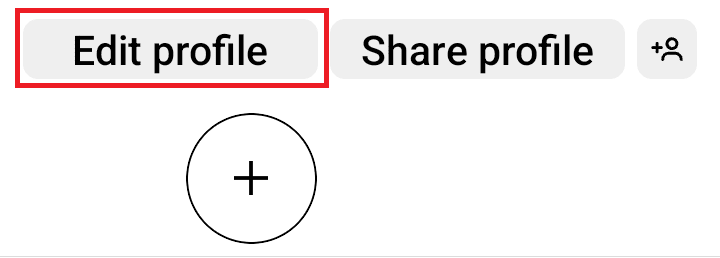
- Tap “Edit Profile.”
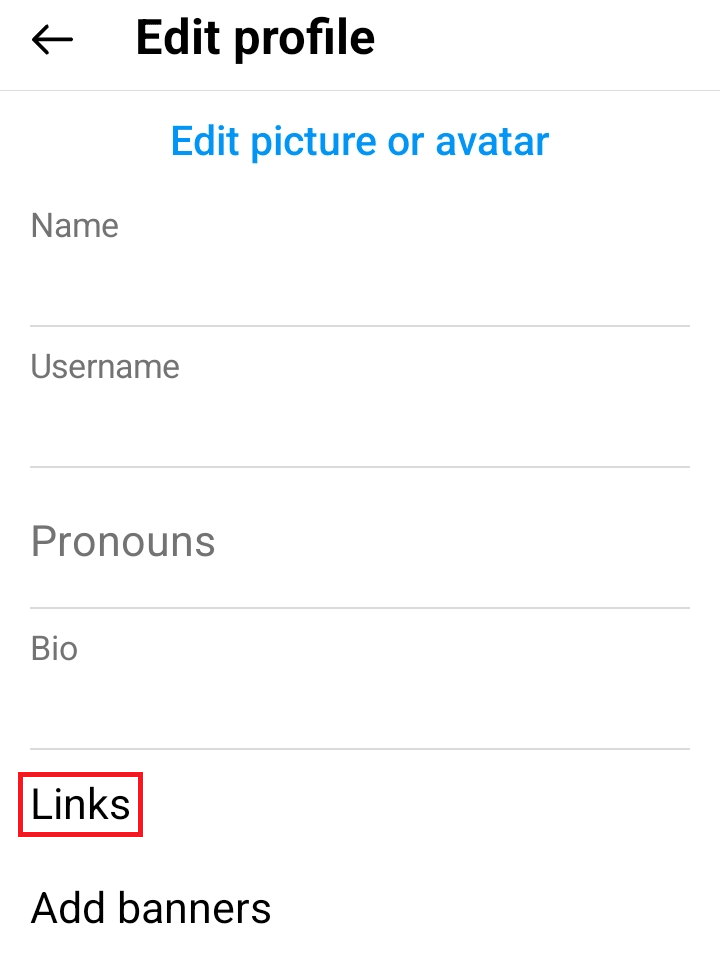
3. Under “Edit Profile,” click “Website” or “Links.”
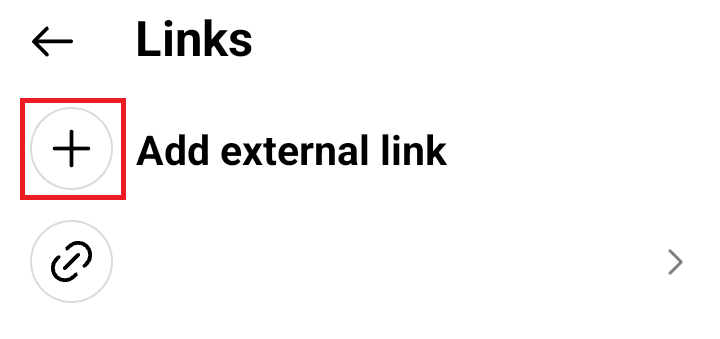
4. Tap the plus sign (+) to add a link.
5. Save, and you’re set!
Popular link-in-bio tools
Linktree
This tool is popular for its simplicity. It lets you add multiple links that open from a single Instagram profile bio link. This allows users to navigate clickable links to your content easily. However, since Linktree is an aggregator, it may divert attention from your personal branding to the Linktree platform itself.
Shorby
Shorby offers a customizable link page for adding links, social media, and contact options. It’s perfect for brands wanting a visual, branded experience with vibrant icons and multimedia. Just keep in mind that this aggregator provides somewhat limited features and design options.
Network Solutions Link in Bio App
Our Link in Bio App is available to domain customers. It provides a simple way to organize your website, products, promotions, and other important links in one place. Because the page can live on your own website, you can keep your branding consistent and give visitors an easy path to explore your content.
Instagram Reels
Reels are a great way to share video content, but they don’t support a standard clickable external link. Instead, you can use a clear CTA to guide viewers to your profile, a comment-triggered DM, or a related Story with a link.
Here are a few ways to share a link through your Reels:
Include a CTA in your Reel or caption
Tell viewers where to go next, such as your Instagram profile, a related Story, or another resource. For example, you could direct them to your profile to read an article, explore a product, or sign up for a service.
Use comment automation to send links by DM
You can ask viewers to comment with a specific word or phrase, then use an automation tool to send them a direct message containing the link. For example, a Reel promoting a free guide could ask viewers to comment “GUIDE” to receive the resource by DM.
Pin a comment with a CTA
Add and pin a comment that tells viewers what to do next. For example, you could write, “Want the full guide? Visit the link in our bio.” This keeps your CTA easy to find alongside your Reel.
Share your Reel to a Story with a link sticker
Share your Reel to an Instagram Story, then add a Link sticker to send interested viewers directly to your website, product page, or another destination.
Using these methods, you can turn the reach of Reels into opportunities to guide viewers to your website or other online content, even when the Reel itself doesn’t support a direct external link.
Instagram Shopping
Instagram Shopping gives businesses another way to share Shopping links through Shoppable posts. Instead of sending followers to a link in your bio, you can tag products directly in eligible Instagram content so people can discover what you feature.
You can add product tags to a photo or video in a post or Story. When viewers tap a tagged product, they can view its details and follow the available shopping path to learn more or make a purchase.
Instagram Business Profile CTA buttons
If you have an Instagram Business Profile, you can add action buttons that make it easier for customers to connect with your business. Depending on your business and available partners, these buttons can help visitors add clickable links and take action directly from your Instagram profile.
Here are some common options:
- Book Now: Lets customers tap to schedule an appointment or service.
- Reserve: Helps customers make a reservation directly from your profile.
- Order Food: Gives customers a quick way to order from your restaurant.
- Get Tickets: Directs customers to a place where they can purchase tickets for an event or activity.
Comparison of linking methods
Each linking method has its own strengths and limitations. Here’s a quick comparison to help you see which option fits your goals, audience, and how you want people to engage with your links.
Linking method | Ease of use | Engagement potential | Limitations |
|---|---|---|---|
Instagram Stories | High: Easy to add a Link sticker to a Story | High: Good for quick engagement and driving website visits | Stories disappear after 24 hours unless saved to Highlights |
Custom-branded URL shorteners | High: Short, memorable URLs can be shared in places where users need to enter or copy a link | Moderate: Branded links can make destinations easier to remember and track | URLs aren’t clickable in Instagram captions; a shortened URL itself isn’t a direct SEO ranking signal |
Interactive photo grids | Moderate: Requires setup with a third-party tool | High: Encourages users to explore related content | Requires third-party functionality and may overwhelm users if too many posts are connected |
Link-in-bio tools | High: Centralizes multiple destinations in one place | High: Gives visitors easy access to multiple resources from your profile | Relies on a third-party service and may direct users away from your Instagram profile |
Instagram Reels | Moderate: Requires a CTA, comment automation, pinned comment, or Story link pathway | High: Reels can reach a wide audience and drive engagement | Reels don’t provide a standard clickable external link; users need another path to reach the destination |
Instagram Shopping | Moderate: Requires an eligible setup and product catalog | High: Product tags let users discover products directly from Instagram content | Availability and features depend on eligibility, setup, and supported shopping features |
Business Profile CTA buttons | Moderate: Requires a Business Profile and, for some actions, a supported partner | High: Gives customers a direct way to take actions such as booking or ordering | Available actions vary by business type, location, and supported partners |
Choosing the best linking method
When selecting the best linking method, consider the size of your business, audience, and goals:
- Small businesses or creators: Link-in-bio tools are ideal for centralizing multiple resources in one spot. This makes it easy for visitors to access everything you offer.
- Content-driven Instagram account: Interactive photo grids work well for accounts that want to drive engagement by connecting specific posts to related content.
- Goal of building trust and tracking engagement: URL shorteners with custom branding provide a clickable link and offer tracking insights.
- Quick updates or promotions: Instagram Stories with link stickers are perfect for driving immediate traffic and engagement, especially for limited-time offers or announcements.
Make social media management easier
Plan, schedule, and manage your social content across Instagram and other platforms with our Social App.

Tips for maximizing Instagram link visibility
Want more followers to click on your Instagram link? Try these simple tips to make your links easier to find and click.
Use captions with a clear CTA
Guide your audiences with a direct call-to-action (CTA) statement. Say things like “Tap the link in our bio for details” or “Visit our website to learn more.” This tells them exactly what to do next.
Make links easy to remember
Use custom or branded links when you can, like bit.ly/MyBrand or mywebsite.com/shop. When links are simple, visitors can remember and return to them more easily.
Highlight links with emojis
Emojis grab attention in a fun way. Try using arrows, stars, or pointing fingers around your CTA button to show visitors where to find the link. Just a few are enough to catch the eye.
Organize multiple links with a link aggregator or link-in bio tool
If you have several links to share, our Link in Bio tool can keep them all in one spot. This way, people can easily check out your website, blog, or shop from one link in your bio.
Frequently asked questions
To copy a link to an Instagram post, follow these steps:
1. Open the Instagram app and navigate to the Instagram post you want to share.
2. Tap the three-dot icon (⋯) at the upper right section of the post.
3. Press “Copy Link” in the menu that appears.
This limitation on Instagram keeps you engaged within the app. Limiting the external link encourages you to explore more content on their platform. This also means Instagram can show you more ads, which helps them earn revenue.
Since Instagram doesn’t support clickable links in post captions, there are two options. You can add it to your bio and mention “link in bio” in your caption. Or, if eligible, add a link in Instagram Stories using the “Link” sticker.
Boost your Instagram impact with smart link-sharing
Using different link types on Instagram can help you reach more people and boost engagement. Whether it’s an Instagram Story, Instagram link, or interactive grid, each offers a different way to connect with your audience and guide them toward your content.
Your Instagram presence works even better when it has a home beyond social media. With a Network Solutions domain, you get free access to our Link in Bio, Social App, and Marketing Calendar App to organize your links, manage your social content, and plan your marketing in one place.
Find a domain that gives your Instagram traffic somewhere to go.
Find the perfect domain
Ready to register a domain name? Check domain availability and get started with Network Solutions today.